


How to Use AI to Analyze Customer Feedback in 2026



The CX intelligence
platform that's AI-native by design
Book a demoManual customer feedback analysis is slow, prone to bias, and doesn't scale. Purpose-built AI platforms outperform DIY approaches once feedback volume grows or sources multiply. Chattermill’s Lyra AI unifies analysis across channels, tying results to NPS, churn, and revenue. Most teams see ROI within months of replacing manual tagging.
Why AI Customer Feedback Analysis Changes Everything
Businesses have more customer feedback than ever before.
Every survey response, support ticket, review, call, and comment adds to the volume. The problem is not gathering feedback. It’s understanding what matters most.
Manual analysis struggles to keep up as data grows across channels. AI can process feedback at scale, uncovering patterns, trends, sentiment shifts, and root causes that would otherwise go unnoticed. Instead of spending weeks sorting data, teams get ranked insights in real time.
This guide explains how to use AI to analyze customer feedback and turn insight into action.
Why Listen To Us
Chattermill has analyzed customer feedback for brands like Uber, HelloFresh, H&M, and Booking.com for over a decade. Our Lyra AI engine processes millions of feedback records across channels every month. This guide draws on patterns we've seen that help CX, VoC, and product teams move from manual tagging to real-time, business-connected insights.

The Power of AI Feedback Analysis: A Real-world Example
Picture a week of mixed-source feedback landing in your inbox:
- 2,867 post-purchase survey responses
- 951 support tickets
- 402 app store reviews
- 679 social mentions
- 30 hours of transcribed support calls.
Handled manually, that pile would take weeks to tag, then another week to analyze. Most of it would never get touched.
- An AI platform ingests all five sources at once. It treats them consistently, whether they are structured or freeform.
- Theme detection runs first. The AI groups comments about slow delivery across surveys, tickets, and reviews, regardless of wording.
- Sentiment and intensity scoring run next. The AI scores two slow-delivery mentions differently: one is mildly inconvenienced, and the other is canceling.
- Volume and impact ranking finish the job. Slow delivery appears in 38% of tickets and correlates with a measurable drop in CSAT. App loading issues affect 12% of users but barely move churn. Slow delivery ranks first. Billing confusion and return-process friction rank third and fourth, respectively.
What started as five disconnected piles is now a single ranked list. Each theme carries a volume count, a sentiment score, and a business impact signal.
That is what AI feedback analysis produces. Not a tagged spreadsheet, but a prioritized brief shaped by AI rankings.
What AI Feedback Analysis Actually Does
AI feedback analysis applies natural language processing and machine learning to unstructured customer comments. It reads every response, not a sample. It tags themes, scores sentiment, and ranks issues by business impact, not just mention count.
The AI engine automatically picks up and tags the keyword.
Nobody has to read a comment to tag it. Nobody has to build a spreadsheet to count themes. Instead, the AI system does both, continuously, across every source you connect.
Why Teams Use AI to Analyze Customer Feedback

Three problems drive teams toward AI and each one gets worse as the business grows.
1. Manual Tagging Does Not Scale
A careful analyst can tag a few hundred comments per day. Most growth-stage companies generate that volume before lunch. Hiring more analysts does not solve the problem. It just adds payroll to a broken process.
Manual tagging also drifts. Two analysts tagging the same comment on different days will categorize it differently. AI applies the same taxonomy consistently across millions of records.
2. Feedback Is Scattered Across Tools
Survey responses live on one platform. Support tickets live in another. Reviews are split across three app stores and two review sites. Nobody has a complete picture without stitching sources together by hand, and manual stitching takes time nobody has.
So every team works from a different slice of reality.
Product sees app reviews. Support sees tickets. CX sees surveys. Nobody sees all three at once.
3. Insights Arrive Too Late to Act
Monthly and quarterly feedback reviews are too slow.
A theme in this month's report has already been costing you retention for weeks. By the time leadership sees it, the damage is done.
AI surfaces emerging themes in near real time. A new issue spiking in support tickets can trigger an alert the same day, not the same quarter.
What Feedback You Can Analyze With AI (6 Channels)
AI works across more sources than most teams realize. Here is what typically feeds into a unified analysis pipeline, so each source fits into the same flow.
1. Surveys and NPS Verbatims
Open-text surveys and NPS responses hold the richest detail. Scores tell you what to measure. Verbatims tell you why the score is what it is. AI groups thousands of open-text responses into a handful of actionable themes without anyone reading each one.
2. Support Tickets
Support tickets capture friction in the customer's own words. They often surface product and process issues before any other channel does. AI mines support ticket data for recurring themes, root causes, and the issues driving the most repeat contacts.
3. Reviews
App store, Google, and Trustpilot reviews are public, unsolicited, and brutally honest. AI tracks sentiment and themes across review platforms over time. A spike in one-star reviews about a specific feature is visible within days, not weeks.
4. Sales and Support Calls
Calls carry tone and nuance that text alone cannot. Transcribed and analyzed with speech analytics, calls surface churn signals, competitor comparisons, and objection patterns that never make it into a CRM note.
5. Social Media
Customers share opinions on social media without being asked. AI listens at scale, filtering genuine product signals from noise. So a complaint that gains traction does not go unnoticed over a weekend.
6. In-App Feedback
In-app prompts, rating widgets, and feature request forms generate a continuous stream of product-specific comments. AI connects these directly to feature themes, so product managers see what real users say about each part of the product.
How to Analyze Customer Feedback With AI, Step by Step
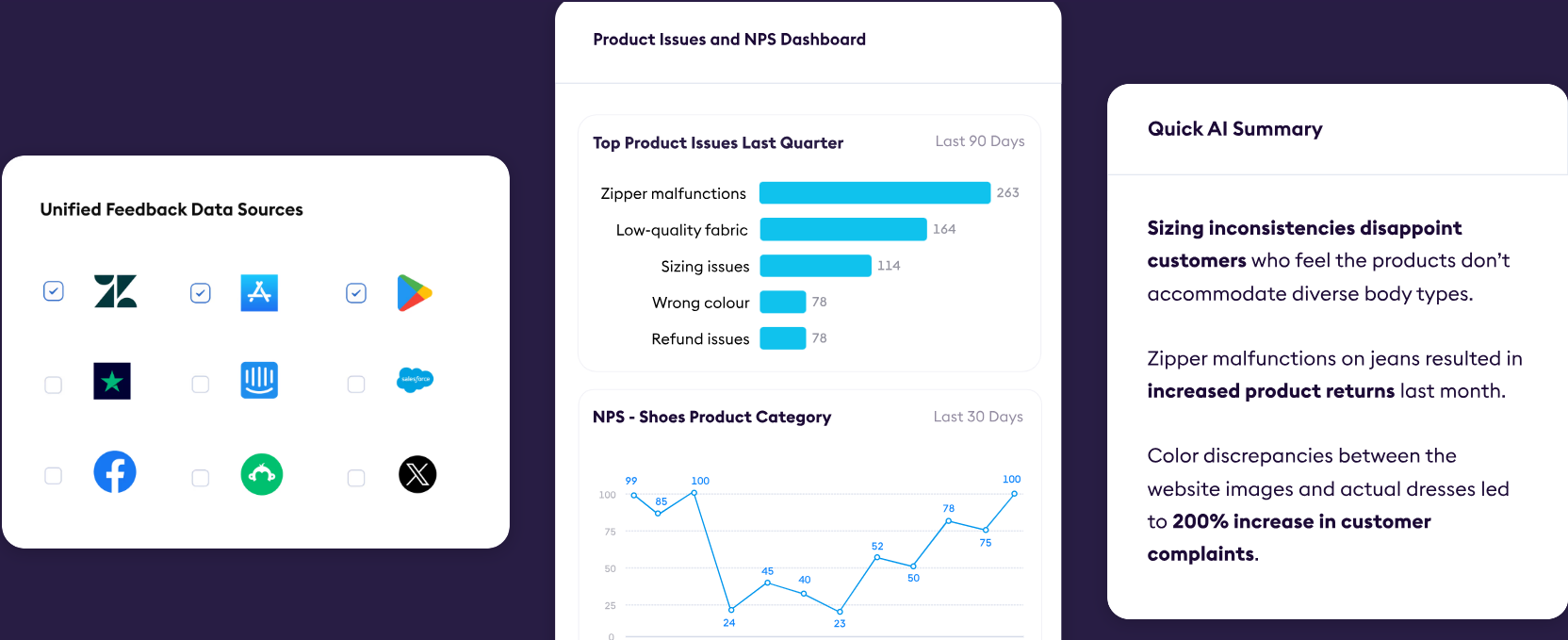
The workflow is the same whether you buy a platform or build your own, and gaps in any step weaken everything downstream.
Step 1: Unify Sources in One Place
Centralize all feedback sources before analysis begins. Connect your survey tool, helpdesk, review platforms, call transcripts, and social listening feed to a single ingestion layer. This way, all the sources start together
Analyzing sources separately just recreates the silos you're trying to escape. A shipping-delay complaint in a ticket and the same complaint in a review need to automatically be routed to the same theme bucket.
Step 2: Auto-Categorize and Theme
Once data flows in, NLP models assign topics and intent tags to every piece of feedback. Topics should roll up into themes automatically, so billing complaints across surveys and tickets merge rather than fragment.
The taxonomy needs to be consistent across channels. A label like 'delivery speed' must mean the same thing whether it comes from a tweet or a support ticket.
Step 3: Layer Sentiment and Intensity
Topic tags alone are not enough. Each tagged comment needs a sentiment score and an intensity flag. The AI should assign different weights to two customers who mention the same theme when their emotional weights differ.
Intensity scoring distinguishes frustrated customers on the verge of churning from those mildly inconvenienced. That distinction changes which issues you escalate.
Step 4: Quantify by Volume and Business Impact
Rank themes by how often they appear and how strongly they connect to business outcomes: NPS movement, CSAT score, churn rate, or revenue.
A theme mentioned by 5% of customers but correlated strongly with cancellations outranks a theme mentioned by 20% of customers with no churn signal. Volume matters. Impact matters more, because it determines what you act on first.
Step 5: Close the Loop by Routing to Owners
Insights that stay in a dashboard nobody opens change nothing. Push product themes to product managers, support themes to support leads, and churn signals to CX leadership. Build alert rules so a spiking theme automatically triggers a Slack notification or a Jira ticket, without someone manually checking a report.
The loop only closes when an insight reaches a person who can act on it, within the same week the signal emerged.
Build vs. Buy: Where DIY Customer Feedback Analysis Breaks Down
Many teams start with a DIY approach. An LLM prompt, a spreadsheet, and a Zapier workflow to stitch the pieces together. It works at low volume with a single source. Then the volume doubles, a second source gets added, and the cracks appear fast.
Understanding where DIY holds up and where it does not helps you decide when to invest in a platform and what to avoid building yourself. So the tradeoffs are easier to compare.
What DIY Gets Right
For a single source at low volume, a GPT-based tagging script can get you most of the way there cheaply. If you have a few hundred survey responses per month and one analyst reviewing outputs, a prompt-based setup is a reasonable starting point.
DIY also gives you full control over the taxonomy. You define the categories. You write the prompts. You update them when your product changes. Nothing is locked inside a vendor's black box.
For teams testing an AI feedback workflow before committing budget, a lightweight DIY build also makes the business case concrete. It shows what is possible before a procurement cycle starts.
Where DIY Customer Feedback Analysis Methods Break Down
Volume is the first wall.
LLM API costs scale with tokens. At 50,000 feedback records per month, the cost and latency of sending each one through a prompt become real constraints.
Consistency is the second barrier.
LLM outputs drift across prompt versions, model updates, and edge cases. A taxonomy that held for three months starts producing different labels for the same inputs. You spend analyst time debugging the model instead of acting on insights.
Integrations are the third hindrance.
Connecting a DIY pipeline to your helpdesk, survey tool, call recording system, and data warehouse requires engineering time. Every new source is a new integration project.
And routing is rarely built at all.
Most DIY setups produce a tagged dataset. They do not push alerts to Slack, create Jira tickets, or surface themes in a dashboard with NPS correlation attached. That last mile, turning a tagged record into an action for a specific person, is where DIY setups stall indefinitely.
There is also a maintenance cost most teams underestimate.
LLM providers change their models. Prompts that worked in January behave differently in June. Someone has to monitor output quality and update prompts when drift appears. That is engineering time pulled away from product work.
When to Buy a Purpose-Built AI Feedback Analysis Platform
It’s time to switch from DIY to a dedicated platform when you have:
- More than one feedback source
- More than a few thousand records per month
- More than one team that needs to act on the output
Purpose-built platforms handle ingestion, taxonomy consistency, sentiment scoring, business impact mapping, and routing out of the box. They also update models without breaking your taxonomy. That is the operational difference most teams underestimate when they start DIY.
A purpose-built platform pays for itself quickly.
How Chattermill Helps To Analyze Customer Feedback
.png)
Here’s how Chattermill uses AI to analyze feedback efficiently:
Unifies feedback sources
Chattermill's Customer feedback analytics platform unifies surveys, support tickets, reviews, calls, and social feedback into one AI-scored view. The proprietary Lyra AI engine analyzes every source with the same taxonomy. So, a shipping complaint in a ticket and the same complaint in a review automatically land in the same theme.
Maps business impact
Business Impact Mapping goes a step further. Every theme connects directly to NPS, CSAT, churn, and revenue, so you can walk into a leadership meeting with a ranked list of issues ordered by financial impact, not just mention count.
Answers team questions
Lyra also answers ad-hoc questions. A product manager can ask why ratings dropped in a specific region last month and get a theme-level breakdown in seconds. And that without writing a query or waiting for an analyst.
Multilingual analysis
Multilingual operations get the same treatment. Chattermill analyzes feedback in over 100 languages using the same taxonomy, so a German-speaking customer and an English-speaking customer reporting the same delivery issue automatically land in the same theme. Global brands managing feedback across regions do not need a separate workflow per market.
Take the product tour to see Chattermill in practice, or read customer outcomes from teams who replaced manual tagging with unified AI analysis.
AI Feedback Analysis Turns Feedback Into A Decision Fast
Customer feedback is one of the richest, most underused data sets most companies sit on. Manual tagging samples a fraction of it, weeks too late. AI feedback analysis reads everything simultaneously. Then tags it, ranks it by impact, and routes it to whoever can act on it.
The workflow is not complex. Unify your sources. Theme and score automatically. Tie every insight to a business metric. Close the loop before the signal goes cold. The difference between teams that do this well and teams that don't is not data access. It's infrastructure.
Want to see what your feedback is actually saying? Book a demo.
FAQ about AI Customer Feedback
Still got questions? Let's answer them for you.
1. What is AI customer feedback analysis?
AI customer feedback analysis uses NLP and machine learning to automatically read, tag, score, and rank customer feedback. It analyzes feedback from surveys, tickets, reviews, calls, and social media. AI analysis replaces manual sampling with full coverage across every source.
2. How is AI feedback analysis different from basic sentiment analysis?
Basic sentiment analysis scores feedback as positive, negative, or neutral. AI feedback analysis goes further. It identifies specific themes, quantifies their frequency, scores their intensity, and connects each theme to business metrics such as churn and NPS.
3. Can AI analyze feedback from multiple channels at once?
Yes. Modern platforms ingest surveys, support tickets, reviews, calls, and social mentions together. They apply a consistent taxonomy across all sources. So the same theme surfaces whether it appears in a tweet or a support ticket.
4. Where does DIY feedback analysis break down?
DIY works at low volume with a single source. But it struggles at scale on three fronts. First, API costs and latency grow fast. Secondly, LLM output consistency drifts over time. Thirdly, integration with every feedback source requires ongoing engineering effort.
5. How quickly can AI surface emerging feedback themes?
A properly configured platform can surface new and spiking themes within hours of feedback arriving. That compares to days or weeks for a manual review cycle. The difference matters most when an issue is escalating fast and every day of delay costs retention.


See Chattermill in action on your own feedback
Book a demo


