


Chattermill vs Unwrap Comparison: Which Feedback Analytics Platform To Choose in 2026


The CX intelligence
platform that's AI-native by design
Book a demoChattermill and Unwrap both use AI to turn customer feedback into structured insights, but they serve different buyers. Chattermill is built for enterprise CX, insights, and product teams that need to unify feedback across channels, languages, and business units at scale. Unwrap focuses on product and CX teams that want fast trend surfacing, proactive alerting, and the ability to respond to customers directly from the platform. This guide breaks down where each platform leads, where each falls short, and which one fits your team.
Quick Summary
- Analytical approach: Chattermill uses aspect-based sentiment analysis (ABSA) to connect feedback themes directly to NPS, CSAT, CES, and revenue impact. Unwrap uses automated theme clustering to surface trends and proactive alerts — faster to deploy, but without business metric attribution.
- Scale: Chattermill processes feedback in 50+ languages natively across 90+ integrations. Unwrap supports core channels (surveys, app reviews, support tickets) with multilingual support mentioned but not detailed.
- Unique to Unwrap: Responder feature lets teams reply to customer feedback directly from the platform — a capability Chattermill does not offer.
- Unique to Chattermill: Speech analytics and social CX analytics (Facebook, TikTok, Instagram) are native. Aspect-based sentiment analysis scores sentiment at the topic level within each response.
- MCP servers: Both platforms offer MCP servers for querying feedback inside AI agents like Claude, ChatGPT, and Cursor. Unwrap's MCP (announced May 2026) exposes 12 read-only tools. Chattermill's MCP integrates with its broader driver analysis and unified analytics layer.
- Reviews (June 2026): Chattermill — 4.4/5 on G2 (237 reviews), 4.5/5 on Capterra (25 reviews), 4.5/5 on Gartner Peer Insights (92 reviews). Unwrap — 4.8/5 on G2 (26 reviews), not listed on Capterra or Gartner.
- Pricing: Unwrap starts at $24,000/year with no per-seat charges and a 30-day trial. Chattermill offers custom enterprise pricing based on data volume.
- Best for: Chattermill fits enterprise B2C/DTC brands with multichannel, multilingual feedback at scale. Unwrap fits product teams that need fast trend visibility with built-in feedback response.
Why Listen to Us
Chattermill processes millions of customer feedback signals daily for brands like Uber, Booking.com, HelloFresh, and H&M. We analyse how AI-native feedback platforms classify, score, and surface insights from unstructured text — and we know where Unwrap's approach genuinely differs from Chattermill's. This guide covers customer feedback analytics capabilities, integration depth, enterprise readiness, and the trade-offs each platform makes.
What Is Unwrap?
Unwrap is a feedback analytics platform that positions itself around "AI-powered customer intelligence." The platform is designed to help product and CX teams surface trends from customer feedback with minimal manual configuration, following a three-step model: connect feedback sources, let automated tagging cluster themes, and act on surfaced trends through dashboards and alerts.
Unwrap's customer base includes companies like lululemon, JetBlue, Southwest Airlines, GitHub, and Perplexity. The platform is SOC 2 and HIPAA compliant, with GDPR support and SSO through Okta. The company is actively hiring, per its careers page.
Key capabilities include Auto Tagger for automated theme clustering, a natural-language assistant for querying feedback data, proactive alerts when new issues emerge, a Responder feature that lets teams reply to customer feedback directly from the platform, and — as of May 2026 — an MCP server that makes feedback data queryable inside Claude, ChatGPT, Cursor, and other AI platforms. Unwrap also offers SupportIQ, a module for support performance measurement and trend analysis. Where the platform genuinely shines is speed to value: G2 reviewers note that setup is fast, the interface is intuitive for product managers, and the no-per-seat pricing model makes it accessible across departments without cost escalation.
How Does Unwrap Compare to Chattermill?
The simplest way to understand the difference: Chattermill is built to unify and analyse feedback at enterprise scale across every channel, language, and business unit. Unwrap is built to surface trends quickly and let teams act on feedback — including responding to customers — without heavy configuration.
But what does "fast insights" actually mean if you cannot connect them to NPS movement or revenue impact? That question determines which teams each platform serves, which integrations matter, and which analysis depth is actually useful.
Head-to-Head Comparison Table: Chattermill vs Unwrap
Chattermill Review
.avif)
Overview
Chattermill is an AI-native feedback analytics platform that unifies customer feedback from every channel into a single source of truth. The platform uses Lyra AI, Chattermill's proprietary AI engine, to classify, tag, and score feedback with aspect-based sentiment analysis — meaning it does not just tell you that customers are unhappy, but identifies which specific aspect of their experience is causing friction.
Where Chattermill separates from most feedback platforms is scale and breadth. The platform processes feedback in 50+ languages natively, connects to 90+ data sources out of the box, and is built to serve cross-functional teams — CX, product, insights, and operations — from a shared analytics layer. Think of it as the difference between reading a patient's temperature and diagnosing what is causing the fever. Rather than showing that "delivery speed" is trending negatively, Chattermill quantifies how that theme is affecting NPS scores, CSAT ratings, or customer retention.
Chattermill also offers anomaly detection, automated alerts, and impact measurement against core metrics like NPS, CSAT, and CES. The platform's MCP server brings feedback data directly into AI agents, making customer intelligence accessible inside workflows rather than locked behind a dashboard.
Chattermill Features
- Aspect-Based Sentiment Analysis (ABSA): Scores sentiment at the topic level within each customer response, not just at the document level. This reveals which specific experience drivers are improving or declining.
- Unified Customer Intelligence: Consolidates feedback from surveys, support tickets, app reviews, social media, and more into a single analytics layer.
- 90+ Native Integrations: Connects to CX, support, survey, social, and product tools without custom engineering.
- 50+ Language Support: Processes multilingual feedback natively — critical for global brands operating across regions.
- Anomaly Detection and Alerts: Surfaces unexpected spikes or drops in feedback themes automatically, so teams catch issues before they escalate.
- Impact Measurement: Ties feedback themes directly to NPS, CSAT, and CES movement, quantifying the business impact of specific customer issues.
- Product Feedback Workflows: Structured workflows for routing product-related insights to the right teams with context and evidence.
- MCP Server: Brings customer intelligence directly into AI agent workflows for agentic operations.
2026 Pricing
Chattermill offers custom enterprise pricing based on feedback volume, integrations, and team size — contact sales for a quote.
Chattermill Pros
- Processes feedback in 50+ languages natively, making it a strong fit for global, multi-region brands.
- 90+ integrations cover a wider range of feedback sources than most competitors, including social, app reviews, speech analytics, and survey platforms.
- Aspect-based sentiment analysis provides granular, topic-level insights rather than surface-level positive/negative scoring.
- Trusted by major enterprise brands (Uber, Booking.com, HelloFresh, H&M, Amazon) with 354 verified reviews across G2, Capterra, and Gartner Peer Insights.
- Cross-functional design serves CX, product, insights, and operations teams from the same platform.
- MCP server connects AI agents to the full driver analysis and unified analytics layer — both platforms offer MCP, but Chattermill's exposes the deeper analytical stack.
Chattermill Cons
- Custom enterprise pricing means no self-serve tier for smaller teams or early evaluation.
- The platform's breadth can require onboarding investment to configure for teams with narrower use cases.
- No built-in feature for replying to customer feedback directly from the platform — teams that need to close the feedback loop with individual responses will need separate tooling.
Who It's For
Enterprise B2C and DTC brands with multi-channel, multilingual feedback at scale — especially CX, insights, and product teams that need a shared analytics layer across business units.
Review Ratings
Chattermill holds a 4.4/5 rating on G2 (237 reviews), 4.5/5 on Capterra (25 reviews), and 4.5/5 on Gartner Peer Insights (92 reviews) — 354 total verified reviews across three platforms (as of June 2026).
Unwrap Review
Overview
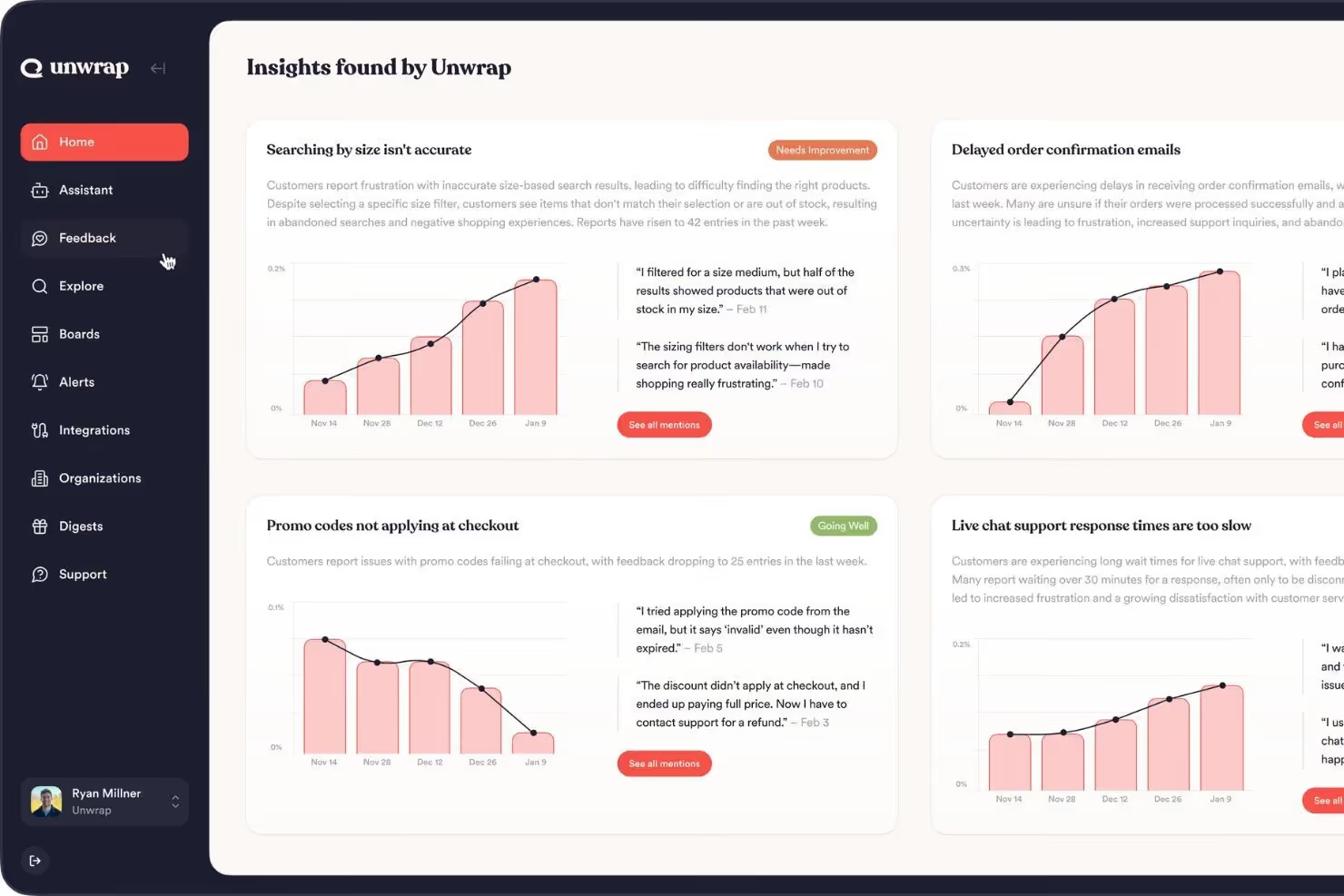
Unwrap positions itself as an AI-powered customer intelligence platform built for speed. The core premise is that teams should not need weeks of configuration to start seeing what customers are saying — Unwrap's automated tagging and dashboard-first approach gets teams from data connection to trend visibility in days rather than weeks.
The platform's customer base reflects this positioning. Companies like lululemon, JetBlue, Southwest Airlines, GitHub, and Perplexity use Unwrap to monitor feedback trends and surface emerging issues. The Responder feature — which lets teams reply to customers directly from the analytics platform — is a genuine workflow differentiator that most feedback analytics tools, including Chattermill, do not offer.
Unwrap also includes SupportIQ for support performance measurement and trend analysis, proactive alerts that notify teams when new issues surface, and a natural-language assistant for querying feedback data conversationally. In May 2026, Unwrap launched an MCP server that exposes 12 read-only tools for querying feedback inside Claude, ChatGPT, Cursor, and other MCP-compatible AI platforms. The platform is SOC 2 and HIPAA compliant with GDPR support.
Unwrap Features
- Auto Tagger: Automated theme clustering that categorises feedback without manual taxonomy setup.
- Proactive Alerts: Notifies teams when new issues or trends emerge before they escalate — a genuine strength for fast-moving product teams.
- Responder: Reply to customer feedback directly from the analytics platform, closing the feedback loop without switching tools.
- SupportIQ: Support performance measurement and trend analysis in a single view alongside feedback analytics.
- Natural-Language Assistant: Query feedback data conversationally without building custom reports.
- MCP Server: 12 read-only tools for querying feedback inside Claude, ChatGPT, Cursor, and other MCP-compatible AI platforms (announced May 2026).
- Customisable Dashboards: Shareable views by team, designed for cross-functional visibility.
2026 Pricing
Unwrap publishes pricing starting at $24,000 per year with no per-seat charges, and offers a 30-day trial.
Unwrap Pros
- Responder feature is a genuine differentiator — replying to customers directly from the analytics platform streamlines the feedback loop.
- Fast deployment with minimal configuration required; G2 reviewers cite quick setup as a standout.
- No per-seat pricing makes it accessible to entire organisations without cost escalation.
- Proactive alerting is strong — the platform surfaces emerging issues before they spiral.
- Intuitive interface particularly praised by product managers on G2.
- Notable customer base (lululemon, JetBlue, GitHub, Perplexity) demonstrates real-world adoption.
Unwrap Cons
- Limited review footprint — 26 G2 reviews with no presence on Capterra or Gartner Peer Insights, making independent validation harder for enterprise buyers.
- Narrower integration ecosystem compared to Chattermill's 90+ native connectors.
- Limited multilingual capabilities — multilingual support is mentioned but without depth or detail on language coverage.
- No confirmed aspect-based sentiment analysis; the platform clusters themes and detects trends rather than scoring sentiment at the topic level within responses.
- No social CX analytics or native speech analytics confirmed as of June 2026.
- Business metric attribution is less developed — Unwrap surfaces what customers are discussing, but does not connect themes directly to NPS, CSAT, CES, or revenue impact the way driver analysis does.
Who It's For
Product teams and mid-market CX teams that need fast feedback visibility, proactive alerting, and the ability to respond to customers directly — particularly organisations operating primarily in English-language markets with concentrated feedback sources.
Review Ratings
Unwrap holds a 4.8/5 rating on G2 with 26 reviews. Unwrap is not listed on Capterra (no reviews) or Gartner Peer Insights (as of June 2026). The rating is strong, but with 26 reviews it reflects a much smaller sample than Chattermill's 354 total verified reviews across three platforms. According to G2's comparison page, reviewers found Chattermill easier to use and administer, while Unwrap scored higher on ease of setup.
Who Should Use Unwrap?
Unwrap is the stronger choice if your team meets most of these criteria:
- You are a product-led team where product managers are the primary consumers of feedback data and need quick visibility without extensive configuration.
- Closing the feedback loop is a priority — the Responder feature lets your team reply to customers directly, which matters if your workflow requires acting on feedback in the same platform where you analyse it.
- Speed to value matters more than analytical depth. You want automated theme clustering running within days, not weeks, and you are willing to trade driver analysis for faster deployment.
- Budget certainty at a defined price point. Unwrap's published starting price of $24,000 per year with no per-seat charges gives smaller teams predictable costs and a 30-day trial to evaluate.
- Your feedback sources are concentrated. If you are primarily analysing English-language app reviews, support tickets, and surveys from a handful of channels, Unwrap covers those sources well.
- Proactive alerting is central to your workflow. You need to know the moment a new issue surfaces, and Unwrap's alerting engine is built for exactly that.
Unwrap's Responder feature is genuinely useful for these scenarios. If your team's primary question is "What are customers saying, and how do we respond to them quickly?" — Unwrap answers that natively.
Who Should Use Chattermill?
Chattermill is the stronger choice if your team meets most of these criteria:
- You are an enterprise B2C or DTC brand managing customer feedback across multiple channels, regions, and business units. Your feedback comes from surveys, support tickets, app store reviews, social media, community forums, and calls — and you need all of it in one place. Chattermill's 90+ integrations cover this breadth.
- You need to process feedback in multiple languages natively — not through translation layers, but with native language understanding across 50+ languages.
- Business metric attribution is non-negotiable. Your leadership team does not just want to know what customers are saying — they want to know how specific themes are affecting NPS, CSAT, CES, and retention. Driver analysis is the capability that answers that question.
- Enterprise governance requirements are real. You need role-based access controls, data residency options, and a platform with a track record at organisations like Uber, Booking.com, H&M, and Amazon.
- Cross-functional adoption matters. CX, product, insights, and operations teams all need access to the same analytics layer.
- You are building toward agentic operations. Both platforms offer MCP servers, but Chattermill's MCP server connects AI agents to its full driver analysis, unified analytics, and 90+ source ecosystem — not just trend data.
- Social proof and enterprise validation factor into your buying decision. Chattermill's 4.4-star G2 rating with 237 reviews (per G2) and customers like Uber, Booking.com, HelloFresh, and H&M demonstrate deeper enterprise adoption. Unwrap holds a strong 4.8 rating on G2 but with 26 reviews, reflecting its smaller review footprint.
If your challenge is "We have feedback everywhere, in every language, and no team has the full picture" — that is the exact problem Chattermill was built to solve. The platform turns fragmented signals into unified customer intelligence that the entire organisation can act on.
Choosing the Right Feedback Analytics Platform
Before picking a platform, evaluate these factors against your team's actual workflow:
Feedback Volume and Channels. How many feedback sources do you need to unify? If you are pulling from 10+ channels including social, app reviews, and multilingual surveys, integration breadth matters more than niche depth. If your sources are concentrated in two or three channels, a lighter-touch tool may suffice.
Language Requirements. If your customers leave feedback in multiple languages, native multilingual processing is non-negotiable. Translation-layer approaches introduce latency and lose nuance — and the difference between native analysis and bolt-on translation shows up in sentiment accuracy.
Analysis Depth. Do you need document-level sentiment, or do you need to know that customers love your checkout speed but hate your return process? Aspect-based sentiment analysis provides the latter. Trend surfacing provides the former.
Team Structure. Is feedback analysis owned by one team, or does it need to serve CX, product, insights, and operations? Platforms designed for cross-functional use handle permissioning, reporting, and workflow routing differently than those built for a single persona.
Automation Goals. Are you looking for alerting and workflow triggers, or do you need to respond to customers directly from the analytics platform? Unwrap's Responder handles the latter natively. Both platforms now offer MCP servers for AI agent integration — evaluate what depth of data each MCP exposes and how it connects to your existing AI workflows.
Enterprise Validation. How much does the vendor's track record matter? Review volume, named enterprise customers, and years in market are proxy signals for platform maturity and reliability. Chattermill's 354 verified reviews across three platforms tell a different story than 26 reviews on a single platform — not because the rating is higher, but because the sample is broader.
Security and Compliance. Enterprise buyers should evaluate data handling, residency options, and compliance certifications — especially for platforms processing customer PII at scale. Both platforms offer SOC 2 compliance; Chattermill adds data residency controls and a track record with enterprise governance requirements.
Get Started With Chattermill
If your team is dealing with fragmented feedback across channels, languages, and business units — and you need an analytics platform that connects customer experience to business performance — Chattermill is built for exactly that challenge.
Book a personalised demo to see how Chattermill consolidates your feedback sources and surfaces the insights that tie customer experience to revenue outcomes.
Feedback Analytics Platforms: FAQs
What Is the Main Difference Between Chattermill and Unwrap?
Chattermill uses aspect-based sentiment analysis to connect feedback themes to business metrics — NPS, CSAT, CES, and revenue impact — through driver analysis. Unwrap uses automated theme clustering for fast trend surfacing with proactive alerts, plus a Responder feature for replying to customers directly. Chattermill tells you why a metric is moving; Unwrap tells you what customers are saying and lets you respond immediately.
Is Unwrap Good for Enterprise Teams?
Unwrap serves enterprise customers including lululemon, JetBlue, and Southwest Airlines, and is SOC 2 and HIPAA compliant. It works well for product teams needing fast feedback visibility. For enterprise CX operations requiring 90+ integrations, multilingual analysis across 50+ languages, speech analytics, and driver analysis connecting themes to revenue, Chattermill offers deeper capabilities — backed by 354 verified reviews across G2, Capterra, and Gartner Peer Insights and customers like Uber, Booking.com, and Amazon.
How Much Does Unwrap Cost Compared to Chattermill?
Unwrap publishes pricing starting at $24,000 per year with no per-seat charges and a 30-day trial. Chattermill uses custom enterprise pricing based on data volume, integrations, and team size. Unwrap's pricing model suits teams that want budget certainty; Chattermill's custom approach reflects the broader scope of its enterprise deployments.
Can Unwrap Replace a Full Voice of Customer Platform?
Unwrap covers core feedback analytics: theme clustering, trend detection, proactive alerts, and direct customer response via Responder. It does not offer aspect-based sentiment analysis, driver analysis connecting themes to NPS/CSAT/revenue, native speech analytics, or social CX analytics. For teams with feedback in multiple languages across 10+ channels, Chattermill's 90+ integrations and 50+ language support cover significantly more ground.
What Are the G2, Capterra, and Gartner Ratings for Chattermill and Unwrap?
As of June 2026: Chattermill holds 4.4/5 on G2 (237 reviews), 4.5/5 on Capterra (25 reviews), and 4.5/5 on Gartner Peer Insights (92 reviews) — 354 total. Unwrap holds 4.8/5 on G2 (26 reviews) and is not listed on Capterra or Gartner. Unwrap's rating is higher; Chattermill's review volume is 13x larger.
Does Chattermill Support AI Agent Workflows?
Yes. Both Chattermill and Unwrap offer MCP servers for querying feedback inside AI agents like Claude, ChatGPT, and Cursor. Chattermill's MCP server integrates with its driver analysis, unified analytics, and 90+ data source ecosystem. Unwrap's MCP (launched May 2026) exposes 12 read-only tools covering theme search, issue surfacing, and trend charting. The difference is less about whether MCP exists and more about the depth of data the MCP can access.


See Chattermill in action on your own feedback
Book a demo


