


16 Best Customer Insights Software in 2026


The CX intelligence
platform that's AI-native by design
Book a demoQuick Summary
Most organizations collect more customer feedback than they can act on. The gap between gathering data and generating insight is where AI-powered customer insights software earns its value - and where the wrong tool costs you months of misaligned product decisions.
After evaluating 16 leading AI customer insights tools across NLP depth, multi-channel support, integrations, and measurable CX impact, Chattermill is our top pick for teams that need to unify feedback from every channel and turn it into action. Qualtrics is the strongest choice for enterprises already invested in a broad experience management ecosystem, and Medallia stands out for enterprises that need deep signal capture across digital, contact center, and in-person touchpoints.
Here is a snapshot of the top three:
| Rank | Tool | Best For |
|---|---|---|
| 1 | Chattermill | AI-native feedback analytics that unifies multi-channel data and ties insights directly to NPS, CSAT, and CES |
| 2 | Qualtrics Customer Experience | Enterprise-scale survey design and experience management across the full customer lifecycle |
| 3 | Medallia | Enterprise CX with deep signal capture across every touchpoint |
Read on for a full comparison of all 16 tools, evaluation methodology, pricing details, and guidance on choosing the right fit.
Why Listen To Us
Chattermill processes millions of customer feedback data points for CX, product, and insights teams across mid-market and enterprise organizations managing high-volume, multi-channel feedback programs. Our platform sits at the intersection of AI, voice of customer, and customer experience measurement - giving us direct visibility into what works, what falls short, and what separates surface-level reporting from genuine insight. This guide reflects that perspective.
What Is Customer Insights Software?
Here is a common assumption: if your team already runs NPS surveys and tracks CSAT scores, you have customer insights covered. In reality, collecting feedback and understanding it are two very different capabilities - and the gap between them is where customer insights software operates.
Customer insights software is a category of tools designed to collect, aggregate, analyze, and surface actionable patterns from customer feedback and behavioral data. These platforms go beyond dashboards and survey results to help CX, product, and insights teams answer a harder question: What should we do next, and why?
Types Of Customer Insights Tools
The landscape breaks into several overlapping categories:
- Voice of Customer (VoC) platforms - Collect and analyze feedback from surveys, reviews, support tickets, and social channels. Focus on what customers are saying and feeling.
- Feedback analytics and AI platforms - Apply natural language processing and machine learning to unstructured text. Surface themes, sentiment trends, and anomalies across large volumes of feedback.
- Experience management (XM) suites - Broader enterprise platforms that cover employee, brand, and product experience alongside CX.
- Product analytics tools - Track behavioral data: what users do inside your product, where they drop off, and which features drive retention.
- Digital experience analytics - Heatmaps, session recordings, and conversion funnels that visualize how users interact with websites and apps.
- Survey platforms - Focused on designing, distributing, and reporting on structured feedback collection.
- Social listening and analytics - Monitor brand mentions, sentiment, and competitive signals across social channels.
The tools in this guide span all of these categories. Which type matters most depends on whether your biggest blind spot is what customers say (feedback analytics), what customers do (product and behavioral analytics), or how to connect the two (unified intelligence platforms).
Why It Matters Now
Customer insights software has evolved rapidly. Legacy tools relied on manual tagging and rigid survey logic. Today's leading platforms use AI and NLP to process unstructured feedback at scale - extracting themes, detecting sentiment shifts, and flagging emerging issues before they show up in your KPIs.
For CX leaders who need to justify investment, the question is no longer "Do we need customer insights software?" - it is "Which AI-powered approach will actually change how we make decisions?" That shift explains why competitors are increasingly branding themselves as AI customer insights platforms rather than traditional VoC or survey tools.
16 Top Customer Insights Tools: Head To Head Comparison
| # | Tool | Best For | AI/NLP Depth | Multi-Channel Support | Key Integrations | Pricing | G2 Rating |
|---|---|---|---|---|---|---|---|
| 1 | Chattermill | AI-native feedback analytics at scale | Advanced (proprietary NLP, theme/sentiment, anomaly detection) | Surveys, reviews, support, social, app stores, calls | Medallia, Zendesk, Intercom, Qualtrics, Snowflake, API, MCP | Custom (contact sales) | |
| 2 | Qualtrics Customer Experience | Enterprise experience management | Advanced (Text i&Q, Predict iQ) | Surveys, web, app, social, call center | Salesforce, SAP, Marketo, Slack, Jira | Custom (contact sales) | |
| 3 | Medallia | Enterprise CX with deep signal capture | Advanced (AI-driven text analytics, speech analytics) | Surveys, digital, social, contact center, messaging | Salesforce, Adobe, ServiceNow, Workday | Custom (contact sales) | |
| 4 | Zonka Feedback | Entity-level insight for multi-location teams | Moderate to strong (thematic analysis, entity tracking, impact scoring) | Surveys, reviews, support, chat, email, kiosk | Zendesk, Intercom, Salesforce, HubSpot, Jira, Slack | From $199/mo (AI from $999/mo) | |
| 5 | InMoment | Guided CX optimization | Advanced (XI Platform NLP) | Surveys, reviews, social, chat, call | Salesforce, Zendesk, HubSpot, Slack | Custom (contact sales) | |
| 6 | Enterpret | AI-powered feedback centralization | Advanced (custom ML models per customer) | Support, surveys, reviews, social, sales calls | Zendesk, Intercom, Salesforce, Slack, Jira | Custom (contact sales) | |
| 7 | Thematic | Text analytics for feedback | Strong (thematic analysis, sentiment, NLP) | Surveys, reviews, support, social | Qualtrics, SurveyMonkey, Zendesk, Intercom | Starts ~$2,000/mo | |
| 8 | UnitQ | Real-time quality intelligence | Strong (AI quality monitors, auto-tagging) | App reviews, support, social, surveys | Zendesk, Salesforce, Jira, Slack, PagerDuty | Custom (contact sales) | |
| 9 | Unwrap.ai | AI feedback summarization | Moderate-Strong (GPT-powered summarization) | Support, reviews, surveys, social | Zendesk, Intercom, Slack, Jira | Free tier + paid plans | |
| 10 | SentiSum | AI support ticket analytics | Strong (auto-tagging, sentiment, topic detection) | Support tickets, CSAT surveys, reviews | Zendesk, Freshdesk, Intercom, Dixa | Custom (contact sales) | |
| 11 | Contentsquare | Digital experience analytics | Moderate (AI-driven session analysis, frustration scoring) | Web, mobile app | Adobe Analytics, Google Analytics, Salesforce, Optimizely | Free tier + custom enterprise | |
| 12 | Hotjar | Heatmaps, recordings, and surveys | Basic (AI-powered survey summaries) | Web | Google Analytics, HubSpot, Slack, Zapier | Free tier; paid from $39/mo | |
| 13 | Mixpanel | Product analytics | Moderate (behavioral cohorts, funnel analysis) | Web, mobile app, backend events | Segment, Snowflake, BigQuery, Salesforce | Free tier; paid from $28/mo | |
| 14 | SurveyMonkey | Survey design and distribution | Basic (sentiment analysis, word clouds) | Web surveys, email, social | Salesforce, HubSpot, Marketo, Slack, Zapier | Free tier; Team from $25/user/mo | |
| 15 | Amplitude | Product analytics | Moderate-Strong (behavioral cohorts, predictive analytics) | Web, mobile, backend events | Segment, Snowflake, Braze, Salesforce | Free tier + Growth/Enterprise | |
| 16 | Sprout Social | Social listening and analytics | Moderate (sentiment analysis, trend detection) | Social channels (Instagram, X, Facebook, LinkedIn, TikTok) | Salesforce, HubSpot, Zendesk, Shopify | From $199/mo |
How We Evaluated These Tools
Choosing which tools to include - and how to rank them - required a framework that reflects how CX and product leaders actually make buying decisions, not just feature checklists.
We evaluated each platform across six dimensions:
- AI and NLP depth. How sophisticated is the platform's ability to process unstructured feedback? Can it detect themes and sentiment at scale, identify anomalies, and surface insights without manual tagging? Tools with proprietary, purpose-built AI models scored higher than those bolting basic sentiment onto existing products.
- Multi-channel feedback support. Does the platform unify data from surveys, support tickets, reviews, social media, app stores, and calls - or does it excel in just one or two channels? Breadth of ingestion matters because customer signals do not stay in one channel.
- Integration ecosystem. Can the tool connect to the systems your team already uses - Salesforce, Zendesk, Jira, Slack, data warehouses? The fastest insight is the one that reaches the right person in the right tool.
- Actionability and business impact. Does the platform stop at dashboards, or does it connect feedback to business metrics like NPS, CSAT, CES, churn, and revenue? Tools that tie insight to measurable outcomes ranked higher.
- Pricing transparency and accessibility. We rewarded platforms with clear pricing and free tiers where they exist. Custom/enterprise pricing is common in this category, but we flagged it where it may create friction for mid-market buyers.
- Real user validation. G2 ratings and review volume provide a market-verified signal. We weighted both score and volume - a 4.8 with 14 reviews tells a different story than a 4.5 with 750.
Chattermill, as the publisher of this guide, is included as the top recommendation because it scores highest across the dimensions most critical for teams managing multi-channel, high-volume feedback: AI-native architecture, unified data ingestion, and direct connection to CX business metrics. That said, every tool in this list - including Chattermill - is reviewed with honest pros and cons.
16 Best Customer Insights Software Tools
1. Chattermill
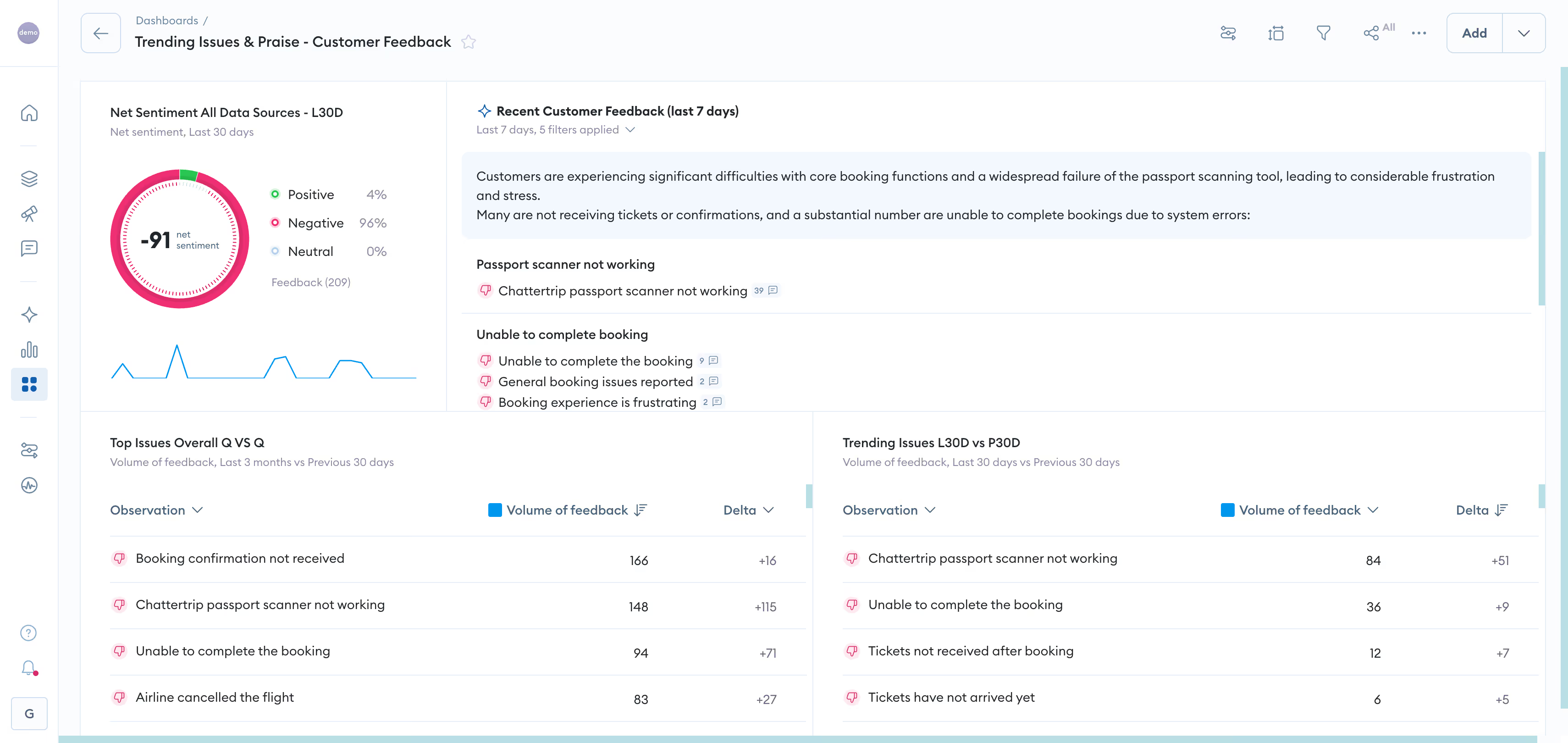
Most customer insights platforms start with surveys and layer AI on as an afterthought. Chattermill was built in the opposite direction - AI-native from the ground up, designed to process unstructured feedback at scale and connect what customers say to the metrics that drive business decisions.
Where other tools ask you to choose between depth of analysis and breadth of data sources, Chattermill unifies feedback from surveys, support tickets, reviews, social channels, app stores, and calls into a single analytics layer. The result is not just a dashboard - it is a system that surfaces themes, tracks sentiment in real time, detects anomalies, and helps CX, product, and insights teams prioritize what matters most.
What sets Chattermill apart is how directly it links customer feedback analytics to business outcomes. Instead of reporting that "shipping" is a trending topic, Chattermill shows you that shipping-related negative sentiment increased 12% this month, correlates with a 3-point NPS drop in your logistics segment, and flags the specific themes driving it. That is the difference between a report and an insight.
Chattermill Features
- Unified feedback ingestion: Connects to every major feedback channel - NPS, CSAT, CES surveys, support platforms, review sites, social media, app stores, and speech analytics from call transcripts - so your analysis reflects the full customer voice, not a single-channel slice.
- Advanced AI theme and sentiment analysis: Proprietary NLP models automatically detect granular themes and sentiment, going beyond positive/negative to capture nuance across languages and contexts.
- Anomaly detection and alerts: Surfaces sudden shifts in customer sentiment or emerging issues before they hit your headline KPIs, giving teams time to respond proactively.
- CX metrics integration: Ties feedback themes directly to NPS, CSAT, and CES movements, so you can quantify the business impact of specific customer pain points.
- Product feedback analytics: Dedicated capabilities for product teams to track feature requests, usability issues, and product sentiment across channels.
- Social CX analytics: Monitors brand perception and customer sentiment across social platforms as part of the unified feedback layer.
- Workflows and collaboration: Pushes insights to Slack, Jira, and CRM systems, and enables cross-team collaboration on action plans.
2026 Pricing
Chattermill offers custom pricing based on data volume, channels connected, and team size. Contact their sales team for a tailored quote. Book a Demo to see the platform and discuss pricing.
Chattermill Pros
- Unifies feedback from more channels than most competitors, reducing data silos
- AI-native architecture means NLP and theme analysis are core - not afterthoughts
- Directly connects feedback themes to NPS, CSAT, and CES for measurable impact
- Strong anomaly detection catches emerging issues before they become crises
- Scales well for enterprise volumes without sacrificing granularity
- Interactive product tour lets you evaluate before committing
Chattermill Cons
- Custom pricing only - no self-serve tier for smaller teams to test independently
- Initial setup and integration configuration can require dedicated onboarding time
- Primarily focused on feedback analytics - teams needing behavioral/product analytics (heatmaps, funnels) will need a complementary tool
Who It's For
Mid-market to enterprise CX, product, and insights teams managing high-volume, multi-channel feedback who need AI-driven analysis that connects directly to business metrics.
G2 Rating
Chattermill G2 Score: 4.5 (236 reviews)
2. Qualtrics Customer Experience
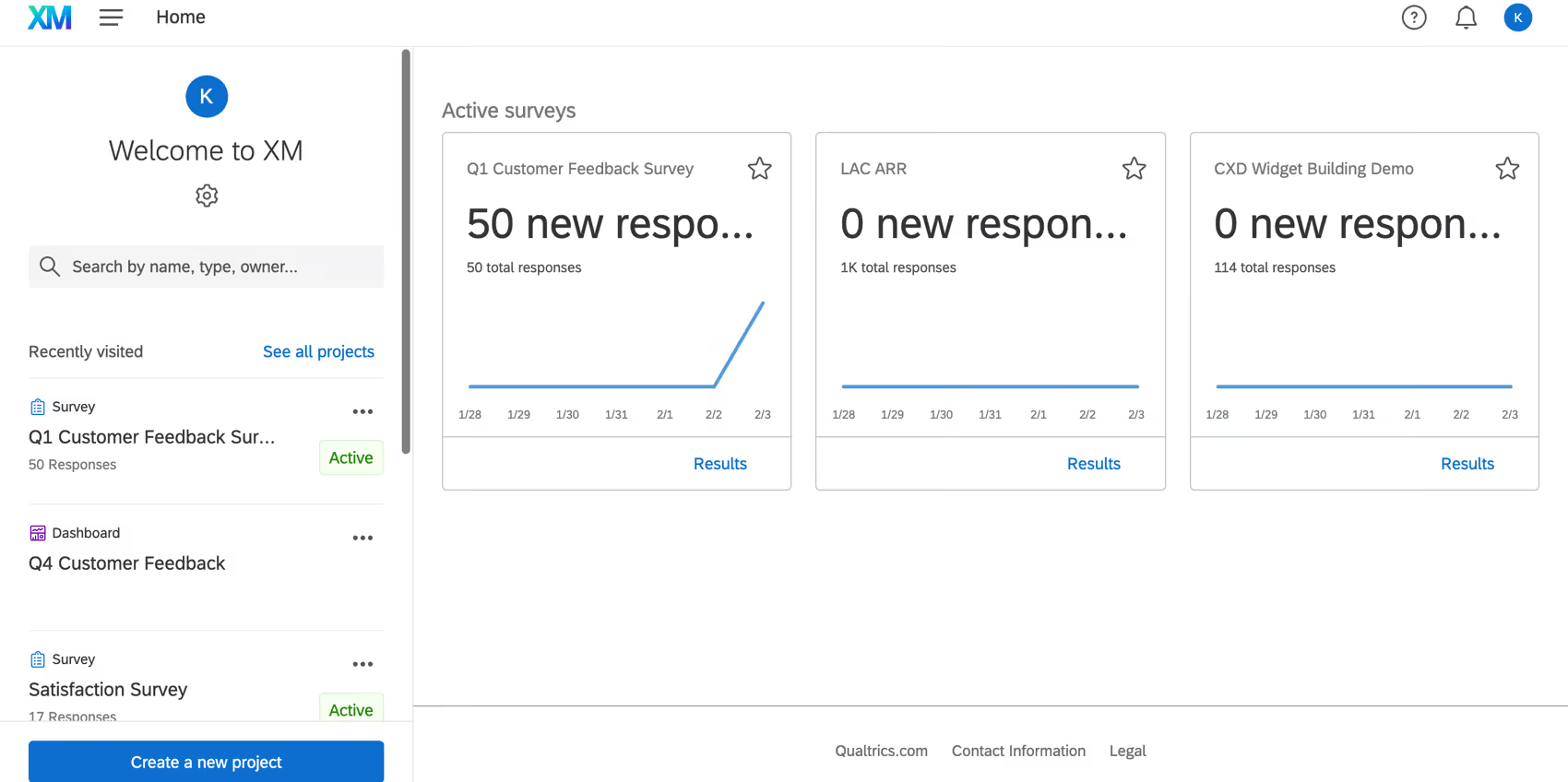
If Chattermill represents the AI-native approach to feedback analytics, Qualtrics represents the enterprise experience management ecosystem. It is one of the most widely deployed XM platforms in the world - and for teams that need to manage customer, employee, brand, and product experience within a single system, that breadth is genuinely hard to match.
Qualtrics CX is built around sophisticated survey design, experience data collection, and AI-powered analytics (Text iQ, Predict iQ, Stats iQ). It excels at structured feedback programs: relationship surveys, transactional touchpoint measurement, and closed-loop follow-up workflows.
The trade-off? That breadth comes with complexity. Qualtrics is a powerful platform that rewards teams with dedicated XM program managers. For organizations that primarily need to analyze unstructured feedback at speed, the survey-centric architecture may feel like working around the tool rather than with it.
Qualtrics Customer Experience Features
- Text iQ: NLP-powered text analytics that surfaces themes and sentiment from open-ended survey responses and other text sources.
- Predict iQ: Machine learning models that predict customer churn and flag at-risk accounts.
- Advanced survey design: Sophisticated branching logic, randomization, and conjoint analysis for complex research programs.
- Closed-loop ticketing: Automatically routes detractor feedback to frontline teams for follow-up.
- Cross-XM platform: Connects customer experience data with employee experience, brand tracking, and product insights within one ecosystem.
2026 Pricing
Qualtrics uses custom, enterprise-tier pricing. Contracts are typically annual, and costs scale with the number of responses, users, and modules. Contact Qualtrics for a quote.
Qualtrics Customer Experience Pros
- Broadest experience management ecosystem - customer, employee, brand, and product in one platform
- Extremely powerful survey design and distribution capabilities
- Strong predictive analytics with Predict iQ for churn modeling
- Large global customer base with extensive support and training resources
- Deep integration with SAP and Salesforce
Qualtrics Customer Experience Cons
- Complexity and steep learning curve - often requires a dedicated XM team or consultant
- Survey-centric architecture may limit agility with unstructured, multi-channel feedback
- Premium pricing puts it out of reach for many mid-market teams
- Text analytics, while capable, is not as granular on theme detection as AI-native alternatives
Who It's For
Large enterprises running mature, multi-program experience management initiatives with dedicated XM teams and budget for a comprehensive platform.
G2 Rating
Qualtrics Customer Experience G2 Score: 4.3 (751 reviews)
3. Medallia

Medallia is one of the foundational names in enterprise experience management, and its platform reflects that heritage: deep signal capture, broad channel coverage, and a large professional services organization that can support complex global deployments.
Where Medallia differentiates is in the sheer volume and variety of signals it can ingest - not just surveys, but digital behavior, speech analytics, social media, messaging, and IoT data. For organizations with massive feedback footprints across dozens of touchpoints, Medallia's infrastructure is designed to handle that scale.
The challenge is similar to Qualtrics: Medallia's power comes with enterprise complexity, long implementation timelines, and pricing that reflects its position as a premium, full-suite solution.
Medallia Features
- Omnichannel signal capture: Collects feedback and behavioral data from surveys, digital, social, contact center, messaging, and in-location sources.
- AI-driven text and speech analytics: NLP models analyze unstructured feedback from text and voice channels to detect themes and sentiment.
- Action intelligence: Suggests prioritized actions based on feedback patterns and predicted impact.
- Role-based dashboards: Delivers tailored views to frontline teams, managers, and executives.
- Enterprise-grade scalability: Architected for global organizations with millions of feedback interactions.
2026 Pricing
Medallia offers custom enterprise pricing. Expect annual contracts with costs varying by data volume, modules, and professional services. Contact Medallia for details.
Medallia Pros
- Exceptionally broad signal capture across more channels and touchpoints than most competitors
- Strong speech analytics for contact center teams
- Established enterprise platform with a large global customer base
- Professional services team can support complex, multi-region deployments
- Role-based views help operationalize insights across the organization
Medallia Cons
- Implementation timelines can be long and resource-intensive
- Pricing is premium - often out of range for mid-market organizations
- Platform complexity can mean slow time-to-value without professional services support
- AI analytics, while strong, are embedded in a broader suite rather than purpose-built for feedback-first teams
Who It's For
Large global enterprises with complex, multi-touchpoint feedback ecosystems and the budget and team to manage a full-suite experience management deployment.
G2 Rating
Medallia G2 Score: 4.5 (600+ reviews)
4. Zonka Feedback

Zonka Feedback approaches customer insight from the collection end. It gathers feedback through its own surveys across email, SMS, WhatsApp, web, in-app, kiosk, and QR channels, pulls in support tickets, chats, emails, and online reviews alongside them, and analyzes the combined set in one place. For teams without an established feedback pipeline, that removes the usual prerequisite of having data sources wired up before an insights tool earns its keep.
Its distinguishing feature in this list is entity-level insight. Teams define the entities that matter to their business, whether that is branches, agents, SKUs, or named competitors, and the AI detects those entities in open-text feedback, attaches themes and sentiment to each one, and scores the effect on NPS, CSAT, and CES. The result is insight reported by operating unit rather than in aggregate, which is what multi-location and multi-product organizations usually need before anyone will act on it.
Zonka Feedback Features
- Entity and Aspect Tracking: Custom business entities detected automatically in free-text feedback, with themes and sentiment attached to each.
- Thematic Analysis: Recurring themes and sub-themes surfaced across all connected sources, with emerging topics flagged.
- Impact Analysis: Every theme scored for its effect on NPS, CSAT, or CES, prioritized on an Impact and Trend matrix.
- Role-Based Dashboards: Separate views for CX, support, product, and location managers, with real-time alerts.
- Reputation Management: Online review monitoring and response handled in the same platform.
2026 Pricing
Feedback Management from $199/month and AI Feedback Intelligence from $999/month, quoted against response volume and AI data credits. A 14-day free trial is available.
Zonka Feedback Pros
- Entity-level reporting gives insight by branch, agent, or product rather than in aggregate
- Collection, analysis, and review management in a single platform
- Impact scoring ranks findings by metric effect, which helps small teams choose what to fix first
- Published entry pricing and a free trial, both uncommon in this category
Zonka Feedback Cons
- No behavioral or product analytics, so it will not replace a Mixpanel or Amplitude
- No call or social listening sources
- The AI tier that delivers the insights carries a much higher price than the base plan
- Smaller enterprise footprint than the platforms at the top of this list
Who It's For
Mid-market and multi-location organizations that want customer insight broken down by location, agent, or product, and that would rather buy collection and analysis together than assemble a stack.
G2 Rating
Zonka Feedback G2 Score: 4.7 (81 reviews)
5. InMoment

InMoment occupies an interesting position in the customer insights landscape: it combines a self-serve analytics platform with one of the stronger professional services teams in the category. For organizations that want more than software - who need guidance on program design, analysis interpretation, and operationalizing insights - that combination can be a real differentiator.
The XI Platform handles survey management, text analytics, and CX program orchestration, with NLP capabilities that automatically categorize and score feedback across channels. InMoment's approach is more prescriptive than some competitors, which can be a strength for teams building CX programs from scratch and a constraint for teams that want maximum analytical flexibility.
InMoment Features
- XI Platform NLP: Automated theme detection, sentiment analysis, and intent classification across feedback sources.
- CX program management: End-to-end tools for designing, deploying, and managing feedback programs.
- Review and reputation management: Aggregates and analyzes online reviews across platforms.
- Case management: Closed-loop workflows for following up on individual customer issues.
- Strategic services: Consulting and advisory support for CX program design and optimization.
2026 Pricing
InMoment uses custom pricing with annual contracts. Pricing varies based on program scope, data volume, and professional services engagement. Contact InMoment for a quote.
InMoment Pros
- Strong combination of self-serve platform and expert consulting services
- Effective NLP for theme and sentiment analysis, particularly on survey data
- Good review management capabilities for multi-location brands
- Case management enables closed-loop follow-up
- High G2 rating reflects strong customer satisfaction
InMoment Cons
- The prescriptive approach may limit flexibility for advanced analytics teams
- Heavy reliance on professional services can increase total cost of ownership
- Multi-channel unification is not as seamless as AI-native platforms
- Customization of dashboards and reports can require consultant involvement
Who It's For
Mid-market to enterprise organizations building or maturing CX programs who value guided expertise alongside a capable analytics platform.
G2 Rating
InMoment G2 Score: 4.7 (319 reviews)
6. Enterpret

Enterpret takes a different approach to feedback analytics: instead of applying a general-purpose NLP model, it trains custom machine learning models for each customer. The idea is that every product and customer base has its own language, and a model tuned to your specific context should produce more accurate themes and classifications than a one-size-fits-all engine.
For product and CX teams drowning in feedback from support tickets, app reviews, sales calls, and surveys, Enterpret centralizes those sources and applies its adaptive models to surface what matters. The platform is particularly strong for product teams that want to connect user feedback directly to roadmap decisions.
Enterpret Features
- Custom ML models: Trains classification and theme-detection models on each customer's unique feedback data.
- Feedback centralization: Aggregates data from support, surveys, reviews, social, and sales conversations into a unified taxonomy.
- Adaptive taxonomy: The classification schema evolves as customer language and product context change.
- Product-aligned insights: Surfaces feature requests, pain points, and sentiment specifically for product decision-making.
- Team collaboration: Integrates with Slack, Jira, and other tools to push insights into product and engineering workflows.
2026 Pricing
Enterpret uses custom pricing based on feedback volume and sources connected. Contact Enterpret for details.
Enterpret Pros
- Custom ML models offer higher accuracy for domain-specific feedback than generic NLP
- Strong product-team alignment - built for connecting feedback to roadmap decisions
- Adaptive taxonomy evolves with your product and customer base
- Good integration with product and engineering tools (Jira, Slack)
- Growing review base with high satisfaction scores
Enterpret Cons
- Custom model training requires an initial onboarding period before insights are fully calibrated
- Smaller review base than enterprise incumbents - less market validation at scale
- Primarily oriented toward product teams; CX-wide programs may need supplementary tools
- Custom pricing with no self-serve entry point
Who It's For
Product-led organizations with complex, multi-source feedback that need precision classification and a direct feedback-to-roadmap pipeline. Before you commit, scan the leading alternatives to Enterpret to confirm the fit.
G2 Rating
Enterpret G2 Score: 4.6 (110 reviews)
7. Thematic
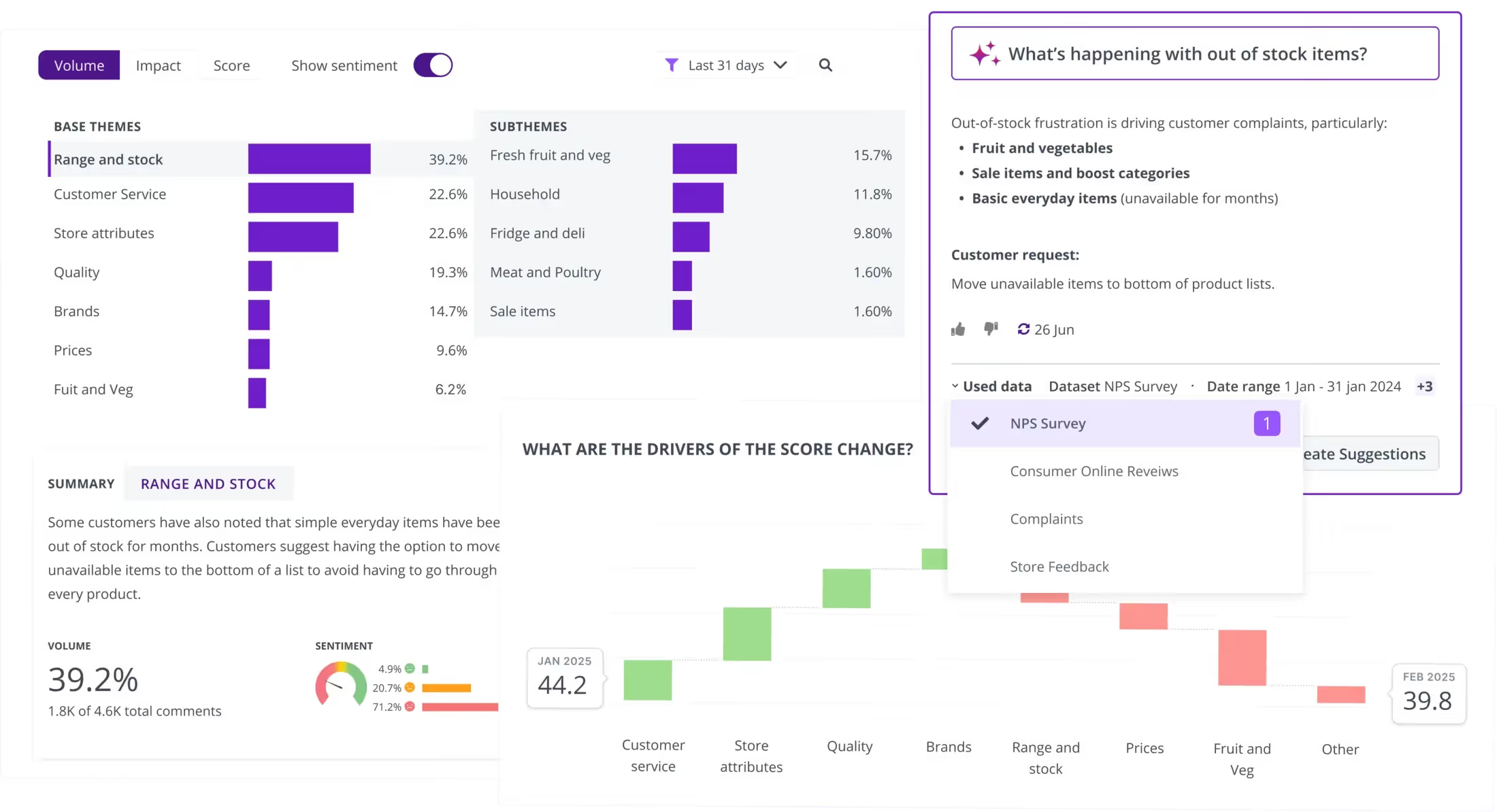
Thematic (formerly GetThematic) focuses squarely on text analytics for customer feedback. If your primary need is to take large volumes of open-ended survey responses, reviews, and support comments and turn them into structured, analyzable themes - without manual coding - Thematic is purpose-built for that job.
The platform uses NLP to automatically identify and group themes from unstructured text, track sentiment over time, and quantify the impact of specific issues on overall satisfaction scores. It integrates well with popular survey tools like Qualtrics and SurveyMonkey, making it a strong analytical layer on top of existing feedback collection programs.
Thematic Features
- Automated theme discovery: NLP identifies recurring themes from open-ended feedback without manual tagging.
- Sentiment and impact analysis: Tracks sentiment trends per theme and quantifies each theme's impact on satisfaction scores.
- Survey tool integrations: Connects natively to Qualtrics, SurveyMonkey, Zendesk, and Intercom for seamless data flow.
- Customizable taxonomies: Allows users to refine and merge auto-detected themes.
- Trend tracking: Monitors theme frequency and sentiment shifts over time to detect emerging issues.
2026 Pricing
Thematic pricing starts at approximately $2,000 per month. Plans scale based on feedback volume and features required.
Thematic Pros
- Excellent automated theme detection - reduces manual analysis time significantly
- Strong integrations with major survey and support platforms
- Impact analysis connects themes to satisfaction metrics
- Clean, intuitive interface for exploring feedback themes
- High G2 rating despite a smaller review base
Thematic Cons
- Smaller company and ecosystem than enterprise competitors
- Limited multi-channel breadth compared to unified platforms - strongest on survey and text data
- Starting price of ~$2,000/mo may be steep for smaller teams relative to the scope
- Less suited for real-time or streaming feedback use cases
Who It's For
Insights and CX teams at mid-market companies with significant open-ended feedback volumes who need automated text analytics without enterprise-scale complexity.
G2 Rating
Thematic G2 Score: 4.8 (43 reviews)
8. UnitQ

UnitQ approaches customer insights from the quality angle. Rather than analyzing survey responses, it monitors real-time feedback signals - app store reviews, support tickets, social mentions - to detect quality issues and product bugs as they emerge. Think of it as an early-warning system for product quality, built for teams that want to catch problems before they scale.
The platform's AI automatically tags and categorizes feedback into quality-related themes, scores severity, and alerts engineering and product teams through integrations with Jira, PagerDuty, and Slack.
UnitQ Features
- Quality monitors: AI continuously scans feedback channels for quality signals and anomalies.
- Auto-tagging and categorization: Classifies issues by product area, severity, and type without manual intervention.
- Real-time alerting: Pushes critical quality issues to engineering teams via Jira, PagerDuty, and Slack.
- Cross-channel aggregation: Pulls from app store reviews, support tickets, social media, and surveys.
- Quality scoring: Quantifies product quality trends over time to track improvement.
2026 Pricing
UnitQ uses custom pricing. Contact their team for a quote.
UnitQ Pros
- Uniquely focused on quality intelligence - catches product issues faster than general feedback tools
- Real-time alerting reduces response time for critical bugs
- Strong integration with engineering workflows (Jira, PagerDuty)
- Effective at bridging the gap between customer feedback and engineering prioritization
- Clean quality scoring gives teams a measurable improvement metric
UnitQ Cons
- Narrower focus than full CX platforms - not designed for broad VoC or experience management
- Best suited for product and engineering teams, not standalone CX programs
- Smaller ecosystem and review base than enterprise alternatives
- Custom pricing with no self-serve option
Who It's For
Product and engineering teams at tech companies that prioritize real-time quality monitoring and need to connect customer-reported issues directly to engineering workflows.
G2 Rating
UnitQ G2 Score: 4.5 (48 reviews)
9. Unwrap.ai
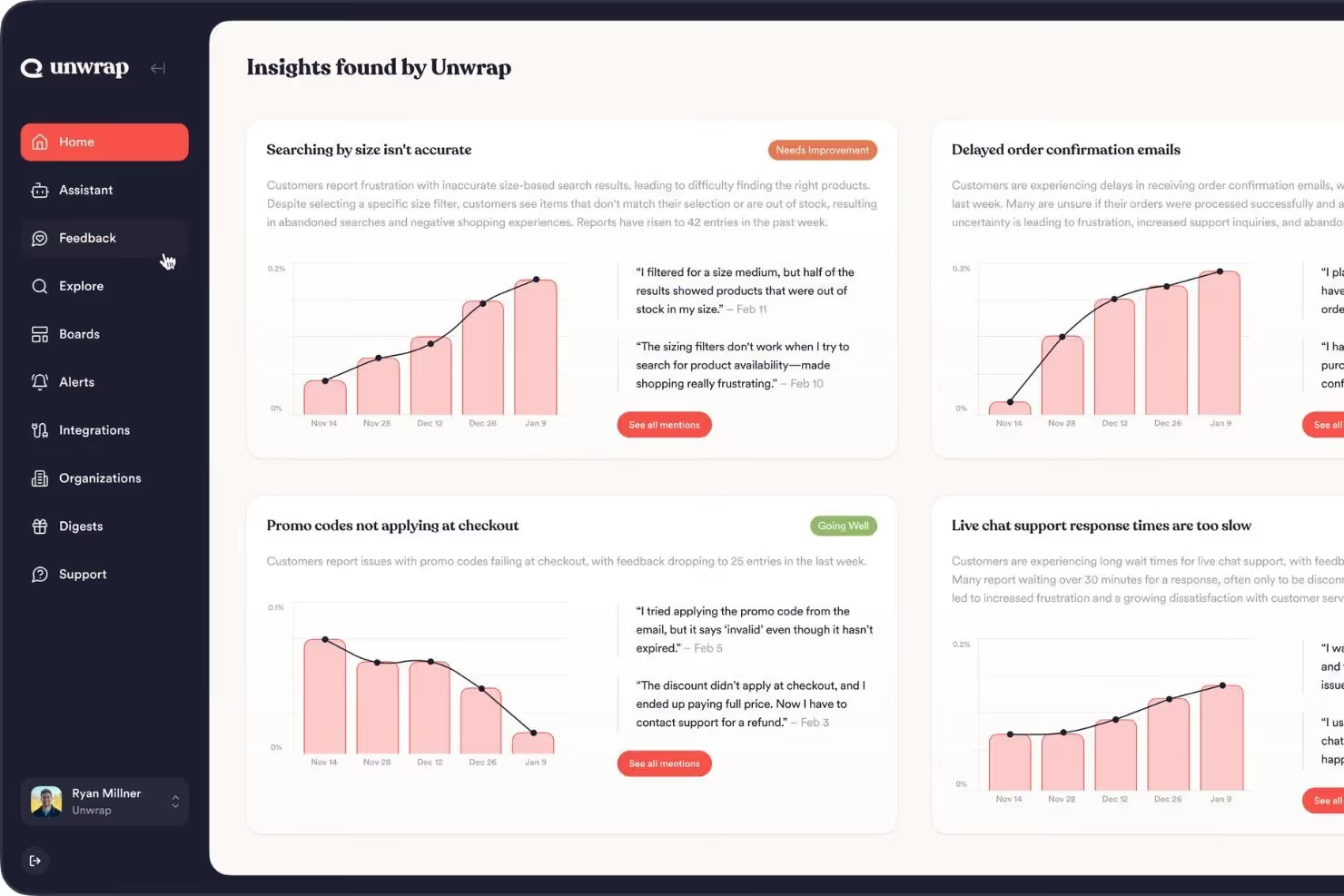
Unwrap.ai takes a lean approach to feedback analytics: it uses GPT-powered AI to automatically summarize and categorize customer feedback from multiple sources, and it does so with a simplicity that more complex platforms often lack. For teams that want fast, digestible insights without building a full-scale feedback operations program, Unwrap.ai offers a compelling entry point.
The platform aggregates feedback from support tickets, reviews, surveys, and social channels, then generates AI-powered summaries, trend reports, and anomaly alerts. Its free tier makes it accessible for smaller teams testing the feedback analytics category.
Unwrap.ai Features
- AI-powered summarization: Generates natural language summaries of feedback themes and trends.
- Multi-source aggregation: Pulls from support, reviews, surveys, and social channels.
- Anomaly detection: Flags sudden shifts in sentiment or topic frequency.
- Trend tracking: Monitors theme and sentiment trends over time.
- Free tier: Entry-level access for teams evaluating the category.
2026 Pricing
Unwrap.ai offers a free tier with limited features. Paid plans are available for teams that need higher volume, more integrations, and advanced analytics. Contact Unwrap.ai for paid plan pricing.
Unwrap.ai Pros
- Free tier lowers the barrier to entry for smaller teams
- AI summarization delivers quick, digestible insights without heavy configuration
- Simple, intuitive interface with fast time-to-value
- Good anomaly detection for flagging emerging issues
- High G2 score suggests strong user satisfaction
Unwrap.ai Cons
- Summarization-first approach sacrifices granularity compared to deeper NLP platforms
- Smaller ecosystem and review base - less validated at enterprise scale
- Paid plan pricing details are not publicly available
- May not scale well for organizations with extremely high feedback volumes
Who It's For
Small to mid-market product and CX teams looking for fast, AI-powered feedback insights without the complexity or cost of enterprise platforms.
G2 Rating
Unwrap.ai G2 Score: 4.8 (26 reviews)
10. SentiSum
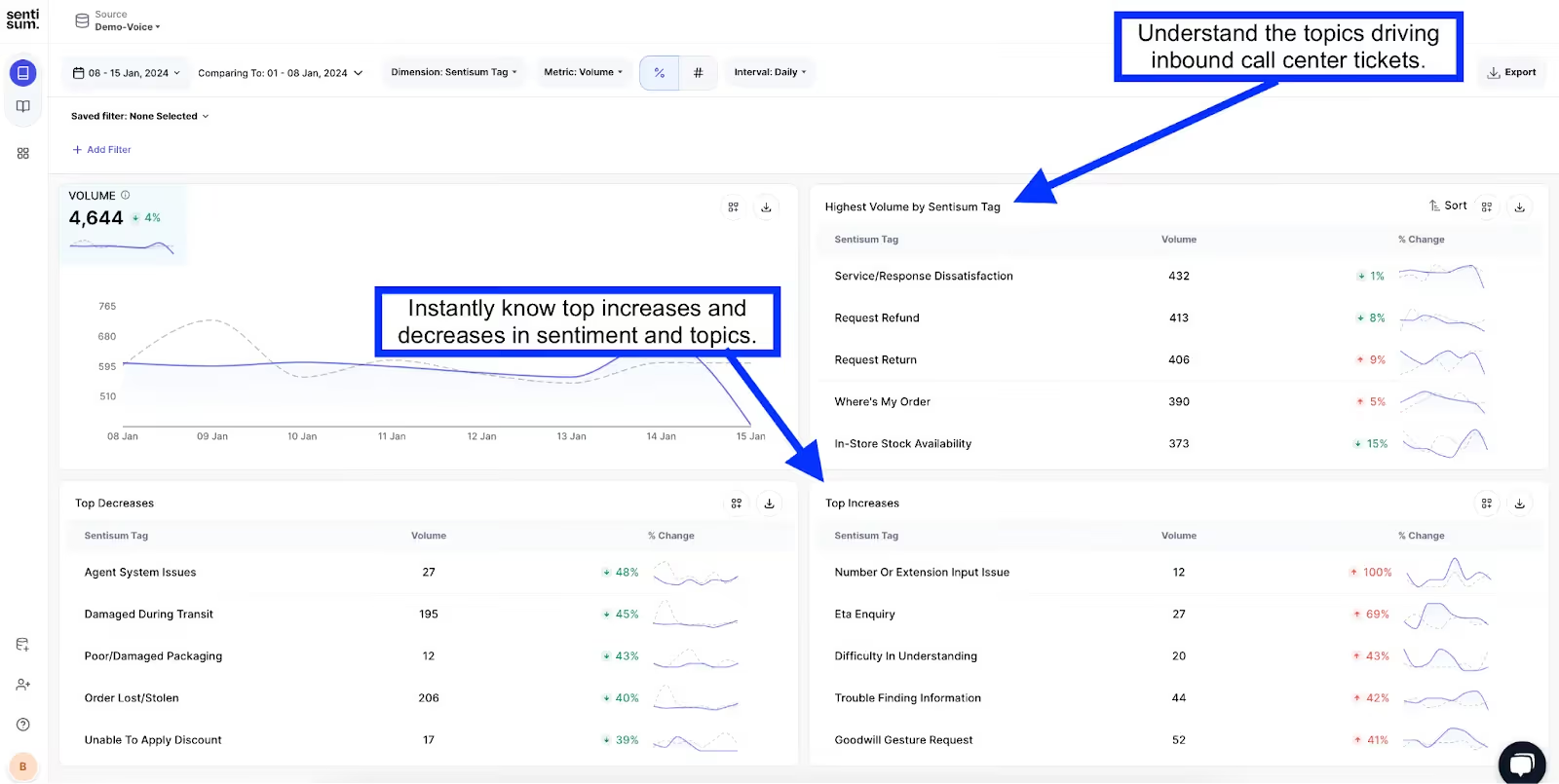
SentiSum specializes in one thing and does it well: AI-powered analytics for customer support conversations. If your primary feedback channel is support tickets and your biggest challenge is understanding what customers are actually contacting you about - at scale - SentiSum is built for that specific problem.
The platform auto-tags support tickets by topic, sentiment, and urgency, integrates directly with helpdesks like Zendesk and Freshdesk, and gives support and CX leaders a real-time view of contact drivers and sentiment trends. It is less of a full VoC platform and more of a surgical tool for support analytics.
SentiSum Features
- Auto-tagging: AI classifies every support ticket by topic, sentiment, and priority without manual rules.
- Contact driver analysis: Identifies why customers are reaching out, quantified by volume and trend.
- Helpdesk integrations: Native connections to Zendesk, Freshdesk, Intercom, and Dixa.
- CSAT analytics: Analyzes survey responses alongside ticket data for a combined support quality view.
- Real-time dashboards: Live views of support topic trends and sentiment.
2026 Pricing
SentiSum offers custom pricing based on ticket volume and integrations. Contact SentiSum for details.
SentiSum Pros
- High auto-tagging accuracy for support tickets, reflected in a 4.8 G2 score from support-focused teams
- Seamless integration with major helpdesk platforms
- Fast time-to-value - useful insights within days, not months
- Clear contact driver analysis helps support leaders justify investment
- High G2 rating (though small review base)
SentiSum Cons
- Narrowly focused on support channels - not a full VoC or multi-channel platform
- Small review base limits market validation
- Custom pricing with no self-serve tier
- Organizations needing survey, social, or behavioral analytics will need additional tools
Who It's For
Support and CX operations teams at companies with high support ticket volumes who need granular, AI-powered analytics on contact reasons and support quality.
G2 Rating
SentiSum G2 Score: 4.8 (14 reviews)
11. Contentsquare
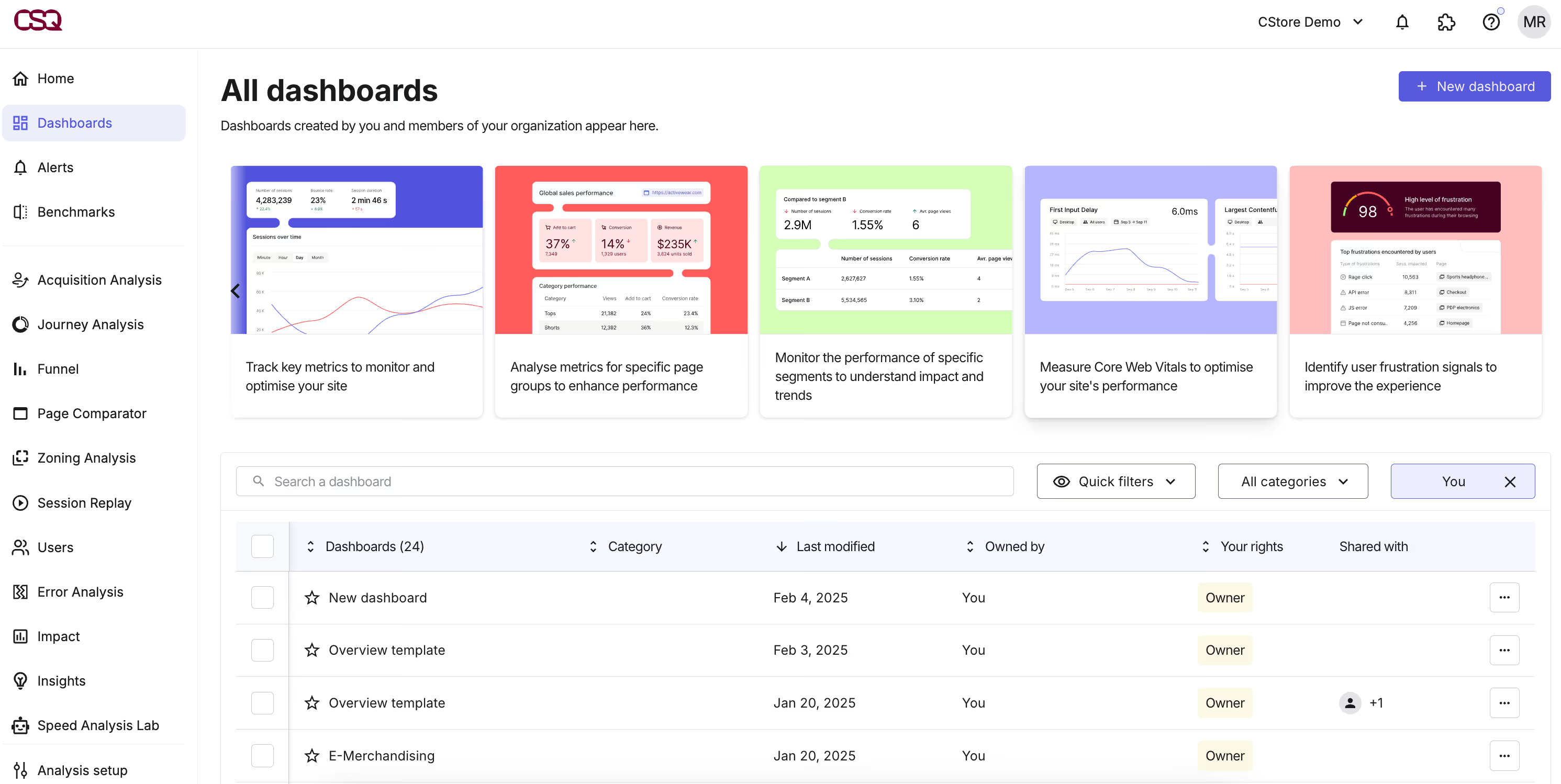
Contentsquare approaches customer insights from a different angle entirely: instead of analyzing what customers say, it analyzes what they do. The platform specializes in digital experience analytics - heatmaps, session replays, journey analysis, and conversion funnels - to help product, UX, and digital teams understand how users interact with websites and mobile apps.
For teams whose primary insight gap is behavioral rather than attitudinal, Contentsquare fills a space that feedback analytics tools typically do not. Its AI identifies frustration signals, revenue opportunities, and usability issues from behavioral data at scale.
Contentsquare Features
- Zone-based heatmaps: Visualizes engagement, click, scroll, and hover behavior at the element level.
- Session replay: Records and replays individual user sessions to identify friction points.
- AI-powered frustration detection: Automatically flags rage clicks, excessive scrolling, and error loops.
- Journey analysis: Maps user flows across pages and identifies drop-off points.
- Conversion and revenue analytics: Connects behavioral data to revenue impact.
2026 Pricing
Contentsquare offers a free Experience Analytics tier with limited features. Enterprise plans are custom-priced based on traffic volume and modules. Contact Contentsquare for enterprise pricing.
Contentsquare Pros
- Zone-based heatmaps deliver element-level engagement data far more granular than page-level analytics tools
- AI-powered frustration detection (rage clicks, error loops, excessive scrolling) adds a proactive quality signal to UX analysis
- Free tier available for teams getting started
- Scales well for high-traffic websites
Contentsquare Cons
- Focused on digital behavior - does not analyze unstructured feedback, surveys, or support data
- Enterprise pricing can be significant for high-traffic sites
- Requires a separate feedback analytics tool to capture what customers are saying, not just what they do
- Learning curve for advanced journey and funnel analysis features
Who It's For
Digital, UX, and product teams at mid-market to enterprise companies optimizing web and app experiences through behavioral data rather than survey-based feedback.
G2 Rating
Contentsquare G2 Score: 4.6 (631 reviews)
12. Hotjar

Hotjar - now part of the Contentsquare family - is one of the most widely used tools for understanding user behavior on websites. It combines heatmaps, session recordings, and on-site surveys in a single, accessible package that has become a staple for product, marketing, and UX teams.
What makes Hotjar distinctive is accessibility: a generous free tier, an intuitive interface, and a focus on making behavioral insights approachable for teams that are not data engineering specialists. It is not the deepest analytics platform, but it is often the first tool teams reach for when they need to understand what users are doing on a page.
Hotjar Features
- Heatmaps: Click, scroll, and move heatmaps for any page.
- Session recordings: Replays of real user sessions to identify friction and confusion.
- On-site surveys and feedback widgets: Collect qualitative feedback directly from users in context.
- Funnels: Basic conversion funnel visualization (on higher-tier plans).
- AI-powered survey summaries: Automatically summarizes open-ended survey responses.
2026 Pricing
Hotjar offers a free Basic plan with limited sessions and surveys. Paid plans start at $39/month (Plus), with Scale and Business tiers for higher volumes.
Hotjar Pros
- Generous free tier makes it accessible to teams of any size
- Extremely easy to set up - often live within minutes
- Combines behavioral data (heatmaps, recordings) with qualitative surveys in one tool
- Large user community and extensive knowledge base
- Good entry point for teams new to behavioral analytics
Hotjar Cons
- Analytics depth is limited compared to Contentsquare and dedicated product analytics tools
- Not designed for feedback analytics, VoC, or multi-channel insights
- Session recording storage and volume limits on lower tiers
- Advanced segmentation and funnel capabilities require higher-tier plans
Who It's For
Small to mid-market product, marketing, and UX teams that need quick, visual insights into website user behavior without enterprise-level complexity.
G2 Rating
Hotjar G2 Score: 4.3 (300+ reviews)
13. Mixpanel
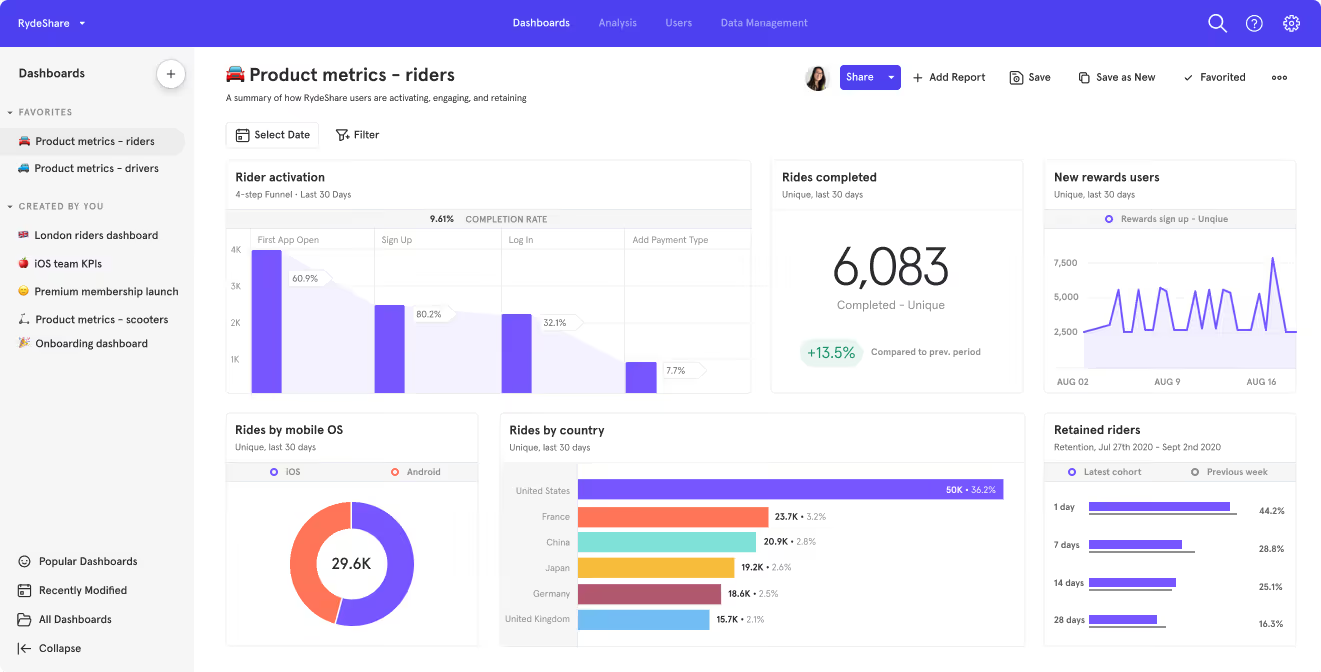
Mixpanel is a product analytics platform built for teams that want to understand user behavior at the event level. Where feedback analytics tools tell you what customers say, Mixpanel tells you what they do - which features they adopt, where they drop off, and what behavioral patterns predict retention or churn.
For product and growth teams, this behavioral lens is essential. Mixpanel's strength is its ability to track custom events, build funnels, run cohort analyses, and measure feature impact - all without requiring SQL or data engineering support for most tasks.
Mixpanel Features
- Event-based tracking: Captures granular user actions across web and mobile apps.
- Funnel analysis: Visualizes conversion paths and identifies drop-off points.
- Cohort analysis: Segments users by behavior, acquisition source, or time period to analyze retention.
- A/B test analysis: Connects experiment results to behavioral outcomes.
- Interactive reports: Self-serve dashboards and reports with no-code query building.
2026 Pricing
Mixpanel offers a free tier (up to 20 million events/month). Paid Growth plans start at $28/month. Enterprise pricing is custom.
Mixpanel Pros
- Generous free tier for startups and smaller teams
- Strong self-serve analytics - product managers and marketers can explore data without SQL
- Excellent funnel and cohort analysis for understanding retention drivers
- Fast implementation with SDKs for web, mobile, and backend
- Integrates well with data warehouses (Snowflake, BigQuery) and CDPs (Segment)
Mixpanel Cons
- Focused on behavioral product analytics - does not process qualitative feedback, surveys, or support data
- Insight generation depends on how well events are instrumented; poor tracking setup limits value
- Advanced features and higher volume require paid plans
- Not a customer insights platform in the VoC or feedback analytics sense
Who It's For
Product and growth teams at SaaS, mobile, and digital businesses that need event-level behavioral analytics to drive feature decisions and retention strategy.
G2 Rating
Mixpanel G2 Score: 4.6 (1,100+ reviews)
14. SurveyMonkey

SurveyMonkey is the name most people think of when they think "surveys" - and for good reason. It is one of the most established, widely used survey platforms in the world, with a template library, distribution tools, and basic analytics that make it easy for any team to start collecting structured feedback.
For teams whose primary insight need is structured survey data - CSAT, NPS, event feedback, market research - SurveyMonkey is reliable, familiar, and broadly accessible. Where it falls short is in the analytics layer: once the data is collected, extracting deep insights from open-ended responses or connecting survey results to behavioral or operational data requires supplementary tools.
SurveyMonkey Features
- Template library: Hundreds of pre-built survey templates for CX, HR, market research, and more.
- Multi-channel distribution: Email, web, social media, and embedded surveys.
- Basic analytics and reporting: Charts, cross-tabs, word clouds, and sentiment analysis.
- Logic and branching: Conditional survey flows based on respondent answers.
- Team collaboration: Shared workspaces, comment threads, and role-based access.
2026 Pricing
SurveyMonkey offers a free tier with limited features. Team plans start at $25/user/month. Enterprise pricing is available for larger organizations with advanced needs.
SurveyMonkey Pros
- The most recognizable survey brand - easy adoption across teams
- Extensive template library reduces survey design time
- Free tier and affordable team plans make it accessible
- Strong multi-channel distribution options
- Simple, intuitive interface requires minimal training
SurveyMonkey Cons
- Analytics capabilities are basic - limited NLP for open-ended responses
- Not designed for multi-channel feedback unification or unstructured data analysis
- Extracting actionable insights (beyond summary charts) requires exporting data to other tools
- Advanced features like conjoint analysis and A/B testing are limited compared to Qualtrics
Who It's For
Teams of any size that need reliable, easy-to-use survey creation and distribution, particularly for structured feedback programs like CSAT, NPS, and event surveys.
G2 Rating
SurveyMonkey G2 Score: 4.4 (22,000+ reviews)
15. Amplitude
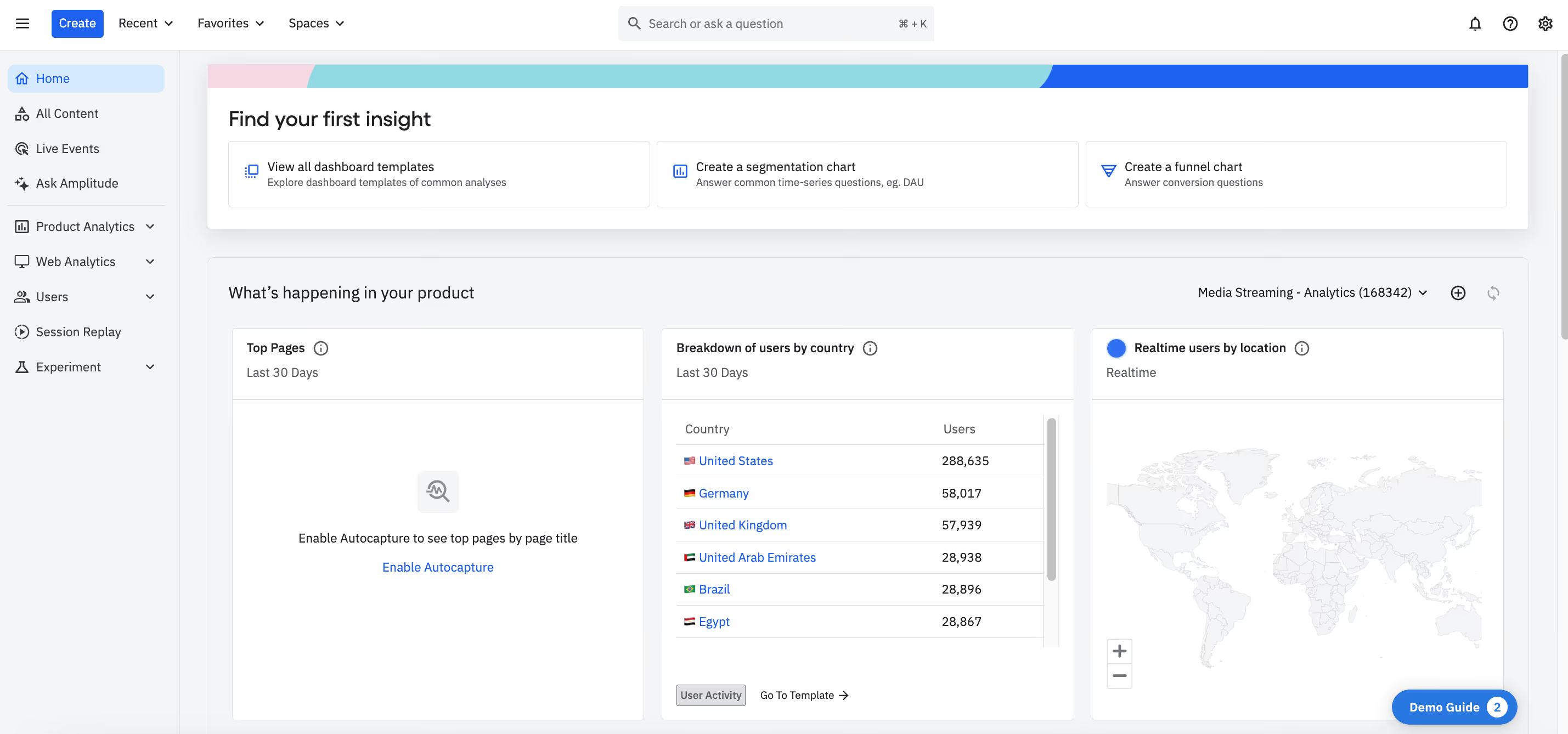
Amplitude is a product analytics platform that competes directly with Mixpanel for the "understand user behavior" use case. Its differentiators include deeper predictive analytics, a strong behavioral cohort builder, and a data governance layer that appeals to larger organizations managing complex product ecosystems.
For product teams evaluating Amplitude vs. Mixpanel, the decision often comes down to organizational scale and governance needs. Amplitude's collaborative features, taxonomy management, and enterprise controls make it a strong fit for companies where multiple product teams need shared, governed analytics.
Amplitude Features
- Behavioral cohorts: Segments users by actions, properties, and lifecycle stage for deep retention analysis.
- Predictive analytics: Machine learning models that forecast user behavior and identify at-risk segments.
- Funnel and path analysis: Visualizes conversion flows and identifies unexpected user journeys.
- Data governance: Taxonomy management, data validation, and access controls for enterprise teams.
- Experimentation: Built-in feature flagging and A/B testing capabilities.
2026 Pricing
Amplitude offers a free Starter plan with core analytics features. Growth and Enterprise plans are custom-priced based on event volume and features.
Amplitude Pros
- Strong predictive analytics - forecasts churn and conversion at the user level
- Powerful behavioral cohort builder for complex segmentation
- Built-in experimentation and feature flagging
- Data governance features appeal to larger, multi-team organizations
- Free tier available for smaller teams
Amplitude Cons
- Focused on behavioral/product analytics - not a feedback, VoC, or sentiment platform
- Steeper learning curve than Mixpanel for non-technical users
- Full value requires significant event instrumentation investment
- Growth and Enterprise pricing can escalate for high-volume products
Who It's For
Product, data, and growth teams at mid-market to enterprise SaaS and digital companies that need predictive behavioral analytics with enterprise-grade governance.
G2 Rating
Amplitude G2 Score: 4.5 (2,800+ reviews)
16. Sprout Social
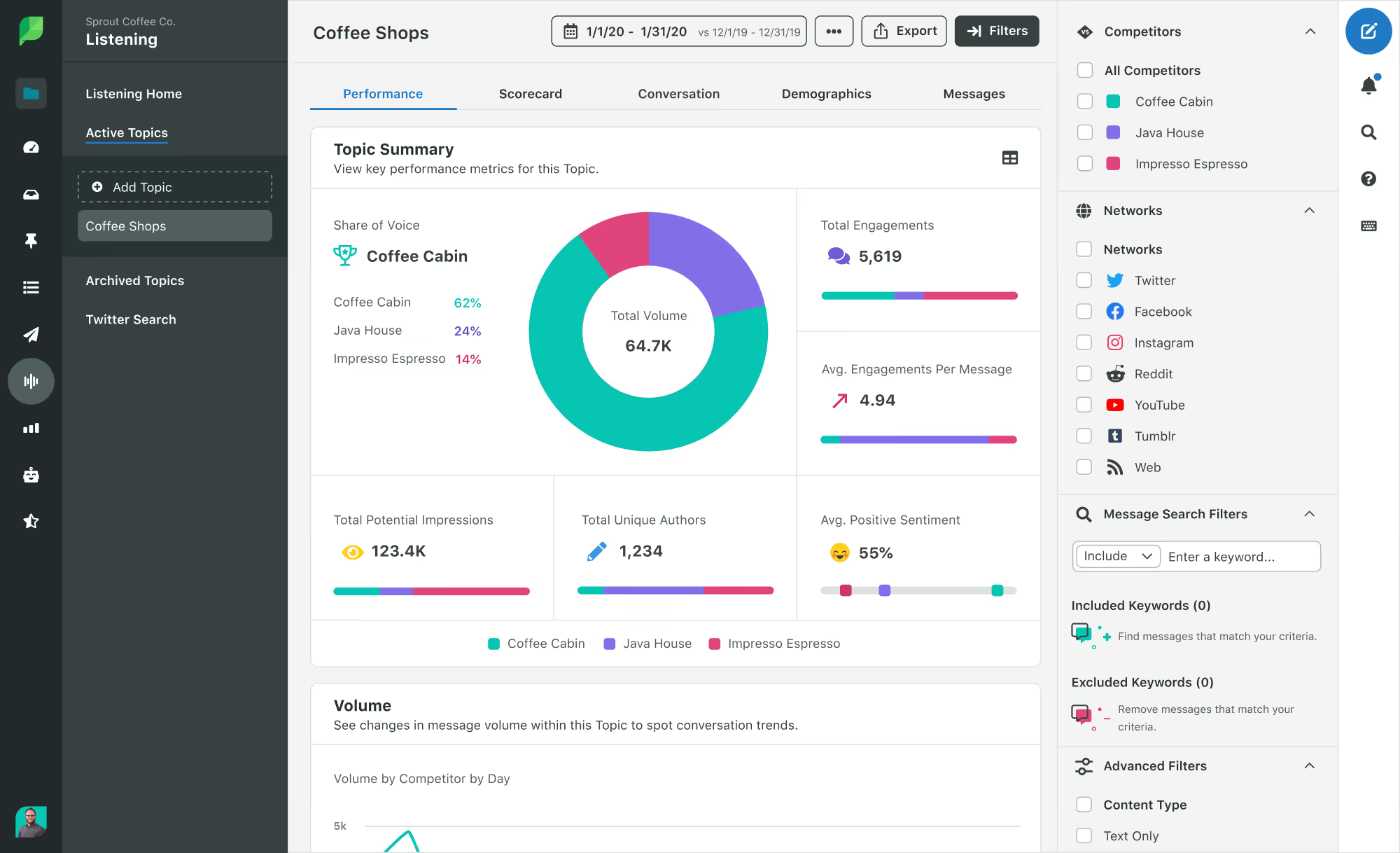
Sprout Social rounds out the list as a social listening and analytics platform - the tool for teams whose customer insights start with what people are saying on social channels. For brands where social media is a primary feedback and perception channel, Sprout Social provides monitoring, sentiment analysis, competitor benchmarking, and publishing in one platform.
While it is not a feedback analytics or VoC platform in the traditional sense, Sprout Social fills a gap that many CX teams overlook: the unstructured, unsolicited feedback that flows through Instagram, X (Twitter), LinkedIn, Facebook, TikTok, and Reddit.
Sprout Social Features
- Social listening: Monitors brand mentions, keywords, hashtags, and competitor activity across platforms.
- Sentiment analysis: Detects positive, negative, and neutral sentiment in social conversations.
- Competitive benchmarking: Compares your social performance and sentiment against competitors.
- Engagement and publishing: Unified inbox for responding to comments and messages; content scheduling.
- Reporting and analytics: Customizable dashboards for social performance, engagement, and audience demographics.
2026 Pricing
Sprout Social plans start at $199/month (Standard). Professional and Advanced plans offer additional features at higher price points. Enterprise pricing is custom.
Sprout Social Pros
- Strong social listening covers a channel that many feedback tools miss
- Combines monitoring, engagement, and publishing in one platform
- Good sentiment analysis for social conversations
- Competitive benchmarking helps contextualize brand perception
- Scales across multiple social platforms including TikTok and Reddit
Sprout Social Cons
- Limited to social channels - does not analyze surveys, support tickets, reviews, or app feedback
- Pricing starts at $199/month - can be expensive for small teams
- Sentiment analysis on social data is inherently noisier than survey or support data
- Not a substitute for dedicated feedback analytics or VoC tools
Who It's For
Marketing, social media, and brand teams that rely on social channels as a primary source of customer perception data and need listening, engagement, and analytics in one platform.
G2 Rating
Sprout Social G2 Score: 4.4 (3,800+ reviews)
Choosing The Right Customer Insights Tools
With 16 tools on this list spanning feedback analytics, product analytics, experience management, and social listening, how do you narrow the field? The answer depends on where your biggest insight gap lives. Here are the evaluation factors that matter most:
- Multi-channel feedback coverage. Does the tool connect to the channels where your customers actually express themselves? A platform that unifies surveys, support, reviews, social, and app store data eliminates blind spots that single-channel tools create.
- AI and NLP depth. Can the platform analyze unstructured text at scale - detecting themes, sentiment, and anomalies automatically? Manual tagging does not scale. The quality of the AI layer determines whether insights arrive in real time or after weeks of analyst work.
- Actionability. Does the tool stop at dashboards, or does it connect insights to actions? Look for workflow integrations (Slack, Jira), alerting, closed-loop follow-up, and clear links between feedback and business metrics.
- Business metric connection. The most valuable customer insights tools tie feedback themes directly to NPS, CSAT, CES, churn, or revenue impact. If you cannot quantify the cost of a pain point, you cannot prioritize it.
- Integration ecosystem. The tool needs to fit into your existing stack - CRM, helpdesk, product management, data warehouse. Poor integration creates data silos that defeat the purpose of a customer insights platform.
- Scalability. Can the platform handle your current feedback volume and grow with you? Enterprise-scale needs are different from startup needs, and switching tools mid-growth is expensive.
- Time-to-value. How quickly can you go from contract to actionable insight? Some platforms deliver value in days; others require months of implementation, training, and professional services.
- Pricing model and transparency. Custom pricing is the norm in this category, but consider total cost of ownership: license fees, implementation, training, professional services, and internal administration time.
- User experience. Can your team actually use the tool day-to-day? The best analytics in the world are wasted if adoption stalls because the interface is too complex for your team's skill level.
- Vendor roadmap and investment. Is the vendor investing in AI, expanding channel coverage, and responding to market needs? A stagnant product roadmap is a risk for a category evolving this quickly.
By Company Size
- Startups and small teams (under 200 employees): Start with accessible, free-tier tools like Hotjar, Mixpanel, or Unwrap.ai to build your insights foundation. SurveyMonkey covers basic structured feedback needs.
- Mid-market (200-2,000 employees): This is where purpose-built feedback analytics platforms like Chattermill, Thematic, and Enterpret deliver the most relative value - enough data volume to benefit from AI, without the enterprise overhead of Medallia or Qualtrics.
- Enterprise (2,000+ employees): Evaluate Chattermill for AI-native feedback analytics at scale, Qualtrics or Medallia for full experience management suites, or InMoment for guided CX optimization. Most enterprises will combine multiple tools - for example, Chattermill for feedback analytics plus Amplitude for product analytics.
What Is AI Customer Insights Software?
AI customer insights software uses natural language processing, machine learning, and large language models to automatically analyze unstructured customer feedback - extracting themes, sentiment, anomalies, and predictive signals that manual analysis cannot match at scale. A few years ago, "AI" in this category meant keyword-based rules and simple sentiment classifiers. Today, the best AI customer insights tools go far deeper.
So what does "AI-powered" actually mean in this context?
Theme and topic detection. Instead of requiring analysts to define categories in advance, AI models automatically discover the themes customers are discussing - and adapt as those themes evolve. A surge in "checkout flow" mentions does not require a new manual tag; the system surfaces it.
Granular sentiment analysis. Beyond positive/negative, modern AI detects aspect-level sentiment (customers love the product but hate the shipping), emotion detection, and intensity scoring.
Anomaly detection. AI monitors feedback streams and alerts teams when something changes - a sudden spike in complaints about a specific feature, a shift in sentiment for a customer segment, or an emerging theme that did not exist last month.
Predictive insights. Some platforms use machine learning to predict churn risk, forecast NPS movements, or identify which feedback themes have the highest revenue impact.
Summarization. Newer tools use large language models to generate natural-language summaries of feedback trends, making insights accessible to stakeholders who do not have time to explore dashboards.
The key distinction is between tools where AI is the core architecture - like Chattermill, Enterpret, and SentiSum - and tools where AI is a feature added to an existing product. The former tend to deliver faster, more accurate insights because the entire system is designed around automated analysis. The latter may check the "AI" box without fundamentally changing how insights are produced.
Benefits Of Using AI-Powered Customer Insights Software
Why invest in a dedicated customer insights platform rather than relying on spreadsheets, manual review, and intuition? Here are the benefits that matter most to CX and product leaders:
- Unified customer view. Customer feedback lives in dozens of systems - surveys, support tickets, app reviews, social channels, call transcripts. Customer insights software brings these signals together, eliminating blind spots that come from analyzing channels in isolation.
- Speed of insight. Manual feedback analysis takes weeks. AI-powered tools surface themes, sentiment shifts, and anomalies in real time - compressing the gap between signal and action.
- Scalability. As feedback volume grows, manual processes break. Software scales effortlessly from hundreds of responses to millions, maintaining analytical consistency.
- Evidence-based prioritization. When product and CX teams can quantify the business impact of specific customer pain points - tied to NPS, CSAT, or revenue - investment decisions become defensible, not political.
- Proactive issue detection. Anomaly detection and real-time alerting mean emerging problems are flagged before they hit headline KPIs - giving teams the chance to respond rather than react.
- Cross-functional alignment. Shared dashboards, automated reports, and workflow integrations (Slack, Jira, CRM) ensure that insights reach product, engineering, support, and leadership teams - not just the analyst who ran the query.
- Reduced analyst burden. Automated theme detection, sentiment scoring, and summarization free up analyst time for strategic interpretation instead of data processing.
- Customer retention. Faster identification of friction, pain points, and churn signals translates directly into improved retention and lifetime value.
- Competitive advantage. Organizations that act on customer insights faster and more accurately outperform those that rely on quarterly survey readouts and gut instinct.
ROI And Business Impact
Customer insights software is an operational investment, not a discretionary tool purchase. Here is how leading organizations measure return:
- NPS and CSAT improvement. Teams that connect feedback themes to satisfaction metrics can target the specific issues dragging scores down. The ability to isolate which feedback themes correlate with NPS declines gives teams a prioritization advantage that broad survey averages cannot provide.
- Churn reduction. Early identification of dissatisfaction signals - through anomaly detection and predictive models - enables proactive retention actions. Even a small reduction in churn rate can represent significant recurring revenue saved.
- Support cost reduction. Understanding contact drivers at scale reveals which issues generate the most support volume. Addressing root causes reduces repeat contacts and lowers cost-to-serve.
- Product development efficiency. When product teams can quantify which feature requests and pain points affect the most customers, roadmap prioritization improves - and engineering resources are allocated to the highest-impact work.
- Faster decision cycles. Real-time insights compress the feedback-to-action loop from weeks to days, enabling teams to respond to market shifts, product issues, and competitive moves faster.
- Revenue growth. Better customer understanding drives improved product-market fit, higher retention, stronger upsell, and more effective positioning - all of which compound into revenue growth.
Get Started With Chattermill
If your team is managing customer feedback from multiple channels and struggling to turn volume into clarity, Chattermill was built for exactly that challenge. The platform unifies feedback from surveys, support, reviews, social, and calls into a single AI-powered analytics layer - connecting what customers say to the business metrics that matter.
Book a Demo to see how Chattermill turns feedback volume into strategic clarity.
Customer Insights Software: FAQs
What Is The Best Customer Insights Tool?
The best customer insights tool depends on your primary use case. For teams that need to unify multi-channel feedback and connect AI-powered analysis to business metrics like NPS, CSAT, and CES, Chattermill is the top choice. For full experience management suites, Qualtrics and Medallia are strong options. For product-focused behavioral analytics, Mixpanel and Amplitude lead the field.
Which Customer Insights Tools Unify Feedback From Multiple Channels?
Chattermill, Qualtrics, Medallia, InMoment, and Enterpret all support multi-channel feedback ingestion - but the depth varies. Chattermill unifies surveys, support tickets, reviews, social media, app stores, and call transcripts into a single AI-driven analytics layer. Qualtrics and Medallia also offer broad channel coverage but are built around survey-centric architectures with analytics layered on top.
What Is The Best Customer Insights Tool For Feedback Analytics?
For dedicated feedback analytics - specifically analyzing unstructured feedback at scale with AI - Chattermill, Enterpret, and Thematic are the strongest options. Chattermill differentiates by combining advanced NLP with direct connections to CX business metrics, while Enterpret trains custom ML models for each customer, and Thematic excels at automated theme discovery from open-ended survey data.
What Is The Best CX Software For Insights?
The best CX software for insights depends on whether you need feedback analytics, behavioral analytics, or full experience management. For feedback-driven CX insights, Chattermill delivers AI-native analysis across every feedback channel. For enterprise-wide experience management, Qualtrics and Medallia provide the broadest suite. For digital experience optimization, Contentsquare offers behavioral analytics that complement feedback tools.
What Is The Best Software For Multi-Channel Feedback Data Analysis?
Chattermill is purpose-built for multi-channel feedback data analysis. It ingests data from surveys (NPS, CSAT, CES), support platforms, online reviews, social media, app stores, and call transcripts, then applies advanced AI to surface unified themes, sentiment trends, and anomalies across all sources. This unified approach ensures you are analyzing the full customer voice, not a single-channel fragment.
What Are The Top-Rated Feedback Analytics Tools For Customer Experience Teams?
Based on G2 ratings and category fit, the highest-rated feedback analytics tools for CX teams include Thematic (4.8), SentiSum (4.8), Unwrap.ai (4.8), InMoment (4.7), Enterpret (4.6), Chattermill (4.5), and UnitQ (4.5). Ratings reflect user satisfaction, but CX teams should also evaluate multi-channel coverage, AI depth, and business metric integration - areas where Chattermill scores highest among tools on this list.
What Is AI Customer Insights Software And Why Does It Matter?
AI customer insights software uses machine learning and natural language processing to automatically analyze unstructured feedback - surveys, support tickets, reviews, social posts, and call transcripts - at a speed and depth that manual tagging cannot match. Unlike traditional survey tools that rely on structured questions and predefined categories, AI-powered platforms discover emerging themes, detect sentiment shifts, and flag anomalies in real time. For CX and product teams managing high-volume, multi-channel feedback, AI-native tools like Chattermill, Enterpret, and SentiSum represent the current state of the art.



See Chattermill in action on your own feedback
Book a demo


