


Zendesk Sentiment Analysis: What It Does and Where It Falls Short



The CX intelligence
platform that's AI-native by design
Book a demoQuick Summary
Zendesk sentiment analysis scores tickets on a five-point scale, from Very positive to Very negative, as part of its intelligent triage AI. Since July 2026 those classifications are included on Professional plans and above. It works well for triage, but it stops at ticket-level labels, a single platform, and shallow theme detection. Chattermill adds an analytical layer on top of Zendesk, providing a unified view of feedback channels through Lyra AI.
Why Zendesk Sentiment Analysis Needs a Second Look
Support tickets carry some of the clearest customer experience signals.
A ticket can read as negative without saying why, or how many others say the same thing. Closing that blind spot helps support teams diagnose issues with confidence, moving beyond labels to deeper, actionable insights.
This guide breaks down what Zendesk sentiment analysis actually does, what changed in 2026, and how to get more out of ticket data with unified customer support analytics.
Why Listen to Us
Chattermill has analyzed support ticket data for enterprise CX teams for over a decade, including Zendesk exports from brands like Uber and HelloFresh. This breakdown draws on that experience, plus how Zendesk's own sentiment features are documented and used in practice day to day.

What Is Zendesk Sentiment Analysis?
Zendesk sentiment analysis is part of intelligent triage, the AI that classifies every eligible ticket as it arrives.
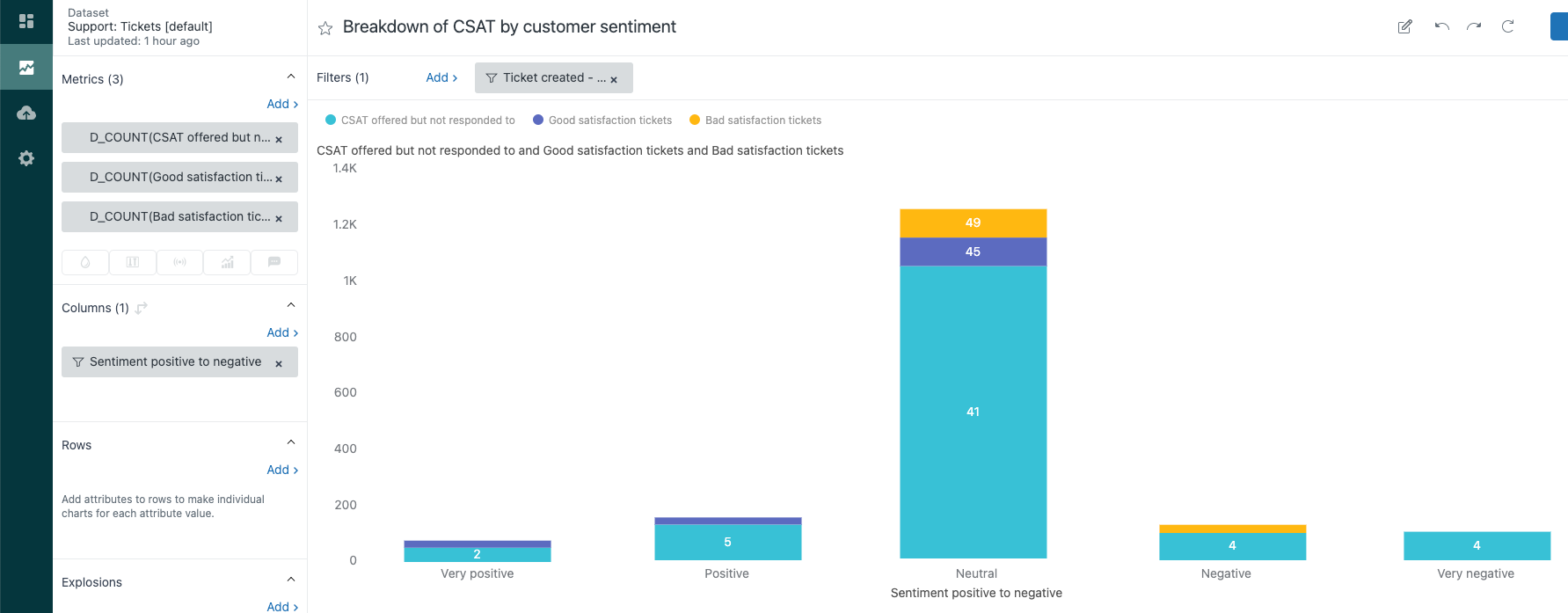
Each ticket gets a sentiment value on a five-point scale, alongside a topic (which Zendesk renamed from "intent" in June 2026), a language, and any detected entities. Agents see the values in the ticket header and properties panel, and can correct them manually.
Three details make the feature more useful than a simple label.
- Sentiment is dynamic. With dynamic detection configured, the score updates as the customer replies, so a rescued conversation shows up as one.
- Every prediction carries a confidence level. High, Medium, or Low, which means admins can automate on high-confidence tickets and queue the rest for human review.
- Values live in standard ticket fields. That makes them available to views, triggers, automations, macros, SLA policies, routing, and the API.
In practice, Zendesk sentiment answers one narrow question. How does this customer sound right now? It doesn't explain why, and it doesn't connect one ticket to a pattern across thousands of others. For triage, that's often enough. For understanding root causes across a support queue, it's a starting point.
What Changed With Zendesk AI in 2026?
If you last evaluated this feature under the "Advanced AI add-on" name, the packaging has moved.
- June 2026. Zendesk renamed the Advanced AI add-on to the Copilot add-on, and renamed "intent" to "topic" across the product.
- July 2026. Intelligent triage classifications, including sentiment, became included on Suite and Support Professional plans and above at no extra cost.
- The catch sits in workflows. Using sentiment in triggers, routing, and other business rules still requires the Copilot add-on, listed at £40 (around $50) per agent per month.
So a Professional-plan team now sees sentiment on every eligible ticket for free, and pays only when it wants to automate on it.
What You Get Natively, at a Glance
What Teams Actually Do With It
Zendesk's own playbook shows where ticket-level sentiment earns its keep.
- Shorten first-reply SLA targets when sentiment is Very negative
- Route negative-sentiment tickets to senior agents or a specially trained group
- Combine conditions, like sentiment is negative and topic is billing, for precise escalation
- Notify a manager or add an internal handling note on angry tickets
- Track mid-ticket sentiment changes in Explore to measure how often agents turn a conversation around
That last one is underused. Explore can report on sentiment transitions, which is the closest native Zendesk gets to answering whether your team recovers unhappy customers.
Where Native Zendesk Sentiment Stops
The limits show up once a team tries to use sentiment for more than individual ticket triage, like reporting trends to leadership or diagnosing a spike in complaints.
A Label, Without the Reason
Zendesk's sentiment score says a ticket is negative. It doesn't say whether the cause is a billing error, a shipping delay, or a broken feature. Agents still have to read the ticket to find the actual issue.
At scale, that manual read-through is exactly the bottleneck sentiment tagging was supposed to remove, and it grows linearly with support ticket volume.
No Theme Depth Across Tickets
A sentiment score per ticket doesn't add up to a pattern across tickets.
Zendesk now suggests custom topics weekly by mining your ticket data, and the Explore dashboard can cross-report topics against sentiment. Both help, but both work top-down from a predefined taxonomy. Spotting that 200 negative tickets this week all mention the same shipping delay still takes manual tagging or an outside tool, and by the time someone notices, the pattern may be a week old.
There's also no aspect-level scoring. A ticket praising the agent while criticizing the product gets one blended score.
One Platform, Rather Than the Full Picture
Zendesk sentiment covers conversations inside Zendesk, including email, messaging, social channels, and voice transcripts. It has no visibility into survey responses, app reviews, or call recordings living outside the helpdesk.
A customer who complains on social media and later contacts support looks like two disconnected data points, even though it's the same underlying frustration. Sentiment and topic models also cover around 30 languages, so global queues will have unscored tickets.
How to Analyze Zendesk Ticket Sentiment with AI: Step by Step
Here's the practical route from raw tickets to answers you can act on. None of it requires replacing Zendesk.
Step 1: Export the Right Ticket Data, Not Just the Ticket
Most teams sync too little and wonder why the analysis is shallow. Pull these fields for every ticket.
- The full public comment thread, since sentiment usually shifts mid-conversation
- Requester email and organization, so tickets can join to other feedback later
- Channel, brand, group, tags, priority, and custom fields like product line or plan
- Zendesk's own AI fields, meaning sentiment, topic, and their confidence levels
- Outcome data, covering CSAT rating, first reply time, and resolution time
Zendesk's incremental exports API handles the ongoing sync. A purpose-built Zendesk integration does the same without the engineering time.
Step 2: Score Customer Comments, Never the Ticket Average
A ticket that opens angry and closes delighted averages out to a meaningless neutral. Score each customer comment on its own, and keep agent replies out of the sentiment math entirely. Agent text is context.
This also unlocks a metric native Zendesk only hints at. Comparing first-comment sentiment to last-comment sentiment tells you how often your team actually turns unhappy customers around.
Step 3: Build Themes Bottom-Up, Then Verify Them
Zendesk's topics come from a predefined taxonomy, so anything unexpected lands in a bucket you already named. Let AI cluster tickets into themes from the language itself, at aspect level.
Done well, "billing" stops being one number and splits into "duplicate charge," "refund delay," and "price increase complaints," each with its own sentiment score and trend line.
Before trusting any model, pull 50 scored tickets and read them against their themes. If fewer than roughly 45 look right, tighten the taxonomy before anyone builds a dashboard on it.
Step 4: Join Tickets to the Feedback Zendesk Never Sees
Match on requester email or account ID so the same customer's app review, NPS verbatim, and support ticket line up as one story. Normalize metadata while you're at it, so "channel" and "product" mean the same thing in every source.
This is the step that turns a support report into a customer report. A shipping-delay theme that shows up in tickets, reviews, and detractor comments at once is a different priority than a ticket-only blip.
Step 5: Push Answers Back to Where Work Happens
Insight that stays in an analytics tab changes nothing. Wire the output into the places people already look.
- Send a weekly theme digest to support leads, ranked by negative volume change
- Alert the moment any theme's negative volume doubles week over week
- Feed high-confidence very negative tickets back into a Zendesk view for same-day follow-up
- Report each theme against CSAT, contact rate, and revenue at risk, then pick one theme a month to eliminate at the root
That last habit is the whole point. Fixing the top recurring theme shrinks ticket volume in a way no amount of faster triage can.
How Chattermill Helps
Here's how Chattermill turns Zendesk data into answers your team can act on.
Unifies Zendesk With Other Channels
Zendesk data shouldn't live in its own silo, disconnected from everything else customers are saying. Chattermill pulls Zendesk in as one native source among many. Ticket data joins surveys, app reviews, social comments, and call transcripts inside the same analysis.
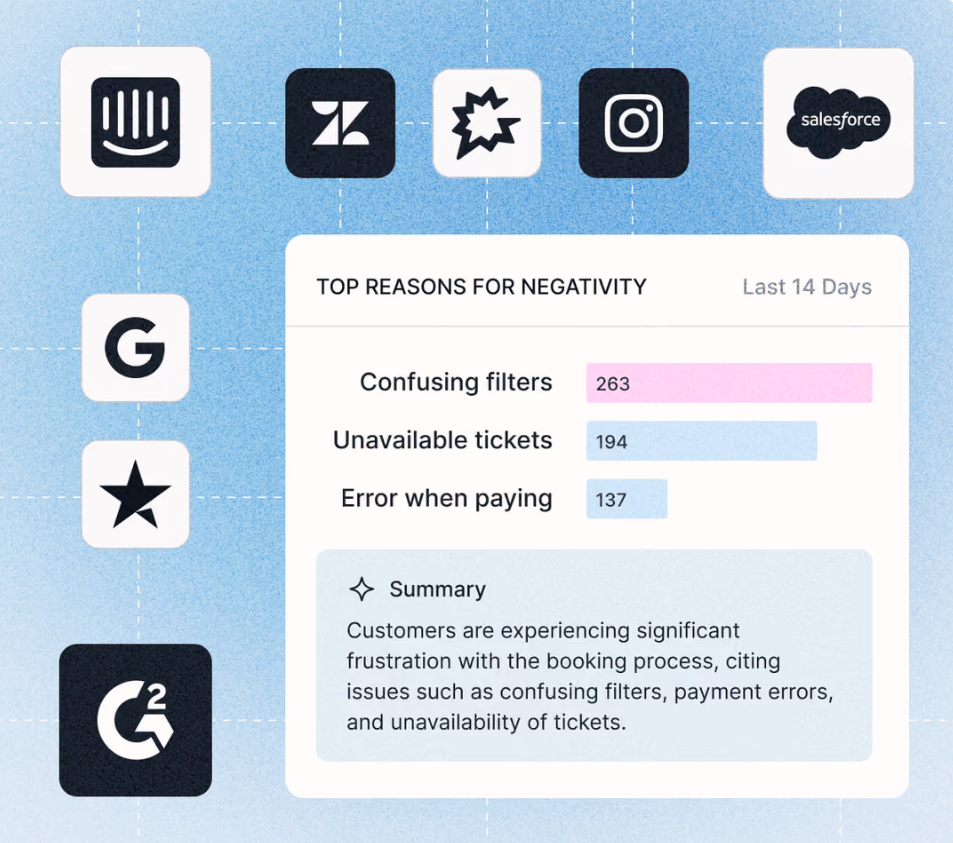
Teams can check a spike in negative Zendesk tickets against what customers are saying everywhere else. That cross-channel view is often the difference between reacting to a symptom and catching the cause.
Scores Every Aspect, Beyond One Ticket-Level Label
A single sentiment score per ticket flattens what's actually a mix of good and bad in the same conversation. Lyra AI, Chattermill's proprietary engine, applies aspect-based sentiment analysis instead.
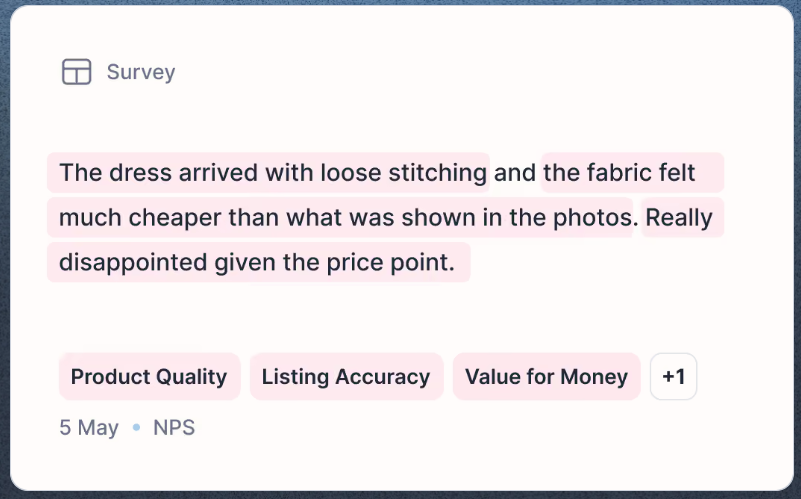
A ticket praising an agent's response but criticizing a broken feature gets scored on both aspects separately, each tied to the specific theme driving it. Themes update automatically as new tickets come in, with no saved search for someone to remember to check.
Connects Tickets to the Business Bottom Line
Knowing sentiment dropped isn't useful without knowing what it's costing the business. Themes route directly to Business Impact Mapping, connecting Zendesk-sourced issues to metrics like CSAT, retention, and revenue.
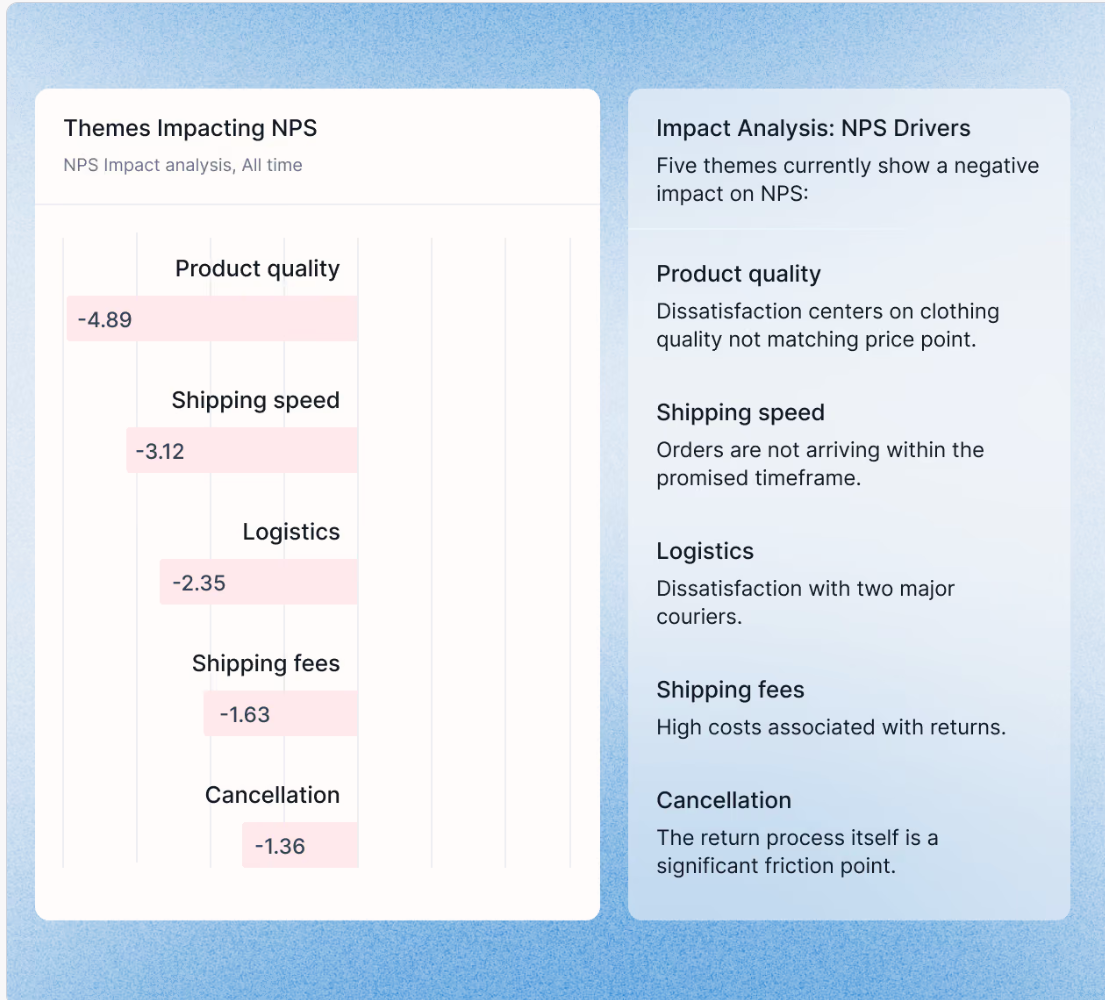
A support lead can see which theme drove a sentiment drop, how many tickets it touched, and what it's likely costing, through a full customer support analytics view.
That depth takes a proper implementation rather than a plug-and-play widget in Zendesk's sidebar. Teams that only need ticket-level tagging for triage may not need the full platform. Teams trying to explain why support sentiment is moving, and connect it to the rest of the customer journey, are exactly who it's built for.
Getting More From Zendesk Sentiment Data
Zendesk's native sentiment tagging is a solid starting point for triage, and since 2026 most teams get it at no extra cost.
It wasn't built to explain root causes or unify Zendesk with the rest of your feedback. Layering AI-driven, cross-channel analysis on top turns ticket-level tags into business-level answers.
Ready to see how Zendesk data looks inside a unified view? Explore the product tour or book a demo.
Frequently Asked Questions
1. Does Zendesk have built-in sentiment analysis?
Yes. Intelligent triage scores eligible tickets on a five-point scale from Very positive to Very negative, shown in the ticket header alongside topic and language detection. Since July 2026, these classifications are included on Suite and Support Professional plans and above.
2. Do I need the Copilot add-on for Zendesk sentiment?
Only for workflows. Seeing sentiment, topic, and language on tickets is included on Professional plans and above. Using those values in triggers, automations, SLAs, or routing requires the Copilot add-on, formerly called Advanced AI, at around $50 per agent per month.
3. How accurate is Zendesk sentiment analysis?
Zendesk's model handles clear-cut cases well and is calibrated for support context, so a ticket isn't marked negative just because it reports a problem. Each prediction carries a High, Medium, or Low confidence level. Mixed-sentiment tickets are the weak spot, since one score covers the whole ticket, and sentiment models cover around 30 languages.
4. Can Zendesk sentiment analysis identify root causes?
Not on its own. Zendesk tags sentiment and suggests topics, but it doesn't cluster tickets into bottom-up themes or explain why sentiment shifted. Root-cause analysis across a queue usually requires a separate analytics layer built for theme detection and aspect-based scoring.
5. Can I combine Zendesk data with other feedback sources?
Yes, through an API connection to a unified analytics platform. Combining Zendesk with surveys, reviews, social comments, and call transcripts shows the full customer picture instead of a support-only view, which matters most for enterprise CX and VoC teams managing feedback at scale.
6. Is Chattermill a replacement for Zendesk?
No. Chattermill analyzes Zendesk ticket data alongside every other feedback channel. It doesn't replace Zendesk as your helpdesk. Most teams keep Zendesk for ticketing and add Chattermill for cross-channel sentiment and theme analysis on top of it.



See Chattermill in action on your own feedback
Book a demo


