


7 Best Support Ticket Analysis Tools in 2026


The CX intelligence
platform that's AI-native by design
Book a demoSupport tickets hold a goldmine of customer intelligence, but only if you have the right tools to extract it. Here are the 7 best support ticket analysis tools for 2026, evaluated for AI capabilities, integration depth, and ability to turn ticket data into actionable CX insights.
Quick Summary
The best support ticket analysis tools go beyond simple tagging and routing. They use AI to detect themes, track sentiment shifts, and connect ticket insights to broader customer experience data, giving CX and product teams the full picture behind every support interaction. For teams evaluating the best client feedback software, the ability to unify ticket analysis with survey, review, and product feedback data is what separates leading platforms from the rest.
Here is a quick look at the top three picks.
| # | Tool | Best For |
|---|---|---|
| 1 | Chattermill | Unified CX intelligence across tickets, surveys, reviews, and all feedback channels |
| 2 | SentiSum | AI-native ticket tagging and real-time support analytics |
| 3 | Enterpret | Adaptive AI taxonomy with revenue-weighted customer insights |
Chattermill leads this list because it treats ticket analysis as one dimension of a unified feedback strategy, connecting support data to voice of customer insights, product feedback, and business metrics like NPS and CSAT. If your goal is to understand not just what customers are saying in tickets, but how those signals connect to everything else they tell you, Chattermill is the strongest choice among the best customer feedback tools available today.
The guide below includes features, pros, cons, 2026 pricing, G2 ratings, and AI approach for all 7 platforms.
Why Listen to Us
At Chattermill, we help CX, insights, and product teams at brands like HelloFresh, Uber, and H&M turn customer feedback into actionable intelligence. Our platform processes millions of support tickets, survey responses, and reviews every month, giving us direct visibility into how ticket analysis fits within a broader voice of customer strategy. That hands-on experience with feedback data at scale informs how we evaluate every tool in this guide.
What Is Support Ticket Analysis?
Support ticket analysis is the process of systematically examining customer support tickets to identify patterns, sentiment trends, and recurring issues that inform business decisions. Rather than treating each ticket as an isolated interaction, modern ticket analysis software uses AI and natural language processing to categorize, quantify, and surface insights from thousands of support conversations at scale.
But here is where the traditional approach falls short: analyzing tickets in isolation gives you a narrow view. A customer who submits a support ticket might also leave a review, respond to an NPS survey, and mention your product on social media. The most effective support ticket analysis tools connect these signals into a unified customer intelligence picture, so you can see not just what went wrong in one interaction, but how it relates to the broader customer experience.
Why does this matter for CX teams? Because the patterns hiding in your ticket data often predict churn, reveal product gaps, and highlight the exact moments where your customer experience breaks down. When ticket analysis feeds into a broader customer feedback analytics strategy, it stops being a reactive support function and starts driving proactive business decisions.
For organizations evaluating the best customer experience software, the shift from isolated ticket analysis to connected CX intelligence is the most important trend shaping this category in 2026.
7 Top Support Ticket Analysis Tools: Head-to-Head Comparison
| # | Tool | Best For | Pricing | G2 Rating | AI/NLP Approach | Feedback Channels | Key Integrations |
|---|---|---|---|---|---|---|---|
| 1 | Chattermill | Unified CX intelligence across all feedback | Custom (see plans) | Deep learning AI with aspect-based sentiment analysis | Omnichannel: tickets, surveys, reviews, social, chat, app feedback | Zendesk, Salesforce, Intercom, Qualtrics | |
| 2 | SentiSum | AI-native ticket tagging and routing | From $3,000/mo | Deep learning NLP for ticket classification | Tickets, surveys, reviews, CSAT | Zendesk, Freshdesk, Intercom | |
| 3 | Enterpret | Revenue-weighted customer intelligence | Custom (enterprise) | Adaptive ML taxonomy with automated tagging | Tickets, surveys, reviews, social, sales calls | Zendesk, Intercom, Salesforce | |
| 4 | Zendesk Explore | Native analytics for Zendesk users | Included in Zendesk Suite (from $55/agent/mo) | Rule-based reporting with pre-built dashboards | Zendesk tickets and messaging | Zendesk ecosystem, Salesforce | |
| 5 | Unwrap.ai | Product-focused feedback intelligence | From $24,000/yr | AI-powered clustering with outcome validation | Tickets, reviews, surveys, social | Zendesk, Intercom, Slack | |
| 6 | SupportLogic | B2B support escalation prediction | Custom | Predictive NLP for escalation and sentiment | Support tickets, CRM cases | Zendesk, Salesforce, ServiceNow | |
| 7 | Intercom | Conversational support with built-in AI | From $29/seat/mo (Essential) | AI agent (Fin) with conversation analytics | Chat, tickets, email, social | Salesforce, HubSpot, Slack |
How We Evaluated These Tools
The best CX software for feedback analysis should do more than count tickets or sort them into buckets. Our evaluation framework prioritized tools that turn support data into strategic intelligence, not just operational reporting.
Here is how we assessed each platform across six dimensions:
- AI and NLP depth: Does the tool use deep learning, adaptive models, or rule-based keyword matching? Platforms with AI-powered sentiment analysis that adapts to your data without manual taxonomy management scored highest.
- Multi-channel support: Can the tool analyze tickets alongside surveys, reviews, social feedback, and other channels? Tools that connect ticket insights to broader feedback analytics scored above those that only process ticket data.
- Integration ecosystem: How easily does the tool connect to your existing support stack, CRM, and BI platforms? Deep integrations with Zendesk, Salesforce, Intercom, and similar platforms were weighted heavily.
- Pricing transparency: We prioritized tools that publish pricing or provide clear tiers. Fully custom pricing without any published benchmarks received lower transparency scores.
- G2 ratings and review volume: G2 scores were included as a trust signal, with review count noted for context. A 5.0 rating from 3 reviews carries different weight than a 4.5 from 3,800.
- Unified CX intelligence: This was the deciding factor. Tools that treat ticket analysis as one input into a broader customer intelligence strategy scored above those that keep ticket data siloed from other feedback signals.
Each tool was also evaluated for ease of use, reporting capabilities, and suitability for different team sizes, from mid-market support teams to enterprise VoC programs.
Chattermill
.png)
What Is Chattermill?
Chattermill is an AI-native customer feedback analytics platform that unifies support tickets, surveys, reviews, social feedback, and every other customer signal into a single source of truth. Unlike tools that analyze tickets in a vacuum, Chattermill connects ticket insights to your full feedback landscape, so you can see how a spike in support volume relates to a drop in NPS, a product launch, or a shift in review sentiment.
The platform uses deep learning AI to automatically detect themes, aspect-level sentiment, and emerging trends across millions of feedback data points, without requiring manual tagging or rule configuration. For CX, insights, and product teams, this means the difference between knowing you have a "billing issue" and understanding exactly which billing flows, customer segments, and journey stages are driving dissatisfaction, and how that connects to churn risk.
What makes Chattermill particularly relevant for support ticket analysis is its ability to contextualize ticket data. A single support ticket is a data point. That same ticket analyzed alongside survey responses, app reviews, and social mentions becomes a signal in a broader pattern. This is the unified approach to customer experience intelligence that separates Chattermill from point solutions.
Chattermill Key Features
- Unified feedback analytics: Consolidates tickets, surveys, reviews, social media, chat, and app feedback into one platform, eliminating data silos across teams
- Deep learning AI: Automatically discovers themes and aspect-level sentiment without manual taxonomy management or rule creation
- Real-time anomaly detection: Proactive alerts when ticket volume spikes, sentiment shifts, or new issues emerge across any feedback channel
- Impact analysis: Connects customer feedback directly to business metrics like NPS, CSAT, CES, and churn, so teams can quantify the cost of unresolved issues
- Advanced segmentation: Slice insights by customer segment, product line, geography, journey stage, or any metadata dimension
- Custom dashboards and reporting: Role-based views for CX, product, support, and leadership teams with automated report delivery
- Enterprise integrations: Native connections to Zendesk, Salesforce, Intercom, Qualtrics, and dozens of other platforms in your CX stack
- Multi-language analysis: Analyze feedback across languages without translation layers, maintaining sentiment accuracy across markets
Chattermill Pros
- Unifies ticket data with survey, review, and social feedback for complete customer intelligence
- Deep learning AI adapts to your data without manual tagging or rule creation
- Real-time anomaly alerts help teams catch emerging issues before they escalate
- Connects feedback insights directly to business outcomes like NPS impact and churn risk
- Intuitive dashboards make insights accessible to non-technical stakeholders
- Enterprise-grade security and compliance
Chattermill Cons
- No built-in data collection (you will need existing survey or feedback tools to feed data in)
- Custom pricing means you need to contact the team for a quote
2026 Pricing
Chattermill offers customized pricing based on data volume and business needs. Visit the plans page for details, or book a demo to discuss your requirements.
G2 Rating
Chattermill G2 Score: 4.4/5 (238 reviews)
Best For
CX, insights, and product teams at mid-market and enterprise organizations that need to analyze support tickets as part of a unified feedback strategy, not in isolation. Chattermill is the strongest choice for teams that want to connect ticket intelligence to surveys, reviews, and business metrics in one platform.
SentiSum
What Is SentiSum?
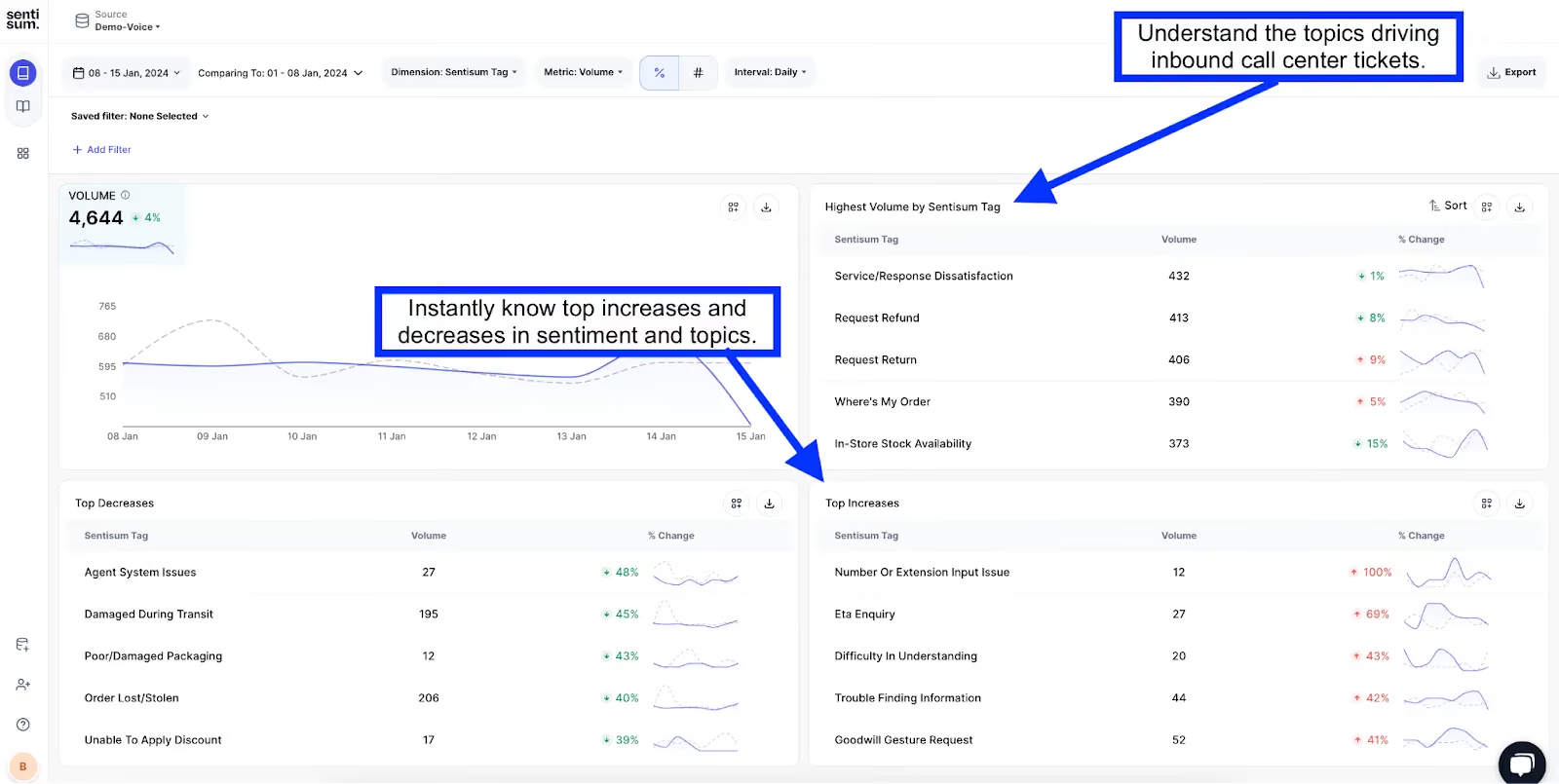
SentiSum is an AI-native support analytics platform that specializes in automated ticket tagging, sentiment analysis, and real-time reporting for customer support teams. The platform applies deep learning NLP to classify tickets by topic, sentiment, and urgency the moment they arrive, enabling faster routing and more data-driven support operations.
SentiSum has built a strong reputation specifically for support ticket analysis, with a focus on reducing manual triage and giving support leaders visibility into what is driving ticket volume. The platform also covers surveys, reviews, and CSAT data, though its core strength remains in the ticket analysis workflow.
SentiSum Key Features
- Automated ticket tagging: Deep learning classifies tickets by topic, sentiment, and priority in real time
- Real-time analytics dashboards: Live views of ticket volume, sentiment trends, and topic distribution
- Root cause analysis: Identifies the underlying drivers behind ticket spikes and recurring issues
- CSAT prediction: Uses ticket data to predict customer satisfaction outcomes before surveys are sent
- Multi-channel coverage: Analyzes tickets, surveys, reviews, and CSAT data
- Support workflow integrations: Native connections to Zendesk, Freshdesk, and Intercom
SentiSum Pros
- Deep learning NLP delivers highly accurate ticket classification without rule maintenance
- Real-time dashboards give support leaders instant visibility into trends
- CSAT prediction helps teams prioritize before issues escalate
- Clean, intuitive interface designed specifically for support teams
SentiSum Cons
- Strongest in ticket-focused workflows; less depth in connecting ticket data to broader CX signals like product reviews or social sentiment
- Smaller G2 review base (14 reviews) makes it harder to benchmark against established competitors
- Starting price of $3,000/mo may be steep for smaller support teams
2026 Pricing
From $3,000/mo (Pro plan). Contact SentiSum for enterprise pricing.
G2 Rating
SentiSum G2 Score: 4.8/5 (14 reviews)
Best For
Support teams that need fast, accurate ticket tagging and real-time analytics to optimize triage and reduce manual classification. Best suited for organizations where ticket analysis is the primary use case, rather than part of a broader multi-channel feedback strategy.
Enterpret
What Is Enterpret?
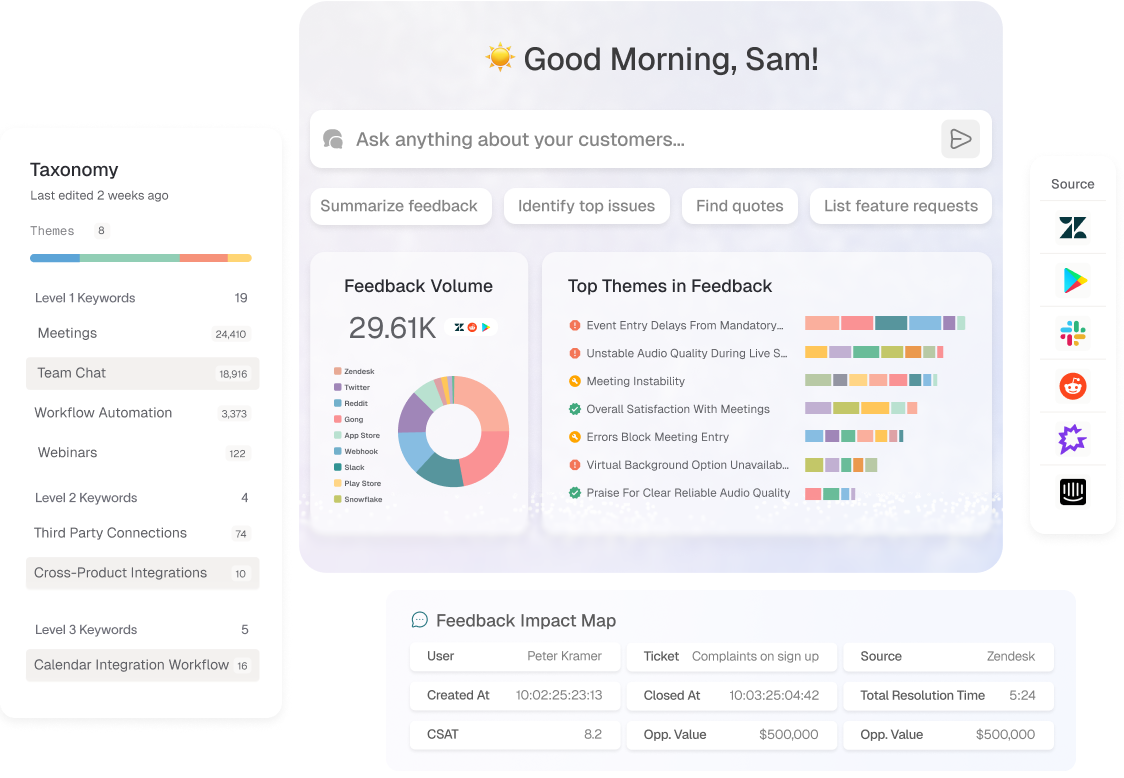
Enterpret is an AI-powered customer intelligence platform that uses adaptive machine learning to build custom taxonomies from your feedback data. The platform is designed for product and CX teams that want to move beyond manual tagging and get a structured, revenue-weighted view of what customers are telling them across channels.
What sets Enterpret apart is its adaptive taxonomy. Rather than forcing you into pre-built categories, the platform learns from your specific data to create classification models tailored to your product and customer base. This makes it particularly strong for product teams that need to connect customer feedback to roadmap decisions with clear revenue implications.
Enterpret Key Features
- Adaptive ML taxonomy: Builds custom feedback classification models from your data, evolving as your product and customer base change
- Revenue-weighted insights: Ties customer feedback to revenue data, so teams can prioritize issues by business impact
- Multi-channel ingestion: Pulls in tickets, surveys, reviews, social, and sales call transcripts
- Automated tagging: AI-driven categorization eliminates manual tagging across feedback sources
- Custom analytics dashboards: Role-based views with drill-down capabilities for product, CX, and leadership teams
- Integrations: Native connections to Zendesk, Intercom, Salesforce, Gong, and product analytics platforms
Enterpret Pros
- Adaptive taxonomy means categories evolve with your product, reducing maintenance
- Revenue-weighting helps product teams quantify which issues matter most financially
- Strong multi-channel coverage including sales call transcripts
- Purpose-built for product and CX team collaboration
Enterpret Cons
- Enterprise-only pricing may put it out of reach for smaller teams
- Requires meaningful data volume to train adaptive models effectively
- Steeper onboarding curve compared to simpler tools
2026 Pricing
Custom pricing (enterprise only). Contact Enterpret's sales team for a quote.
G2 Rating
Enterpret G2 Score: 4.6/5 (110 reviews)
Best For
Product-led organizations that want AI-built custom taxonomies and the ability to weight feedback by revenue impact. Ideal for teams with high feedback volume across multiple channels.
Zendesk Explore

What Is Zendesk Explore?
Zendesk Explore is the built-in analytics and reporting module for the Zendesk Suite. It provides pre-built dashboards and custom reporting capabilities that let support teams track ticket metrics, agent performance, and customer satisfaction trends directly within their existing Zendesk environment.
For teams already using Zendesk as their helpdesk, Explore offers a zero-friction way to start analyzing ticket data without adding another tool to the stack. The trade-off is that its analytics capabilities are primarily rule-based and reporting-focused, rather than AI-driven insight generation.
Zendesk Explore Key Features
- Pre-built dashboards: Out-of-the-box views for ticket volume, resolution times, agent performance, and CSAT
- Custom report builder: Drag-and-drop interface for creating tailored reports and visualizations
- Cross-channel reporting: Unified view of tickets, messaging, chat, and voice within Zendesk
- Scheduled reporting: Automated report delivery to stakeholders on a set cadence
- Data export: Export capabilities for deeper analysis in BI tools
Zendesk Explore Pros
- No additional cost for Zendesk Suite customers
- Zero setup friction for existing Zendesk users
- Solid operational reporting for ticket volume, SLA tracking, and agent metrics
- Pre-built dashboards get teams running quickly
Zendesk Explore Cons
- Limited to Zendesk data; cannot analyze feedback from external sources like reviews or social media
- Rule-based reporting, not AI-powered insight generation
- Custom report building has a learning curve for complex queries
- Lacks theme detection, sentiment analysis, and predictive capabilities found in dedicated tools
2026 Pricing
Included in Zendesk Suite plans, starting from $55/agent/mo. For organizations looking to transform Zendesk tickets into actionable insights beyond what Explore offers, dedicated analytics platforms can connect directly to your Zendesk data.
G2 Rating
Zendesk Explore G2 Score: 4.3/5 (included in Zendesk Suite rating)
Best For
Support teams already on Zendesk who need operational reporting and ticket metrics without adding another vendor. Not suited for teams that need AI-driven theme detection or multi-source feedback analysis.
Unwrap.ai
What Is Unwrap.ai?
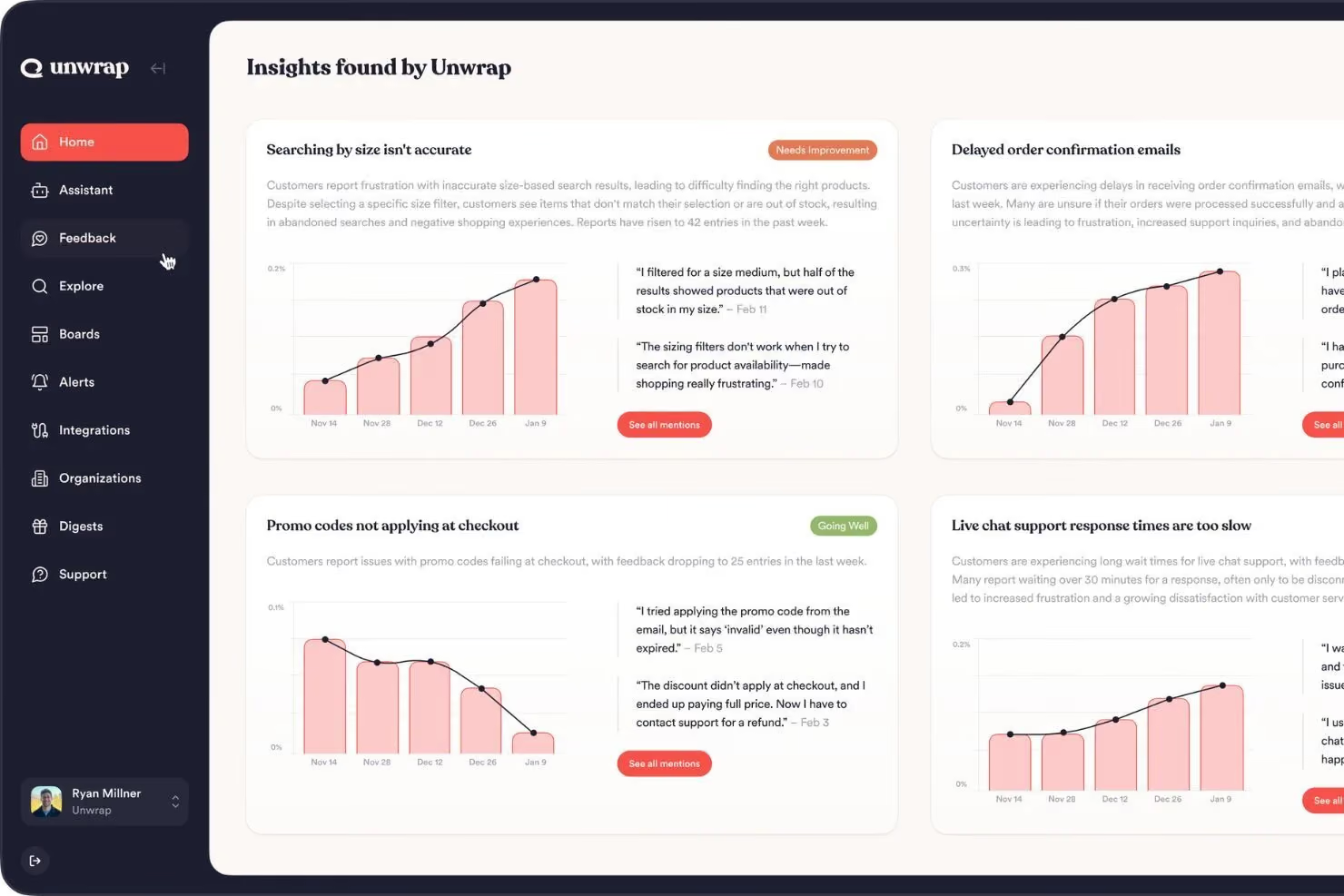
Unwrap.ai is an AI-powered customer intelligence platform that uses clustering algorithms to identify patterns in customer feedback across tickets, reviews, surveys, and social media. The platform differentiates itself through outcome validation, which lets teams verify whether the insights surfaced by AI actually match the real-world impact they expect.
For product teams in particular, Unwrap.ai provides a structured way to move from raw feedback to prioritized action, with clear visibility into which issues affect the most customers and carry the greatest business weight.
Unwrap.ai Key Features
- AI-powered clustering: Groups similar feedback themes automatically across sources
- Outcome validation: Lets teams validate whether AI-surfaced insights align with expected business impact
- Multi-channel ingestion: Pulls in tickets, reviews, surveys, and social feedback
- Priority scoring: Ranks issues by customer impact and frequency
- Trend monitoring: Tracks how themes evolve over time
- Integrations: Connects to Zendesk, Intercom, Slack, and other platforms
Unwrap.ai Pros
- Outcome validation adds a layer of accountability to AI-generated insights
- Strong product-team focus with clear prioritization workflows
- Multi-channel coverage gives broader context than ticket-only tools
- Clean interface that non-technical users can navigate
Unwrap.ai Cons
- Starting at $24,000/yr may be steep for smaller teams
- Smaller vendor with fewer G2 reviews than established competitors
- May require meaningful feedback volume to get the most value from clustering
2026 Pricing
Starting at $24,000/yr. Pricing scales based on monthly feedback volume and integrations. No per-seat charges. Contact Unwrap.ai for a custom quote.
G2 Rating
Unwrap.ai G2 Score: 4.8/5 (26 reviews)
Best For
Product teams that want AI-driven feedback prioritization with outcome validation. Best for organizations with moderate to high feedback volume that need to connect ticket data to product decisions.
SupportLogic
What Is SupportLogic?
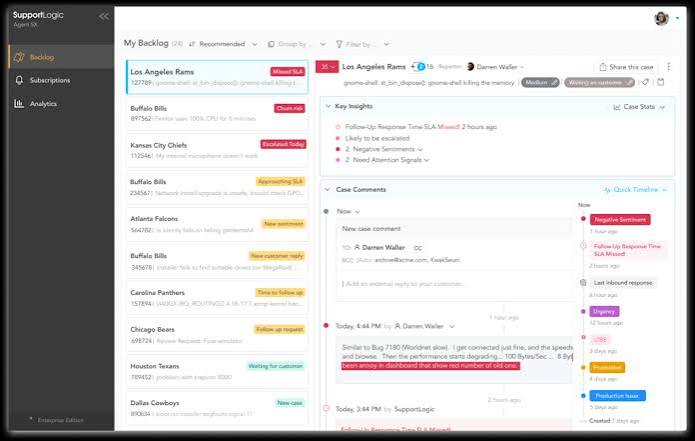
SupportLogic is a B2B-focused support intelligence platform that layers predictive analytics on top of your existing support data. The platform specializes in escalation prediction, sentiment monitoring, and account health scoring, helping B2B support teams get ahead of potential churn and escalation before they happen.
What makes SupportLogic distinct is its predictive focus. Rather than just reporting on what has already happened, the platform uses NLP to identify signals in ticket language that predict escalation risk, customer dissatisfaction, and potential churn. For B2B companies where a single account can represent significant revenue, this predictive capability is particularly valuable.
SupportLogic Key Features
- Escalation prediction: NLP identifies early warning signals in ticket language before issues escalate
- Account health scoring: Aggregates ticket sentiment into account-level health metrics
- Sentiment monitoring: Tracks customer sentiment across support interactions in real time
- Intelligent routing: Routes tickets based on predicted complexity and escalation risk
- CRM integration: Connects support signals to account data in Salesforce and other CRMs
- Integrations: Native connections to Zendesk, Salesforce, ServiceNow
SupportLogic Pros
- Predictive escalation capabilities are genuinely differentiated in the ticket analysis space
- Account health scoring is highly valuable for B2B customer success teams
- Strong CRM integration connects support data to revenue context
- Purpose-built for the B2B support workflow
SupportLogic Cons
- B2B focus means it is less suited for B2C or high-volume consumer support
- Custom pricing with no published starting point
- Primarily focused on support tickets; limited multi-channel feedback analysis beyond CRM cases
2026 Pricing
Custom pricing. Contact SupportLogic for details.
G2 Rating
SupportLogic G2 Score: 4.7/5 (25 reviews)
Best For
B2B support and customer success teams that need predictive escalation intelligence and account-level health scoring. Not the best fit for B2C or high-volume consumer ticket analysis.
Intercom
What Is Intercom?
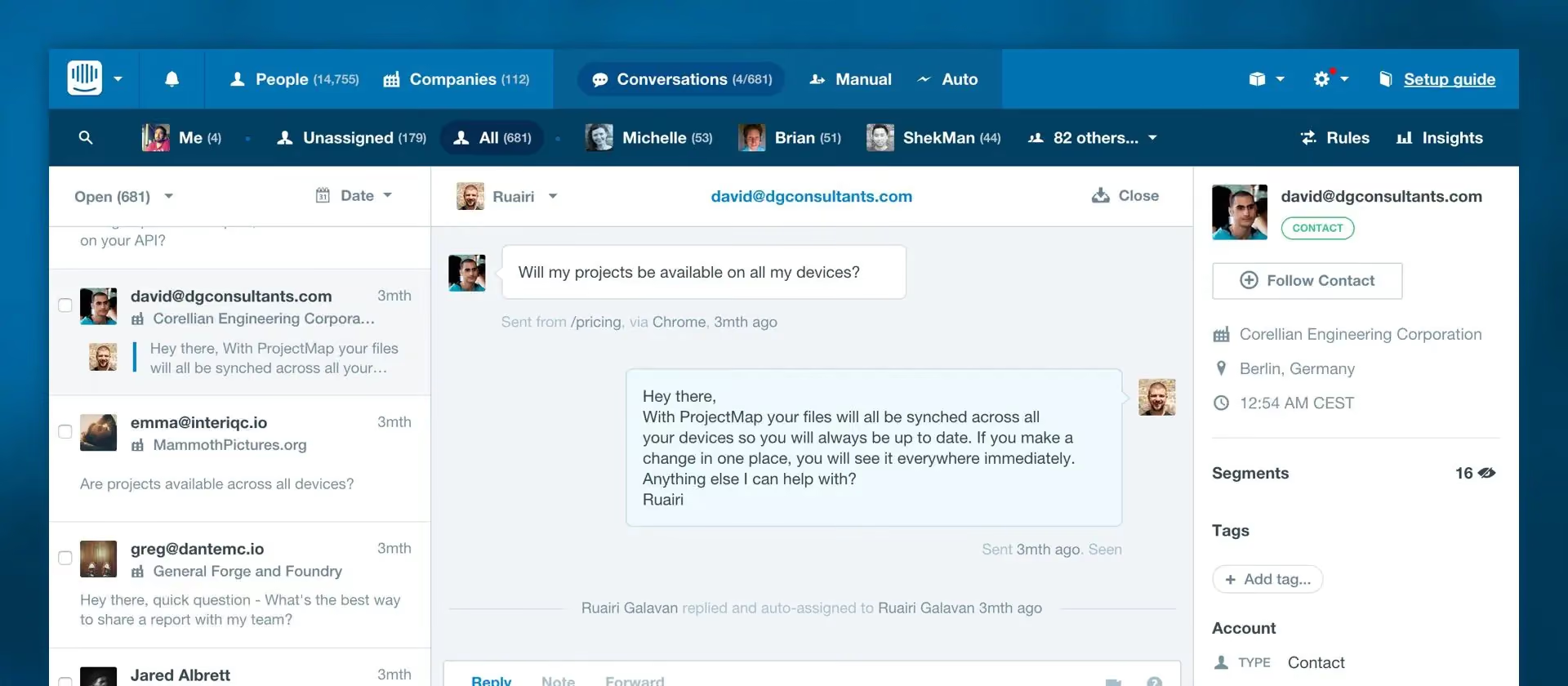
Intercom is a customer messaging and support platform that includes built-in conversation analytics and AI-powered support capabilities. With the addition of Fin, Intercom's AI agent, the platform now offers automated ticket resolution alongside analytics that help teams understand conversation trends, agent performance, and customer sentiment.
Intercom occupies a different position in this list than dedicated analytics tools. It is primarily a support and messaging platform with analytics built in, rather than an analytics platform that connects to support data. For teams already using Intercom as their support tool, the built-in analytics provide useful operational visibility without requiring a separate vendor.
Intercom Key Features
- Fin AI agent: Automated ticket resolution and customer responses powered by AI
- Conversation analytics: Tracks topics, volume, resolution rates, and customer sentiment across conversations
- Performance reporting: Agent and team metrics with customizable dashboards
- Multi-channel support: Chat, email, social, and ticket management in one platform
- Workflow automation: Custom bots and routing rules based on conversation attributes
- Integrations: Connects to Salesforce, HubSpot, Slack, and hundreds of other tools
Intercom Pros
- AI-powered Fin agent handles resolution alongside analytics, not just reporting
- Massive integration ecosystem with broad platform support
- Intuitive interface that support teams adopt quickly
- The largest G2 review base on this list (3,872 reviews), providing strong social proof
Intercom Cons
- Analytics are secondary to the messaging platform; depth trails dedicated analysis tools
- Less suited for teams that need to analyze feedback beyond Intercom conversations
- Per-seat pricing can scale up quickly for larger teams
- Not designed for multi-source feedback unification
2026 Pricing
From $29/seat/mo (Essential plan). Advanced and Expert plans available at higher tiers.
G2 Rating
Intercom G2 Score: 4.5/5 (3,872 reviews)
Best For
Support teams already on Intercom who want built-in conversation analytics and AI-powered resolution. Not the best fit for teams needing deep multi-source ticket analysis beyond Intercom data.
Support Ticket Analysis Tools: FAQs
What Is Support Ticket Analysis?
Support ticket analysis is the process of using software, typically powered by AI and NLP, to categorize, quantify, and extract insights from customer support tickets at scale. It helps CX and support teams identify recurring issues, track sentiment trends, and prioritize improvements based on what customers are actually telling them, rather than relying on anecdotal observations or manual review.
What Is the Best Tool for Analyzing Customer Support Tickets?
The best tool depends on your needs and existing stack. For teams that need to connect ticket insights to broader customer feedback across surveys, reviews, and social channels, Chattermill offers the most comprehensive unified approach. For ticket-specific analytics, SentiSum excels at automated tagging and real-time reporting. For B2B escalation prediction, SupportLogic is purpose-built. And for teams already on Zendesk, built-in analytics via Zendesk Explore provide a no-cost starting point.
How Does AI Improve Support Ticket Analysis?
AI transforms ticket analysis from a manual, rule-based process into an automated, adaptive one. Deep learning models can classify tickets by topic and sentiment the moment they arrive, detect emerging issues before they become trends, and identify patterns across thousands of interactions that human analysts would miss. The most advanced platforms, including Chattermill and Enterpret, use AI that adapts to your data over time, building custom taxonomies without requiring manual rule creation. This AI-driven approach to sentiment analysis delivers faster, more accurate insights at scale.
Can Support Ticket Analysis Tools Integrate With Zendesk and Other Helpdesks?
Yes, virtually all dedicated ticket analysis tools offer native integrations with major helpdesk platforms. Zendesk, Freshdesk, and Intercom are the most commonly supported, with Salesforce Service Cloud and ServiceNow also covered by enterprise-focused tools. The key question is not whether a tool integrates, but how deeply. Some tools pull in ticket data for analysis only, while others push insights back into the helpdesk workflow for real-time routing, tagging, and escalation. Tools like Chattermill integrate with Zendesk to pull ticket data alongside other feedback sources for unified analysis.
How Does Ticket Analysis Differ From Customer Feedback Analytics?
Ticket analysis focuses specifically on support interactions: categorizing tickets, tracking resolution metrics, and identifying recurring support issues. Customer feedback analytics is broader. It encompasses tickets alongside surveys, reviews, social media, chat, and any other channel where customers share their experience. The most effective approach treats ticket analysis as one input within a comprehensive feedback analytics strategy, connecting what customers tell support agents to what they say in NPS surveys, app reviews, and social posts. This unified approach gives teams a complete picture of the customer experience, rather than isolated snapshots from a single channel.
The Bottom Line
The best customer experience software for ticket analysis in 2026 does more than categorize and count support interactions. It connects what customers say in tickets to what they express across every other feedback channel, turning fragmented signals into coherent, actionable intelligence.
For most CX and product teams, the central question is not whether to analyze tickets, but whether to analyze them in isolation or as part of a unified feedback strategy. Zendesk Explore handles the basics well if you just need operational reporting from your existing helpdesk. SentiSum and Enterpret bring AI depth for teams that need advanced ticket classification and product intelligence. And for organizations that want the full picture, connecting ticket insights to surveys, reviews, social sentiment, and business metrics like NPS and churn, Chattermill provides the most complete approach to customer feedback analytics.
The shift from isolated ticket analysis to connected CX intelligence is not just a technology upgrade. It is a strategic one. The teams that make this shift will be the ones that move from reacting to support volume to predicting and preventing the issues that drive it.
Ready to see how unified feedback intelligence works in practice? Book a Demo and discover what Chattermill can do with your ticket data and beyond.



See Chattermill in action on your own feedback
Book a demo


