


Top 20 Best Customer Feedback Tools Compared in 2026


The CX intelligence
platform that's AI-native by design
Book a demoThis guide compares 20 of the best customer feedback tools across pricing, capabilities, and fit for different teams. Whether you need an enterprise-grade feedback analytics engine or a lightweight survey builder, this comparison cuts through vendor noise to help you make a confident, well-informed choice.
Quick Summary: Our Top 3 Picks
If you need a recommendation before the deep dive, here is where to start:
Chattermill is the strongest choice for enterprise CX, insights, and product teams that need to unify feedback from every channel into a single source of truth. Its AI engine consolidates surveys, support tickets, reviews, social data, and call transcripts, then surfaces the themes, sentiment shifts, and anomalies that drive business outcomes. If your challenge is not collecting feedback but making sense of it at scale, Chattermill delivers the most comprehensive AI-powered feedback unification for enterprise teams.
Qualtrics remains the default for large enterprises that need a full experience management suite stretching across customer, employee, product, and brand research. Its analytical depth is unmatched for organizations with dedicated research teams.
Medallia is the go-to for experience management at massive operational scale, with signal capture across digital, in-store, contact center, and social channels.
| # | Tool | Best For |
|---|---|---|
| 1 | Chattermill | Unified AI-powered feedback analytics across every channel |
| 2 | Qualtrics | Enterprise experience management and advanced research |
| 3 | Medallia | Omnichannel experience management at operational scale |
Why Listen To Us
Chattermill's AI platform processes millions of customer feedback data points every day for enterprise CX teams across industries including retail, financial services, travel, and technology. Brands like HelloFresh, Uber, TransferWise, and Zappos use Chattermill to turn feedback into action. We have spent years building the technology that unifies surveys, support conversations, reviews, and social feedback into actionable intelligence. That depth of experience across the feedback analytics category informs every recommendation in this guide. We are transparent about our own positioning and honest about where other tools excel.
What Is Customer Feedback Software?
Customer feedback tools are software platforms that help organizations collect, organize, analyze, and act on input from customers across channels such as surveys, support tickets, online reviews, social media, in-app feedback, and call transcripts.
At their simplest, these tools gather structured data like NPS and CSAT scores through targeted surveys. At their most advanced, they act as a translator — converting thousands of scattered customer voices into a shared language that every team in the organization can read. These AI-powered platforms use natural language processing to analyze unstructured text from open-ended responses, detect emerging themes and sentiment patterns, and surface the specific issues driving churn, dissatisfaction, or product gaps.
The category spans a wide spectrum. Survey tools like Typeform and SurveyMonkey focus on feedback collection. Feature request platforms like Canny and UserVoice manage product-level input. And AI-powered feedback analytics platforms like Chattermill unify data from every source, translating raw customer voices into prioritized, evidence-backed insights that CX, product, and insights teams can act on immediately.
For CX leaders, the right customer feedback tool is not just about gathering opinions. It is about connecting the dots between what customers say, what they feel, and what that means for the business.
Why Customer Feedback Tools Matter In 2026
Three shifts have reshaped this category in the past year, and any team evaluating customer feedback software needs to account for them.
The enterprise landscape has consolidated. Qualtrics completed its acquisition of InMoment (through the Forsta/Emplifi path) in late 2025, a $6.75 billion deal that combined two of the largest enterprise VoC platforms. For buyers, this means fewer standalone enterprise options and more pressure to evaluate whether the combined Qualtrics-InMoment offering actually meets your needs or whether you should look at independent alternatives.
GetFeedback has been sunset. SurveyMonkey's CX-focused product, once a popular mid-market choice, is no longer available. Teams that relied on it are actively migrating, and the shift has opened space for platforms like Survicate, Zonka Feedback, and SurveySparrow to absorb displaced users.
AI is no longer a differentiator. It is the baseline. Nearly every tool in this guide now offers some form of AI-powered analysis, whether that is automated sentiment scoring, theme detection, or predictive analytics. But does having an AI label on the feature page actually mean the platform understands your customers? The question is no longer "does this tool have AI?" but "how deeply does the AI integrate across channels, how accurately does it detect nuance, and can it connect feedback themes to business metrics?" The gap between tools that bolt on AI and those that build their core around it has never been wider.
Against this backdrop, choosing the right customer feedback management platform is less about feature checklists and more about strategic fit: the depth of analysis you need, the number of channels you must unify, and whether the platform can connect customer sentiment to the revenue and retention metrics your leadership team cares about.
How We Evaluated These Customer Feedback Tools
Selecting the right customer feedback tool depends on far more than a feature comparison chart. Every tool in this guide was evaluated against the criteria that matter most when your team has to justify an investment, drive adoption, and prove impact. Here is how we assessed each platform.
| Criterion | What We Evaluated | Why It Matters |
|---|---|---|
| Feedback Channel Coverage | Number and variety of supported channels: surveys, tickets, reviews, social media, in-app, call transcripts | Teams using multiple channels need a tool that consolidates all feedback, not one that covers only a single source. |
| AI and Analytics Depth | Text analytics, sentiment analysis, theme detection, anomaly detection, ability to connect themes to NPS/CSAT/CES | The gap between tools that bolt on AI and those built around it determines whether insights are surface-level or actionable. |
| Scalability | Enterprise-level volume handling, multi-market support, multilingual analysis, multi-business-unit reporting | A tool that works for 500 responses per month may break down at 50,000 across 15 markets. |
| Ease of Implementation | Setup complexity, time to value, training requirements, need for dedicated admin or analyst resources | A powerful platform that takes six months to deploy may lose executive sponsorship before it delivers results. |
| Integration Ecosystem | Native integrations with CRMs (Salesforce, HubSpot), helpdesks (Zendesk, Intercom), collaboration tools (Slack) | Feedback that stays siloed in one tool cannot drive cross-functional action. |
| Reporting & Communication | Dashboard customization, automated reporting, role-based views for CX, product, and executive teams | Insights only create value when they reach the right person in a format they can act on. |
| Closed-Loop Action | Alerting, workflow routing, case management, follow-up automation, response triggers | Collecting feedback without acting on it erodes customer trust faster than not collecting it at all. |
| Pricing Transparency | Published pricing, per-user vs. volume-based models, free/trial availability, total cost predictability | Opaque pricing slows evaluation cycles and makes it harder to build a business case internally. |
| Security and Compliance | SOC 2, GDPR, data residency options, access controls, HIPAA where applicable | Enterprise buyers in regulated industries cannot adopt a tool that fails a security review. |
| User Community & Reviews | G2 ratings, customer reviews, support responsiveness, community engagement | Real-user feedback reveals what vendor demos and sales decks do not. |
No single tool excels across every criterion. The best choice depends on where your team sits on the spectrum: a product team managing feature requests has fundamentally different needs than an enterprise CX organization unifying feedback across 10 channels and 30 markets. Use these criteria as a framework for your own evaluation.
The 20 Best Customer Feedback Tools In 2026
Here is a quick side-by-side overview of each tool before we look at them in detail:
| # | Tool | Best For | AI Features | Channels | Pricing (2026) | G2 Rating |
|---|---|---|---|---|---|---|
| 1 | Chattermill | Unified feedback analytics for enterprise CX | Theme/sentiment detection, anomaly alerts, impact scoring | Surveys, tickets, reviews, social, in-app, calls | Custom | |
| 2 | Qualtrics | Enterprise XM and research | Text iQ, Stats iQ, predictive intelligence | Surveys, email, web, SMS, social | Custom | |
| 3 | Medallia | Omnichannel CX at operational scale | Athena AI, text analytics, predictive scoring | Surveys, digital, in-store, contact center | Custom | |
| 4 | InMoment | Enterprise CX analytics (Qualtrics family) | Lexalytics NLP, intent/churn prediction | Surveys, support, reviews, social | Custom | |
| 5 | Zonka Feedback | Omnichannel CX with AI intelligence | Thematic analysis, sentiment, impact scoring | Email, SMS, WhatsApp, web, kiosk | Custom | |
| 6 | Survicate | Targeted product team workflows | AI-assisted insights, basic sentiment | Website, email, in-app, link | From $55.99/mo | |
| 7 | SurveySparrow | Mobile-first conversational surveys | AI survey builder, AI Wings, CogniVue | Email, SMS, WhatsApp, web | From $19/mo | |
| 8 | Typeform | High-completion branded surveys | AI Insights, adaptive follow-ups | Web, email, link, embedded | From $28/mo | |
| 9 | SurveyMonkey | General-purpose surveys & research | Genius AI, basic sentiment analysis | Email, web, link, social | From $30/user/mo | |
| 10 | Canny | Feature request management | AI-powered categorization | In-app portal, web, API | From $19/mo | |
| 11 | Enterpret | AI-first feedback classification | Adaptive taxonomy, knowledge graph | Support, reviews, social, calls | Custom | |
| 12 | AskNicely | NPS-driven frontline coaching | NiceAI summaries, content assist | Email, SMS, web | Custom | |
| 13 | Hotjar | Behavioral + qualitative website data | AI survey analysis | Heatmaps, recordings, widgets | From $32/mo | |
| 14 | Alchemer | Advanced survey design & research | AI analysis, role-based dashboards | Email, web, SMS, offline | From $55/user/mo | |
| 15 | UserVoice | Product feedback prioritization | Smart voting, revenue-weighted scoring | In-app portal, web, internal | From $500/mo | |
| 16 | Sprinklr | Global social and digital CX | AI listening, competitive benchmarking | 30+ social channels, support | Custom | |
| 17 | Zendesk | Support-embedded CSAT collection | Basic satisfaction scoring | Email, chat, phone, social | From $19/agent/mo | |
| 18 | Nicereply | In-email support satisfaction | Basic reporting and trend analysis | In-signature email, post-resolution | From $39/mo | |
| 19 | Refiner | SaaS in-app microsurveys | AI-assisted response tagging | In-app, web, API | From $99/mo | |
| 20 | Khoros CX | Community & social feedback analytics | AI theme detection, sentiment analysis | Forums, social, messaging | Custom |
Let’s review each tool in detail.
1. Chattermill
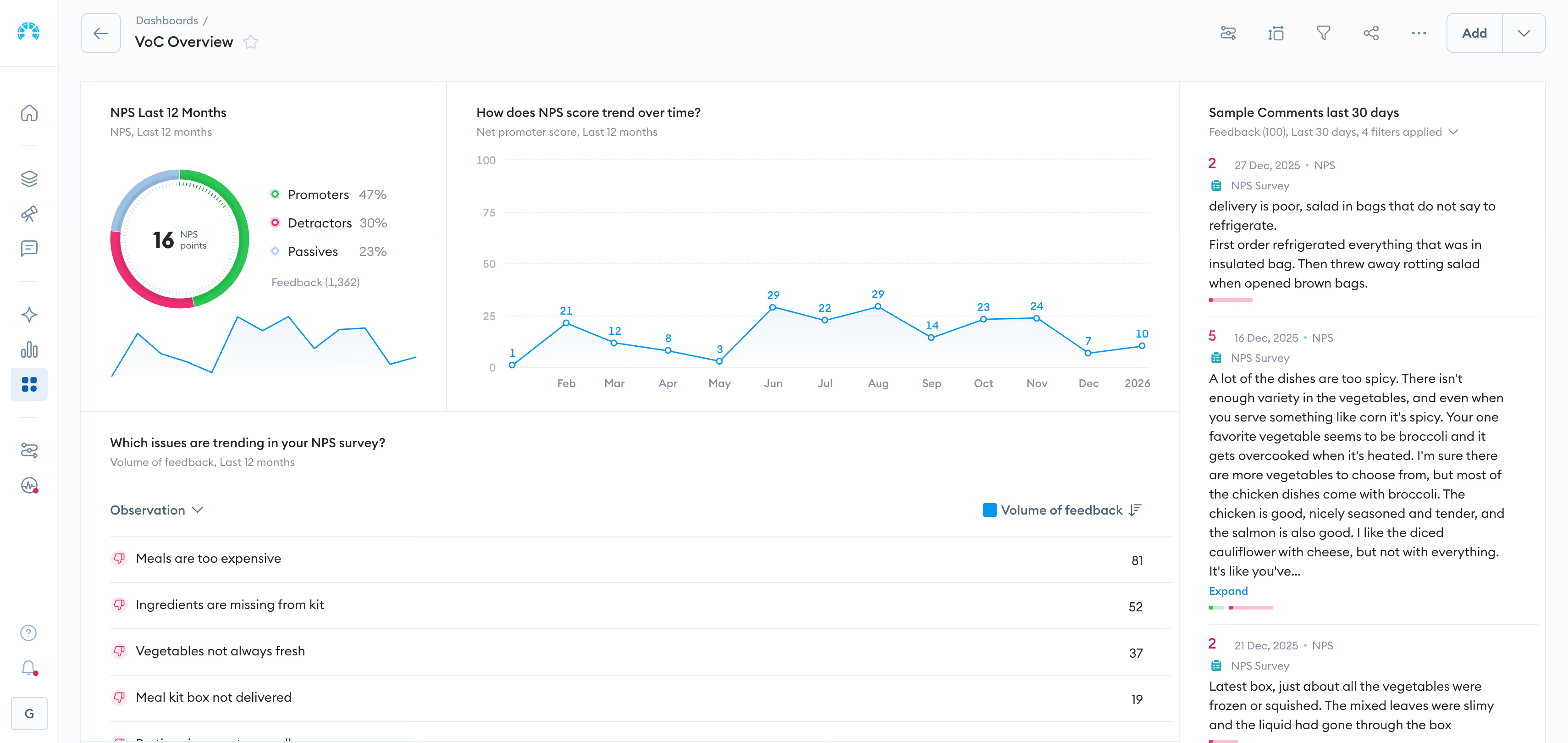
Best for: Enterprise CX, insights, and product teams that need to unify feedback from every channel into actionable intelligence.
Every organization collects customer feedback. Few manage to connect the dots between what customers say in a support ticket, what they write in an NPS survey, what they post in an app review, and what they mention on a call. Chattermill was built to solve that exact problem.
Chattermill is an AI-powered customer feedback analytics platform that consolidates feedback from surveys, support tickets, online reviews, social media, in-app responses, and call transcripts into a unified view. Rather than forcing teams to manually read and tag thousands of open-ended responses, Chattermill's AI engine automatically detects themes, tracks sentiment, identifies emerging trends, and flags anomalies, across multiple languages and feedback channels simultaneously.
What sets Chattermill apart from survey tools and basic analytics platforms is the depth of its intelligence layer. Think of it as the difference between a weather report and a climate model — one tells you what happened, the other explains why and predicts what comes next. The platform does not just tell you that your NPS dropped. It tells you why it dropped, which themes are driving the decline, which customer segments are affected, and how those themes connect to business metrics like retention, CSAT, and CES. How many tools on your current stack can actually answer that question? For CX leaders who need to translate customer voices into board-level insights, that level of granularity changes how decisions get made.
Chattermill integrates with the tools enterprise teams already use, including Zendesk, Intercom, Salesforce, Trustpilot, the App Store, Google Play, and more, pulling feedback in automatically without manual exports or data wrangling. The platform's integrations ecosystem is designed for teams that operate across multiple systems and need a single pane of glass for customer intelligence.
The platform also offers product experience analytics, support data analytics, and speech analytics, making it one of the most comprehensive feedback intelligence platforms available for enterprise teams.
Chattermill Features
- Unified Feedback Intelligence: Consolidates feedback from surveys, support, reviews, social media, and call transcripts into a single platform, eliminating data silos.
- AI-Powered Theme and Sentiment Analysis: Automatically detects themes and sentiment across open-ended feedback in multiple languages, without manual tagging.
- Anomaly Detection and Automated Alerts: Flags sudden shifts in sentiment or emerging issues so teams can respond before problems escalate.
- NPS, CSAT, and CES Impact Measurement: Connects feedback themes directly to experience metrics, showing exactly which issues drive score changes.
- Multi-Language Support: Analyzes feedback natively in dozens of languages, critical for global enterprises operating across markets.
- Customizable Dashboards and Reporting: Provides real-time dashboards that can be tailored to CX, product, and executive stakeholders.
- Deep Integration Ecosystem: Connects to Zendesk, Intercom, Salesforce, Trustpilot, App Store, Google Play, and many more platforms out of the box.
2026 Pricing
Custom pricing based on feedback volume and use case. Book a Demo to get a tailored quote and see the platform in action with your data.
Chattermill Pros
- Unifies all feedback channels into one platform, eliminating the need to piece together insights from multiple tools
- AI analysis goes far deeper than basic sentiment scoring, connecting themes to business metrics
- Anomaly detection helps teams catch emerging issues early, before they show up in quarterly reports
- Strong multilingual support makes it practical for global CX programs
- Integrations pull data automatically, reducing manual data handling
- Purpose-built for enterprise scale and complexity
Chattermill Cons
- Custom pricing means smaller teams need to engage sales to evaluate cost
- The depth of the platform benefits teams with established feedback programs; very early-stage organizations may not yet generate enough volume to take full advantage
- Initial setup for complex multi-channel configurations may require onboarding support
Who It's For
Enterprise CX, insights, and product teams at mid-size to large organizations that collect feedback across multiple channels and need to turn that data into prioritized, evidence-backed actions.
G2 Rating
Chattermill: 4.5 out of 5 on G2.
Explore a product tour to see how Chattermill unifies feedback into actionable intelligence.
2. Qualtrics
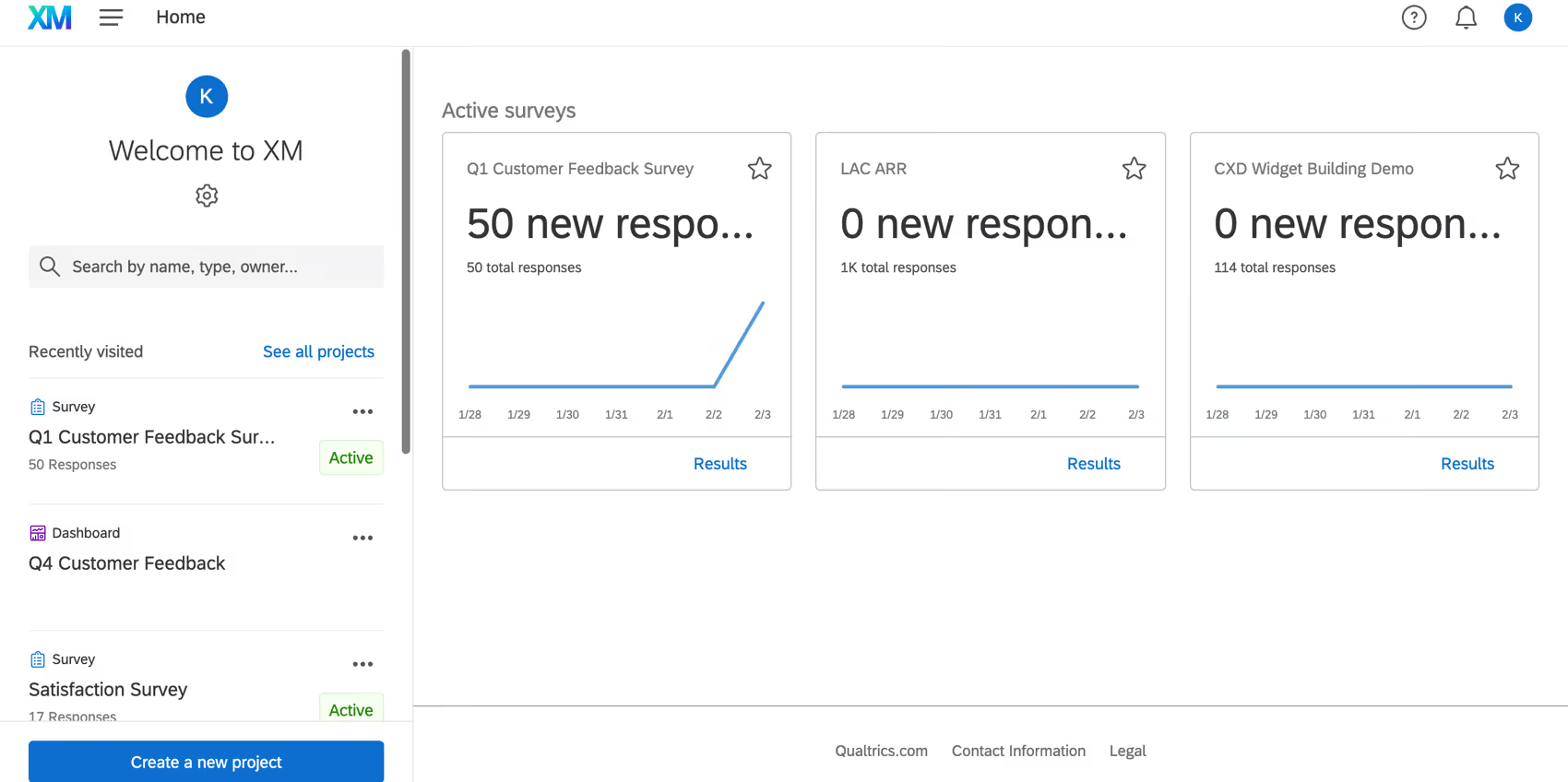
Best for: Large enterprises with dedicated research teams that need a full experience management suite across customer, employee, product, and brand.
Qualtrics is the dominant name in enterprise experience management. The platform spans customer experience, employee experience, product research, and brand tracking, offering a breadth that few competitors match. Its analytical tools, including Text iQ for natural language processing, Stats iQ for statistical analysis, and predictive intelligence capabilities, make it particularly powerful for organizations with in-house research and analytics teams who need to run sophisticated studies alongside operational CX programs.
The late-2025 acquisition of InMoment through the Forsta deal expanded Qualtrics' text analytics capabilities and CX analytics depth. For enterprise buyers, the combined platform offers an extensive feature set, though integration between the legacy InMoment and Qualtrics products is still maturing.
Qualtrics Features
- Text iQ: AI-driven text analysis that identifies themes and sentiment across open-ended survey responses.
- Stats iQ: Built-in statistical analysis engine for hypothesis testing, regression, and trend analysis without requiring a data science team.
- Predictive Intelligence: Machine learning models that forecast customer behavior and identify at-risk segments.
- Full XM Suite: Spans customer, employee, product, and brand experience on a single platform.
- Advanced Survey Logic: Complex branching, piping, and embedded data for sophisticated survey design.
- Action Planning: Workflow tools that route insights to the right teams with recommended actions.
2026 Pricing
Custom pricing. Qualtrics does not publish standard rates. Enterprise contracts typically start in the mid-five figures annually, depending on modules and seat count.
Qualtrics Pros
- Unmatched breadth across CX, EX, product, and brand research
- Powerful built-in statistical and text analytics tools
- Strong ecosystem of integrations and professional services
- Trusted by a large base of Fortune 500 companies
Qualtrics Cons
- Steep learning curve, especially for teams without dedicated research or analytics staff
- Pricing is among the highest in the category, limiting accessibility for mid-market teams
- The InMoment integration is still evolving post-acquisition, which may create short-term uncertainty for new buyers
- Can feel over-engineered for teams that primarily need feedback analytics rather than full experience management
Who It's For
Enterprise organizations with 1,000+ employees, dedicated CX or research teams, and the budget for a comprehensive experience management platform.
G2 Rating
Qualtrics: 4.3 out of 5 on G2.
3. Medallia
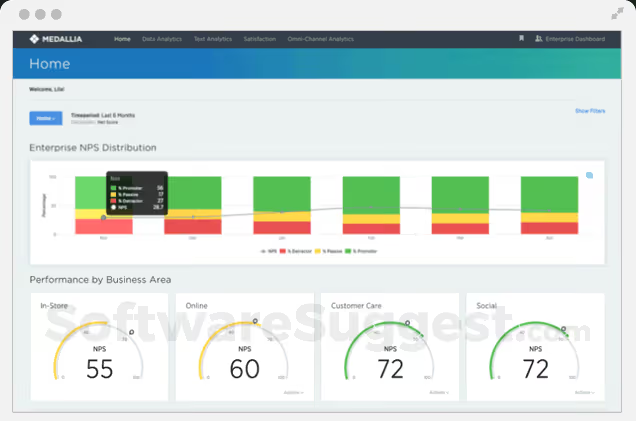
Best for: Large enterprises managing omnichannel customer experience programs at operational scale.
Medallia is an enterprise experience management platform built for organizations that need to capture and act on customer signals across digital, in-store, contact center, and social channels. Its strength lies in operational CX, connecting feedback capture directly to frontline workflows so that insights drive action in real time, not just in quarterly reports.
Medallia's AI engine, Athena, powers text analytics, theme detection, and predictive scoring across feedback sources. The platform's journey analytics capabilities let CX teams map customer experiences across touchpoints and identify the moments that matter most to satisfaction and retention.
Medallia Features
- Omnichannel Signal Capture: Collects feedback from surveys, digital behavior, social media, contact center interactions, IoT, and in-location signals.
- Athena AI: Text analytics, sentiment analysis, theme detection, and predictive intelligence across all feedback.
- Journey Analytics: Maps customer journeys across touchpoints to identify friction points and experience gaps.
- Role-Based Dashboards: Tailored views for executives, frontline managers, and operational teams.
- Action Management: Routes insights to frontline teams with workflow-driven follow-ups.
2026 Pricing
Custom pricing. Medallia's enterprise contracts are negotiated based on program scope, channels, and user count.
Medallia Pros
- Best-in-class omnichannel signal capture across digital and physical touchpoints
- Strong journey analytics for mapping the end-to-end customer experience
- Scalable for the largest global enterprises
- Mature AI capabilities with Athena
Medallia Cons
- Implementation is complex and typically requires professional services
- Pricing is enterprise-only, making it inaccessible for mid-market teams
- The platform's breadth can be overwhelming for teams with simpler CX programs
- Reporting customization can require significant configuration effort
Who It's For
Large enterprises with 5,000+ employees managing CX programs across multiple channels, regions, and business units.
G2 Rating
Medallia: 4.5 out of 5 on G2.
4. InMoment

Best for: Enterprise CX analytics teams that need deep text analytics and case management capabilities.
InMoment made its name as a CX analytics platform with particularly strong text analytics, powered by its Lexalytics NLP engine. The platform combines feedback collection, text analysis, case management, and journey mapping into an integrated suite aimed at enterprise CX programs.
Following its acquisition by Qualtrics (via the Forsta deal) in late 2025, InMoment now sits within the broader Qualtrics family. For existing InMoment customers, the platform continues to operate, though the long-term product roadmap will increasingly align with Qualtrics' direction. New buyers should evaluate how the combined offering serves their needs.
InMoment Features
- Lexalytics Text Analytics: Industry-leading NLP engine for sentiment, theme, and intent detection across open-ended feedback.
- Case Management: Closed-loop follow-up workflows that route critical feedback to the right teams.
- Journey Mapping: Visual journey orchestration tools for mapping customer experiences across touchpoints.
- Multi-Source Feedback Collection: Surveys, reviews, social, and support data consolidated in one platform.
- Benchmarking: Industry and competitive benchmarking data for contextualizing performance.
2026 Pricing
Custom pricing. Enterprise contracts are negotiated directly.
InMoment Pros
- Lexalytics NLP engine provides exceptionally accurate text analytics
- Strong case management for closing the loop on critical feedback
- Journey mapping tools help visualize the full customer experience
- High G2 ratings reflect strong customer satisfaction
InMoment Cons
- The Qualtrics acquisition introduces uncertainty about the standalone product's future direction
- Enterprise-only pricing limits accessibility
- Implementation can be lengthy for complex multi-channel deployments
- The UI can feel dated compared to newer entrants in the category
Who It's For
Enterprise CX teams that prioritize deep text analytics and closed-loop case management, particularly those already evaluating the Qualtrics ecosystem.
G2 Rating
InMoment: 4.7 out of 5 on G2.
5. Zonka Feedback
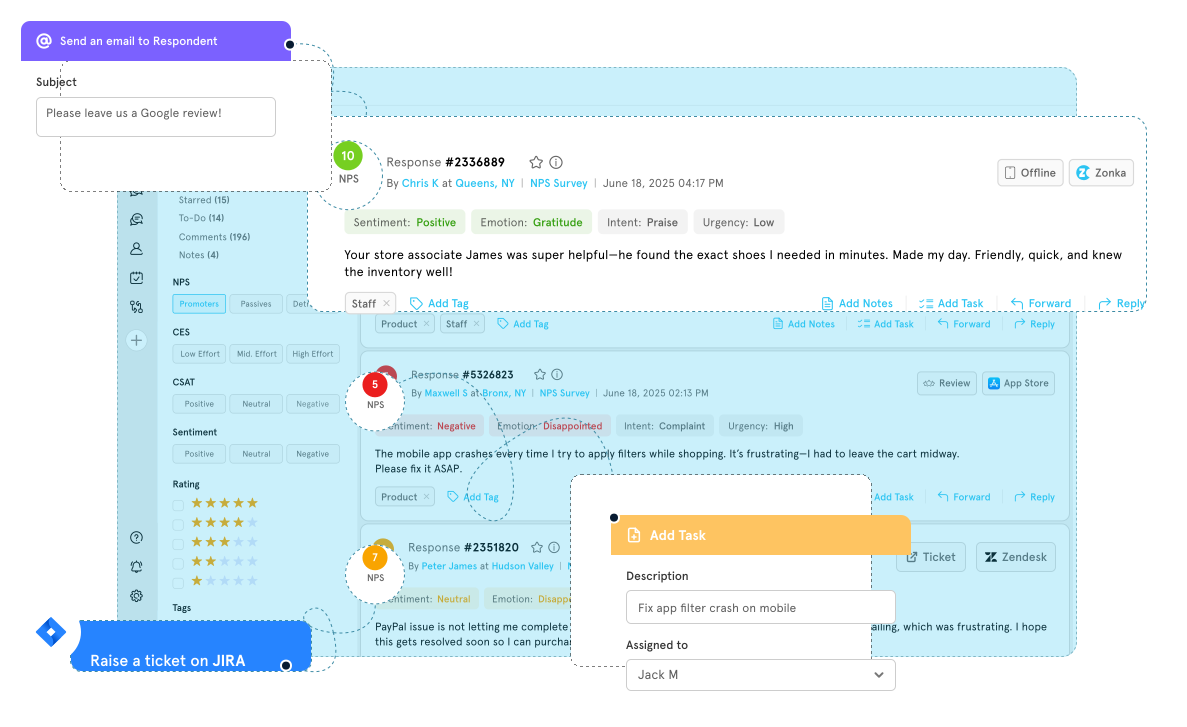
Best for: Mid-market and enterprise teams that want omnichannel feedback collection with built-in AI analytics in a single platform.
Zonka Feedback has emerged as a strong contender in the customer feedback software space, particularly for teams that want both survey distribution and AI-powered analysis without stitching together multiple tools. The platform supports feedback collection across email, SMS, web, in-app, kiosk, and offline channels, with built-in thematic analysis and impact scoring that connects feedback themes to CX metrics.
Zonka's AI intelligence layer performs automated theme detection, sentiment analysis, and urgency scoring, helping teams prioritize the feedback that matters most. Its CX automation workflows can trigger actions based on feedback scores, routing detractors to support teams and promoters to review platforms.
Zonka Feedback Features
- Omnichannel Surveys: Deploy across email, SMS, web, in-app, kiosk, QR code, and offline touchpoints.
- AI Thematic Analysis: Automatically tags and categorizes open-ended responses into themes with sentiment scoring.
- Impact Scoring: Connects feedback themes to their impact on NPS, CSAT, and CES scores.
- CX Automation Workflows: Trigger follow-ups, alerts, and routing based on survey responses and scores.
- White-Label Surveys: Fully branded survey experiences for agencies and multi-brand organizations.
- Real-Time Reporting: Live dashboards with drill-down by channel, location, and team.
2026 Pricing
Custom pricing for enterprise plans. Zonka previously offered self-serve tiers, but current pricing for AI and enterprise features requires a conversation with sales.
Zonka Feedback Pros
- Combines feedback collection and AI analytics in one platform, reducing tool sprawl
- Strong omnichannel coverage including offline and kiosk
- Impact scoring ties feedback themes directly to CX metrics
- White-label capabilities make it flexible for agencies and multi-brand teams
Zonka Feedback Cons
- AI analytics depth does not match purpose-built feedback intelligence platforms for complex enterprise use cases
- Enterprise pricing structure is not transparently published
- Less established brand presence compared to Qualtrics, Medallia, or Chattermill in the enterprise segment
Who It's For
Mid-market CX teams and growing enterprises that need an all-in-one platform for both collecting and analyzing feedback across multiple channels.
G2 Rating
Zonka Feedback: 4.7 out of 5 on G2.
6. Survicate

Best for: Product and marketing teams that need targeted, contextual surveys across websites, emails, and in-app experiences.
Survicate is a comprehensive survey tool built for teams that want to capture feedback at specific moments in the customer journey without complex implementation. It excels at website and in-app surveys, email surveys triggered by customer actions, and NPS/CSAT measurement workflows that run automatically.
The platform integrates tightly with tools like HubSpot, Intercom, Salesforce, and Slack, making it practical for product and marketing teams that want feedback flowing into their existing workflows rather than siloed in a separate analytics tool.
Survicate Features
- Contextual Website Surveys: Target surveys based on page, scroll depth, time on site, and user behavior.
- In-App Feedback: Embed surveys directly in mobile and web applications.
- Email and Link Surveys: Distribute via email campaigns with embedded questions for higher response rates.
- NPS/CSAT/CES Automation: Set up recurring metric surveys with automated follow-ups.
- AI Research Assistant: Uses AI to analyze open-ended responses and generate summaries.
- Native Integrations: Connects to HubSpot, Intercom, Salesforce, Slack, and 30+ other platforms.
2026 Pricing
From $55.99/month for the Business plan. Free plan available with limited responses. Enterprise pricing available on request.
Survicate Pros
- Easy to set up and deploy without engineering resources
- Strong targeting options for contextual, behavior-triggered surveys
- Tight integrations with popular CRM and support tools
- Responsive rates tend to be high due to in-context placement
Survicate Cons
- Analytics capabilities are relatively basic compared to dedicated feedback analytics platforms
- Open-ended response analysis is limited compared to AI-native tools
- Pricing can scale quickly as response volumes grow
- Less suited for enterprise teams needing cross-channel feedback unification
Who It's For
Product and marketing teams at SaaS companies and mid-market organizations that need to collect targeted feedback across websites, apps, and emails.
G2 Rating
Survicate: 4.6 out of 5 on G2.
7. SurveySparrow

Best for: Teams that prioritize mobile-friendly, conversational surveys with high response rates.
SurveySparrow takes a conversational, mobile-first approach to surveys. Its chat-like survey format is designed to boost completion rates, particularly for customer feedback scenarios where traditional form-style surveys see drop-off. The platform includes an AI Survey Builder that generates surveys from natural language prompts, NPS and CSAT workflows, and an employee experience module.
SurveySparrow also offers an offline survey app for in-person feedback collection, making it useful for retail, hospitality, and event-based scenarios where internet connectivity is not guaranteed.
SurveySparrow Features
- Conversational Surveys: Chat-style interface designed to increase completion rates on mobile devices.
- AI Survey Builder: Generates surveys from text prompts, reducing survey creation time.
- Offline Surveys: Collect feedback without internet connectivity via a dedicated app.
- NPS and CSAT Workflows: Automated recurring surveys with follow-up triggers.
- Executive Dashboard: Summary views with trend tracking and benchmark comparisons.
- Multi-Channel Distribution: Share surveys via email, SMS, QR code, web embed, and social media.
2026 Pricing
From $19/month for the Starter plan. Business and enterprise tiers available at higher price points.
SurveySparrow Pros
- Conversational format genuinely improves response rates, especially on mobile
- AI Survey Builder reduces setup time for common survey types
- Offline collection is valuable for retail and in-person scenarios
- Affordable entry pricing for small teams
SurveySparrow Cons
- Analytics and reporting are basic compared to enterprise feedback platforms
- Customization options for survey design can feel limited at lower tiers
- The conversational format is not ideal for long, multi-section surveys
- Integration ecosystem is narrower than more established competitors
Who It's For
Small to mid-size teams that prioritize response rates and mobile feedback collection, particularly in retail, hospitality, and service industries.
G2 Rating
SurveySparrow: 4.4 out of 5 on G2.
8. Typeform

Best for: Marketing and UX teams that need beautifully designed, high-completion-rate surveys.
Typeform pioneered the one-question-at-a-time survey format that dramatically improved completion rates compared to traditional survey forms. The platform's strength is in its user experience: surveys feel more like conversations than questionnaires, which makes it popular for customer research, lead generation, event registration, and post-purchase feedback.
Typeform's AI Insights feature, introduced in its 2025-2026 updates, adds automated analysis of open-ended responses, summarizing key themes and sentiment without requiring manual review. For teams that collect moderate volumes of qualitative feedback, this bridges the gap between raw responses and usable insights.
Typeform Features
- Conversational UX: One-question-at-a-time format with logic jumps, designed for high engagement.
- AI Insights: Automated theme and sentiment analysis for open-ended responses.
- Visual Design Flexibility: Highly customizable branding, media embeds, and layout options.
- Logic Jumps and Branching: Advanced conditional logic for personalized survey paths.
- Integrations: Connects to HubSpot, Slack, Google Sheets, Zapier, and hundreds of other tools.
- Videoask Integration: Combine video-based and text-based feedback collection.
2026 Pricing
From $28/month for the Basic plan. Plus and Business tiers available. Enterprise pricing on request.
Typeform Pros
- Best-in-class survey design and user experience
- High completion rates driven by conversational format
- Strong integration ecosystem via native and Zapier connections
- AI Insights adds useful automated analysis for open-ended feedback
Typeform Cons
- Not designed for enterprise-scale feedback analytics or multi-channel unification
- Pricing scales with response volume, which can become expensive for high-volume programs
- Advanced analytics capabilities are limited compared to dedicated feedback analytics tools
- The one-question format can make longer surveys feel slow for respondents
Who It's For
Marketing, UX, and product teams that value survey design and respondent experience, particularly for branded surveys, customer research, and lead capture.
G2 Rating
Typeform: 4.5 out of 5 on G2.
9. SurveyMonkey

Best for: Teams that need a familiar, general-purpose survey tool for quick feedback collection and research.
SurveyMonkey is the most widely recognized name in online surveys. It offers a template library spanning hundreds of use cases, a Genius AI assistant for survey optimization, and built-in sentiment analysis for open-ended responses. For teams that need to spin up a customer feedback survey quickly without a steep learning curve, SurveyMonkey delivers on accessibility.
The platform has added AI capabilities through its Genius feature, which suggests question improvements, identifies bias, and predicts completion rates. For basic customer feedback workflows like post-interaction CSAT surveys, event feedback, and employee pulse checks, SurveyMonkey handles the job reliably.
SurveyMonkey Features
- Genius AI: Suggests question optimizations, detects bias, and predicts completion rates.
- Template Library: Hundreds of pre-built survey templates across CX, HR, marketing, and research.
- Sentiment Analysis: Basic AI analysis of open-ended text responses.
- Collaboration Tools: Team workspaces with shared surveys, results, and access controls.
- Distribution Options: Email, web link, social media, and embedded surveys.
- Built-In Analytics: Filtering, cross-tabulation, and trend tracking for survey data.
2026 Pricing
From $30/user/month for the Team Advantage plan. Individual plans available at lower price points. Enterprise pricing on request.
SurveyMonkey Pros
- Widely known and easy to adopt, with minimal training required
- Large template library accelerates survey creation
- Genius AI helps improve survey quality before distribution
- Affordable for basic survey needs
SurveyMonkey Cons
- Analytics capabilities are basic compared to purpose-built feedback platforms
- Per-user pricing can become expensive for large teams
- Not designed for multi-channel feedback unification or advanced text analytics
- GetFeedback (its CX product) has been sunset, narrowing its dedicated CX capabilities
Who It's For
Teams of any size that need a straightforward, general-purpose survey tool for ad-hoc research and basic customer feedback collection.
G2 Rating
SurveyMonkey: 4.4 out of 5 on G2.
10. Canny

Best for: Product teams that need to collect, organize, and prioritize feature requests with customer voting and public roadmaps.
Canny takes a different approach to customer feedback. Rather than surveys or analytics, Canny is a feature request management platform that helps product teams collect feature ideas from customers, let users vote on priorities, and communicate product decisions through public and private roadmaps.
The platform's AI-powered categorization automatically groups similar feature requests, reducing the manual work of triaging hundreds of submissions. For product-led organizations where customer input directly shapes the roadmap, Canny provides a structured system for turning feedback into product decisions.
Canny Features
- Feature Request Boards: Centralized boards where customers and internal teams submit and vote on feature ideas.
- AI-Powered Categorization: Automatically groups and deduplicates similar requests.
- Public and Private Roadmaps: Share planned features with customers or keep roadmaps internal.
- Changelog: Announce shipped features and close the loop with requesters.
- Integrations: Connects to Jira, Asana, Linear, Intercom, Zendesk, and Slack.
- Feedback Widget: Embeddable widget for in-app feature request collection.
2026 Pricing
From $19/month for the Starter plan. Free plan available with one board and basic features. Growth and Business tiers scale with volume and advanced features.
Canny Pros
- Purpose-built for feature request management, which survey tools handle poorly
- Voting system gives product teams clear signal on customer priorities
- Public roadmaps build transparency and customer trust
- AI categorization saves significant triage time
Canny Cons
- Focused specifically on feature requests, not general customer feedback or CX analytics
- Not designed for NPS, CSAT, or sentiment analysis workflows
- Free plan is quite limited in functionality
- Less useful for teams whose feedback challenges are about understanding sentiment rather than prioritizing features
Who It's For
Product teams at SaaS companies that want a structured, customer-facing system for managing feature requests and building customer-informed roadmaps.
G2 Rating
Canny: 4.6 out of 5 on G2.
11. Enterpret

Best for: Product and CX teams that need AI-first feedback classification and anomaly detection across multiple input sources.
Enterpret is an AI-driven feedback analytics platform that positions itself around its adaptive taxonomy, a machine learning model that continuously learns and refines how it categorizes feedback as new data comes in. Rather than relying on predefined tags or keyword matching, Enterpret's system evolves its classification as your feedback volume and product evolve.
The platform unifies feedback from support tickets, surveys, reviews, social media, and sales calls, then uses its AI to surface themes, detect anomalies, and highlight trending issues. Its anomaly detection is particularly useful for product teams that need early warning when something breaks or when customer sentiment shifts unexpectedly.
Enterpret Features
- Adaptive Taxonomy: ML-driven categorization that refines itself as feedback data grows and products change.
- Anomaly Detection: Automated alerts when feedback themes spike or sentiment shifts significantly.
- Multi-Source Unification: Consolidates feedback from support, surveys, reviews, social, and sales calls.
- Trend Analysis: Surfaces emerging themes and tracks how feedback topics evolve over time.
- Product Prioritization Insights: Connects feedback themes to product decisions with evidence-based prioritization.
2026 Pricing
Custom pricing based on feedback volume and data sources. Requires a conversation with sales.
Enterpret Pros
- Adaptive taxonomy is genuinely differentiated, reducing manual categorization work over time
- Strong anomaly detection for early issue identification
- Multi-source unification brings feedback from disparate channels into one view
- Well-regarded by product teams for connecting feedback to prioritization
Enterpret Cons
- Custom pricing without published tiers makes it harder to evaluate cost upfront
- Relatively newer entrant with a smaller customer base than established enterprise players
- Primarily focused on product feedback, with less emphasis on operational CX or frontline coaching
- Onboarding the adaptive taxonomy requires patience as the model learns your data
Who It's For
Product and CX teams at growth-stage and mid-market companies that want AI-first feedback classification without the overhead of manual taxonomy management.
G2 Rating
Enterpret: 4.8 out of 5 on G2.
12. AskNicely

Best for: Service businesses focused on NPS-driven frontline coaching and customer experience improvement.
AskNicely is an NPS-focused customer feedback platform built specifically for service businesses, franchise operations, and multi-location organizations. Its core differentiation is the connection between customer feedback and frontline team performance: the platform collects NPS and CSAT data, then uses its NiceAI feature to generate coaching summaries and performance insights that frontline managers can act on immediately.
For organizations where customer experience is delivered by distributed teams, such as healthcare providers, financial advisors, property managers, and franchise operators, AskNicely bridges the gap between what customers report and how frontline teams can improve.
AskNicely Features
- NPS and CSAT Collection: Automated survey distribution with real-time score tracking.
- NiceAI Summaries: AI-generated coaching insights based on customer feedback patterns.
- Frontline Coaching Workflows: Route feedback insights to managers with actionable recommendations.
- Leaderboards and Benchmarks: Compare NPS performance across teams, locations, and time periods.
- Customer Follow-Up: Triggered responses for detractors and promoters.
2026 Pricing
Custom pricing. AskNicely does not publish standard rates; pricing depends on locations and user count.
AskNicely Pros
- Uniquely focused on connecting NPS feedback to frontline coaching and performance
- NiceAI summaries reduce the effort needed to translate feedback into manager-ready insights
- Leaderboards create healthy competition and accountability across teams and locations
- Purpose-built for multi-location and franchise-model businesses
AskNicely Cons
- Narrow focus on NPS-driven coaching limits usefulness for teams needing broader feedback analytics
- Does not offer advanced text analytics, multi-channel unification, or anomaly detection
- Custom pricing without transparency makes it harder to compare against alternatives
- Less relevant for product-led or digital-first organizations
Who It's For
Service businesses, franchise operators, and multi-location organizations where frontline team performance directly drives customer experience outcomes.
G2 Rating
AskNicely: 4.7 out of 5 on G2.
13. Hotjar

Best for: UX and product teams that want to combine behavioral data (heatmaps, session recordings) with on-site feedback.
Hotjar occupies a unique position in the customer feedback tools category. Rather than focusing purely on surveys or analytics, Hotjar combines website behavioral data, including heatmaps, session recordings, and funnel analysis, with feedback collection through on-site surveys and feedback widgets. This combination gives product and UX teams both the "what" (behavioral patterns) and the "why" (customer-stated reasons) in a single platform.
The platform's feedback widget lets visitors flag issues, share frustration, or leave suggestions directly on the page they are viewing. For product teams running conversion optimization, redesign projects, or usability studies, this pairing of qualitative and quantitative data is highly practical.
Hotjar Features
- Heatmaps: Visualize where users click, scroll, and spend time on any page.
- Session Recordings: Watch real user sessions to understand behavior and identify friction.
- Feedback Widget: On-site widget that lets users rate their experience and leave comments in context.
- Surveys: Pop-up and embedded surveys triggered by behavior, page, or user segment.
- Funnels: Track drop-off points in key user flows.
- AI-Powered Survey Analysis: Summarizes open-ended feedback responses.
2026 Pricing
From $32/month for the Plus plan. Free plan available with limited data. Business and Scale tiers for higher volumes.
Hotjar Pros
- Uniquely combines behavioral data with qualitative feedback in one tool
- Heatmaps and session recordings provide context that surveys alone cannot
- Generous free tier for small teams and early validation
- Easy to install and start using without engineering dependencies
Hotjar Cons
- Not designed for enterprise-scale feedback analytics or multi-channel unification
- Feedback analysis capabilities are basic compared to AI-powered analytics platforms
- Data retention limits on lower tiers can be restrictive
- Primarily focused on website and web app experiences, not support, reviews, or call data
Who It's For
UX designers, product managers, and conversion optimization teams that want behavioral and qualitative data together to improve digital experiences.
G2 Rating
Hotjar: 4.3 out of 5 on G2.
14. Alchemer

Best for: Research teams that need highly flexible, advanced survey design with complex logic and in-app interactions.
Alchemer (formerly SurveyGizmo) is an advanced survey platform aimed at teams that need more control over survey design, logic, and data handling than consumer-grade tools provide. The platform supports complex branching, piping, custom scripting, and multi-mode distribution, making it a strong fit for research teams, market research agencies, and organizations running sophisticated feedback programs.
Alchemer also offers in-app survey capabilities and role-based dashboards, allowing teams to embed feedback collection into digital products and segment reporting by stakeholder group. For organizations where survey design complexity is a requirement, not a nice-to-have, Alchemer delivers the flexibility that simpler tools cannot.
Alchemer Features
- Advanced Survey Logic: Complex branching, piping, skip logic, quotas, and custom scripting.
- In-App Interactions: Embed surveys and feedback prompts directly in web and mobile applications.
- Role-Based Dashboards: Customize reporting views by team, function, or stakeholder group.
- Multi-Mode Distribution: Email, web, SMS, offline, and embedded survey delivery.
- Data Security: Enterprise-grade security with SOC 2 compliance and data residency options.
- API and Integrations: REST API and native integrations with Salesforce, Marketo, and Slack.
2026 Pricing
From $55/user/month for the Collaborator plan. Professional and Full Access tiers available at higher price points. Enterprise pricing on request.
Alchemer Pros
- Exceptional survey design flexibility with advanced logic and scripting capabilities
- Strong data security and compliance posture for enterprise requirements
- Role-based dashboards enable tailored reporting for different stakeholders
- In-app feedback collection adds a valuable touchpoint beyond email surveys
Alchemer Cons
- Steeper learning curve than simpler survey tools, particularly for advanced features
- UI feels less modern than newer competitors like Typeform or SurveySparrow
- Analytics are focused on survey data; not designed for multi-channel feedback unification
- Per-user pricing can add up for larger teams
Who It's For
Research teams, market research agencies, and enterprise organizations that need sophisticated survey design capabilities with advanced logic and data handling.
G2 Rating
Alchemer: 4.4 out of 5 on G2.
15. UserVoice

Best for: Product managers who need a structured system for collecting, prioritizing, and acting on customer feedback to build better products.
UserVoice is a product feedback management platform designed to help product teams capture feature requests, prioritize them based on customer value, and communicate product decisions. The platform provides voting boards, prioritization frameworks, and direct integrations with development tools so that customer feedback directly informs product planning.
UserVoice differentiates itself through its prioritization engine, which helps product managers weigh feature requests by revenue impact, customer segment, and strategic alignment rather than just raw vote counts. For product-led organizations where the roadmap should be grounded in customer evidence, UserVoice provides the system to make that happen.
UserVoice Features
- Feedback Collection: Customer-facing portals, in-app widgets, and internal submission tools for gathering feature ideas.
- Smart Voting and Prioritization: Weighted prioritization that accounts for revenue, segment, and strategic value, not just vote counts.
- Product Roadmap Communication: Share planned, in-progress, and shipped features with customers and stakeholders.
- Internal Feedback Capture: Let customer-facing teams submit feedback on behalf of customers without exposing internal portals.
- Integrations: Connects to Jira, Salesforce, Slack, Zendesk, and development tools.
2026 Pricing
From $500/month for the Essentials plan. Premium and Enterprise tiers available for larger organizations with more advanced needs.
UserVoice Pros
- Purpose-built for product feedback management with sophisticated prioritization
- Smart voting prevents the "loudest voice wins" problem common in simple request boards
- Internal feedback capture lets support and sales teams contribute customer context
- Mature platform with a long track record in the product feedback space
UserVoice Cons
- Starting at $500/month, it is among the more expensive options for product feedback specifically
- Focused on feature requests and product planning, not general CX feedback or sentiment analysis
- The platform's design and UX can feel dated compared to newer alternatives like Canny
- Less useful for teams whose primary feedback challenge is analytics rather than prioritization
Who It's For
Product managers and product-led teams at mid-market and enterprise organizations that need a structured, evidence-based system for turning customer feedback into product decisions.
G2 Rating
UserVoice: 4.5 out of 5 on G2.
16. Sprinklr
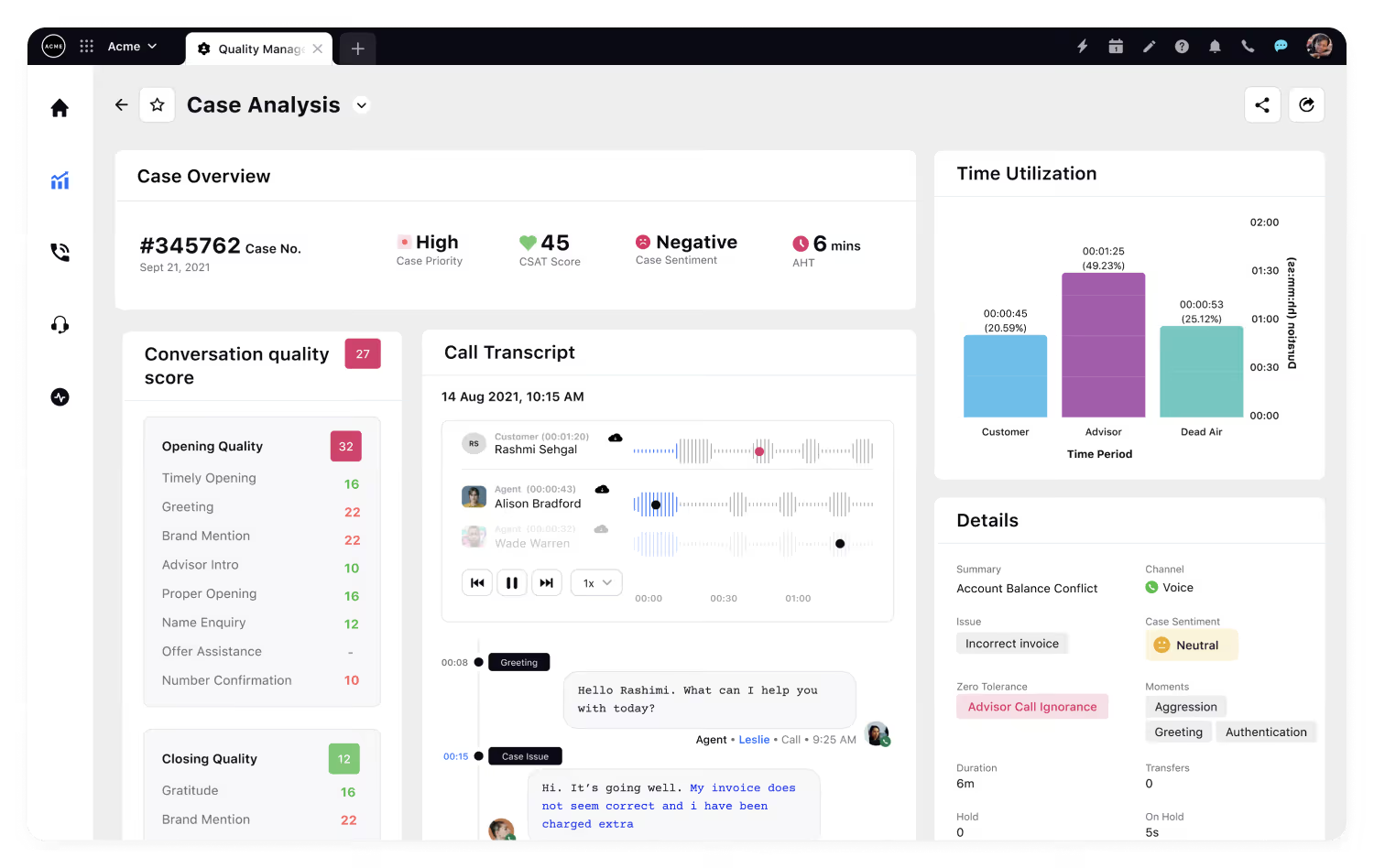
Best for: Large enterprises managing customer experience across social, messaging, and digital channels at global scale.
Sprinklr is a unified customer experience management (Unified-CXM) platform that spans social media management, customer care, marketing, and feedback analytics. Its strength is breadth: Sprinklr captures customer signals from over 30 social and messaging channels, combines them with survey and support data, and feeds everything into a centralized AI engine for analysis.
For global enterprises that need to manage customer experience across social, messaging, community, and traditional feedback channels in a single platform, Sprinklr's scale is difficult to match. The tradeoff is complexity — the platform's breadth means a longer implementation cycle and a steeper learning curve than tools focused solely on feedback analytics.
Sprinklr Features
- Unified-CXM Platform: Combines social listening, customer care, marketing, and feedback analytics in one system.
- AI-Powered Listening: Monitors over 30 social and messaging channels for brand mentions, sentiment, and emerging themes.
- Survey and Feedback Collection: Embeds CSAT, NPS, and CES surveys across digital touchpoints.
- Advanced Reporting: Custom dashboards with cross-channel analytics and competitive benchmarking.
- Case Management: Routes customer issues from social and feedback channels to the right teams automatically.
2026 Pricing
Custom pricing. Sprinklr does not publish standard rates. Enterprise contracts typically require annual commitments.
Sprinklr Pros
- Unmatched breadth of social and messaging channel coverage for global enterprises
- AI engine processes feedback across channels and languages at scale
- Strong competitive benchmarking and social listening capabilities
- Consolidates social, care, and feedback workflows into one platform
Sprinklr Cons
- Complexity and cost make it impractical for mid-market or smaller teams
- Implementation timelines can stretch to months, requiring dedicated resources
- The platform's breadth can feel overwhelming when the primary need is feedback analytics
- Per-module pricing means costs can escalate quickly as capabilities are added
Who It's For
Large, global enterprises that manage customer experience across social, messaging, and digital channels and need a unified platform for listening, care, and feedback analytics.
G2 Rating
Sprinklr: 4.3 out of 5 on G2.
17. Zendesk
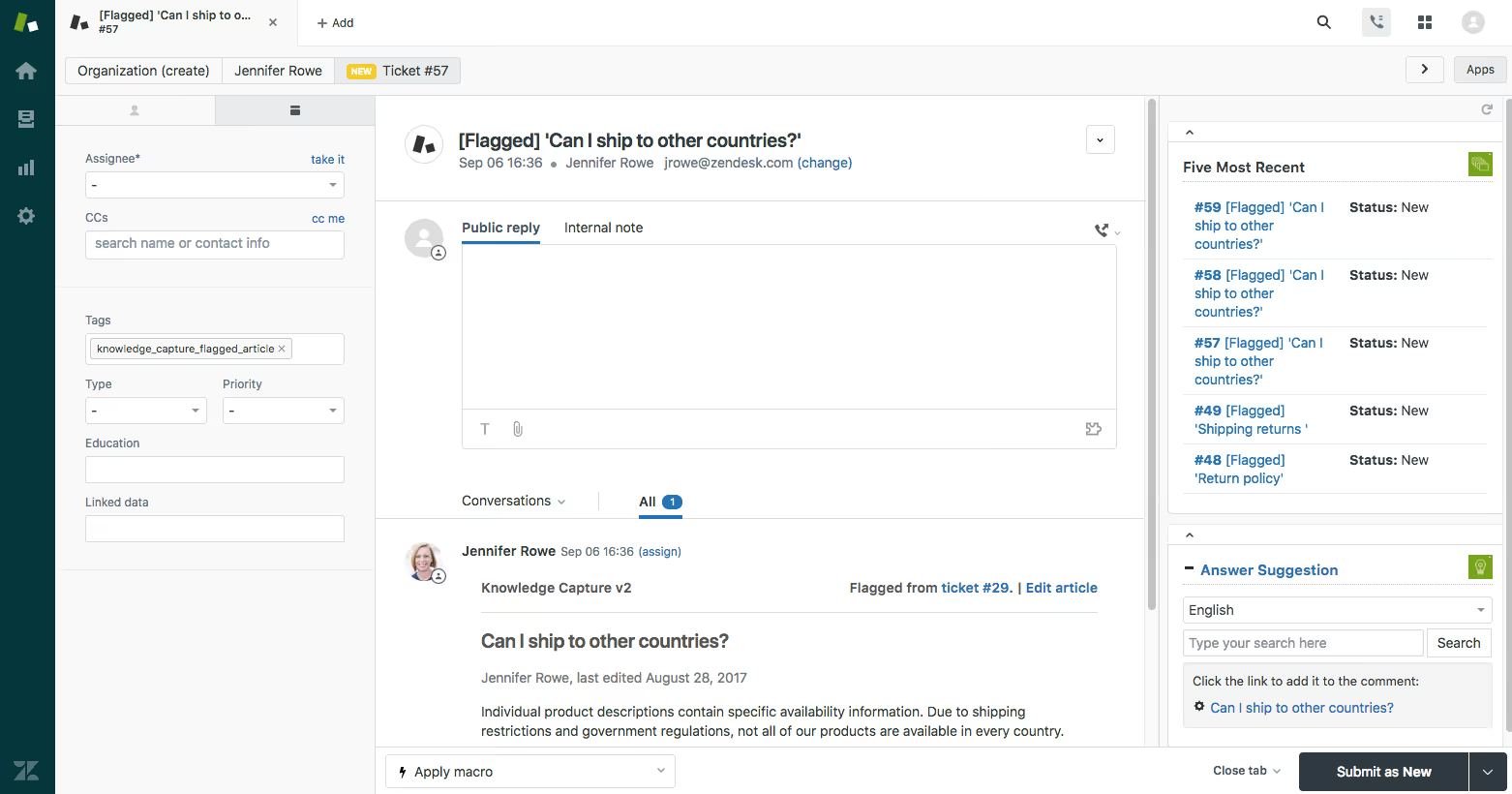
Best for: Support-driven organizations that want to embed CSAT and feedback collection directly into their existing ticketing workflows.
Zendesk is primarily a customer support and ticketing platform, but its built-in CSAT surveys and customer feedback features make it a practical choice for teams that want to collect feedback without adding another tool to their stack. Post-resolution CSAT surveys, customer satisfaction ratings, and support analytics are native to the platform, so feedback collection is tightly integrated with every support interaction.
Where Zendesk falls short is in analytics depth. Feedback analysis is limited to basic satisfaction scoring and reporting — there is no AI-powered theme detection, multi-channel feedback unification, or advanced text analytics. For teams whose feedback needs extend beyond support satisfaction, Zendesk works best as a data source feeding into a more capable analytics platform like Chattermill.
Zendesk Features
- Post-Resolution CSAT Surveys: Automated satisfaction surveys sent after ticket resolution.
- Customer Satisfaction Ratings: Built-in scoring for every support interaction.
- Reporting Dashboards: Standard and custom reports on support satisfaction trends and agent performance.
- Omnichannel Support: Email, chat, phone, social, and messaging support in a single workspace.
- Marketplace Integrations: Extensive app marketplace for extending feedback capabilities.
2026 Pricing
From $19/agent/month for the Support Team plan. Suite plans start at $55/agent/month. Enterprise pricing available.
Zendesk Pros
- Feedback collection is natively embedded in support workflows, requiring no additional tool
- Widely adopted with a mature ecosystem of integrations and extensions
- Affordable entry point for teams that primarily need support-focused CSAT
- Strong omnichannel support capabilities across email, chat, phone, and social
Zendesk Cons
- Feedback analytics are basic — no AI-powered theme detection or sentiment analysis
- Not designed for multi-channel feedback unification beyond support interactions
- CSAT surveys are limited to post-resolution contexts, missing proactive feedback opportunities
- Requires a separate analytics platform for teams that need deeper feedback intelligence
Who It's For
Support teams that want built-in CSAT collection and basic feedback reporting without adding a standalone survey or analytics tool.
G2 Rating
Zendesk: 4.3 out of 5 on G2.
18. Nicereply

Best for: Customer support teams that need lightweight, in-signature CSAT, NPS, and CES surveys directly inside helpdesk tools.
Nicereply focuses on one thing and does it well: collecting satisfaction feedback from support interactions with minimal friction. Its in-email and in-signature survey widgets let customers rate their experience directly in the support reply, without clicking through to an external survey page. This approach consistently achieves higher response rates than traditional post-interaction survey emails.
The platform integrates natively with major helpdesks including Zendesk, Freshdesk, Intercom, and LiveAgent, making it straightforward to add feedback collection to an existing support workflow. For teams that need a simple, focused CSAT and NPS measurement tool, Nicereply delivers on usability and response rates.
Nicereply Features
- In-Signature Surveys: Embed CSAT, NPS, or CES rating scales directly in email signatures and support replies.
- Post-Resolution Surveys: Automated surveys triggered after ticket closure.
- Helpdesk Integrations: Native connections to Zendesk, Freshdesk, Intercom, LiveAgent, and others.
- Agent Performance Tracking: Dashboards showing individual and team satisfaction scores.
- Customizable Rating Scales: Flexible survey design with brand-matching options.
2026 Pricing
From $39/month for up to 100 responses. Pricing scales with response volume. Free trial available.
Nicereply Pros
- In-signature surveys achieve significantly higher response rates than external survey links
- Simple setup that integrates directly into existing helpdesk workflows
- Agent-level performance tracking supports team coaching
- Affordable entry point for support-focused feedback collection
Nicereply Cons
- Focused exclusively on support feedback — no multi-channel unification or product feedback capabilities
- Analytics are basic compared to AI-powered feedback platforms
- Response-based pricing can become expensive for high-volume support teams
- Limited survey customization compared to full survey platforms like Typeform or Survicate
Who It's For
Support teams that want a simple, high-response-rate method for measuring CSAT, NPS, and CES directly inside their helpdesk workflows.
G2 Rating
Nicereply: 4.5 out of 5 on G2.
19. Refiner
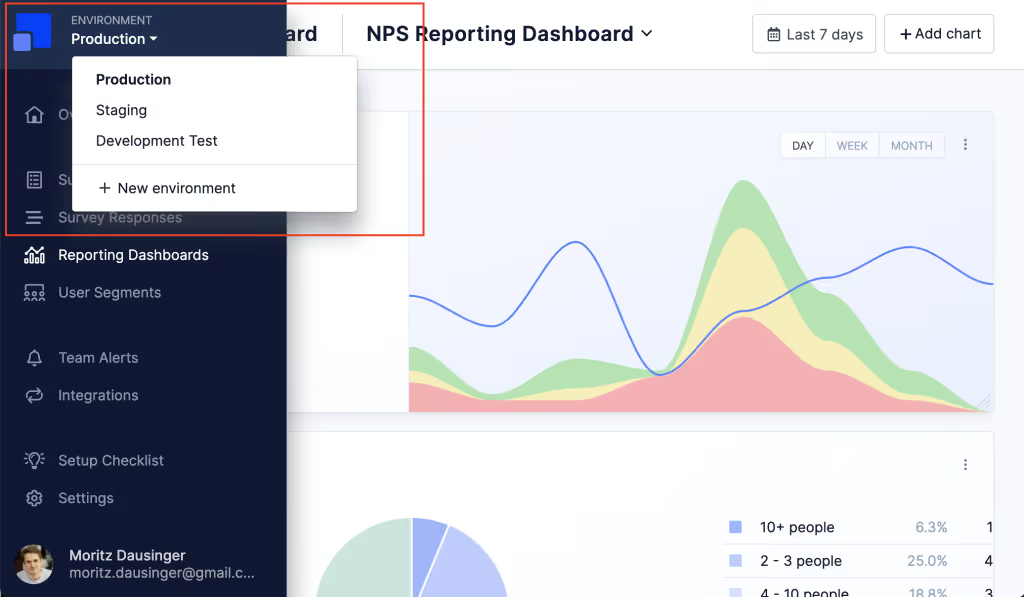
Best for: SaaS product teams that need in-app microsurveys to collect contextual feedback at key moments in the user journey.
Refiner is a lightweight, developer-friendly feedback tool built specifically for SaaS products. It specializes in in-app microsurveys — short, targeted feedback prompts that appear at specific moments in the product experience, such as after onboarding, feature adoption, or before cancellation. This contextual approach captures feedback when it is most relevant, rather than relying on email surveys days after the experience.
For SaaS product and growth teams, Refiner fills a specific gap: collecting qualitative and quantitative feedback inside the product itself, segmented by user attributes, behavior, and lifecycle stage. It is not an enterprise feedback analytics platform, but for its niche, it delivers focused value.
Refiner Features
- In-App Microsurveys: NPS, CSAT, CES, and custom surveys triggered by user behavior, segment, or lifecycle stage.
- User Segmentation: Target surveys based on user attributes, plan type, activity level, and custom properties.
- Developer-Friendly Integration: JavaScript widget, REST API, and native integrations with Segment and other data tools.
- Response Tagging: AI-assisted categorization of open-ended responses (beta).
- CRM and Analytics Sync: Push survey responses to HubSpot, Salesforce, Segment, and analytics platforms.
2026 Pricing
From $99/month for the Essentials plan. Growth and Enterprise tiers available. 14-day free trial.
Refiner Pros
- Purpose-built for SaaS in-app feedback with strong contextual targeting
- Lightweight integration that does not slow down the product experience
- User segmentation enables precise targeting of feedback requests
- Developer-friendly with clean API and native Segment integration
Refiner Cons
- Focused on in-app SaaS feedback only — not suitable for multi-channel CX programs
- Analytics depth is limited compared to full feedback analytics platforms
- AI-assisted tagging is still in beta with limited capabilities
- Smaller ecosystem of integrations compared to established survey tools
Who It's For
SaaS product and growth teams that need contextual in-app feedback collection tied to specific user behaviors and lifecycle stages.
G2 Rating
Refiner: 4.6 out of 5 on G2.
20. Khoros CX Insights

Best for: Enterprises that need to combine community management, social engagement, and customer feedback analytics in a single platform.
Khoros (formerly Lithium Technologies) offers a customer engagement platform that combines community management, social media engagement, and CX analytics. Khoros CX Insights, its analytics layer, aggregates customer feedback from community forums, social channels, and support interactions, then uses AI to detect themes, sentiment, and emerging issues across those sources.
For organizations that run large branded communities or manage high-volume social engagement, Khoros provides a unique combination of community-driven feedback and enterprise-grade analytics. The platform is less relevant for teams whose feedback comes primarily from surveys, support tickets, or product interactions.
Khoros CX Insights Features
- Community Analytics: Track themes, sentiment, and engagement across branded community forums.
- Social Listening and Engagement: Monitor and respond to customer feedback across social channels.
- AI-Powered Theme Detection: Automatically identify trending topics and sentiment shifts across community and social data.
- Care Console: Unified agent workspace for managing customer interactions from community, social, and messaging channels.
- Enterprise Reporting: Custom dashboards and reporting for cross-channel CX analytics.
2026 Pricing
Custom pricing. Khoros does not publish standard rates. Pricing depends on modules, channels, and engagement volume.
Khoros CX Insights Pros
- Unique combination of community management and CX analytics in one platform
- Strong social listening and engagement capabilities for high-volume brands
- AI-powered theme and sentiment detection across community and social data
- Mature enterprise platform with established integrations
Khoros CX Insights Cons
- Less relevant for teams whose feedback comes primarily from surveys or support tickets
- Pricing is opaque and typically enterprise-only
- The platform's breadth can create complexity for teams focused specifically on feedback analytics
- Community management features may be unnecessary for organizations without branded forums
Who It's For
Enterprises with active branded communities and high-volume social engagement that need unified feedback analytics across community, social, and customer care channels.
G2 Rating
Khoros: 4.0 out of 5 on G2.
What Are AI Customer Feedback Tools?
AI customer feedback tools represent the latest evolution in the category — platforms that go beyond collecting and organizing feedback to actively interpreting it. Where earlier-generation tools relied on rule-based keyword matching and manual tagging to categorize responses, AI-powered platforms use natural language processing and machine learning to detect themes, classify sentiment, identify intent, and flag anomalies across thousands of responses automatically.
The shift from rule-based to AI-powered analysis is not just a technical upgrade. It changes what is possible. Rule-based systems could tell you how many customers mentioned "shipping." AI-powered platforms can tell you that shipping complaints spiked 40% this week, that the driver is a specific carrier in one region, that the affected customers skew toward your highest-value segment, and that the issue correlates with a 12-point NPS decline. That level of granularity — connecting what customers say to what it means for the business — is what separates modern AI feedback tools from the previous generation.
Most platforms in this guide now incorporate some level of AI. The critical distinction for buyers is whether AI is the foundation of the platform's analytical engine or a feature bolted on to a survey or ticketing product. Platforms like Chattermill and Enterpret are built AI-first, with models trained on millions of feedback data points across languages and channels. Others, like SurveyMonkey and Typeform, have added AI-assisted analysis as a supplementary layer on top of their core survey functionality. Both approaches have value — the right choice depends on whether your primary challenge is collection or comprehension.
Benefits of Using Customer Feedback Software
Faster identification of customer pain points. AI-powered feedback tools surface emerging issues in hours, not weeks. Instead of waiting for quarterly NPS reports, teams can detect and respond to friction points as they appear.
Data-driven product decisions. Customer feedback platforms connect feature requests and complaints to specific customer segments and revenue impact, giving product teams the evidence they need to prioritize the right initiatives.
Improved customer retention. Organizations that act on feedback signals quickly can intervene before dissatisfied customers churn. Anomaly detection and automated alerts ensure that critical signals reach the right people in time to make a difference.
Unified customer intelligence. Multi-channel feedback platforms consolidate input from surveys, support, reviews, social media, and calls into a single view — eliminating the data silos that prevent teams from seeing the full customer picture.
Stronger cross-functional alignment. When CX, product, and executive teams share a common source of customer intelligence, prioritization conversations are grounded in evidence rather than anecdote. Customizable dashboards ensure each stakeholder sees the metrics that matter to their function.
Reduced manual analysis burden. AI theme detection and sentiment analysis eliminate the hours of manual tagging and reading that slow down traditional feedback programs. Teams can reallocate that time to action and strategy.
Measurable CX impact. Platforms that connect feedback themes to business metrics like NPS, CSAT, CES, and retention rate enable teams to quantify the ROI of experience improvements, not just describe them.
Competitive advantage through customer closeness. Organizations that systematically listen, analyze, and act on customer feedback build products and experiences that their competitors, who rely on assumptions and intuition, simply cannot match.
ROI and Business Impact
Customer feedback software delivers measurable returns when implemented as part of an operational CX program, not just a research exercise.
- Retention improvement: Companies using AI-powered feedback analytics platforms like Chattermill report faster identification of churn drivers, enabling proactive intervention before dissatisfied customers leave.
- Support cost reduction: By identifying recurring pain points across support tickets and surveys, teams can address root causes rather than symptoms — reducing ticket volume and lowering cost-to-serve.
- Product development efficiency: Feedback-driven prioritization ensures engineering resources are allocated to the features and fixes that matter most to customers, reducing wasted development cycles.
- NPS and CSAT score improvement: Teams that close the feedback loop — acting on issues and communicating changes back to customers — consistently see score improvements that reflect genuine experience gains.
- Speed to insight: AI analysis that once required weeks of manual coding and reporting now delivers results in hours, compressing the feedback-to-action cycle from quarterly to near-real-time.
Get Started with Chattermill
If your team is ready to move from scattered feedback to unified customer intelligence, Chattermill is built for exactly that challenge. See how the platform consolidates every feedback channel, surfaces the themes that drive business outcomes, and connects customer voices to the metrics your leadership team cares about.
Book a Demo and explore the platform with your own data.
Customer Feedback Tools: FAQs
What Is Customer Feedback Software?
Customer feedback tools are software platforms that help businesses collect, organize, analyze, and act on input from their customers. They range from simple survey builders to AI-powered analytics platforms that unify feedback from multiple channels, including surveys, support conversations, reviews, social media, and call transcripts. The goal is to turn raw customer voices into structured insights that inform product, CX, and business decisions.
What Is The Difference Between A Survey Tool And A Feedback Analytics Platform?
Survey tools like Typeform, SurveyMonkey, and Survicate focus primarily on collecting feedback through structured questionnaires. Feedback analytics platforms like Chattermill, Qualtrics, and Enterpret go further by consolidating feedback from multiple channels and using AI to detect themes, sentiment, and trends across all of that data. If your challenge is collecting responses, a survey tool may suffice. If your challenge is understanding what thousands of responses mean and connecting them to business outcomes, you need a feedback analytics platform.
What Is The Best Customer Feedback Tool For Enterprises?
For enterprise teams that need to unify feedback from every channel and turn it into actionable intelligence, Chattermill is the strongest choice. Its AI consolidates surveys, support tickets, reviews, and call data into a single platform, connecting feedback themes to business metrics like NPS, CSAT, and retention. Qualtrics and Medallia are also strong enterprise options, particularly for organizations that need a full experience management suite or omnichannel signal capture at massive operational scale.
How Do You Choose The Right Customer Feedback Software?
Start by defining your primary use case. If you need to collect feedback, prioritize ease of survey creation and distribution. If you need to analyze feedback at scale, prioritize AI analytics depth, multi-channel unification, and reporting capabilities. Then evaluate integration compatibility with your existing tools, scalability for your feedback volume, and pricing transparency. The right tool fits your team's maturity level and the complexity of your feedback challenges.
Can AI Really Analyze Customer Feedback Accurately?
Yes, but accuracy varies significantly between tools. Modern AI-powered feedback analytics platforms use natural language processing to detect themes, sentiment, and intent across open-ended text. The best platforms, like Chattermill, train their models across millions of data points and multiple languages to achieve high accuracy. However, tools that bolt on basic sentiment scoring as an afterthought will not deliver the same depth. When evaluating AI capabilities, ask vendors about accuracy benchmarks, how the model handles nuance and sarcasm, and whether it can work across the languages and channels your team needs.
The Bottom Line
The customer feedback tools landscape in 2026 rewards specificity. The era of one-size-fits-all survey platforms has given way to a segmented market where the right choice depends on what your team actually needs to accomplish.
For enterprise CX, insights, and product teams that collect feedback across multiple channels and need to turn that data into prioritized, evidence-backed actions, Chattermill delivers the unified feedback intelligence that connects customer voices to business outcomes. For teams evaluating full experience management suites, Qualtrics and Medallia offer breadth. For product teams focused on feature prioritization, Canny and UserVoice are purpose-built. And for teams that need quick, targeted surveys, Survicate, Typeform, and SurveySparrow each bring distinct strengths.
The tools on this list range from free plans to enterprise contracts. What they share is the ability to move your organization from collecting feedback to acting on it. Start with the criteria that matter most to your team, pressure-test against your specific use case, and prioritize the platform that connects insight to action.
Ready to see how Chattermill unifies your customer feedback into actionable intelligence? Book a Demo and explore the platform with your own data.


See Chattermill in action on your own feedback
Book a demo


