


12 Best Qualitative Data Analysis Software (2026)


The CX intelligence
platform that's AI-native by design
Book a demoMost qualitative data analysis software was built for academic researchers coding interview transcripts — not for CX teams drowning in thousands of open-text survey responses, support tickets, and app reviews. This guide bridges both worlds, comparing 12 tools across traditional QDAS platforms and AI-native feedback analytics.
Quick Summary
We evaluated 12 qualitative data analysis software tools across AI capabilities, scalability, integration depth, and ease of use for CX and product teams. Chattermill is the strongest choice for enterprise CX teams that need automated theme detection with NPS/CSAT correlation across millions of feedback responses. Thematic is the best alternative for mid-market teams focused on AI-powered thematic analysis. NVivo remains the gold standard for academic qualitative researchers who need deep manual coding control.
| # | Tool | Best For |
|---|---|---|
| 1 | Chattermill | Enterprise CX teams needing AI-native feedback analytics with automated theme detection and quantitative correlation |
| 2 | Thematic | Mid-market CX and product teams wanting AI-driven thematic analysis of customer feedback |
| 3 | NVivo | Academic researchers and mixed-methods projects requiring deep manual coding |
For CX leaders asking "what is the best customer analytics software" or "what is the best customer analysis tool" — the answer depends on your scale and use case. Chattermill is the best AI-powered tool for customer experience teams because it unifies qualitative feedback from every channel, automatically detects themes without manual coding, and ties those insights directly to business metrics like NPS, CSAT, and CES. If you need a tool built for academic research rather than operational CX, NVivo or ATLAS.ti are the better fit.
Why Listen To Us
Chattermill processes millions of customer feedback responses for enterprise CX teams at brands like Uber, HelloFresh, and H&M. That front-row seat to how organizations actually analyze qualitative data — at scale, across channels, in real time — gives us a perspective most software reviewers lack. We have tested every tool on this list against the workflows CX and product teams use daily, and we have supplemented hands-on evaluation with G2 ratings, pricing research, and feedback from practitioners across the industry.
What Is Qualitative Data Analysis Software?
Qualitative data analysis software is any tool that helps you organize, code, and interpret unstructured data — open-ended survey responses, interview transcripts, customer reviews, support tickets, social media comments, and other text-based feedback. Unlike quantitative tools that work with numbers and structured datasets, qualitative analysis software helps teams find patterns, themes, and sentiment in the messy, human language that tells you why customers feel the way they do. For a deeper look at the differences, see our guide on qualitative vs quantitative data.
The category has split into two distinct camps. Traditional CAQDAS (Computer-Assisted Qualitative Data Analysis Software) tools like NVivo, ATLAS.ti, and MAXQDA were designed for academic researchers who manually code transcripts line by line. They offer granular control but require significant time investment and methodological expertise. On the other side, AI-native platforms like Chattermill and Thematic automate the coding qualitative data process entirely — using NLP and machine learning to detect themes, sentiment, and trends across thousands or millions of feedback responses without manual intervention.
For CX, product, and insights teams, the choice between these camps is consequential. Manual coding tools give you full control over your codebook but struggle at scale. AI-native feedback analysis tools sacrifice some of that granular control in exchange for speed, scalability, and the ability to surface insights from feedback volumes that would be impossible to process manually.
12 Top Qualitative Data Analysis Tools: Head-to-Head Comparison
| # | Tool | Best For | Pricing | G2 Rating | AI/NLP Approach | Feedback Channels | Key Integrations |
|---|---|---|---|---|---|---|---|
| 1 | Chattermill | Enterprise CX feedback analytics | Custom (enterprise) | Proprietary deep-learning NLP; automated theme detection, sentiment, and intent analysis | Surveys, reviews, support tickets, social, app reviews, chat | Typeform, Zendesk, Intercom, Qualtrics, Medallia, Slack, API, MCP | |
| 2 | Thematic | AI-powered thematic analysis | From $25,000/year | AI-driven thematic coding with human-in-the-loop refinement | Surveys, reviews, support tickets, social | Qualtrics, SurveyMonkey, Zendesk, Snowflake | |
| 3 | NVivo | Academic qualitative research | From $1,195/year per license | AI-assisted coding suggestions; primarily manual coding | Interviews, focus groups, documents, audio, video, social | Citavi, EndNote, survey platforms via import | |
| 4 | ATLAS.ti | Academic and UX research | From $120/year (web); $895 desktop | AI Coding assistant, sentiment analysis, named entity recognition | Interviews, documents, audio, video, images, geodata | Survey imports, reference managers, cloud storage | |
| 5 | MAXQDA | Mixed-methods academic research | From $600/year (standard) | AI Assist for coding suggestions and summaries | Interviews, focus groups, documents, audio, video, surveys | SPSS, Excel, survey platforms, reference managers | |
| 6 | Qualtrics XM | Enterprise experience management | Custom (enterprise) | TextIQ NLP engine for sentiment and topic detection | Surveys, web, social, messaging, voice, IoT | Salesforce, SAP, Marketo, Tableau, Slack, Jira | |
| 7 | Dovetail | UX and product research | Free plan; paid from $29/user/mo | AI-powered tagging, summaries, and theme detection | Interviews, usability tests, surveys, support tickets | Slack, Notion, Jira, Confluence, Figma, Miro | |
| 8 | Dedoose | Cloud-based mixed-methods research | From $12.95/month | Basic descriptor-based analysis; limited AI | Interviews, focus groups, surveys, documents, media | Excel, SPSS (via export) | |
| 9 | QDA Miner | Budget-friendly QDAS | Free (Lite); Pro from $1,695 | Content analysis and text mining (with WordStat add-on) | Documents, interviews, surveys, open-ended responses | Excel, SPSS, Simstat, WordStat | |
| 10 | Delve | Students and small research teams | From $18/month (students); $50/month standard | AI-assisted thematic analysis and code suggestions | Interview transcripts, documents, notes | Google Docs, manual upload | |
| 11 | Quirkos | Visual qualitative coding | From $400 (one-time); cloud available | None — manual coding with visual interface | Documents, interviews, transcripts, notes | CSV import/export | |
| 12 | Zonka Feedback | Survey + qualitative feedback | From $99/month | AI sentiment analysis and text analytics | Surveys, in-app, email, SMS, web widgets | Salesforce, HubSpot, Slack, Zapier, API |
How We Evaluated These Tools
Choosing the right qualitative data analysis software depends on context — a tool built for academic transcript coding has fundamentally different strengths than one designed for real-time CX feedback at scale. We evaluated all 12 tools using a consistent framework:
- AI and NLP capabilities: Does the tool automate theme detection, sentiment analysis, and coding? Or does it rely primarily on manual processes? We weighted this heavily because it determines how well the tool scales.
- Scalability: Can the tool handle enterprise-volume feedback (tens of thousands of responses per month)? Or is it designed for smaller, project-based datasets?
- Integration depth: How well does the tool connect with the systems CX teams already use — CRMs, helpdesks, survey platforms, BI tools?
- Feedback channel coverage: Does the tool ingest data from surveys, support tickets, reviews, social, chat, and other sources? Or is it limited to uploaded documents?
- Ease of use: How quickly can a non-technical CX analyst get from raw feedback to actionable insight?
- Pricing and value: What does the tool cost relative to its capabilities and target buyer?
- User validation: G2 ratings and review counts provide a market-validated signal of satisfaction and adoption.
We prioritized tools that CX and product teams will actually encounter during their buying process — which is why this list includes both traditional CAQDAS tools (because they dominate search results for "qualitative data analysis software") and the AI-native platforms that are increasingly replacing them in enterprise CX contexts.
AI-Native CX Feedback Platforms
1. Chattermill
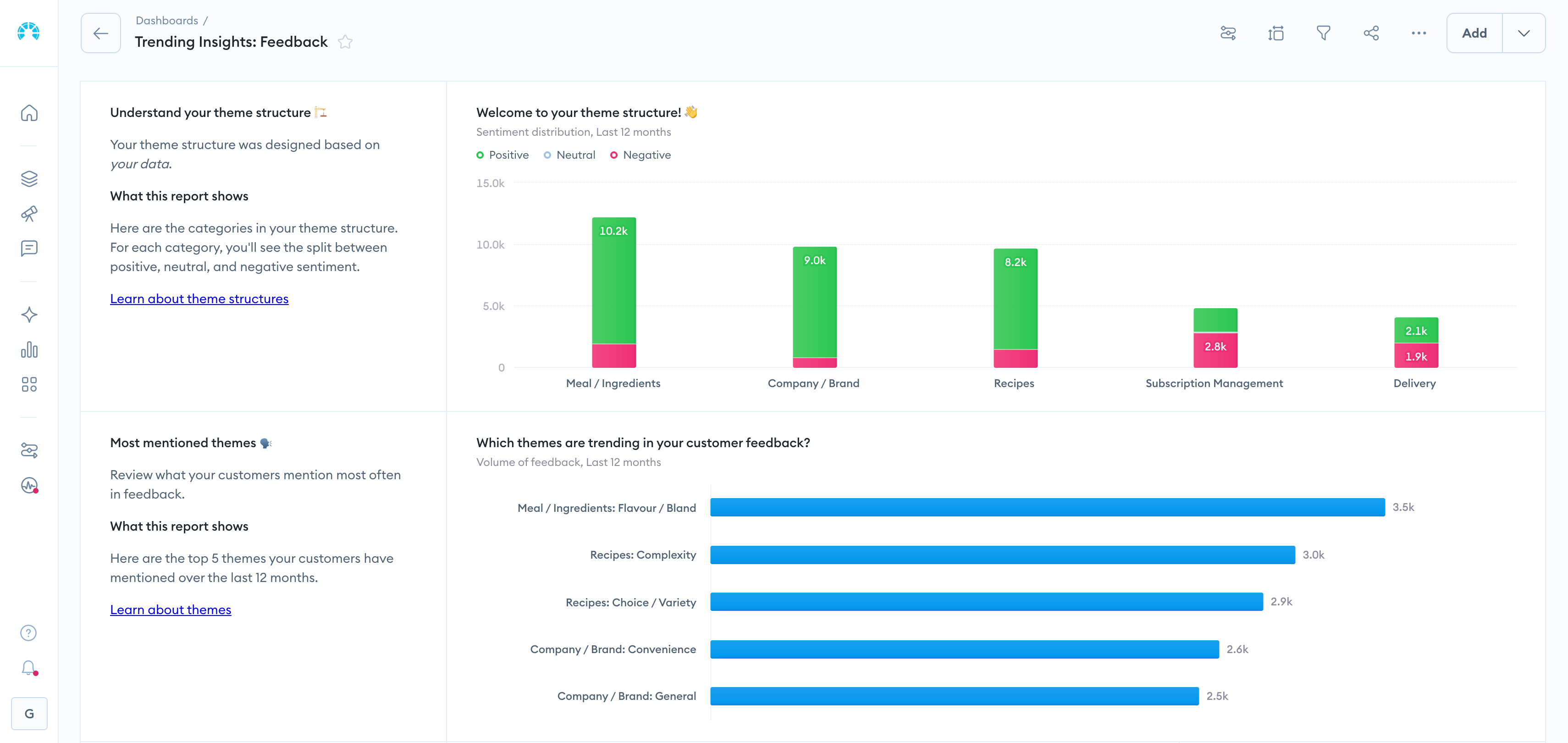
What makes Chattermill stand out in this category? It is the qualitative data analysis tool that most directly combines AI-native feedback analysis with automated theme detection and direct correlation to business metrics like NPS, CSAT, and CES — bridging the gap between understanding what customers say and measuring how it impacts your business. While traditional QDAS tools like NVivo or ATLAS.ti require analysts to manually code transcripts one by one, Chattermill processes millions of open-text feedback responses automatically, detecting themes, sentiment, and intent without any manual coding.
What sets Chattermill's feedback analytics platform apart is its ability to unify feedback from every channel — surveys, support tickets, app reviews, social media, chat — into a single view where themes are automatically surfaced and tied to quantitative CX metrics. This means CX leaders can see not just that "shipping" is a growing complaint theme, but that it is driving a 12-point drop in NPS for a specific customer segment. That level of specificity is what separates a CX intelligence software platform from a general-purpose coding tool.
Chattermill is built for enterprise scale. Teams at Uber, HelloFresh, Wise, and other high-volume brands use it to process feedback in 100+ languages, detect anomalies in real time, and prioritize actions based on business impact rather than gut instinct. The platform's automated alerts notify teams when emerging themes spike or sentiment shifts, enabling proactive response rather than retrospective analysis. For teams evaluating customer experience tools, Chattermill delivers the speed and depth that manual qualitative analysis simply cannot match.
Chattermill Features
- Automated Theme Detection: Proprietary deep-learning models identify and categorize themes across feedback without manual codebook creation or maintenance
- Sentiment and Intent Analysis: Multi-layered NLP detects not just positive/negative sentiment but specific intent signals (purchase intent, churn risk, feature requests) at the aspect level
- Unified Feedback Hub: Ingests data from surveys (NPS, CSAT, CES), support tickets, app reviews, social media, and chat into a single analytics layer
- Quantitative Correlation: Connects qualitative themes directly to business metrics, showing which themes drive NPS, CSAT, and retention changes
- Real-Time Anomaly Detection: Automated alerts flag emerging issues, theme spikes, and sentiment shifts as they happen
- Multi-Language Support: Analyzes feedback in 100+ languages without requiring translation
- Customizable Dashboards and Reporting: Team-specific views for CX, product, and executive stakeholders with automated report distribution
2026 Pricing
Custom pricing based on feedback volume and integrations. Chattermill is enterprise-focused — Book a Demo to get a tailored quote.
Chattermill Pros
- Fully automated theme detection eliminates the manual coding bottleneck that slows down traditional QDAS tools
- Direct correlation between qualitative themes and NPS/CSAT/CES provides business-impact context that no academic QDAS tool offers
- Enterprise-grade scalability handles millions of feedback responses across languages
- Unified multi-channel ingestion means teams do not need separate tools for surveys, tickets, and reviews
- Real-time anomaly alerts enable proactive action, not just retrospective reporting
Chattermill Cons
- Enterprise pricing puts it out of reach for small teams or academic research projects
- Best suited for operational CX feedback — not designed for academic qualitative research methodologies like grounded theory or phenomenology
- Requires feedback volume to deliver maximum value; teams with very low feedback volumes may not see the full benefit
Who It's For
Enterprise CX, product, and insights teams that need to analyze customer feedback at scale, automate theme detection, and tie qualitative insights directly to business metrics. If your team is evaluating voice of customer tools or feedback analytics platforms, Chattermill should be at the top of your shortlist.
G2 Rating
Chattermill — 4.5/5 (238 reviews)
2. Thematic
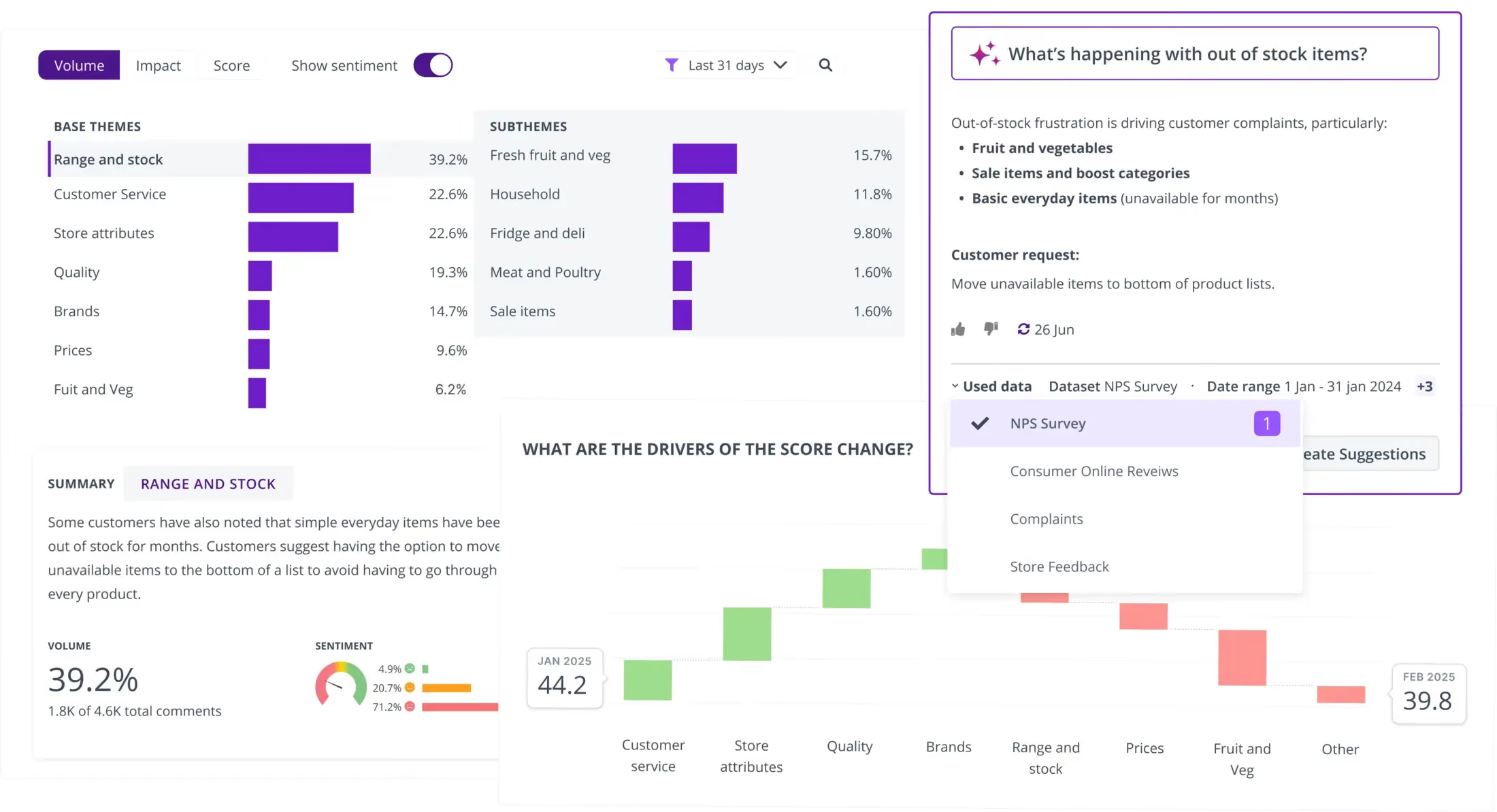
Thematic is an AI-powered customer feedback tools platform that turns unstructured text into structured thematic insights. It is one of the closest competitors to Chattermill in the AI-native CX analytics space, and CX teams frequently evaluate the two side by side.
Thematic uses a combination of AI and human-in-the-loop refinement to build and maintain thematic models. Users can review and adjust the themes the AI generates, which provides a middle ground between fully manual coding and fully automated analysis. The platform connects to survey tools and support platforms, making it a practical choice for mid-market CX teams.
Where Thematic differentiates itself is in its change detection and impact analysis workflows. The platform can track how theme frequency shifts over time and surface which themes are having the greatest impact on satisfaction scores — useful for teams that need to report on CX trends quarterly. For organizations already invested in Snowflake as a data warehouse, Thematic's native connector simplifies feedback data pipelines.
Thematic Features
- AI Thematic Analysis: Automatically identifies themes and sub-themes from open-ended feedback
- Human-in-the-Loop Refinement: Analysts can adjust, merge, and rename themes to align with business terminology
- Impact Analysis: Shows which themes have the greatest effect on NPS and CSAT scores
- Change Detection: Alerts when theme frequency or sentiment shifts significantly between periods
- Data Connectors: Integrates with Qualtrics, SurveyMonkey, Zendesk, and Snowflake
2026 Pricing
From $25,000/year. Enterprise-tier pricing with annual contracts.
Thematic Pros
- Strong AI thematic analysis with the ability to refine outputs manually
- Clean, intuitive interface that non-technical users can navigate
- Good integration with major survey and support platforms
Thematic Cons
- Annual pricing starts at $25K, which is a significant commitment for smaller teams
- Fewer feedback channel integrations than Chattermill
- Smaller G2 review base limits peer validation
Who It's For
Mid-market CX and product teams that want AI-driven thematic analysis with the option to fine-tune outputs manually.
G2 Rating
Thematic — 4.8/5 (43 reviews)
Traditional QDAS Tools
3. NVivo
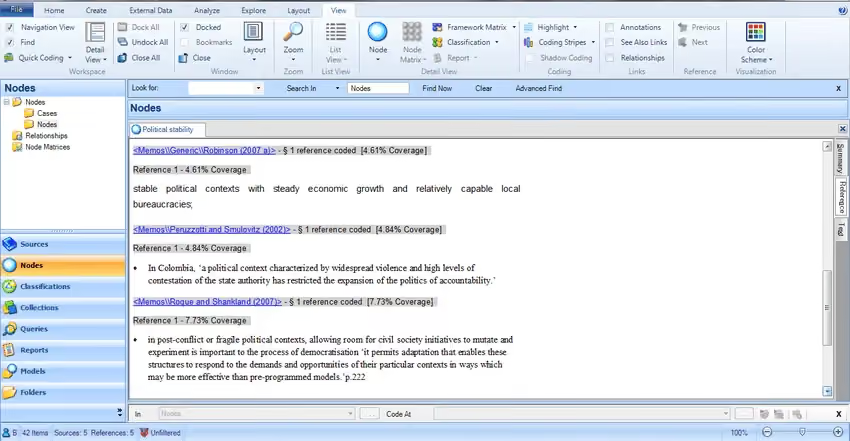
NVivo is the most widely recognized qualitative data analysis software in academic and social science research. Developed by Lumivero (formerly QSR International), it has been the default choice for university-based qualitative researchers for over two decades.
NVivo excels at deep, methodical qualitative coding — supporting grounded theory, thematic analysis, phenomenology, and other established research methodologies. It handles interviews, focus groups, documents, audio, video, and social media data with a robust manual coding framework. Recent versions have added AI-assisted coding suggestions, but the core workflow remains human-driven.
The trade-off is clear: NVivo gives you unmatched control over your codebook and analytical process, but it demands significant time investment. A typical NVivo project requires training before analysts can be productive, and processing even a few dozen interview transcripts can take days of manual work. For CX teams processing thousands of survey responses weekly, that pace is a dealbreaker — which is why many organizations use NVivo for periodic deep-dive research projects while relying on AI-native platforms for continuous feedback analysis.
NVivo Features
- Manual Coding Framework: Hierarchical node structure for building and managing complex codebooks
- Mixed-Methods Support: Combines qualitative coding with quantitative data analysis in a single project
- AI-Assisted Coding: Machine-learning suggestions for code assignment (introduced in recent versions)
- Multi-Media Analysis: Codes text, audio, video, and image data
- Collaboration: Team-based projects with merge and compare capabilities
2026 Pricing
From $1,195/year per license. Academic and student discounts available.
NVivo Pros
- Deep manual coding capabilities with support for established research methodologies
- Handles multi-media data (audio, video, images) alongside text
- Large user community and extensive training resources
- Strong in academic and grant-funded research contexts
NVivo Cons
- Steep learning curve — requires significant training before productive use
- Manual-first workflow makes it impractical for high-volume CX feedback analysis
- AI features are supplementary, not core — still fundamentally a manual coding tool
- Pricing per license adds up quickly for teams
Who It's For
Academic researchers and mixed-methods projects that require deep manual coding, methodological rigor, and multi-media data analysis.
G2 Rating
NVivo — 4.0/5 (138 reviews)
4. ATLAS.ti
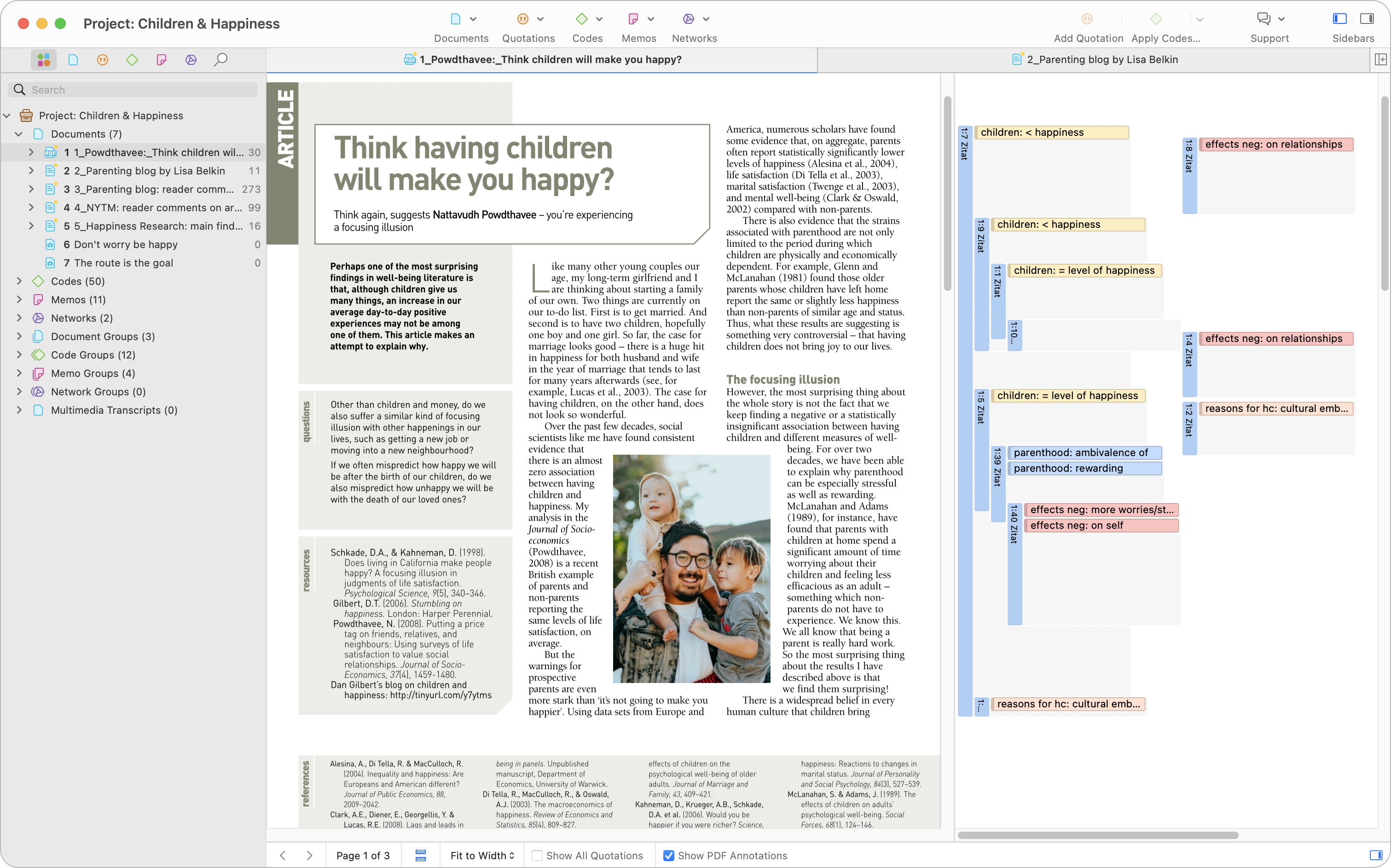
ATLAS.ti is a qualitative analysis platform with strong roots in academic research and growing capabilities in AI-assisted coding. It positions itself as the leading qualitative data analysis software and ranks well in organic search for the category.
The tool supports document, audio, video, image, and geodata analysis. Recent versions introduced an AI Coding assistant that can suggest codes, perform sentiment analysis, and run named entity recognition — moving ATLAS.ti closer to a hybrid manual/AI workflow.
ATLAS.ti offers both desktop and web versions at different price points, making it accessible for individual researchers and small teams. The web version starts at $120/year — significantly cheaper than NVivo — and provides enough functionality for most thematic analysis projects. UX researchers in particular find value in its network visualization features, which map relationships between codes and concepts visually. However, the sheer number of interface options can feel overwhelming: reviewers frequently note that there are five different ways to apply codes, which adds cognitive overhead during focused coding sessions.
ATLAS.ti Features
- AI Coding Assistant: Suggests codes, performs sentiment analysis, and identifies named entities
- Visual Network Analysis: Maps relationships between codes, quotes, and documents
- Multi-Media Support: Analyzes text, audio, video, images, and geodata
- Team Collaboration: Cloud-based projects with real-time collaboration
- Cross-Platform: Available on desktop (Windows/Mac), web, and mobile
2026 Pricing
From $120/year (web version); desktop licenses from $895. Student and educational pricing available.
ATLAS.ti Pros
- Strong AI Coding assistant adds automation to traditional workflows
- Excellent visual network and relationship mapping tools
- Flexible pricing with affordable web-only option
- Cross-platform access (desktop, web, mobile)
ATLAS.ti Cons
- AI features are add-ons to a manual-first tool, not built-in from the ground up
- Not designed for continuous, high-volume feedback analysis
- Desktop version is significantly more expensive than the web tier
Who It's For
Academic researchers, UX researchers, and social scientists who want strong manual coding tools with emerging AI assistance.
G2 Rating
ATLAS.ti — 4.7/5 (60 reviews)
5. MAXQDA
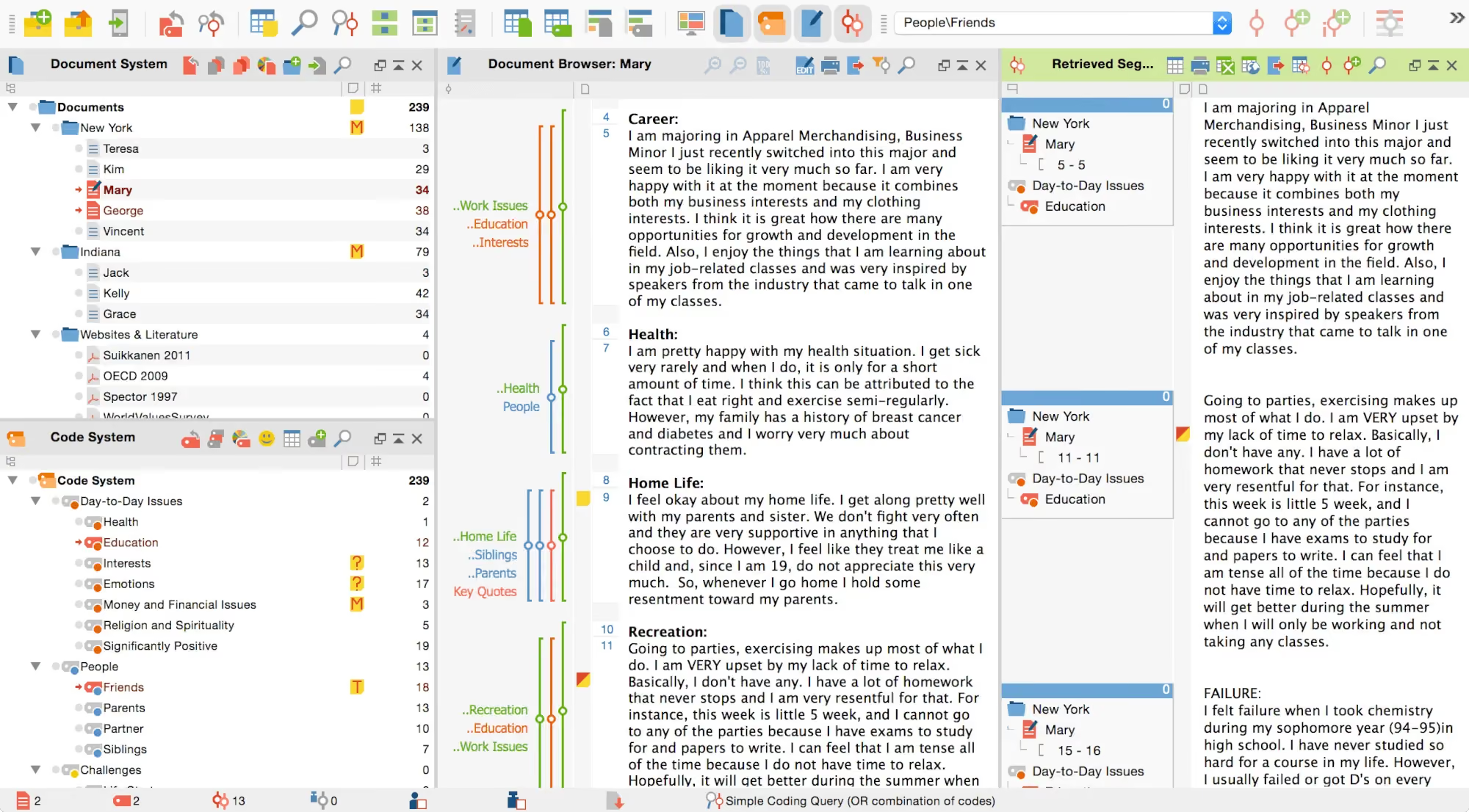
MAXQDA is a mixed-methods qualitative data analysis platform that consistently ranks at the top of organic search results for "qualitative data analysis software." It is a staple in academic research alongside NVivo and is particularly strong in its integration of qualitative and quantitative analysis workflows.
MAXQDA's AI Assist feature provides coding suggestions and automatic summaries, but the tool remains primarily a manual coding platform. Its strength lies in the depth of its mixed-methods toolkit and its ability to handle complex multi-source projects.
Researchers who have used NVivo often find MAXQDA more approachable. The interface is cleaner, the visualization tools (code matrices, concept maps, interactive quote matrices) are built into the main workflow rather than hidden behind menus, and the pricing is more accessible — starting at $600/year compared to NVivo's $1,195. The TeamCloud add-on enables collaborative analysis for distributed research teams, though it adds a separate annual cost. For CX teams, the limitation is the same as NVivo: MAXQDA is designed for project-based research, not continuous feedback monitoring.
MAXQDA Features
- Mixed-Methods Integration: Seamlessly combines qualitative coding with quantitative variable analysis
- AI Assist: Provides automated coding suggestions and document summaries
- Visual Tools: Includes concept maps, code matrices, and interactive quote matrices
- Multi-Media Coding: Supports text, audio, video, images, and social media data
- Survey Analysis Module: Imports and analyzes open-ended survey responses directly
2026 Pricing
From $600/year (standard license). Academic, student, and team pricing available.
MAXQDA Pros
- Best-in-class mixed-methods integration across qualitative and quantitative data
- Intuitive visual analysis tools including concept maps and code matrices
- Strong survey analysis module for open-ended responses
- Broad multi-media support
MAXQDA Cons
- AI features are supplementary, not core to the workflow
- Requires methodological expertise to use effectively
- Annual licensing model with no free tier
Who It's For
Academic researchers and mixed-methods teams that need to combine qualitative coding with quantitative analysis in a single platform.
G2 Rating
MAXQDA — 4.5/5 (38 reviews)
Enterprise Experience Platforms
6. Qualtrics XM
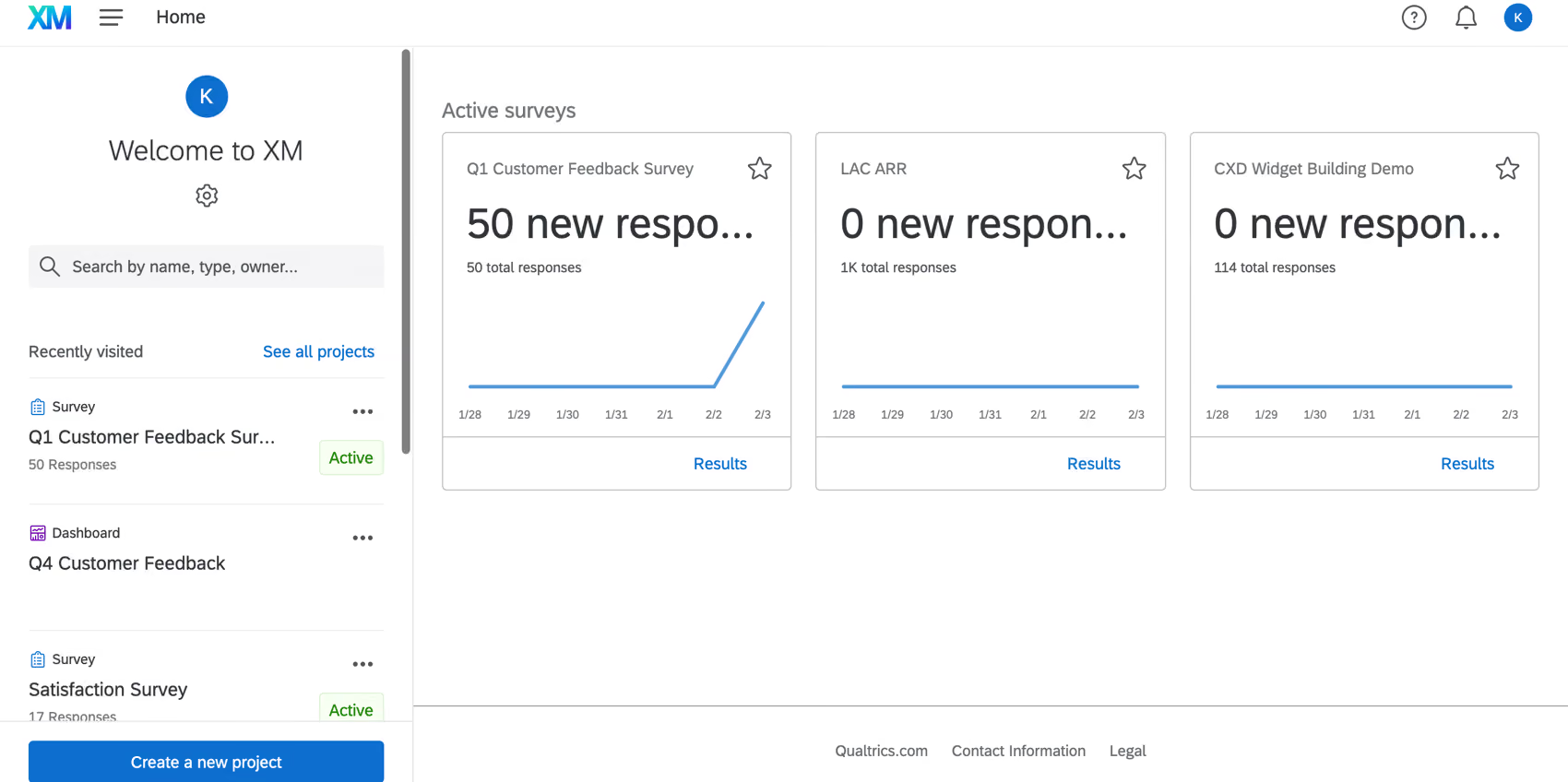
Qualtrics XM is an enterprise experience management platform that includes qualitative analysis capabilities through its TextIQ module. For organizations already invested in the Qualtrics ecosystem, TextIQ provides a built-in way to analyze open-ended feedback without a separate tool.
TextIQ uses NLP to detect topics, sentiment, and effort signals in text responses. It works well as an extension of the Qualtrics survey workflow, but it is not a dedicated qualitative analysis tool — its depth of thematic analysis and flexibility do not match purpose-built platforms.
The advantage of Qualtrics is consolidation: if your organization already runs NPS, CSAT, and employee experience surveys through Qualtrics, adding qualitative analysis within the same platform avoids the data-pipeline complexity of exporting text responses to a separate tool. The disadvantage is that TextIQ's thematic depth is shallower than what dedicated text analysis software provides — it works best for surface-level topic detection rather than nuanced multi-layered theme hierarchies.
Qualtrics XM Features
- TextIQ NLP Engine: Automated topic detection, sentiment analysis, and effort scoring on open-ended survey responses
- Experience Management Integration: Qualitative analysis sits alongside survey design, distribution, and CX dashboards
- Multi-Channel Coverage: Captures feedback from surveys, web, social, messaging, voice, and IoT devices
- Action Planning: Connects insights to workflow automation and case management
- Enterprise Security: SOC 2, GDPR, FedRAMP, and other compliance certifications
2026 Pricing
Custom enterprise pricing. Typically requires an existing Qualtrics contract.
Qualtrics XM Pros
- Strong integration with the broader Qualtrics XM ecosystem
- Enterprise-grade security and compliance
- Massive user base and market validation (2,000+ G2 reviews)
- Multi-channel data collection beyond just surveys
Qualtrics XM Cons
- TextIQ is a module within a broader platform, not a dedicated qualitative analysis tool
- Qualitative analysis depth is limited compared to purpose-built tools like Chattermill or NVivo
- Enterprise pricing and complexity make it impractical for smaller teams
- Vendor lock-in to the Qualtrics ecosystem
Who It's For
Large enterprises already using Qualtrics for survey and experience management that want to add basic qualitative text analysis without procuring a separate tool.
G2 Rating
Qualtrics XM — 4.4/5 (2,000+ reviews)
Modern Research and Feedback Platforms
7. Dovetail

Dovetail is a modern qualitative analysis platform designed primarily for UX and product research teams. It bridges the gap between traditional QDAS tools and CX feedback platforms, offering AI-powered tagging and theme detection alongside a collaborative research repository.
Dovetail's strength is its clean interface and integration with the tools product teams already use — Slack, Notion, Jira, Figma, and Miro. It works well for teams that need to analyze interview data, usability test recordings, and survey feedback in a shared workspace.
The free plan makes it easy to trial, and the paid tiers scale per user — a pricing model that fits product research teams better than the per-license academic pricing of NVivo or MAXQDA. Dovetail's research repository feature is a genuine differentiator: past research findings are searchable and reusable, so teams avoid re-doing studies that were already completed by a colleague. The limitation for CX teams is that Dovetail is designed around discrete research projects rather than continuous feedback monitoring.
Dovetail Features
- AI-Powered Tagging: Automatic tag suggestions and theme detection across research data
- Research Repository: Centralized library for all qualitative research with search and organization
- Video and Audio Analysis: Transcription, tagging, and highlight clips from recordings
- Collaboration Tools: Shared workspaces with commenting, tagging, and insight boards
- Integrations: Connects to Slack, Notion, Jira, Confluence, Figma, and Miro
2026 Pricing
Free plan available for individuals. Paid plans from $29/user/month.
Dovetail Pros
- Excellent UX and modern interface designed for product teams
- Strong collaboration features for shared research repositories
- Free plan lowers the barrier to entry
- Good integration with product and design tools
Dovetail Cons
- AI analysis capabilities are less mature than Chattermill or Thematic
- Not designed for high-volume operational CX feedback at enterprise scale
- Per-user pricing can add up for larger teams
Who It's For
UX and product research teams that need a collaborative qualitative analysis workspace with AI-assisted tagging and integrations to product tools.
G2 Rating
Dovetail — 4.5/5 (168 reviews)
8. Dedoose
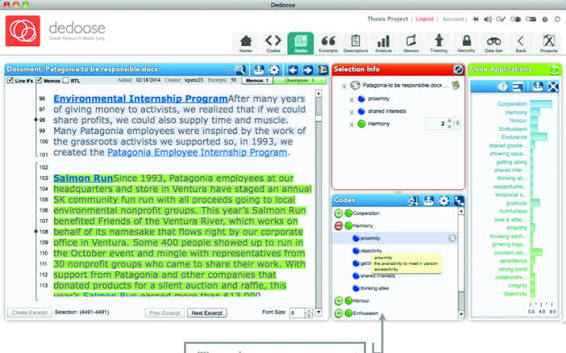
Dedoose is a cloud-based mixed-methods qualitative analysis platform popular in academic research, particularly in health sciences, education, and social work. Its fully web-based architecture makes it accessible without desktop installation.
Dedoose's pricing model is its key advantage — monthly per-user pricing starting under $13 makes it the most affordable dedicated QDAS tool in this list. However, its analysis capabilities are basic compared to both traditional QDAS tools and AI-native platforms.
The interactive visualization features are a strong point — code co-occurrence charts and descriptor-by-code matrices help researchers spot patterns across mixed-methods datasets. But reviewers consistently flag a steep learning curve and a cluttered interface that buries basic features behind dashboard layers. Dedoose is best suited for research teams on a tight budget who need basic coding and mixed-methods capabilities without investing in NVivo-tier licensing.
Dedoose Features
- Cloud-Based Access: Fully web-based — no desktop installation required
- Mixed-Methods Design: Combines qualitative coding with quantitative descriptor analysis
- Team Collaboration: Real-time collaborative coding with role-based permissions
- Media Support: Handles text, audio, video, and image data
- Descriptor-Based Analysis: Links qualitative codes to participant demographics and variables
2026 Pricing
From $12.95/month per user. No annual commitment required.
Dedoose Pros
- Most affordable QDAS tool with monthly pricing and no long-term contracts
- Fully cloud-based with no installation required
- Good for collaborative academic research teams
- Mixed-methods descriptor framework is useful for linking codes to demographics
Dedoose Cons
- Limited AI capabilities — no automated theme detection or NLP
- Interface feels dated compared to modern platforms
- Smaller user community means fewer training resources
- Not suitable for operational CX feedback at scale
Who It's For
Academic research teams, graduate students, and small organizations needing an affordable cloud-based QDAS tool for mixed-methods projects.
G2 Rating
Dedoose — 3.7/5 (14 reviews)
9. QDA Miner
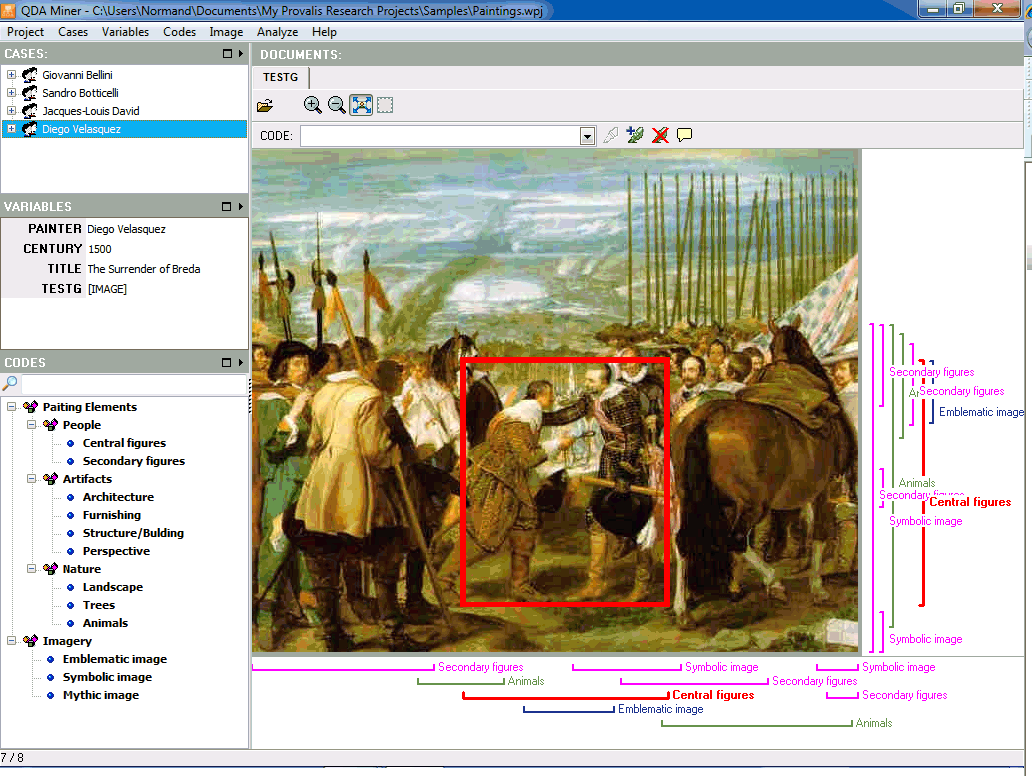
QDA Miner is an established qualitative data analysis tool from Provalis Research that offers both a free version (QDA Miner Lite) and a professional version. It is one of the few QDAS tools with a genuinely free tier, making it a popular entry point for students and small-budget research projects.
The professional version integrates with WordStat for text mining and Simstat for statistical analysis, creating a more complete research toolkit. However, QDA Miner's interface and workflow feel distinctly traditional — this is a tool built for desktop-based academic research, not modern CX feedback analysis.
QDA Miner Lite deserves specific attention because it is the best genuinely free qualitative coding tool available. It supports up to an unlimited number of documents and codes, with text search and retrieval, Boolean queries, and basic coding frequency analysis. The limitation is that Lite lacks the advanced add-ons (WordStat, Simstat) and the professional version's import flexibility. For students writing a thesis or small teams with minimal budgets, QDA Miner Lite is a practical starting point before investing in a paid tool.
QDA Miner Features
- Free Lite Version: Fully functional free edition for basic qualitative coding
- Manual Coding Tools: Standard hierarchical codebook, text retrieval, and annotation
- WordStat Integration: Add-on for automated content analysis, text mining, and keyword extraction
- Geographic Mapping: GIS integration for mapping coded segments to geographic locations
- Multi-Format Import: Supports documents, surveys, PDFs, HTML, and database connections
2026 Pricing
Free (QDA Miner Lite). QDA Miner Pro from $1,695 (one-time license).
QDA Miner Pros
- Free Lite version is genuinely useful for basic qualitative coding
- One-time Pro license avoids recurring subscription costs
- WordStat add-on provides basic text mining capabilities
- Good for budget-conscious academic researchers
QDA Miner Cons
- Interface feels dated and has a learning curve
- Free version has meaningful limitations (fewer code types, smaller project sizes)
- No AI-powered theme detection or sentiment analysis in the core tool
- No cloud or collaboration features
Who It's For
Students, independent researchers, and budget-conscious teams that need basic qualitative coding tools — especially those who want to start with the free Lite version.
G2 Rating
QDA Miner — 4.3/5 (15 reviews)
10. Delve
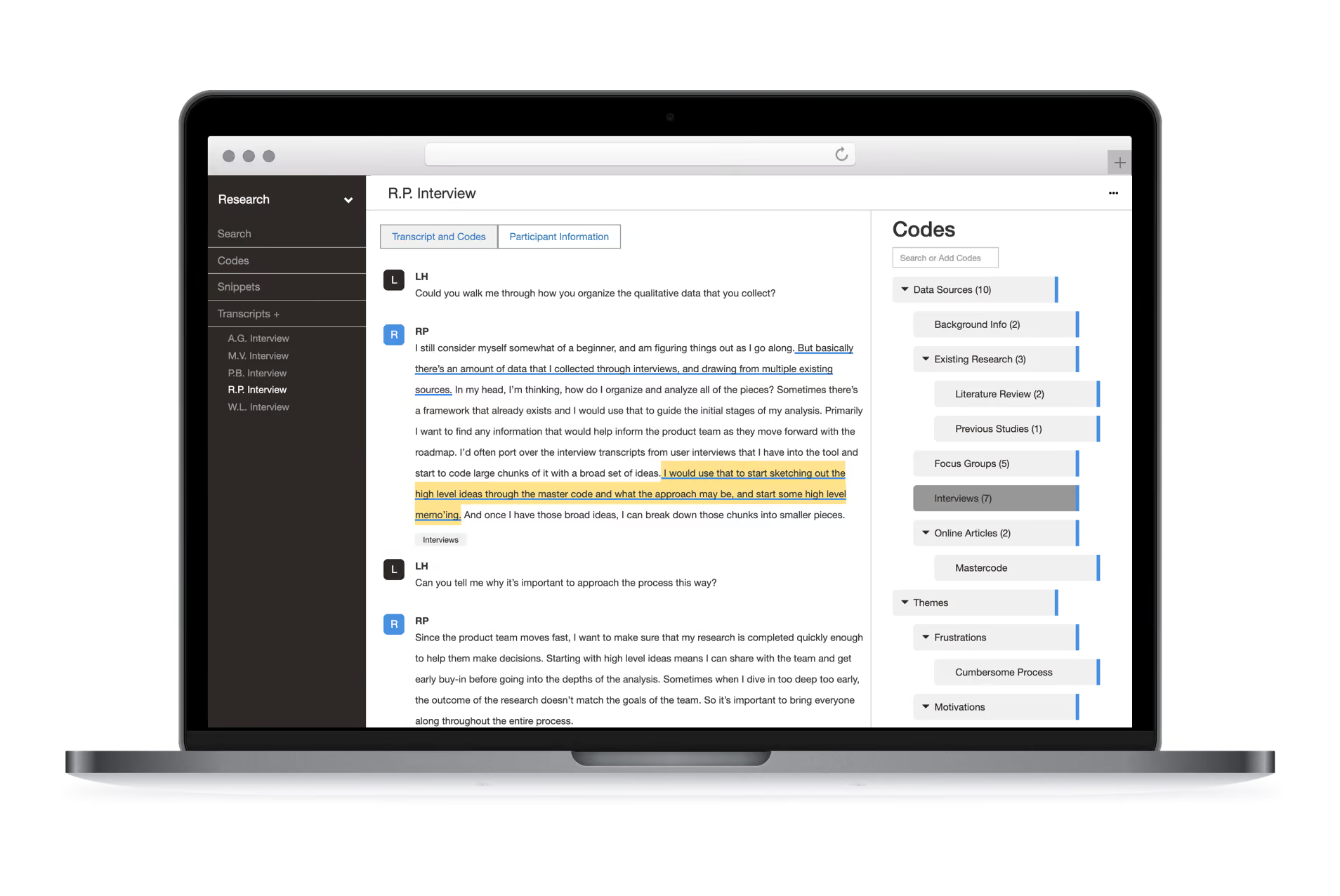
Delve is a lightweight, modern qualitative analysis tool designed to make thematic analysis accessible to students, independent researchers, and small teams. It is one of the simplest tools in this list to get started with, offering AI-assisted code suggestions alongside a clean manual coding interface.
Delve's strength is simplicity. It strips away the complexity of tools like NVivo and MAXQDA, focusing on the core thematic analysis workflow: upload transcripts, code segments, generate themes, and export findings. For researchers who find traditional QDAS tools overwhelming, Delve is a compelling alternative.
The student pricing ($18/month) makes it one of the most accessible paid options for dissertation research. Collaborative features allow research teams to code the same dataset together, with code co-occurrence matrices that reveal overlapping patterns. Delve also includes a free qualitative research course — a practical resource for first-time researchers who need methodology guidance alongside the software.
Delve Features
- AI-Assisted Coding: Suggests codes based on text content to speed up initial coding
- Thematic Analysis Focus: Purpose-built for the thematic analysis workflow
- Clean Interface: Minimal, distraction-free design for focused coding work
- Collaboration: Shared projects for team-based analysis
- Export and Reporting: Export coded data, theme summaries, and audit trails
2026 Pricing
From $18/month (student pricing); $50/month standard. Free trial available.
Delve Pros
- Simplest QDAS tool to learn and get started with
- Student pricing makes it very accessible for academic use
- AI-assisted coding reduces initial time investment
- Clean, modern interface compared to traditional QDAS tools
Delve Cons
- Limited to text-based thematic analysis — no audio, video, or image coding
- Lacks the depth of NVivo or MAXQDA for complex multi-method projects
- Small user base and limited integration options
- Not suitable for CX feedback analysis at any scale
Who It's For
Students, independent researchers, and small teams that need a simple, affordable thematic analysis tool without the complexity of full QDAS platforms.
G2 Rating
Delve — 4.7/5 (30 reviews)
11. Quirkos
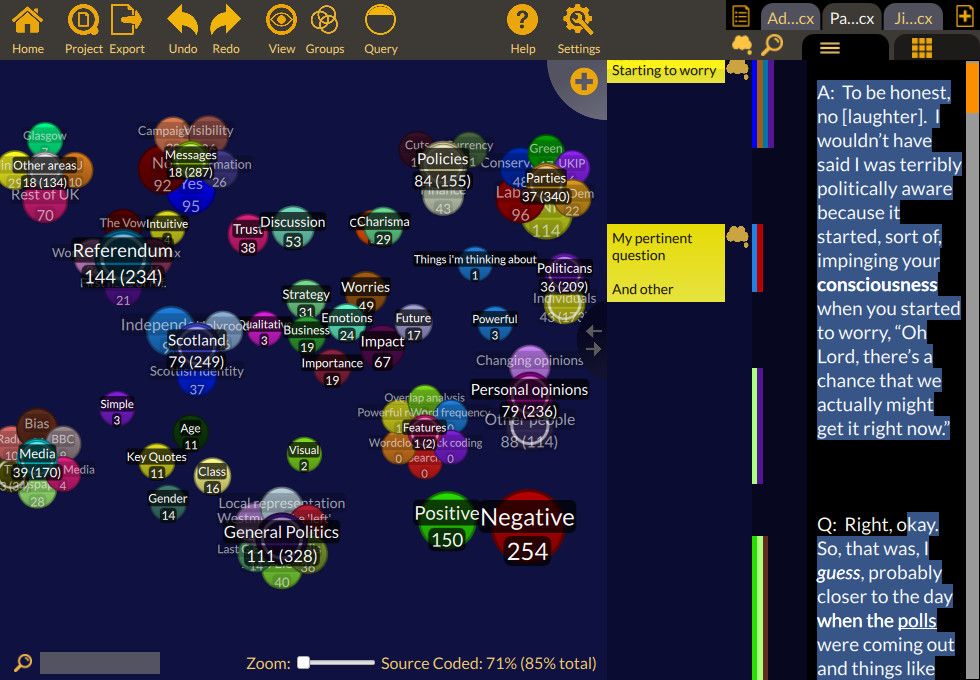
Quirkos is a visual qualitative coding tool that differentiates itself with a unique bubble-based interface. Instead of the traditional hierarchical codebook approach, Quirkos lets users drag and drop text segments onto color-coded "quirks" (bubbles) that grow in size as more data is coded to them.
This visual approach makes Quirkos particularly intuitive for researchers who are new to qualitative coding or who think visually. The one-time purchase model is also attractive for researchers who dislike subscription pricing.
Quirkos runs on Windows, Mac, and Linux — one of the few qualitative tools with genuine cross-platform desktop support. The cloud version (Quirkos Cloud) adds real-time collaboration and browser-based access. The trade-off is depth: Quirkos focuses exclusively on manual coding with no AI capabilities, no automated theme detection, and limited advanced analysis features. For simple coding projects with straightforward frameworks, that focus is an asset. For complex multi-source analysis, it feels restrictive.
Quirkos Features
- Visual Bubble Interface: Unique drag-and-drop coding with color-coded bubbles that resize based on data volume
- Simple Coding Workflow: Intuitive process that does not require QDAS training
- One-Time Purchase Option: Perpetual license available alongside cloud subscription
- Query and Reporting: Basic text retrieval, overlap analysis, and report export
- Cross-Platform: Available on Windows, Mac, and as a cloud version
2026 Pricing
From $400 (one-time perpetual license). Cloud version also available with subscription pricing.
Quirkos Pros
- Unique visual interface makes qualitative coding intuitive and engaging
- One-time purchase option eliminates ongoing subscription costs
- Very low learning curve compared to NVivo, ATLAS.ti, or MAXQDA
- Good for teaching qualitative methods to students
Quirkos Cons
- No AI or NLP capabilities — entirely manual coding
- Limited scalability for large datasets or team projects
- Fewer features than full QDAS tools (no mixed-methods, no multi-media)
- Small user community (10 G2 reviews) limits peer validation
Who It's For
Individual researchers, educators, and students who prefer visual coding and want a simple, one-time-purchase tool for basic qualitative analysis.
G2 Rating
Quirkos — 4.6/5 (10 reviews)
12. Zonka Feedback
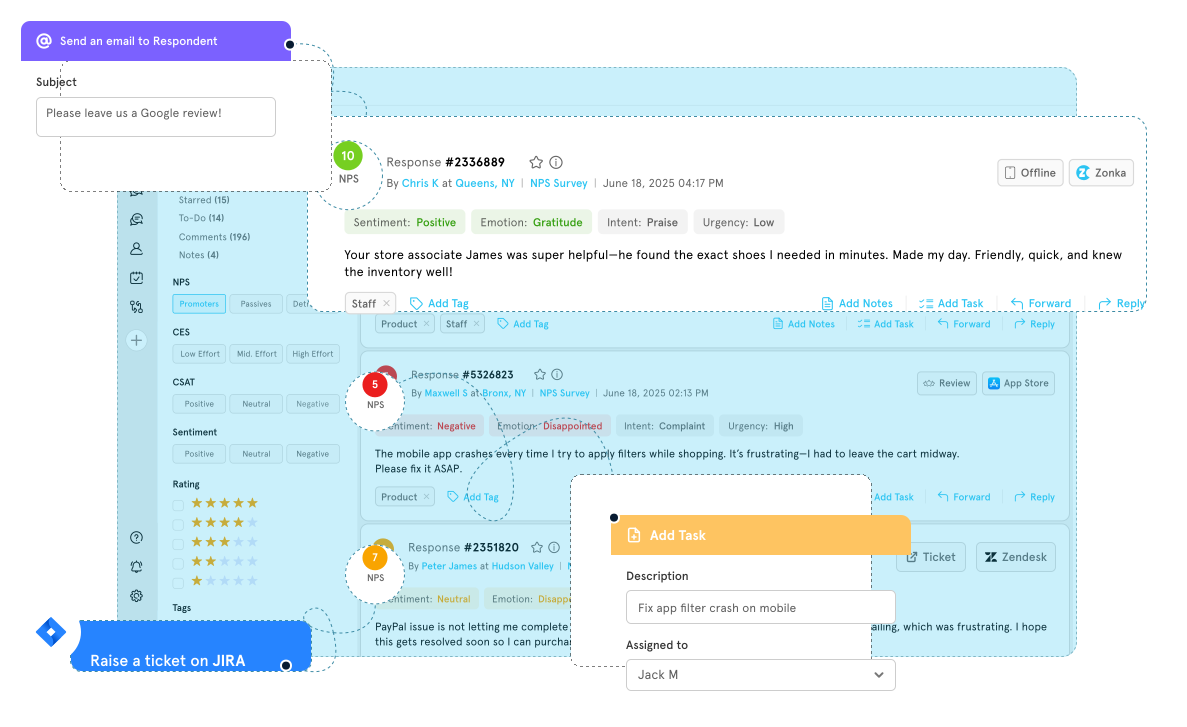
Zonka Feedback is an AI-powered customer feedback and survey platform that includes qualitative text analysis capabilities. It bridges the survey creation and qualitative analysis categories, offering a combined tool for teams that want to collect and analyze feedback in one place.
Zonka's qualitative analysis features — AI sentiment analysis, text analytics, and theme tagging — are not as deep as Chattermill's or Thematic's, but they provide useful insights for teams that primarily need a survey analysis software tool with built-in text analysis.
The platform's strength is its omnichannel feedback collection: in-app surveys, email, SMS, web widgets, and kiosk surveys all feed into one dashboard. Starting at $99/month, it is accessible for small and mid-market teams that want both survey distribution and basic qualitative analysis without paying enterprise pricing. For organizations that have outgrown basic survey tools but are not yet ready for a dedicated CX analytics platform, Zonka Feedback fills a practical middle ground.
Zonka Feedback Features
- AI Sentiment Analysis: Automated sentiment scoring on open-ended survey responses
- Text Analytics: Theme detection and keyword extraction from qualitative feedback
- Multi-Channel Surveys: Collect feedback via email, SMS, in-app, web widgets, and kiosks
- CX Metric Tracking: Built-in NPS, CSAT, and CES measurement alongside qualitative analysis
- Workflow Automation: Trigger actions based on feedback scores and sentiment
2026 Pricing
From $99/month. Free trial available.
Zonka Feedback Pros
- Combines survey creation and qualitative analysis in a single platform
- Affordable starting price for small to mid-size teams
- Multi-channel feedback collection reduces tool sprawl
- Built-in CX metrics (NPS, CSAT, CES) alongside text analysis
Zonka Feedback Cons
- Qualitative analysis depth is limited compared to dedicated platforms
- AI theme detection is basic compared to Chattermill or Thematic
- Primarily a survey tool with analysis features, not a dedicated qualitative analysis platform
- Less suited for academic research or deep qualitative coding
Who It's For
Small to mid-size teams that want to collect customer feedback and run basic qualitative analysis in a single platform without buying separate survey and analysis tools.
G2 Rating
Zonka Feedback — 4.7/5 (81 reviews)
Choosing the Right Qualitative Data Analysis Software
How do you know which qualitative data analysis software is right for your team? The answer depends on what you are analyzing, how much of it there is, and what you plan to do with the insights. Here is how to evaluate your options:
Analysis Volume and Scale: How much qualitative data do you process? If your team reviews a handful of interview transcripts per quarter, a manual QDAS tool like NVivo is fine. If you are analyzing thousands of survey responses, support tickets, and reviews every month, you need an AI-native platform like Chattermill that automates theme detection.
AI vs. Manual Coding: Do you need full control over your codebook, or do you want the tool to surface themes automatically? Academic researchers often need manual coding for methodological rigor. CX teams typically need speed and scale — making AI-native tools the better fit.
Feedback Channels: Where does your qualitative data come from? Traditional QDAS tools primarily work with uploaded documents and transcripts. Customer feedback tools and AI-native platforms connect directly to surveys, support systems, review sites, and social channels.
Integration Requirements: Does the tool need to connect to your CRM, helpdesk, BI tools, or survey platforms? Enterprise CX teams need deep integrations. Academic researchers may only need document import/export.
Business Metric Correlation: Do you need to tie qualitative themes to quantitative metrics like NPS, CSAT, or revenue? This is a key differentiator — most QDAS tools treat qualitative data in isolation, while platforms like Chattermill correlate themes with business outcomes.
Team Collaboration: Will multiple people analyze data simultaneously? Cloud-based tools with collaboration features matter for larger teams. Desktop-only tools can create workflow bottlenecks.
Budget and Pricing Model: Pricing ranges from free (QDA Miner Lite) to custom enterprise contracts. Consider whether per-user pricing, annual licenses, or volume-based pricing aligns with your team structure and budget.
Security and Compliance: Enterprise teams need SOC 2, GDPR, and potentially industry-specific compliance. Academic researchers may need data sovereignty or IRB-compliant data handling.
For CX and product teams processing operational customer feedback, AI-native platforms like Chattermill deliver the fastest time to insight. For academic researchers conducting deep qualitative studies, traditional QDAS tools provide the methodological control you need. For teams somewhere in between — like UX research or smaller product teams — tools like Dovetail and Delve offer a pragmatic middle ground.
What Are Qualitative Data Analysis AI Tools?
The qualitative data analysis software category has undergone a fundamental shift in the past five years. So what separates the new generation of AI-native tools from the CAQDAS platforms that have dominated since the 1990s?
Traditional CAQDAS tools — NVivo, ATLAS.ti, MAXQDA — were built on a code-and-retrieve model. A researcher reads a transcript, highlights passages, assigns codes manually, and then retrieves coded segments for pattern analysis. This approach works well for small datasets and methodologies that require deep interpretive judgment, but it breaks down when teams need to process thousands of feedback responses per week.
AI-native qualitative analysis tools flip this model. Instead of waiting for a human to assign codes, platforms like Chattermill use deep-learning NLP to detect themes, sentiment, and intent automatically across millions of responses. The AI learns the language patterns in your feedback data and categorizes them without a pre-built codebook. Human analysts then review, refine, and interpret the results — spending their time on strategic insight rather than manual tagging.
The practical result is a category split: traditional QDAS for research rigor, AI-native platforms for operational speed and scale. Most CX teams today need the latter. The question worth asking is whether your current tool matches the volume and velocity your team actually faces — because a tool designed for 50 interview transcripts will not keep up with 50,000 survey responses per month.
Benefits of Using Qualitative Data Analysis Software
Faster Time to Insight: Qualitative data analysis software compresses the cycle from raw feedback to actionable insight. AI-native tools like AI sentiment analysis tools can process thousands of responses in minutes, compared to weeks of manual coding.
Consistent and Scalable Analysis: Human coding is inherently subjective — different analysts code the same text differently. Software-driven analysis applies consistent logic across every response, improving reliability as data volumes grow.
Theme Discovery You Would Miss Manually: AI-powered tools surface emerging themes and patterns that human analysts might overlook when working through data sequentially. Text analysis software can detect weak signals across large datasets that are invisible in manual review.
Connection Between Qualitative and Quantitative Data: The most valuable insight often comes from connecting what customers say (qualitative) with how they score their experience (quantitative). Tools that correlate themes with NPS, CSAT, or revenue turn feedback into a business decision-making input.
Real-Time Monitoring and Alerting: AI-native CX analytics tools provide continuous monitoring of feedback streams, alerting teams to emerging issues before they escalate — something that is impossible with periodic manual analysis.
Cross-Channel Visibility: Modern qualitative analysis platforms unify feedback from surveys, support tickets, reviews, social media, and more — enabling a unified customer experience view that siloed tools cannot provide.
Democratized Access to Customer Insights: By making qualitative analysis faster and more accessible, software-based tools extend access to customer insights software beyond dedicated research teams, enabling product managers, CX leaders, and executives to engage with customer feedback directly.
Audit Trails and Reproducibility: Both traditional QDAS and AI-native tools maintain audit trails that document how data was coded and analyzed — critical for research validity and business decision accountability.
ROI and Business Impact of Qualitative Data Analysis Software
Investing in the right qualitative data analysis software pays back quickly when teams stop guessing what customers mean and start acting on structured evidence. Here is where the impact shows up:
- Faster Time-to-Insight: AI-native tools reduce the time from feedback collection to actionable insight from weeks to hours. Teams using automated theme detection can significantly reduce manual analysis time — from weeks of manual coding to hours of AI-powered processing.
- Churn Reduction: Identifying emerging negative themes in customer feedback before they become systemic enables proactive retention. Organizations that act on feedback analytics data typically see measurable reductions in churn rates within 6-12 months.
- Product Prioritization: Qualitative analysis surfaces the specific features, friction points, and unmet needs that quantitative metrics alone cannot explain — enabling product teams to prioritize based on customer evidence rather than assumption.
- Operational Efficiency: Centralizing qualitative analysis in a single platform eliminates the manual work of exporting, tagging, and synthesizing feedback across spreadsheets and disconnected tools.
- Customer Satisfaction Improvement: Teams that systematically analyze open-ended feedback and close the loop on emerging themes see sustained improvements in NPS, CSAT, and CES scores over time.
FAQ: Qualitative Data Analysis Software
What Is the Most Popular Qualitative Data Analysis Software?
In academic and social science research, NVivo and MAXQDA are the most widely adopted qualitative data analysis software tools. They have been the standard for university-based qualitative research for over two decades. For CX and business teams, Chattermill and Qualtrics XM are among the most popular choices because they combine qualitative analysis with operational feedback workflows and business metric correlation. The "most popular" depends entirely on your context — academic vs. business, manual vs. AI-driven, project-based vs. continuous.
What Is CAQDAS Software?
CAQDAS stands for Computer-Assisted Qualitative Data Analysis Software. It is the academic term for software tools that support the process of coding qualitative data — organizing, annotating, and interpreting unstructured text, audio, video, and image data. Traditional CAQDAS tools include NVivo, ATLAS.ti, MAXQDA, and Dedoose. The term is increasingly outdated as AI-native platforms like Chattermill automate the analysis process rather than merely assisting it.
Can AI Replace Manual Qualitative Coding?
For operational CX feedback analysis, AI has largely replaced manual coding in practice. Platforms like Chattermill and Thematic process millions of responses with automated theme detection, sentiment analysis, and intent classification — delivering results that would take human coders months. For academic qualitative research, the answer is more nuanced. Methodologies like grounded theory and interpretive phenomenology require human judgment in coding that AI cannot fully replicate. The practical middle ground: AI handles the volume and pattern detection, while researchers apply interpretive judgment to the themes and insights that emerge.
What Is the Best Free Qualitative Data Analysis Software?
QDA Miner Lite is the best genuinely free qualitative data analysis software for basic coding projects. It provides core coding functionality without a time limit or paywall. Dedoose offers a low-cost monthly option starting at $12.95/month with no annual commitment. For students, Delve offers pricing from $18/month. If you need AI-powered analysis at no cost, most commercial platforms (including Chattermill and Dovetail) offer free trials or demo environments that let you evaluate before committing.
What Is the Best Qualitative Data Analysis Tool for Customer Experience Teams?
Chattermill is the best qualitative data analysis tool for CX teams. It is purpose-built for analyzing customer feedback at scale — automatically detecting themes, sentiment, and intent across surveys, support tickets, reviews, and social feedback, then correlating those insights with NPS, CSAT, and CES metrics. For CX teams evaluating survey analysis tools and feedback analysis tools, Chattermill delivers the AI-native speed, multi-channel coverage, and business metric integration that traditional QDAS tools were never designed to provide.
Get Started with Chattermill
The qualitative data analysis software market is no longer just about academic transcript coding. For CX and product teams, the tools you choose determine whether customer feedback sits in a spreadsheet or drives strategic decisions.
If you are an enterprise CX team processing high-volume feedback from multiple channels, Chattermill gives you AI-native analysis that automatically surfaces themes, detects sentiment, and ties insights directly to business metrics like NPS and CSAT. If you are an academic researcher, NVivo and MAXQDA provide the methodological depth you need. And if you are a product or UX team looking for a collaborative research workspace, Dovetail and Delve offer accessible entry points.
The question is not whether to use qualitative data analysis software — it is whether your current tool matches the scale and speed your team actually needs. If you are still manually coding feedback or working with a tool that was not built for operational CX, it is time to see what AI-native analysis looks like in practice.
Book a Demo to see how Chattermill turns customer feedback into actionable intelligence.



See Chattermill in action on your own feedback
Book a demo


