


15 Best Survey Analysis Tools in 2026 (Updated with 2026 Pricing)

.avif)

The CX intelligence
platform that's AI-native by design
Book a demoQuick Summary
You already collect surveys. The real question is whether your team can actually do something with the data that comes back.
Most organizations sit on thousands of open-ended responses, NPS comments, and CSAT scores spread across three or four platforms. They export to spreadsheets, tag manually, and spend weeks producing reports that are outdated before they reach a stakeholder's inbox. The best survey analysis tools in 2026 eliminate that bottleneck entirely — using AI to unify, categorize, and surface patterns across every feedback channel in real time.
So what is the best tool to analyze customer surveys? It depends on your team's scale, the complexity of your feedback data, and whether you need pure analysis or end-to-end survey creation. After evaluating 15 platforms across AI depth, integration breadth, open-text analysis, and pricing transparency, our top recommendation is Chattermill for enterprise teams that need to unify multi-channel feedback at scale — followed by Qualtrics for research-heavy organizations and Thematic for teams focused on theme extraction and trend tracking.
This guide breaks down every tool with honest pros, cons, pricing, and use-case fit so you can make the right call for your team.
| # | Tool | Best For |
|---|---|---|
| 1 | Chattermill | Enterprise multi-channel feedback unification and AI-driven CX analytics |
| 2 | Qualtrics | Research-grade statistical analysis and advanced survey design |
| 3 | Thematic | AI theme extraction and trend tracking across feedback sources |
Key Takeaways
- Survey analysis tools range from lightweight form builders with basic reporting to enterprise AI platforms that unify feedback from surveys, support tickets, reviews, and social media into a single view.
- The best software for multi-channel feedback data analysis combines advanced NLP, real-time dashboards, and native integrations with the platforms your team already uses — rather than forcing manual data exports.
- AI-driven NLP — including aspect-level sentiment detection and unsupervised theme extraction — has become the baseline expectation for enterprise buyers. Tools that still rely on keyword matching or manual tagging can't keep pace with the volume and nuance of modern feedback.
- Pricing models vary wildly: pay-per-response, per-seat, usage-based, and custom enterprise contracts. The cheapest plan isn't always the cheapest in practice — watch for per-response fees that scale with volume.
- Every tool in this list has at least one meaningful limitation. We include cons for every platform, including our top pick.
Why Listen to Us
Chattermill analyzes customer feedback at scale for brands including Uber, HelloFresh, H&M, and Booking.com. Our team works with CX and VoC leaders daily, giving us direct visibility into which survey analysis tools actually perform at enterprise volume — and which ones fall short once feedback grows beyond a few hundred responses per month.
What Are Survey Analysis Tools?
Survey analysis tools are software platforms that help teams collect, process, and interpret survey response data — turning raw answers into structured insights that inform business decisions. At their simplest, these tools aggregate quantitative scores (like NPS or CSAT ratings) into dashboards and trend lines. At their most advanced, they apply natural language processing to open-ended responses, automatically detecting themes, sentiment shifts, and emerging issues across thousands of comments in dozens of languages.
The category has expanded significantly. Where survey analysis once meant crosstabs and frequency tables, today's tools span the full spectrum: AI-powered text analytics platforms that unify feedback from multiple channels, statistical research suites built for conjoint analysis and significance testing, and lightweight builders that handle both survey creation and basic reporting. The right choice depends on whether your team needs deep analytical power, multi-channel unification, or a simpler tool that covers creation and analysis in one place.
For a deeper look at how feedback analytics fits into your CX strategy, see our guide to customer feedback analytics.
15 Top Survey Analysis Tools: Head-to-Head Comparison
| # | Tool | Key Strengths | Best For | Pricing (2026) | G2 | AI/NLP Depth | Open-Text Analysis | Integrations |
|---|---|---|---|---|---|---|---|---|
| 1 | Chattermill | Multi-source unification, Lyra AI, impact scoring | Enterprise multi-channel feedback unification | Custom enterprise | Deep: 100+ languages, aspect-level sentiment | Advanced: theme extraction, anomaly detection | Zendesk, Salesforce, Snowflake | |
| 2 | Qualtrics | Text iQ, Experience Agents™, research-grade stats | Research-grade statistical testing | Custom enterprise | Advanced: topic/sentiment modeling | Advanced: open-text coding with stats rigor | Salesforce, SAP, Marketo | |
| 3 | SurveyMonkey Ent. | Industry benchmarks, Genius AI, team collaboration | Enterprise-grade survey workflows | Custom enterprise | Moderate: AI sentiment, auto-categorization | Moderate: keyword and sentiment-level | Salesforce, Zendesk, Tableau | |
| 4 | Thematic | Unsupervised theme discovery, KPI mapping | AI theme extraction and trend tracking | From ~$2,000/mo | Deep: trend analysis & semantic embeddings | Advanced: theme-level with impact scoring | Zendesk, Salesforce, Qualtrics | |
| 5 | SentiSum | Root-cause analysis, Kyo AI agent, real-time tagging | AI tagging and root-cause analysis for CX | From ~$3,000/mo | Deep: root-cause drill-down | Advanced: real-time narrative explanations | Zendesk, Intercom, Freshdesk | |
| 6 | MAXQDA | Qualitative coding, AI Assist, rich visualizations | Qualitative and mixed-method research | From ~$15/user/mo | Moderate: AI-assisted coding & LLM summaries | Advanced: manual + AI-assisted coding | SPSS, Excel, NVivo | |
| 7 | Crunch.io | Drag-and-drop crosstabs, version control | Crosstabs and survey weighting | Custom enterprise | Low: rules-based classification | Limited: quantitative-first focus | SPSS, Decipher, Confirmit | |
| 8 | Displayr | Automated reporting, driver analysis, R integration | Statistical analysis and reporting | Custom pricing | Moderate: text analytics via R | Moderate: categorization with stats | Q Research, SPSS, R | |
| 9 | Alchemer | Complex routing logic, survey design | Advanced survey design with analysis | From ~$55/user/mo | Low: basic sentiment models | Basic: word clouds, keyword grouping | Salesforce, HubSpot, Slack | |
| 10 | Zonka Feedback | Omnichannel collection, AI sentiment, kiosks | Omnichannel surveys with AI sentiment | From ~$49/mo | Moderate: AI sentiment analysis | Moderate: sentiment-level analysis | Salesforce, HubSpot, Zendesk | |
| 11 | Sogolytics | HIPAA/GDPR compliance, offline surveys | Multilingual surveys with compliance | From ~$99/mo | Low: basic text analytics | Basic: keyword and frequency | Salesforce, Slack, Teams | |
| 12 | Pollfish | Mobile-first panel, pay-per-response | Mobile audience targeting | Pay-per-response | Low: basic sentiment tagging | Basic: limited open-text | Google Sheets, Zapier | |
| 13 | SurveySparrow | Conversational UX, recurring surveys | Conversational surveys with CX tracking | From ~$19/mo | Low: basic sentiment | Basic: keyword tagging | Salesforce, HubSpot, Zapier | |
| 14 | Jotform | 10,000+ templates, payment integration | Form building with visual reports | From $29/mo | None (Standard AI tools coming) | None: quantitative only | Google Sheets, Salesforce | |
| 15 | Survicate | Behavior triggers, Insights Hub, Research AI chat | Behavior-triggered surveys | From ~$56/mo | Moderate: AI categorization & AI Chat | Basic: AI-powered keyword grouping | HubSpot, Salesforce, Intercom |
How We Evaluated These Tools
Choosing the right survey analysis tool means weighing factors that matter differently depending on your team's size, feedback volume, and analytical maturity. Here is how we assessed each platform in this guide:
- AI and NLP accuracy: We prioritized tools that go beyond keyword matching — looking for aspect-level sentiment analysis, unsupervised theme discovery, and the ability to process open-ended responses at scale without manual tagging frameworks.
- Open-text analysis depth: Most survey data lives in free-text fields. We evaluated how each tool handles qualitative responses: can it extract themes automatically, detect emerging issues, and distinguish between nuanced sentiment shifts?
- Integration ecosystem: A survey analysis tool that operates in isolation creates more work, not less. We assessed native integrations with survey platforms (Typeform, SurveyMonkey, Qualtrics), CRM systems (Salesforce, HubSpot), and support tools (Zendesk, Intercom).
- Multi-channel capability: The best platforms unify feedback across surveys, support tickets, online reviews, and social channels — giving teams a complete picture rather than siloed snapshots.
- Scalability: We tested whether tools that work well for 500 responses per month can handle 50,000 without degraded performance or prohibitive cost.
- Pricing transparency: Custom enterprise pricing is standard at the top end, but we flagged tools that hide pricing entirely versus those that publish starting tiers. We also noted per-response models that can spike costs unpredictably.
- User satisfaction (G2 reviews): G2 ratings provide a peer-validated signal. We referenced G2 scores and recurring themes in user reviews, weighting recent feedback over historical ratings.
This framework shaped every ranking, pro, and con in the reviews below. No tool paid for placement or a higher ranking.
Enterprise Survey Analysis Tools ($1000+/Mo or Custom Pricing)
1. Chattermill
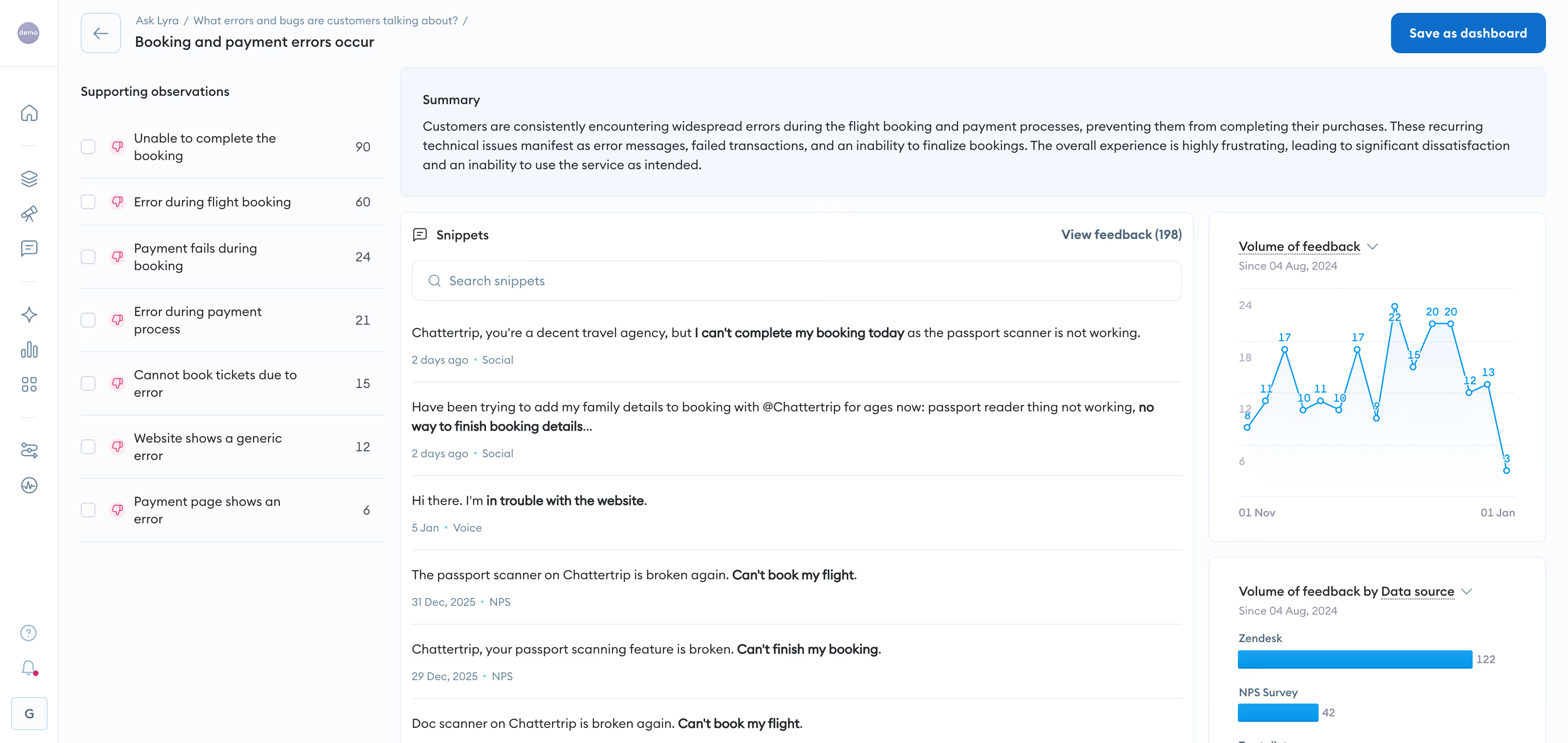
If your team needs to analyze survey responses alongside support tickets, app reviews, social comments, and chat transcripts — all in one place — Chattermill is built for exactly that workflow. Rather than treating survey data in isolation, Chattermill's approach starts from a simple premise: customer feedback doesn't live in one channel, and your analysis shouldn't either.
Chattermill's AI engine, Lyra, processes open-ended responses across more than 100 languages, automatically extracting granular themes and aspect-level sentiment without requiring manual taxonomy setup. Where most tools need weeks of configuration to build tagging frameworks, Lyra surfaces patterns from day one — identifying not just what customers are saying, but connecting those themes to business metrics like NPS, CSAT, and CES impact.
For CX and VoC teams at scale, the difference is speed to insight. Chattermill's customer feedback analytics platform delivers automated alerts when sentiment shifts on a theme, letting teams identify emerging issues early, before they widen into larger patterns. The platform integrates natively with survey tools (Typeform, SurveyMonkey, Qualtrics), support platforms (Zendesk, Intercom), and CRM systems — meaning feedback flows in automatically rather than through manual exports.
Organizations at that scale use Chattermill to shift from quarterly comment sampling to continuous, real-time visibility across every theme and anomaly — a level of coverage that manual processes simply cannot maintain. For teams managing feedback at that volume, the result is a consistent, real-time view of what customers experience and what drives it.
Chattermill Features
- Lyra AI engine: Aspect-level sentiment and theme extraction across 100+ languages with no manual taxonomy required
- Multi-channel unification: Ingests surveys, support tickets, reviews, social media, and chat data into a single analytics view
- Impact scoring: Ties customer feedback themes directly to NPS, CSAT, and CES movements
- Anomaly detection: Automated alerts when sentiment shifts significantly on any theme or segment
- Custom dashboards: Role-specific views for CX, product, and executive teams
- Native integrations: Typeform, SurveyMonkey, Qualtrics, Zendesk, Intercom, Salesforce, and more
2026 Pricing
Custom enterprise pricing. Book a Demo for a tailored quote based on feedback volume and data sources.
Chattermill Pros
- Unifies feedback from multiple channels into a single analytical view — eliminates the "survey silo" problem
- AI-driven theme extraction works out of the box without weeks of manual taxonomy setup
- Connects qualitative feedback directly to CX metrics (NPS, CSAT, CES) for impact measurement
- Scales to millions of responses across 100+ languages
- MCP integration (Claude, ChatGPT, Cursos and other) and AI agent workflows
- Strong integration ecosystem reduces manual data handling
Chattermill Cons
- Custom pricing means no self-serve trial — enterprise sales process required
- Best suited for teams with meaningful feedback volume; smaller teams may not need the depth
- Dashboard customization has a learning curve for first-time users
Who It's For
Enterprise CX, VoC, and product teams that need to unify multi-channel feedback and measure its impact on business metrics at scale.
G2 Rating
Chattermill G2 Score: 4.5/5
2. Qualtrics
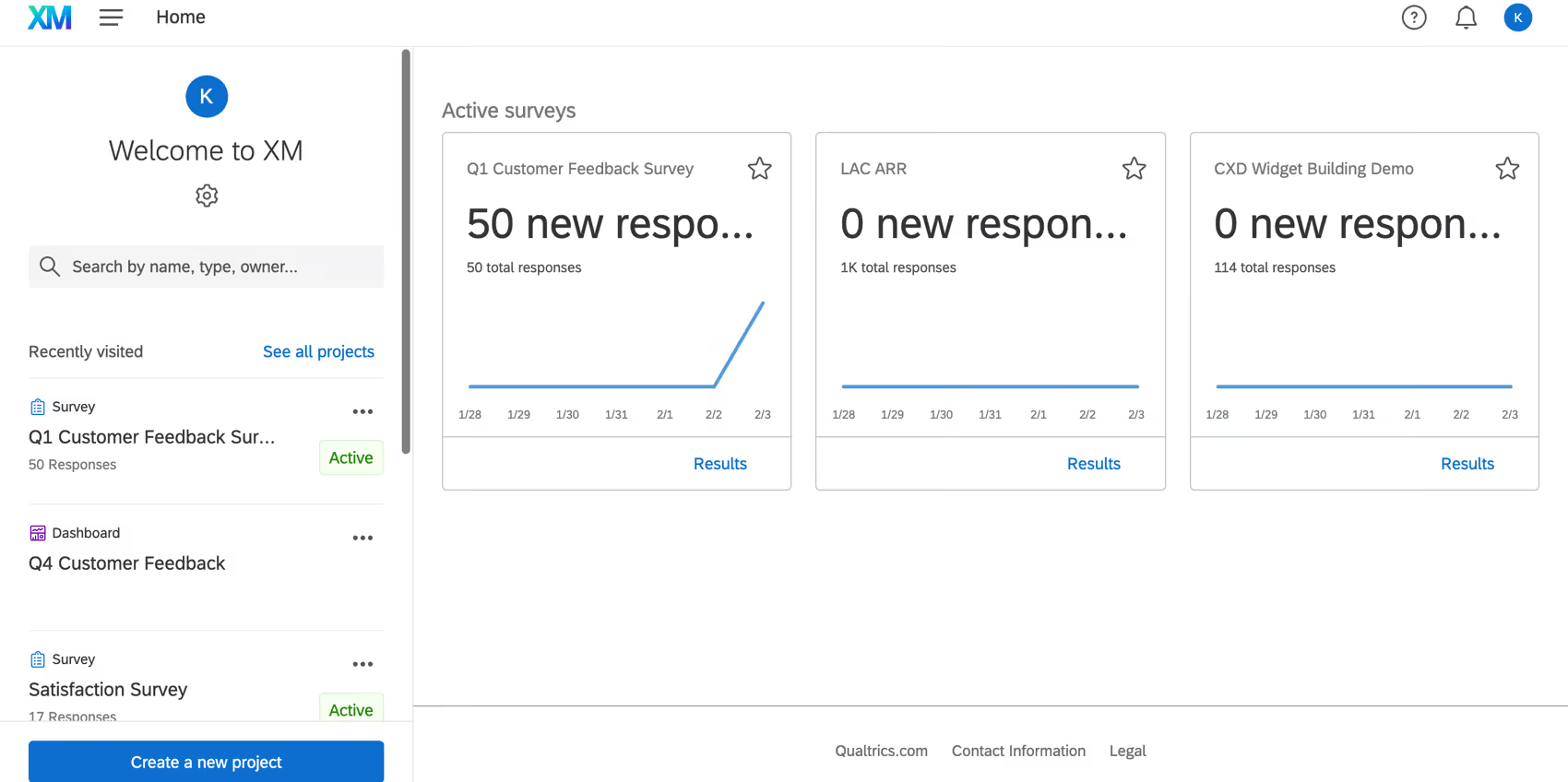
Qualtrics approaches survey analysis from the research side — offering statistical rigor that most feedback analytics platforms don't attempt. If your team runs conjoint analysis, MaxDiff studies, or needs significance testing on segmented survey data, Qualtrics is the established standard.
The platform's Text iQ module applies NLP to open-ended responses, grouping them into topics with sentiment scoring. It's capable, though it operates within Qualtrics' broader experience management ecosystem rather than as a standalone text analytics engine. Where Qualtrics excels is in the depth of its quantitative analysis: crosstabs, regression, weighting, and advanced survey logic that supports complex research designs.
Qualtrics Features
- Text iQ: NLP-driven topic and sentiment analysis for open-ended survey responses
- Advanced statistical testing: Conjoint, MaxDiff, significance testing, regression analysis
- Survey design engine: Complex branching, piping, and display logic for sophisticated research
- Experience management suite: Combines survey analysis with employee, product, and brand experience modules
- Enterprise security: SOC 2, FedRAMP, GDPR compliance
2026 Pricing
Custom enterprise pricing. Academic pricing available for universities and research institutions.
Qualtrics Pros
- Research-grade statistical capabilities that few competitors match
- Comprehensive survey creation and analysis in a single platform
- Strong academic and research community with established methodologies
- Text iQ adds NLP capability without requiring a separate tool
Qualtrics Cons
- Complexity means a significant onboarding and training investment
- Text analytics (Text iQ) is competent but not as deep as dedicated NLP platforms for open-text analysis
- Pricing is opaque and typically high — even for mid-sized organizations
- The platform's breadth can feel bloated for teams that only need survey analysis
Who It's For
Research teams, insights departments, and large enterprises that need statistical rigor alongside survey creation and text analytics.
G2 Rating
Qualtrics G2 Score: 4.4/5
3. SurveyMonkey Enterprise

SurveyMonkey is the name most people associate with online surveys, and the Enterprise tier adds analytical capabilities that the free or Team plans lack. AI-powered sentiment tagging, industry benchmarking, and enterprise access controls make it a viable choice for organizations that want survey creation and analysis in one familiar platform.
The platform's strength is accessibility: most team members can build, distribute, and analyze surveys without training. The trade-off is analytical depth — SurveyMonkey's text analysis is sentiment-level rather than theme-level, and multi-channel unification isn't a core capability.
SurveyMonkey Enterprise Features
- AI sentiment tagging: Automated sentiment classification on open-ended responses
- Industry benchmarking: Compare results against SurveyMonkey's benchmark database
- Enterprise access controls: Role-based permissions, SSO, HIPAA compliance
- Survey templates: Extensive library for NPS, CSAT, employee engagement, and market research
- Collaboration tools: Shared workspaces, commenting, and approval workflows
2026 Pricing
Custom enterprise pricing. Individual and Team plans available from ~$25/user/mo.
SurveyMonkey Enterprise Pros
- Nearly universal brand recognition reduces adoption friction
- End-to-end survey creation and analysis in one platform
- Strong compliance credentials (HIPAA, GDPR)
- Industry benchmarking provides useful context for results
SurveyMonkey Enterprise Cons
- Open-text analysis stays at sentiment level — limited theme extraction compared to dedicated AI platforms
- Multi-channel feedback unification isn't a core capability
- Enterprise pricing is a significant jump from Team plans
- Advanced analytics require workarounds or third-party integrations
Who It's For
Organizations that want familiar survey creation with enterprise-grade access controls and basic analysis in one platform.
G2 Rating
SurveyMonkey Enterprise G2 Score: 4.4/5
4. Thematic
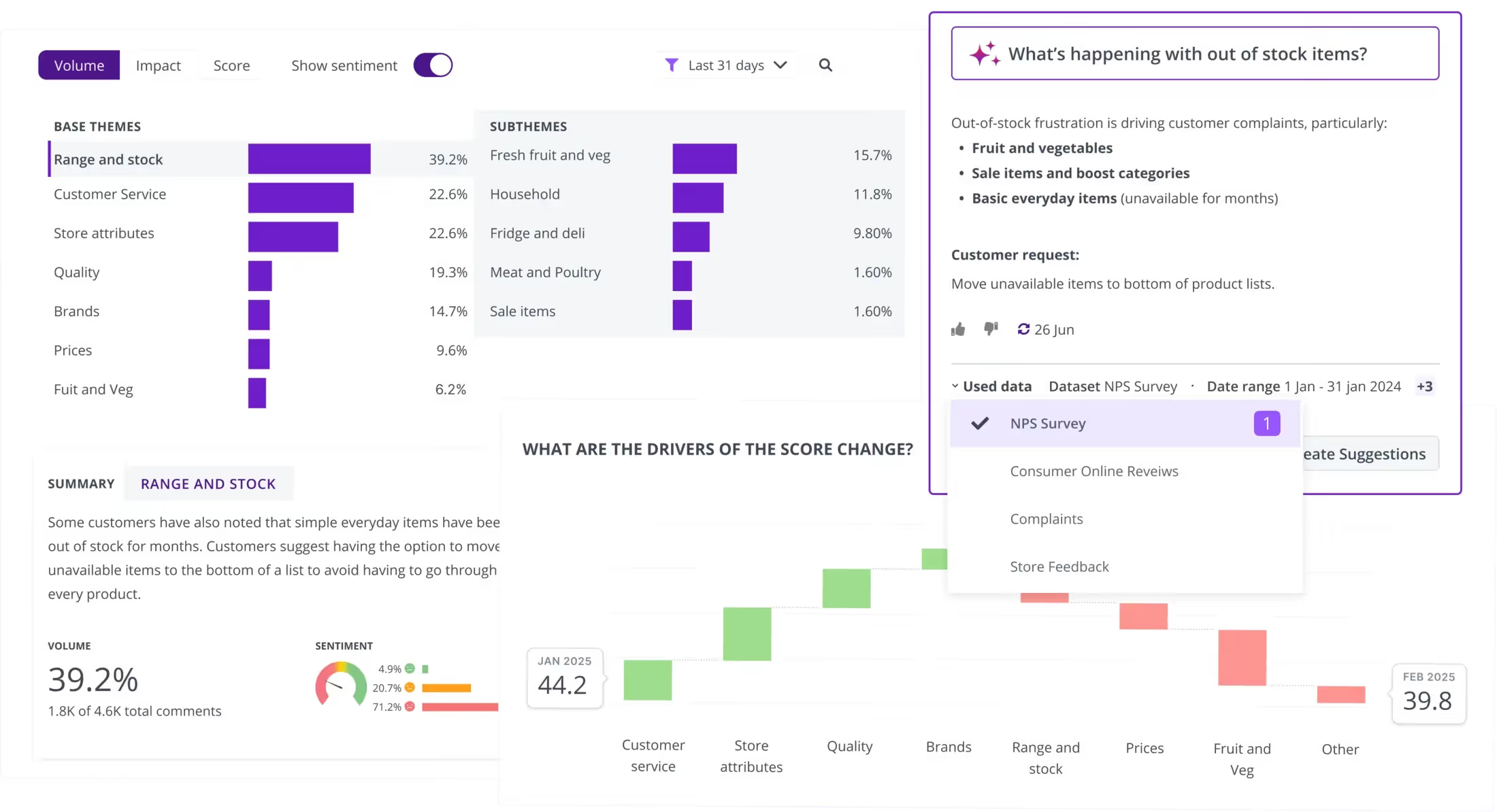
Thematic focuses on one thing and does it well: extracting themes from unstructured feedback and tracking how those themes change over time. The platform uses unsupervised AI to discover themes without pre-built taxonomies, then layers on trend tracking and KPI impact measurement.
For teams drowning in open-ended responses and needing to show stakeholders "here's what changed this quarter and why it matters," Thematic delivers that narrative with minimal manual effort. (For a detailed comparison, see Chattermill vs Thematic.)
Thematic Features
- Unsupervised theme discovery: AI identifies themes without predefined categories
- Trend tracking: Monitors theme frequency and sentiment over time
- KPI impact scoring: Connects feedback themes to business metric movements
- Data source integrations: Zendesk, Medallia, Salesforce, Qualtrics, SurveyMonkey
- Stakeholder reporting: Automated summaries and visual dashboards
2026 Pricing
From approximately $1,000/mo. Custom pricing based on data volume.
Thematic Pros
- Theme extraction works without manual setup or taxonomy building
- Strong trend visualization shows how feedback patterns shift over time
- Connects themes to business outcomes, not just frequency counts
- Integrates with major survey and CX platforms
Thematic Cons
- Entry price point puts it out of reach for smaller teams
- Focuses primarily on text analytics — not a survey creation tool
- Theme granularity can require tuning for niche industries
Who It's For
CX and insights teams that need automated theme extraction and trend tracking across multiple feedback sources.
G2 Rating
Thematic G2 Score: 4.7/5
5. SentiSum
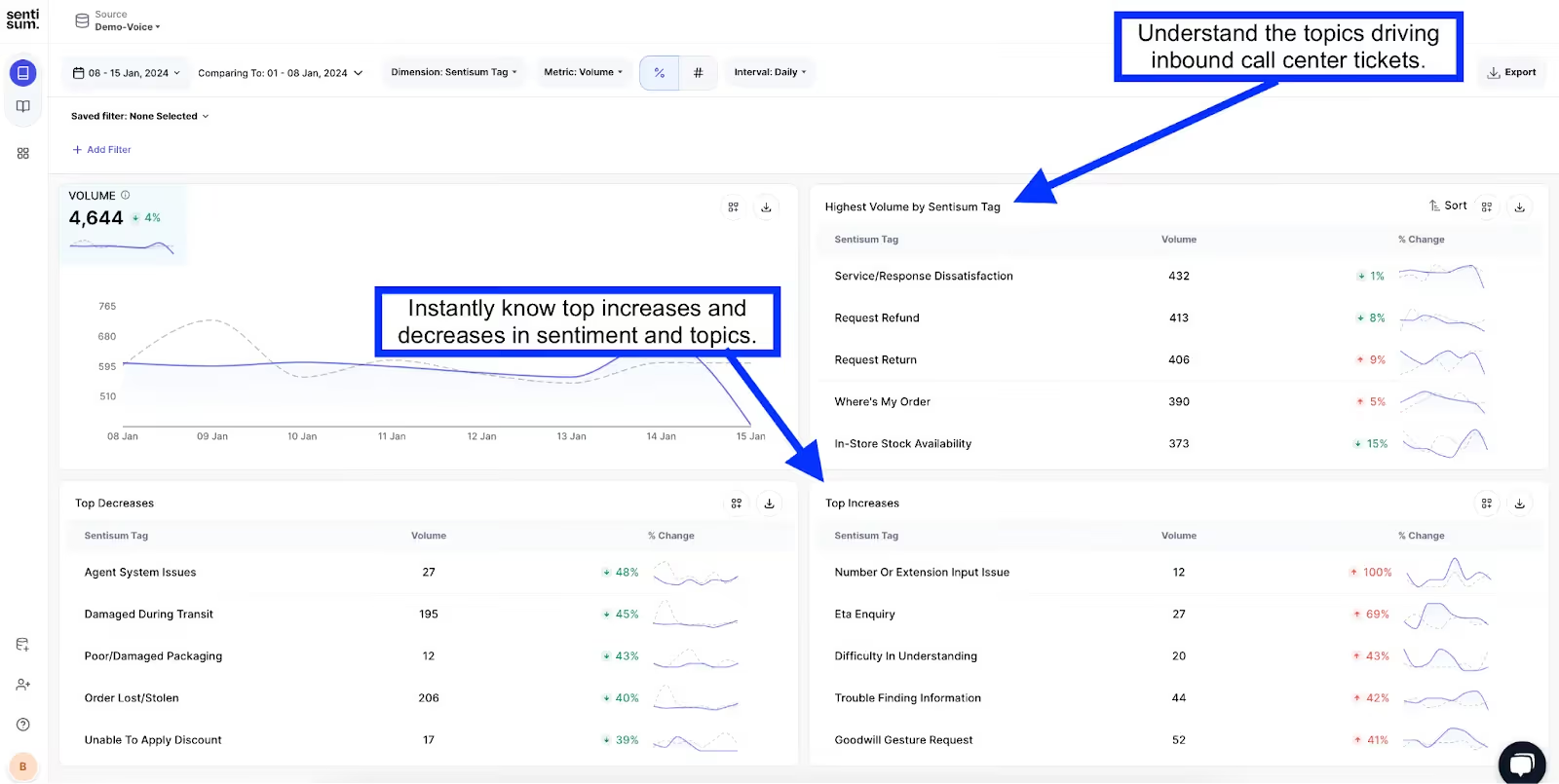
SentiSum specializes in real-time AI tagging and root-cause analysis, primarily for support and CX teams. The platform automatically categorizes incoming feedback (surveys, tickets, chat) with granular topic and sentiment tags, then surfaces the root causes driving negative experiences.
Where SentiSum differentiates is speed: dashboards update in real time, and the AI tagging model adapts to your specific business context rather than relying on generic sentiment dictionaries. Teams focused on support analytics will find SentiSum's approach particularly relevant.
SentiSum Features
- AI auto-tagging: Granular topic and sentiment classification tuned to your business
- Root-cause analysis: Identifies the underlying drivers behind negative feedback trends
- Real-time dashboards: Live views of feedback volume, sentiment, and emerging topics
- Multi-channel ingestion: Surveys, support tickets, reviews, live chat
- Custom reporting: Scheduled reports and stakeholder-ready exports
2026 Pricing
From approximately $3,000/mo. Custom pricing based on volume and channels.
SentiSum Pros
- Real-time tagging means teams see issues as they emerge, not weeks later
- Root-cause analysis goes beyond "what" to "why"
- AI model adapts to your specific product and business context
- Strong support-channel integrations (Zendesk, Intercom, Freshdesk)
SentiSum Cons
- High entry price makes it inaccessible for most mid-market teams
- Primarily CX/support-focused — less suited for market research use cases
- Onboarding requires initial model training period
Who It's For
CX and support teams at scale that need real-time feedback categorization and root-cause identification.
G2 Rating
SentiSum G2 Score: 4.7/5
6. MAXQDA

MAXQDA takes a fundamentally different approach: it's a qualitative and mixed-method research tool, not a SaaS analytics dashboard. Researchers manually code responses (with AI-assisted suggestions), build codebooks, and conduct rigorous qualitative analysis on interview transcripts, open-ended survey responses, and focus group data.
If your analysis needs to withstand academic or regulatory scrutiny, MAXQDA provides the methodological framework that automated platforms don't.
MAXQDA Features
- Qualitative coding: Manual and AI-assisted coding with customizable codebooks
- Mixed-method analysis: Combines qualitative coding with quantitative data analysis
- Visual tools: Code maps, document portraits, and concept mapping
- Team collaboration: Multi-user projects with inter-coder reliability testing
- Wide format support: Text, PDFs, images, audio, video transcripts
2026 Pricing
From approximately $15/user/mo for academic licenses. Professional licenses priced higher — check maxqda.com for current tiers.
MAXQDA Pros
- Gold standard for qualitative research rigor
- Supports mixed-method designs that combine quant and qual
- Academic pricing makes it accessible for research institutions
- Inter-coder reliability testing ensures analytical consistency
MAXQDA Cons
- Steep learning curve for teams without qualitative research training
- Manual coding is time-intensive, even with AI assistance
- Not designed for real-time dashboards or automated feedback flows
- Desktop-first experience (though cloud options are expanding)
Who It's For
Academic researchers, UX research teams, and analysts who need rigorous qualitative coding and mixed-method analysis.
G2 Rating
MAXQDA G2 Score: 4.5/5
7. Crunch.io

Crunch.io is purpose-built for market research survey analysis — specifically, the kind of weighted crosstab analysis that research agencies and insights teams run daily. If your workflow involves weighting survey data, running significance tests across demographic segments, and producing polished crosstab reports, Crunch.io streamlines that entire process.
Crunch.io Features
- Drag-and-drop crosstabs: Build and iterate on cross-tabulations without coding
- Advanced weighting: Custom weighting schemes for representative analysis
- Significance testing: Automated statistical testing across segments
- Collaborative dashboards: Share interactive views with clients and stakeholders
- SPSS/CSV import: Ingest data from standard research formats
2026 Pricing
Custom enterprise pricing. Contact Crunch.io for a quote.
Crunch.io Pros
- Purpose-built for the crosstab-heavy workflows market researchers actually run
- Weighting and significance testing are first-class features, not afterthoughts
- Collaborative dashboards reduce the "export to PowerPoint" cycle
- Clean interface despite complex underlying functionality
Crunch.io Cons
- Narrow focus — not useful for teams outside market research workflows
- No NLP or open-text analysis capabilities
- Custom pricing with no published tiers
Who It's For
Market research agencies and insights teams that need weighted crosstab analysis and client-facing dashboards.
G2 Rating
Crunch.io G2 Score: 4.3/5
8. Displayr
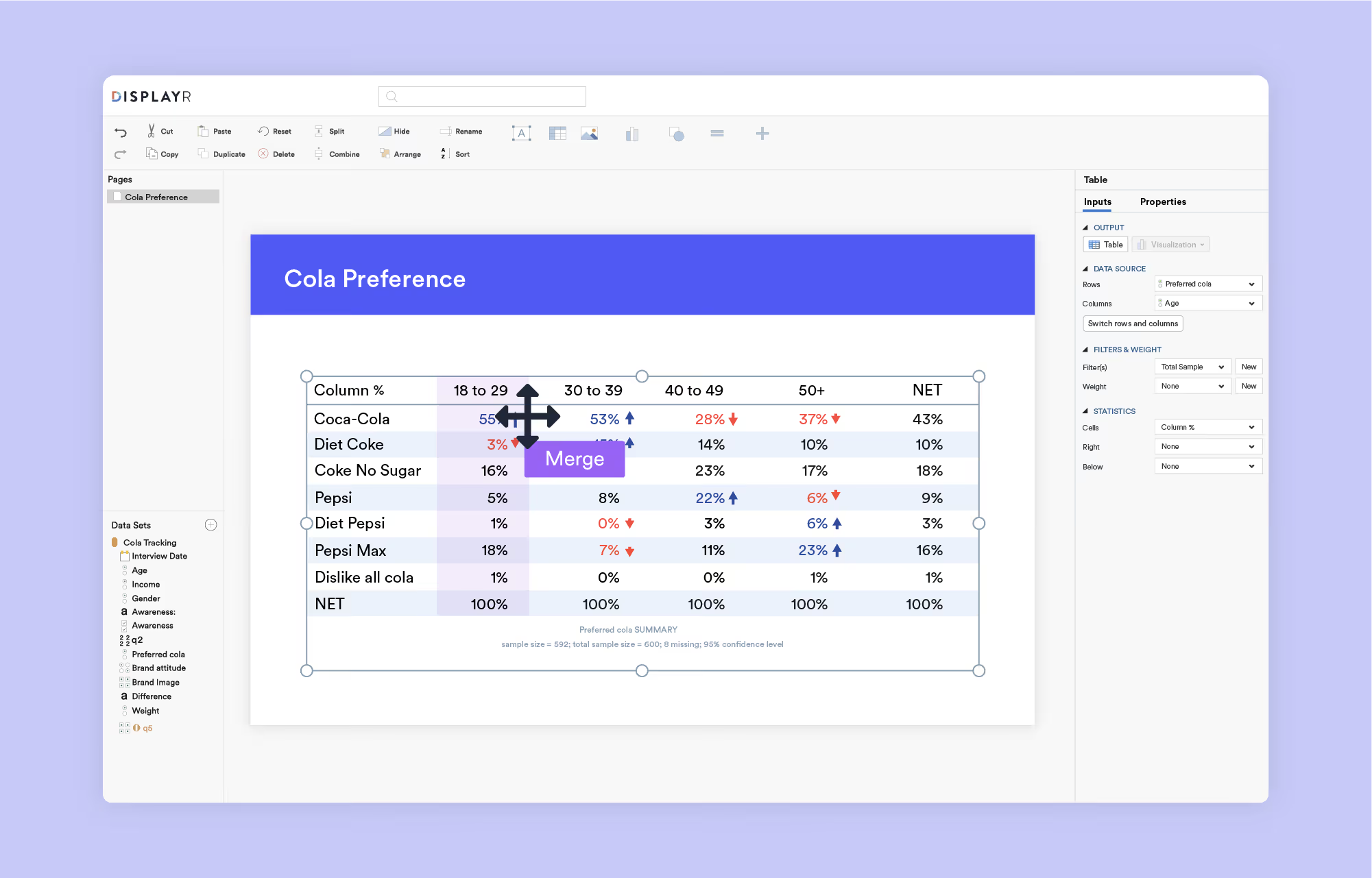
Displayr combines statistical analysis, automated reporting, and data visualization in a platform designed for research professionals. It integrates R scripting for advanced analysis while keeping point-and-click workflows available for less technical users. Driver analysis — identifying which factors most influence satisfaction or loyalty — is a standout capability.
Displayr Features
- Driver analysis: Identifies key drivers of satisfaction, loyalty, and churn
- Automated reporting: Scheduled, templated reports that update with new data
- Built-in R integration: Run custom statistical models without leaving the platform
- Text analytics: Categorization and sentiment analysis for open-ended responses
- Visualization engine: Interactive charts, tables, and infographics
2026 Pricing
Custom pricing. Contact Displayr for a quote based on team size and usage.
Displayr Pros
- Bridges the gap between point-and-click analysis and R-powered statistical modeling
- Automated reporting saves significant time on recurring deliverables
- Driver analysis is a genuine differentiator for CX-focused teams
- Handles both quantitative and qualitative data
Displayr Cons
- Steeper learning curve than simpler tools, especially for R-based features
- Custom pricing with no published starting tiers
- Interface can feel dense for users coming from lighter platforms
Who It's For
Research professionals and insights teams that need statistical depth, driver analysis, and automated reporting in one tool.
G2 Rating
Displayr G2 Score: 4.5/5
Mid-Tier Survey Analysis Tools ($50-$1000/Mo)
9. Alchemer

Alchemer (formerly SurveyGizmo) targets teams that need advanced survey logic without enterprise-tier pricing. The platform supports complex routing, branching, and customization — making it popular with product teams and researchers who build sophisticated multi-path surveys. Analysis capabilities are functional but basic compared to dedicated analytics platforms.
Alchemer Features
- Advanced survey logic: Complex branching, skip logic, piping, and custom scripting
- White-labeling: Custom branding for surveys and reports
- Workflow automation: Trigger actions based on response data
- Built-in reporting: Cross-tabulation, filtering, and data export
- Integration ecosystem: Salesforce, HubSpot, Slack, Webhooks, Zapier
2026 Pricing
From approximately $55/user/mo (Collaborator plan). Professional and Full Access plans at higher tiers.
Alchemer Pros
- Survey design flexibility rivals enterprise platforms at a lower price point
- Strong workflow automation reduces manual follow-up
- White-labeling supports client-facing or branded survey experiences
- Responsive customer support noted in G2 reviews
Alchemer Cons
- Analysis capabilities are basic — no advanced NLP or theme extraction
- Pricing scales per user, which adds up for larger teams
- Interface feels dated compared to newer platforms
- Reporting lacks the statistical depth of research-focused tools
Who It's For
Product and research teams that need sophisticated survey design and routing logic at a mid-market price.
G2 Rating
Alchemer G2 Score: 4.4/5
10. Zonka Feedback
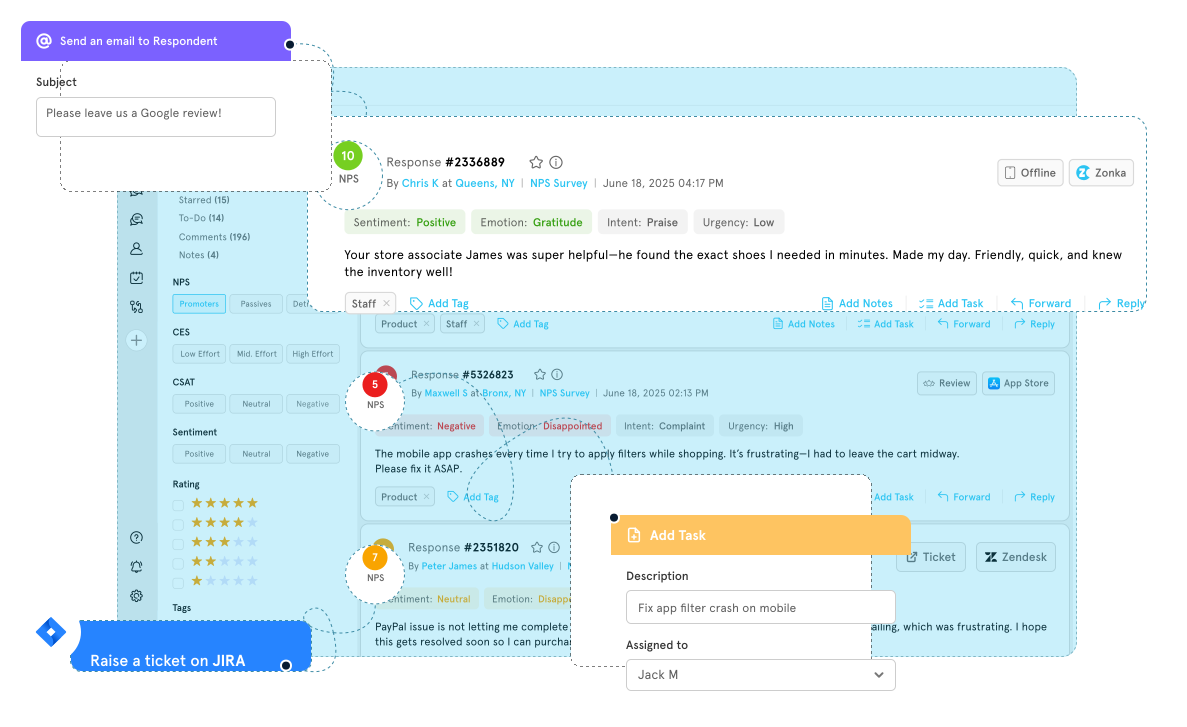
Zonka Feedback combines survey creation with omnichannel distribution and AI-powered sentiment detection. It covers email, SMS, web, in-app, and kiosk channels from a single platform — making it a solid choice for teams that need to collect and analyze feedback across multiple touchpoints without stitching together separate tools.
Zonka Feedback Features
- Omnichannel surveys: Email, SMS, web, in-app, kiosk, and QR code distribution
- AI sentiment detection: Automated sentiment scoring on open-ended responses
- CX metric tracking: NPS, CSAT, CES dashboards with trend analysis
- Workflow automation: Trigger alerts and follow-ups based on survey responses
- Integrations: Salesforce, HubSpot, Zendesk, Slack, Zapier
2026 Pricing
From approximately $49/mo (Starter plan). Growth and Enterprise tiers available.
Zonka Feedback Pros
- True omnichannel distribution from a single platform
- AI sentiment detection adds analysis depth at a mid-tier price
- CX metric dashboards are well-designed and actionable
- Competitive pricing for the feature set
Zonka Feedback Cons
- Open-text analysis stays at sentiment level — limited theme granularity
- Less known than larger competitors, which can slow enterprise procurement
- Advanced analytics require higher-tier plans
Who It's For
Mid-market CX teams that need omnichannel survey distribution with built-in sentiment analysis and CX metric tracking.
G2 Rating
Zonka Feedback G2 Score: 4.5/5
11. Sogolytics
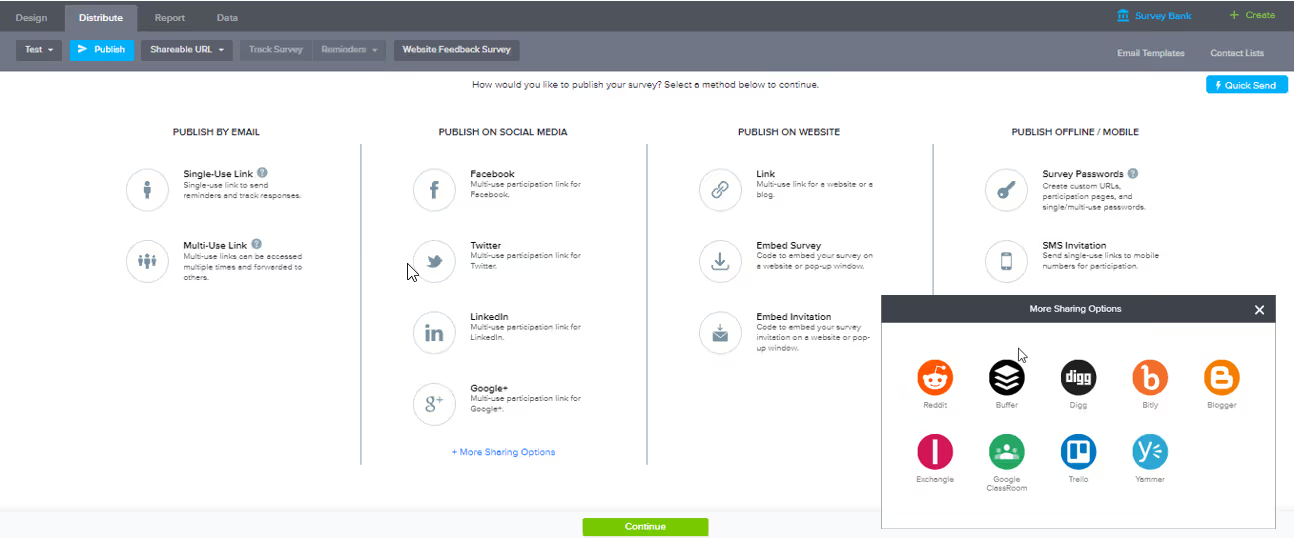
Sogolytics (formerly SoGoSurvey) positions itself as a secure, multilingual survey platform with built-in analytics. HIPAA and GDPR compliance are core features — not add-ons — making it a practical choice for healthcare, government, and financial services organizations that handle sensitive response data.
Sogolytics Features
- Multilingual surveys: Full support for multi-language survey deployment
- Compliance built-in: HIPAA, GDPR, and Section 508 compliance as standard features
- Analytics dashboards: Real-time reporting with cross-tabulation and trend analysis
- Experience management: Combined survey analytics with employee and customer experience modules
- Text analytics: Basic keyword and frequency analysis on open-text fields
2026 Pricing
From approximately $99/mo (Plus plan). Premium and Enterprise tiers available.
Sogolytics Pros
- Compliance credentials make it viable for regulated industries without extra cost
- Strong multilingual support for global survey deployments
- Competitive pricing relative to enterprise compliance-focused tools
- Combined survey creation and analytics platform
Sogolytics Cons
- Text analytics capabilities are basic — keyword and frequency level only
- Smaller user community means fewer third-party resources and templates
- Integration ecosystem is less developed than larger competitors
- Interface design lags behind more modern platforms
Who It's For
Compliance-conscious organizations in healthcare, government, or financial services that need multilingual survey capabilities with built-in HIPAA/GDPR support.
G2 Rating
Sogolytics G2 Score: 4.6/5
Budget-Friendly Survey Analysis Tools (Under $50/Mo)
12. Pollfish
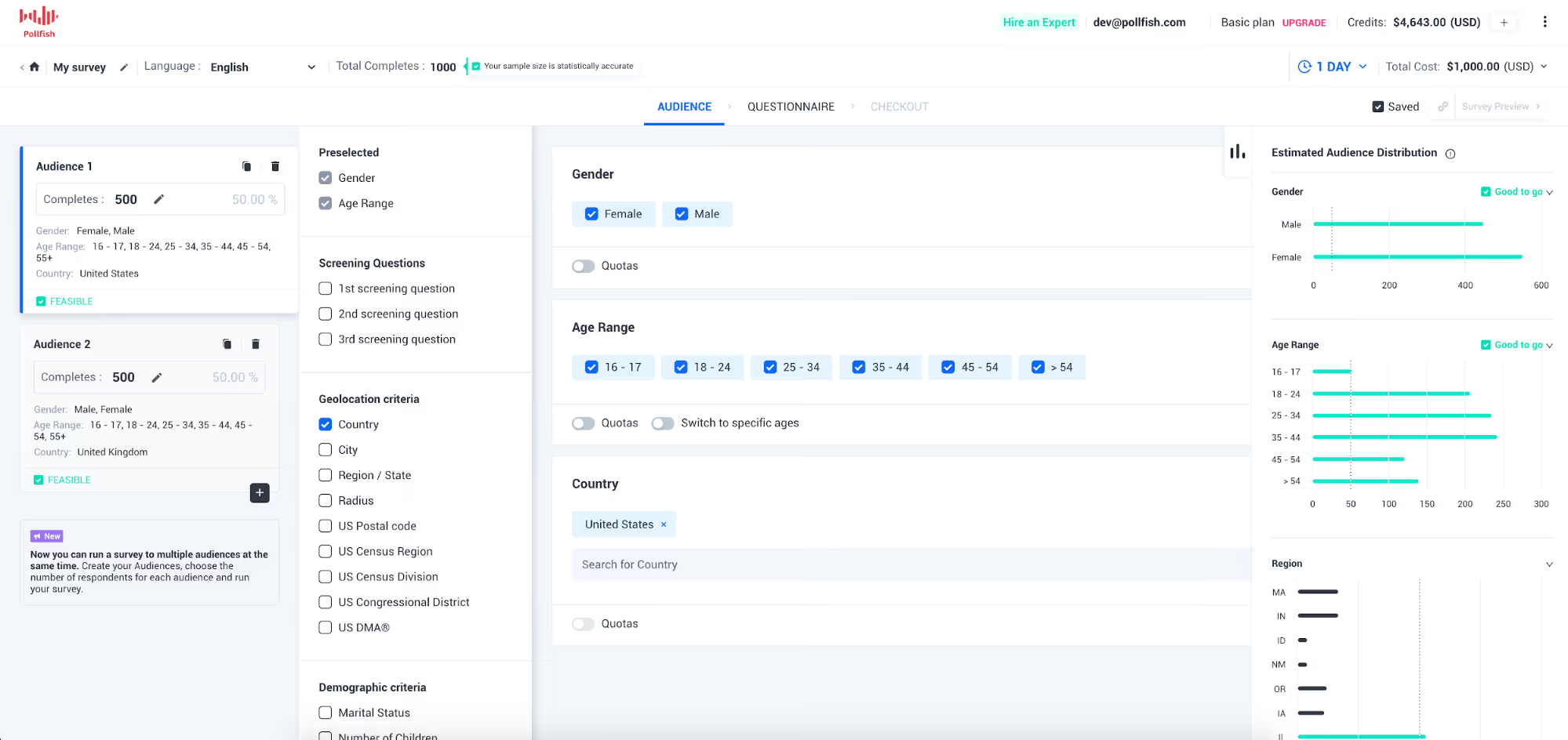
Pollfish takes a different approach to survey analysis: instead of analyzing your existing customer feedback, it helps you collect responses from a global audience panel in real time. The mobile-first platform targets respondents through apps, letting you reach specific demographics quickly and pay only for completed responses.
Analysis capabilities are lightweight, but for teams that need fast audience research or market validation at a low cost, Pollfish fills a gap that traditional survey tools don't.
Pollfish Features
- Real-time audience targeting: Reach specific demographics through a global mobile panel
- Pay-per-response pricing: No monthly commitment — pay only for completed surveys
- Mobile-first design: Surveys optimized for in-app completion
- Basic analytics: Summary statistics, crosstabs, and sentiment scoring
- Free tier: Limited surveys available at no cost
2026 Pricing
Pay-per-response model. Free tier with basic features. Pricing varies by audience targeting and response volume.
Pollfish Pros
- Fast audience access without building your own distribution list
- Pay-per-response model keeps costs predictable and scalable
- Free tier allows testing before committing budget
- Strong for quick market research and concept validation
Pollfish Cons
- Analysis capabilities are basic — no NLP, theme extraction, or advanced text analytics
- Panel-sourced responses may not reflect your actual customer base
- Not designed for ongoing customer feedback programs
- Limited integration options
Who It's For
Product managers and marketers who need fast, affordable audience research and concept validation with a mobile-first respondent panel.
G2 Rating
Pollfish G2 Score: 4.3/5
13. SurveySparrow

SurveySparrow differentiates on survey experience: conversational, chat-like surveys that aim for higher completion rates than traditional form-based approaches. The platform includes NPS, CSAT, and CES tracking with basic text analysis — making it a reasonable choice for teams that prioritize response rates over analytical depth.
SurveySparrow Features
- Conversational surveys: Chat-like interface designed to boost completion rates
- CX metric tracking: Built-in NPS, CSAT, and CES workflows
- Recurring surveys: Automated distribution on schedules
- Basic text analysis: Sentiment scoring and keyword tagging
- Multi-channel distribution: Email, web, SMS, and embedded chat widget
2026 Pricing
From approximately $19/mo (Basic plan). Business and Enterprise tiers at higher price points.
SurveySparrow Pros
- Conversational format genuinely improves response rates for many use cases
- Low entry price makes it accessible for small teams and startups
- Built-in CX metric tracking covers the basics well
- Easy to set up without technical expertise
SurveySparrow Cons
- Text analysis is surface-level — basic sentiment and keywords only
- Analysis capabilities don't scale for teams with complex feedback needs
- Some features require higher-tier plans
- Reporting lacks depth for serious analytical work
Who It's For
Small-to-mid-sized teams that prioritize high survey response rates and need basic CX metric tracking at a low price point.
G2 Rating
SurveySparrow G2 Score: 4.4/5
14. Jotform + Report Builder
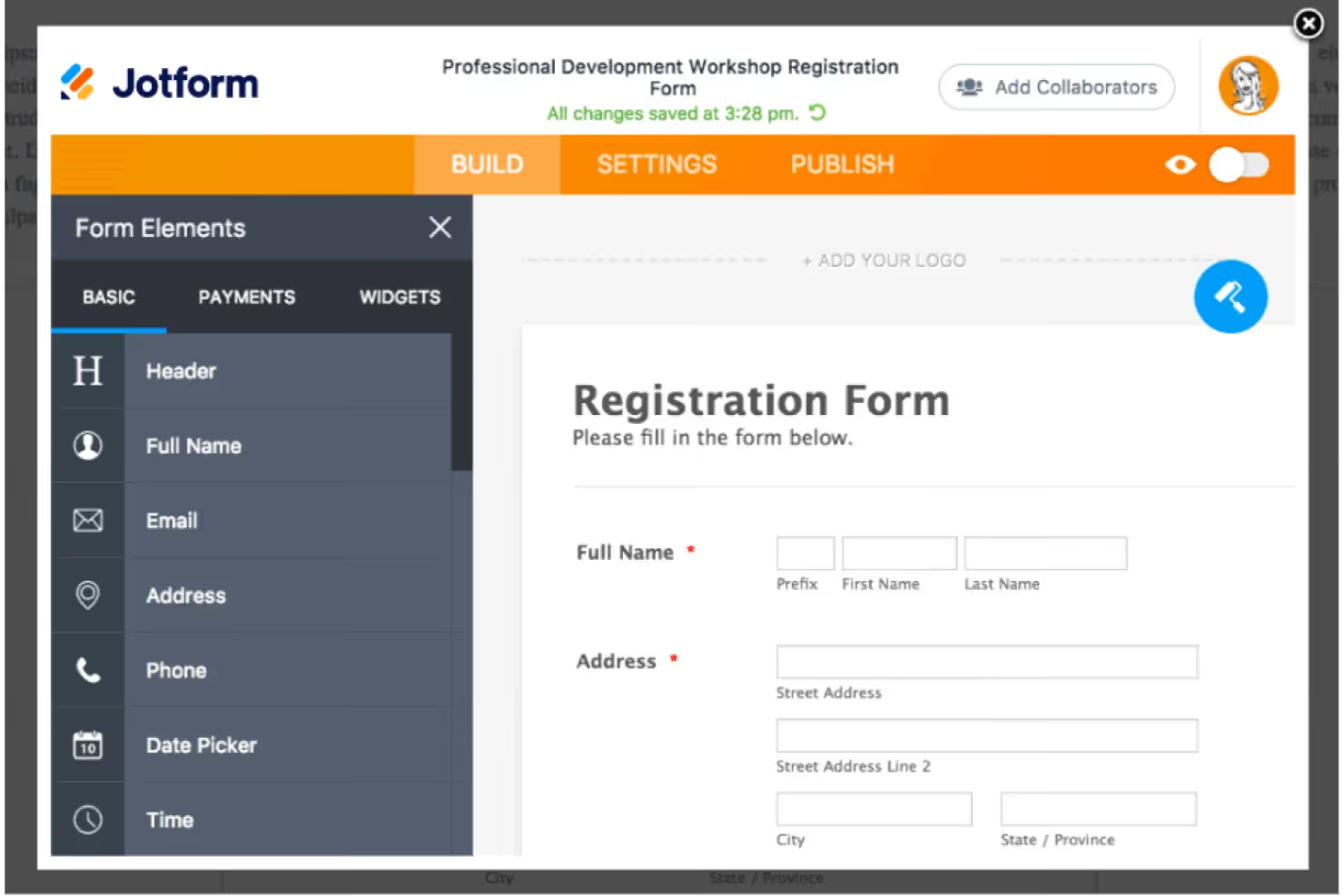
Jotform is a drag-and-drop form builder with over 10,000 templates — and when paired with its Report Builder, it offers visual summaries of collected data. This is not a survey analysis tool in the analytical sense: there's no NLP, no sentiment analysis, no theme extraction. But for teams that need to collect structured data and generate clean visual reports without any learning curve, Jotform delivers simplicity.
Jotform + Report Builder Features
- Drag-and-drop builder: Intuitive form creation with 10,000+ templates
- Report Builder: Visual summaries, charts, and filtered views of form data
- Conditional logic: Show/hide fields based on responses
- Payment collection: Built-in payment processing for paid surveys
- Wide integrations: Google Sheets, Airtable, Salesforce, Zapier, and hundreds more
2026 Pricing
From $29/mo (Bronze plan). Free tier with 5 forms and 100 monthly submissions.
Jotform + Report Builder Pros
- Easiest setup of any tool in this list — zero learning curve
- Free tier covers basic needs for small teams and individual users
- 10,000+ templates for nearly every use case imaginable
- Strong integration ecosystem for routing data to other tools
Jotform + Report Builder Cons
- No text analytics, NLP, or open-text analysis capabilities whatsoever
- Report Builder is visual summaries only — no statistical analysis
- Free tier limits (5 forms, 100 submissions) restrict serious use
- Not built for ongoing feedback programs or CX measurement
Who It's For
Small teams and individuals who need simple data collection and visual reporting with zero setup complexity.
G2 Rating
Jotform + Report Builder G2 Score: 4.7/5
15. Survicate

Survicate focuses on behavior-triggered surveys embedded in websites, apps, and email — capturing feedback at specific moments in the customer journey rather than through standalone survey blasts. The platform includes basic text categorization and CX metric tracking, making it useful for product teams that want contextual feedback tied to user actions.
Survicate Features
- Behavior-triggered surveys: Launch surveys based on user actions, page views, or events
- Journey insights: Map feedback to specific points in the customer journey
- CX metric tracking: NPS, CSAT, CES with automated workflows
- Multi-channel deployment: Web, in-app, email, and link surveys
- Integrations: HubSpot, Intercom, Salesforce, Segment, Google Analytics
2026 Pricing
From approximately $56/mo (Good plan). Better and Best plans at higher tiers. Free plan available with limited features.
Survicate Pros
- Behavior-triggered deployment captures feedback at the right moment
- Journey mapping ties responses to specific user actions — not just general satisfaction
- Decent integration ecosystem for product and marketing stacks
- Free plan allows testing the core survey functionality
Survicate Cons
- Text analysis is basic — keyword grouping rather than theme extraction
- Analysis depth doesn't match dedicated analytics platforms
- Higher-tier features require significant price increases
- Less suited for offline or phone-based feedback collection
Who It's For
Product teams and growth marketers who want behavior-triggered, contextual feedback embedded in digital experiences.
G2 Rating
Survicate G2 Score: 4.6/5
Choosing the Right Survey Analysis Tool
With 15 platforms spanning different price points, capabilities, and use cases, the selection comes down to a few key questions:
What Type of Feedback Are You Analyzing?
If your feedback lives exclusively in surveys you create and distribute, a platform that combines survey creation and analysis (like Alchemer or SurveyMonkey) keeps everything in one place. If your feedback comes from multiple channels — surveys, support tickets, reviews, social media — you need a platform built for unification, like Chattermill or Thematic.
How Important Is Open-Text Analysis?
Open-ended responses contain your richest insights, but they're also the hardest to analyze at scale. If your surveys are primarily closed-ended (rating scales, multiple choice), lighter tools suffice. If open-text analysis is central to your work, prioritize platforms with genuine NLP capabilities — not just keyword counting.
What's Your Feedback Volume?
Tools that work beautifully for 200 responses per month may buckle or become prohibitively expensive at 20,000. Match the tool's scalability and pricing model to your current and projected volume.
Do You Need Statistical Rigor or Speed to Insight?
Research teams running significance tests and weighted crosstabs need tools like Qualtrics, Displayr, or Crunch.io. CX teams that need real-time theme tracking and automated alerts should look at Chattermill, Thematic, or SentiSum. These are different problems requiring different tools.
What Does Your Integration Stack Look Like?
The best analysis tool is the one that connects to where your data already lives. Check native integrations with your survey platform, CRM, support desk, and BI tools before evaluating features.
What's Your Budget Reality?
Enterprise AI platforms deliver depth that lighter tools can't match, but they start at $1,000/mo and up. Mid-tier tools ($50-$1000/mo) cover most needs for growing teams. Budget tools under $50/mo handle basics but won't scale for complex analysis.
How Much Setup Time Can You Invest?
Some tools deliver insights from day one. Others require weeks of taxonomy building, model training, or configuration. Be honest about your team's available bandwidth for onboarding.
For a more detailed framework, see our guide on choosing a customer feedback analysis tool.
What Are AI Survey Analysis Tools?
The survey analysis category has evolved from basic crosstab software into a spectrum of platforms with fundamentally different capabilities. Understanding where each type sits helps you match the right tool to your analytical needs.
Statistical analysis platforms (Qualtrics, Displayr, Crunch.io) focus on quantitative rigor: significance testing, weighting, regression, and conjoint analysis. They're built for research teams that need to validate hypotheses and produce statistically defensible findings.
AI-driven feedback analytics platforms (Chattermill, Thematic, SentiSum) apply natural language processing to unstructured text at scale. Rather than requiring analysts to build tagging taxonomies manually, these tools detect themes, sentiment shifts, and emerging issues automatically — often across multiple languages and data sources simultaneously.
All-in-one survey platforms (SurveyMonkey, Alchemer, Sogolytics) combine survey creation with built-in analysis. Their analysis features tend to be lighter than dedicated tools, but they eliminate the friction of exporting data between systems.
Qualitative research tools (MAXQDA) support manual and semi-automated coding of open-ended responses, interviews, and mixed-method research. They prioritize researcher control over automation.
The most significant shift in recent years has been the integration of generative AI into analysis workflows. Platforms now offer natural-language querying of feedback data, AI-generated summaries of open-ended responses, and automated anomaly detection that surfaces issues without waiting for a scheduled report. For CX and VoC teams handling thousands of responses monthly, this shift from reactive reporting to proactive intelligence is the defining feature of modern survey analysis.
Benefits of Using Survey Analysis Software
Faster time to insight: Manual tagging and spreadsheet-based analysis takes weeks. Dedicated survey analysis tools surface patterns in hours or minutes, letting teams act on feedback while it's still relevant.
Consistent analysis at scale: Human analysts can review a sample; software can process every response. This eliminates sampling bias and ensures edge-case issues aren't missed in large datasets.
Multi-channel visibility: Customers don't give feedback in one place. The best platforms unify survey data with support tickets, reviews, and social comments — giving teams a complete view rather than channel-specific fragments.
Reduced manual effort: Automated theme extraction, sentiment tagging, and anomaly detection free analysts from repetitive categorization work, letting them focus on interpretation and strategic recommendations.
Stronger stakeholder alignment: Dashboards and automated reports make insights accessible to product, CX, and executive teams simultaneously — reducing the "insights bottleneck" where one analyst translates data for everyone else.
Measurable impact on CX metrics: Platforms that tie feedback themes to NPS, CSAT, and CES movements let teams quantify the impact of specific issues and prioritize fixes based on business outcomes, not gut instinct.
Improved response rates through feedback loops: When customers see their feedback acted on, response rates improve over time. Survey analysis tools that enable closed-loop workflows — flagging issues, tracking resolution, and reporting back — create a virtuous cycle of engagement.
Competitive intelligence from your own data: Survey analysis reveals not just what your customers think of you, but how they compare you to alternatives. Theme and sentiment analysis on competitive mentions in open-ended responses provides direct, unprompted competitive intelligence.
ROI and Business Impact of Survey Analysis Tools
Investing in the right survey analysis platform delivers measurable returns across several business dimensions:
- Reduced churn: Teams that identify and act on negative feedback themes within days rather than quarters can intervene before at-risk customers leave. Closing the gap between feedback collection and action is consistently linked to stronger retention.
- Lower cost of support: Root-cause analysis surfaces the product issues driving repeat contacts. Fixing those issues reduces ticket volume and support costs.
- Product development efficiency: Feedback-informed prioritization reduces the risk of building features customers don't want. Teams that ground roadmap decisions in structured feedback data typically see shorter iteration cycles and stronger feature adoption.
- Faster decision-making: Real-time dashboards and automated alerts eliminate the waiting period between data collection and insight delivery, compressing decision cycles from weeks to days.
- Higher survey response rates: Closing the loop on feedback — showing customers their input led to changes — is the most effective way to sustain participation in ongoing feedback programs.
Chattermill connects feedback themes directly to NPS, CSAT, and retention outcomes — giving teams the data to detect emerging issues early and prioritize fixes based on business impact rather than intuition.
Get Started with Chattermill
Your customers are already telling you what they need — across surveys, support conversations, reviews, and social channels. The question is whether your team can see the full picture or just fragments of it.
Chattermill unifies feedback from every channel and applies AI-driven analysis to surface the themes, trends, and anomalies that matter most to your business. That means no manual tagging, no spreadsheet exports, and no waiting weeks for insights that are outdated before they reach your team.
Book a Demo to see how Chattermill turns fragmented feedback into decisions your team can act on today.
Survey Analysis Tools: FAQs
What Is the Best Tool to Analyze Customer Surveys?
The best tool depends on your feedback complexity and scale. For enterprise teams unifying multi-channel feedback (surveys, tickets, reviews, social), Chattermill provides the deepest AI-driven analysis with automated theme extraction across 100+ languages. For research-focused teams needing statistical testing, Qualtrics is the established leader. For teams on a budget that need survey creation and basic analysis in one place, SurveyMonkey or Alchemer are practical choices.
Can AI Analyze Survey Data?
Yes — and increasingly, AI is the only practical way to analyze survey data at scale. Modern survey analysis platforms use natural language processing to categorize open-ended responses, detect sentiment at the aspect level, identify emerging themes without manual tagging, and surface anomalies in real time. The key difference between AI tools is depth: some offer basic keyword matching disguised as "AI," while platforms like Chattermill and Thematic apply genuine NLP that understands context, nuance, and multi-language responses.
What Is the Best Free Survey Analysis Tool?
For free survey creation with basic visual reporting, Jotform offers a free tier (5 forms, 100 monthly submissions) with its Report Builder. Pollfish provides a free tier for small-scale audience research. SurveySparrow and Survicate also offer limited free plans. Keep in mind that free tiers typically lack the AI-powered text analysis, multi-channel unification, and statistical depth that paid platforms provide — so they work best for simple, low-volume use cases.
How Do You Analyze Open-Ended Survey Responses?
There are three approaches, in increasing order of sophistication: (1) Manual coding, where analysts read responses and assign tags — accurate but unsustainable beyond a few hundred responses. (2) Rule-based categorization, using keyword dictionaries to sort responses — faster but misses context and nuance. (3) AI-powered theme extraction, where NLP models automatically identify themes, sentiment, and emerging patterns without predefined rules. For teams handling more than a few hundred open-ended responses per month, AI-powered analysis is the only approach that scales without sacrificing accuracy.
What Is the Best Survey Analysis Tool for Enterprise Teams?
Enterprise teams typically need multi-channel feedback unification, advanced AI/NLP, role-based access controls, and integrations with existing CRM and support platforms. Chattermill, Qualtrics, and SurveyMonkey Enterprise are the three most common choices at the enterprise level. Chattermill is strongest for teams that analyze feedback beyond surveys (tickets, reviews, social). Qualtrics leads for teams with heavy research and statistical testing needs. SurveyMonkey Enterprise suits organizations that want familiar survey workflows with enterprise security.
What Is the Best Software for Multi-Channel Feedback Data Analysis?
For teams that need to analyze feedback across surveys, support tickets, online reviews, social media, and chat — not just survey data in isolation — Chattermill is purpose-built for that workflow. The platform unifies data from all these channels, applies AI-driven theme and sentiment analysis, and connects findings to CX metrics like NPS and CSAT. Thematic and SentiSum also offer multi-channel capabilities, though with different strengths (Thematic for trend tracking, SentiSum for real-time root-cause analysis).
How Much Do Survey Analysis Tools Cost?
Pricing spans a wide range. Budget tools (Jotform, SurveySparrow, Pollfish) start from free to ~$29/mo. Mid-tier platforms (Alchemer, Zonka Feedback, Survicate, Sogolytics) run $49-$99/mo. Enterprise AI platforms (Chattermill, Qualtrics, Thematic, SentiSum) use custom pricing typically starting from $1,000/mo and up, reflecting the depth of AI analysis and volume of data processed. The right investment depends on your feedback volume, analytical needs, and the cost of not acting on customer insights.


See Chattermill in action on your own feedback
Book a demo


