


Lyra Agent is Now Available in Slack


The CX intelligence
platform that's AI-native by design
Book a demoToday we're bringing Lyra Agent to Slack. Mention @Chattermill in any channel, thread, or direct message to ask about your customer feedback, investigate a metric change, or follow up on an alert — and get the same verified intelligence as the in-app agent, right where your team is already talking.
.png)
What is Lyra Agent?
Lyra Agent is Chattermill's CX-trained AI agent, built to turn unstructured feedback into reliable intelligence every team can act on. It works like a seasoned analyst: answering questions about your customer experience, running analysis on your behalf, and delivering insights grounded in verified, quantified evidence.
Since the launch, the response from our customers has been exceptional. We're building on that momentum, guided by a simple principle: customer intelligence should be available wherever decisions are made.
Until now, Lyra Agent has lived inside the Chattermill app. Starting today, the same capability is available in Slack, so your teams can get quantified customer insights without leaving the conversation they're already in.
Getting answers from Lyra Agent in Slack
Much of a company's problem-solving happens in Slack, as teams work through issues, weigh priorities, and agree on next steps. It's in these moments that customer context is most valuable, when it can still shape the outcome of the discussion.
Think of a product team debating what goes on the roadmap, or a CX team trying to understand why NPS dropped this month. With Lyra Agent in Slack, anyone in the conversation can bring that customer context in, from a quick check on a metric to a full investigation of customer issues.
In Slack, your teams can ask Chattermill questions in three ways:
- In a channel or thread. Mention @Chattermill with your question and it replies in-thread, so the whole team sees the same answer.
- In a direct message. For a private conversation, simply start a DM with Chattermill.
- In the side panel. Open Chattermill from the top of Slack to chat with it alongside your current conversation. (This functionality requires a paid Slack plan.)
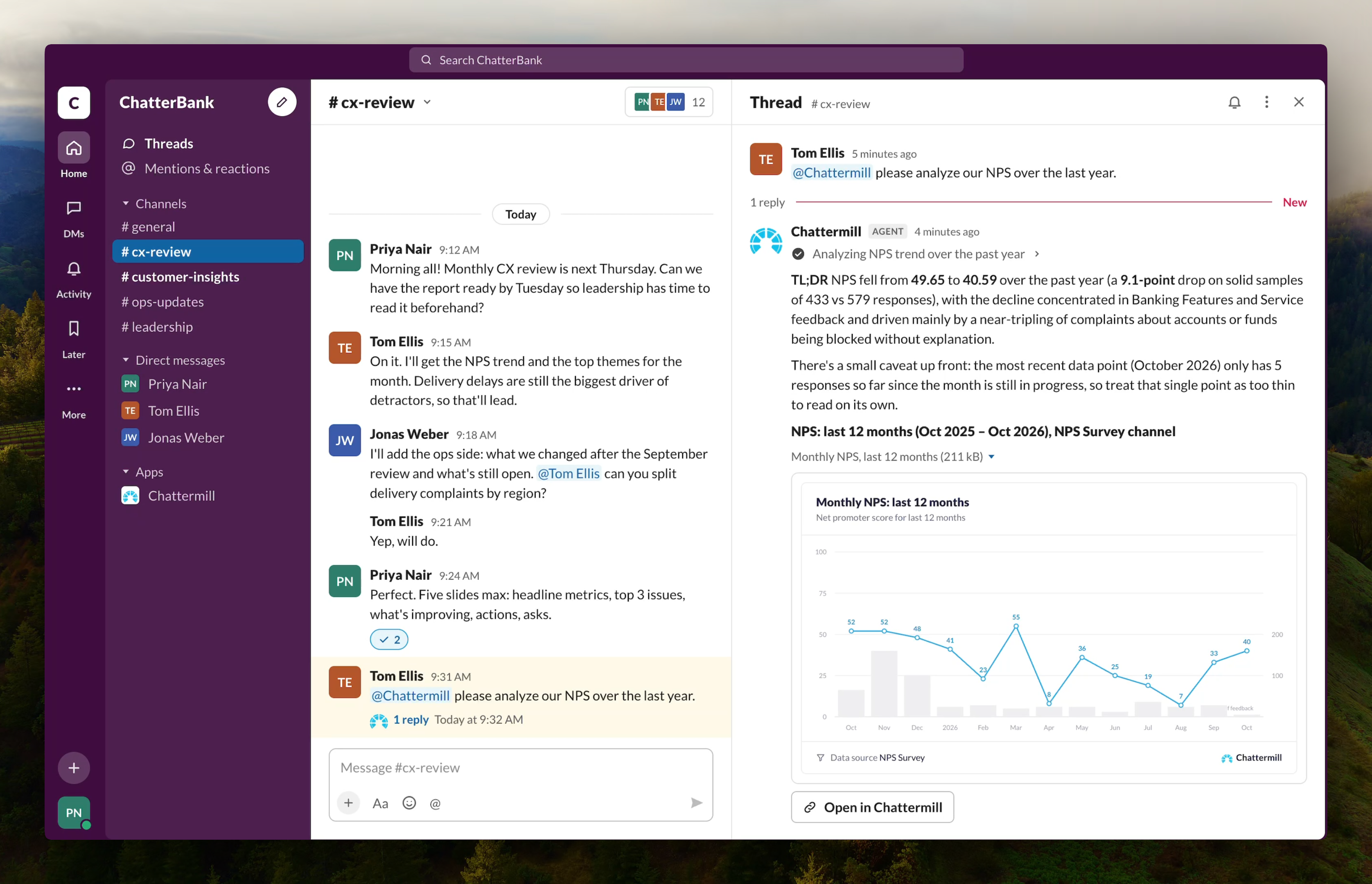
So the next time you're drafting a PRD or discussing next quarter's priorities with colleagues and need evidence from customer feedback to back a decision, just ask @Chattermill.
You'll get a structured answer with the numbers, real customer quotes, and links back to the data, all drawn from the same verified intelligence that powers Lyra Agent in the Chattermill app.
Importantly, Chattermill in Slack respects your existing roles and permissions, so you'll only see results from data you already have access to.
What you can do with Lyra Agent in Slack
Chattermill in Slack brings a focused set of Lyra Agent's capabilities into the conversations where your teams already work. Whether you're in CX, Product, Insights, Support, or Revenue, you can ask questions about your customers, investigate issues, and turn the answer into a chart or table, all without leaving Slack.
Ask any question, get analyst-quality answers
Ask anything about your customers, metric changes, or key issues — from a quick check like "What was our NPS last quarter?" to a full investigation like "Our CSAT dropped last month — dig into why, show me the top three issues behind it, and pull a few customer quotes for each."
Product teams can find out what customers think of a new release without leaving the launch channel. CX teams can get the full picture on checkout — sentiment, top issues, and what customers are asking to fix — in a single reply. And because every answer draws on the same verified data, the results are always consistent.
Investigate issues as they emerge
If you already receive scheduled notifications or alerts from Chattermill in Slack, reply in the thread and ask it to investigate. "What caused our NPS to drop this week?" "Which customer segments are driving the increase in negative feedback?"
An alert shows you that something has changed, and a quick follow-up in the same thread helps you understand why.
You can also ask Chattermill for help in any team thread. If support spots a rise in failed-payment tickets, anyone in the conversation can mention @Chattermill to see what's driving it, who's most affected, and what customers are saying.
Create charts and tables
Ask for a chart or table, and Chattermill applies the relevant filters and breakdowns to build the view you need — NPS trended over time, the top 10 customer issues this quarter, or NPS compared across countries. The result appears right in the thread, so everyone in the conversation can see the evidence at a glance.
One agent, multiple ways to interact with it
There are now three ways to work with Chattermill's customer intelligence, each suited to a different way of working.
In the Chattermill app, Lyra Agent is built for in-depth work: detailed analysis, delegated tasks, and reports.
In Slack, it's built to bring the customer context into your conversations. Mention @Chattermill for quick questions and investigations, right where your team is collaborating.
And through Chattermill's MCP, you can bring the same intelligence into the AI agents you already use, including Claude, Claude Code, ChatGPT, Notion AI, and Glean.
Wherever you use it, every answer draws on the same verified intelligence, so results stay consistent across teams and tools.
Try it now
If Lyra Agent is already enabled on your account, you can start using it in Slack today. Just go to Settings > Integrations > Slack in Chattermill and connect your workspace in a few clicks. Our help guide walks you through each step.
If you connected Slack before Lyra Agent was enabled, make sure to refresh the connection and you're ready to go.
Not using Lyra Agent yet? It's currently in Closed Beta, so reach out to your XLG Programme Lead or support@chattermill.com to request early access, or join the waitlist.



See Chattermill in action on your own feedback
Book a demo


