


9 Best Customer Service Analytics Software in 2026


The CX intelligence
platform that's AI-native by design
Book a demoMost customer service teams already track ticket volume and resolution times. But what if those surface-level metrics are hiding the insights that actually move retention, satisfaction, and revenue?
Quick Summary
| Tool | Best For | Starting Price |
|---|---|---|
| Chattermill | Unifying support ticket, survey, and review analytics with AI-native VoC intelligence | Custom |
| Zendesk | Built-in service analytics within an established help desk ecosystem | From $19/agent/mo |
| Qualtrics XM | Enterprise CX analytics with advanced statistical modeling and text analytics | Custom |
We evaluated 9 customer service analytics tools across AI depth, feedback channel coverage, integration ecosystems, pricing transparency, and G2 user sentiment. Chattermill is the strongest option for enterprise teams that need to unify support tickets, surveys, and reviews into a single customer feedback analytics engine powered by custom AI models. Zendesk is the go-to choice for teams that want built-in analytics tightly coupled with their existing help desk workflows. Qualtrics XM stands out for organizations that need enterprise-scale CX analytics with deep statistical analysis and acquired Clarabridge text analytics capabilities.
Why Listen to Us
We build customer feedback analytics software used by enterprise CX teams at companies like Uber and HelloFresh. That means we spend our days inside the same workflows, metrics, and integration challenges this article covers. This guide reflects what we have learned from analyzing billions of feedback data points alongside the teams that depend on these tools daily.
What Is Customer Service Analytics Software?
Customer service analytics software is any platform that collects, structures, and analyzes data from support interactions to surface patterns, measure performance, and drive improvements in the customer experience.
That sounds straightforward. But here is where it gets interesting: the category has fractured. On one side, you have help desk platforms like Zendesk and Freshdesk that bolt analytics onto their ticketing systems. On the other, you have dedicated voice of customer tools and AI-native platforms that treat every support interaction as a signal worth mining for product, CX, and strategic insights.
The difference matters. A basic dashboard tells you how many tickets your team closed this week. A purpose-built analytics platform tells you why tickets spiked, which product issues are driving churn, and where your NPS is headed before the next quarterly review. It is the difference between reporting on service performance and actually improving it.
Key use cases include:
- Ticket trend analysis — identifying recurring themes across support channels
- Sentiment tracking — measuring how customers feel, not just what they ask about
- Root cause detection — pinpointing the product or process failures behind ticket spikes
- Agent performance measurement — linking resolution quality to customer satisfaction scores
- Cross-channel unification — combining insights from tickets, surveys, calls, reviews, and social into a single view
9 Top Customer Service Analytics Tools: Head-to-Head Comparison
| # | Tool | Best For | Pricing | G2 Rating | AI/NLP Approach | Feedback Channels | Key Integrations |
|---|---|---|---|---|---|---|---|
| 1 | Chattermill | Unified VoC analytics across tickets, surveys, and reviews | Custom | Custom ML models for theme and sentiment | Tickets, surveys, reviews, social, calls | Zendesk, Salesforce, Intercom, Slack | |
| 2 | Zendesk | Built-in help desk analytics | From $19/agent/mo | Rule-based + AI-assisted | Tickets, chat, email, phone | Salesforce, Slack, Shopify | |
| 3 | Qualtrics XM | Enterprise CX analytics | Custom | Statistical NLP + Clarabridge text analytics | Surveys, social, calls, tickets | Salesforce, SAP, Tableau | |
| 4 | Medallia | Enterprise experience management | Custom | AI-driven text analytics and speech analytics | Surveys, social, calls, digital, IoT | Salesforce, ServiceNow, Adobe | |
| 5 | Sprinklr Service | Omnichannel contact center analytics | Custom | Unified AI engine across 30+ channels | Social, messaging, chat, email, voice | Salesforce, Microsoft Dynamics, SAP | |
| 6 | Enterpret | AI-first customer intelligence | Custom | Adaptive ML models, custom taxonomy | Tickets, surveys, reviews, social, calls | Zendesk, Intercom, Salesforce, Slack | |
| 7 | SentiSum | AI support ticket analytics | From $3,000/mo | NLP-powered ticket tagging | Tickets, chat, surveys | Zendesk, Freshdesk, Intercom | |
| 8 | InMoment | AI-driven feedback + conversational intelligence | Custom | NLP + conversational analytics | Surveys, reviews, social, calls | Salesforce, Adobe, SAP | |
| 9 | Freshdesk | Affordable service analytics | Free plan; paid from $15/agent/mo | Rule-based + Freddy AI | Tickets, chat, email, phone | Slack, Shopify, Salesforce |
How We Evaluated These Tools
Choosing the right customer service analytics platform depends on your data sources, team maturity, and what you plan to do with the insights. Here is the framework we used to evaluate each tool in this guide:
- AI and NLP depth — Does the tool use custom ML models, rule-based tagging, or generic LLM classification? How accurately does it detect themes and sentiment without heavy manual setup?
- Feedback channel coverage — Can it ingest tickets, surveys, reviews, calls, and social data, or is it limited to one or two sources?
- Analytics depth — Does it stop at dashboards, or does it surface root causes, detect anomalies, and connect feedback to business metrics like NPS, CSAT, and CES?
- Ease of setup — How quickly can a team get from zero to actionable insights? Does it require extensive taxonomy configuration?
- Pricing transparency — Are pricing tiers published, or is every deal custom?
- Integration ecosystem — Does it connect to the CRM, help desk, and BI tools your team already uses?
- Scalability — Can it handle enterprise-level feedback volume across multiple languages and regions?
- G2 user sentiment — What do verified users say about the platform in practice, not just in marketing?
1. Chattermill
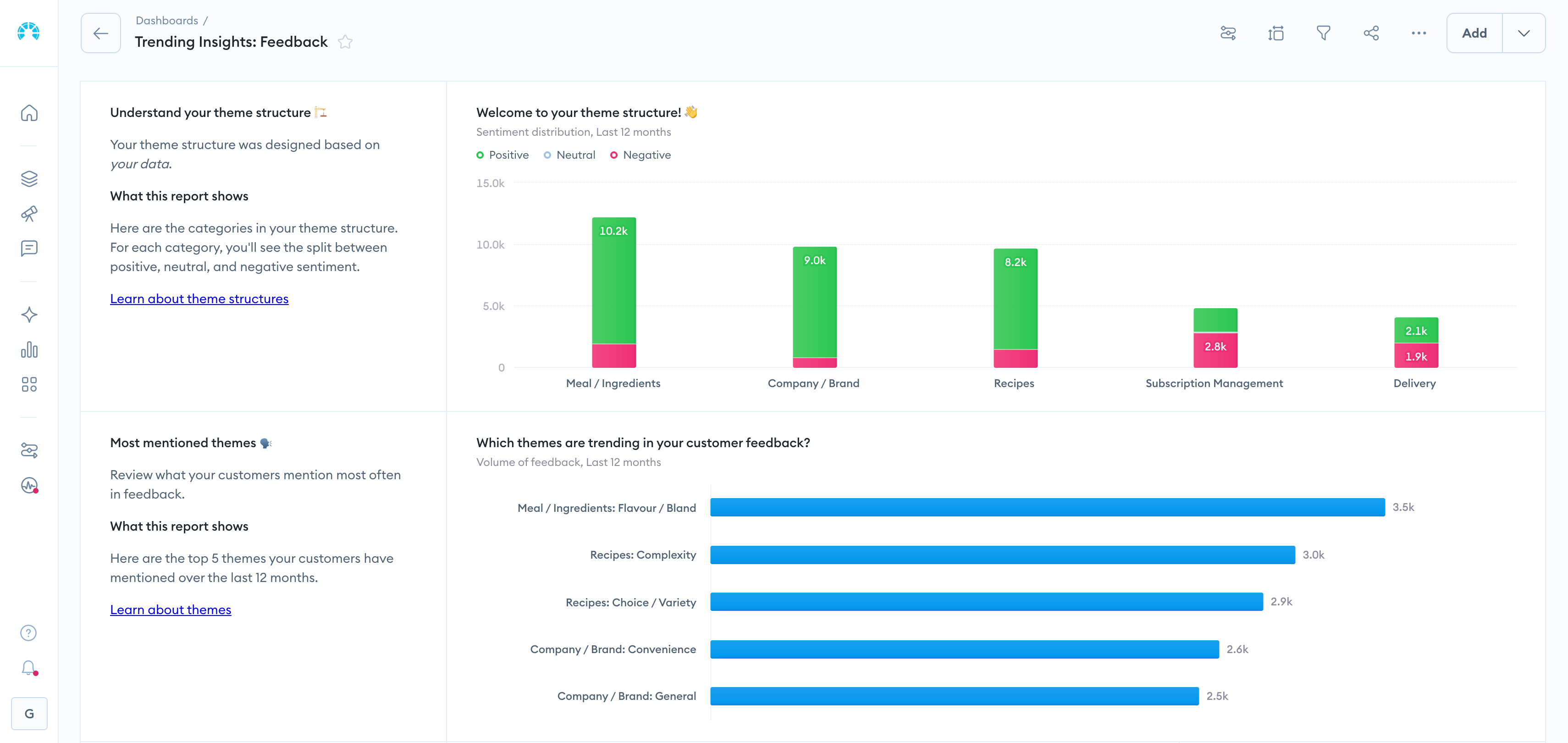
Chattermill is an AI-native customer feedback analytics platform built to unify support tickets, surveys, reviews, and social feedback into a single source of customer intelligence. Where most service analytics tools analyze one channel in isolation, Chattermill connects the dots across every touchpoint — giving CX, product, and insights teams a complete picture of what customers are experiencing and why.
That distinction — unification versus siloed reporting — is what makes Chattermill particularly relevant for this category. Customer service data does not exist in a vacuum. A spike in support tickets often traces back to a product issue that is also showing up in app store reviews and CSAT survey comments. Chattermill surfaces those connections automatically using custom ML models trained on your data, not generic sentiment scores that miss the nuance of your industry and customer language.
Enterprise teams at companies like Uber and HelloFresh rely on Chattermill to go beyond measuring what happened to understanding why it happened. The platform detects anomalies in real time, prioritizes issues by business impact, and measures how feedback trends connect to NPS, CSAT, and CES. For teams exploring agentic AI workflows, the Chattermill MCP server lets you query and act on customer feedback data directly inside AI agents — bringing customer experience intelligence into your existing automation stack.
Chattermill Features
- Custom AI theme and sentiment analysis — purpose-built ML models adapt to your feedback language and taxonomy, delivering more accurate categorization than off-the-shelf NLP
- Multi-channel unification — consolidates tickets, surveys, reviews, social mentions, and call transcripts into a single analytics layer
- Anomaly detection and automated alerts — flags unexpected shifts in sentiment or ticket volume so teams can respond before issues escalate
- Business metric integration — connects feedback themes directly to NPS, CSAT, and CES movement, tying qualitative insights to quantitative outcomes
- Multi-language support — analyzes feedback across languages without requiring separate models or manual translation
- MCP server for agentic AI — enables AI agents to query customer feedback data programmatically, supporting next-generation automation workflows
- Automated reporting and stakeholder sharing — distributes insight summaries to product, CX, and leadership teams without manual report building
2026 Pricing
Custom pricing based on feedback volume and use case. Chattermill is positioned as an enterprise platform, so expect pricing conversations tailored to your data scale and integration requirements.
Chattermill Pros
- Unifies feedback across channels that most tools treat as separate data silos
- Custom ML models deliver higher accuracy than rule-based or generic sentiment analysis tools
- Connects feedback themes to business metrics, making it easier to quantify CX investment impact
- Anomaly detection catches emerging issues before they appear in quarterly reports
- MCP server opens up agentic AI use cases that most analytics platforms do not support yet
Chattermill Cons
- Custom enterprise pricing means smaller teams may face a higher entry point than expected
- Implementation requires thoughtful onboarding to map feedback taxonomies — not a plug-and-play setup
- Limited native help desk functionality — this is an analytics and intelligence layer, not a ticketing system
Who It's For
Enterprise and scale-up CX, insights, and product teams that need to unify multi-channel feedback into actionable intelligence tied to business outcomes.
G2 Rating
Chattermill G2 Score: 4.4/5 (238 reviews)
2. Zendesk

Zendesk is the help desk platform most service teams encounter first, and its built-in analytics capabilities make it a natural starting point for organizations that want reporting without adding another vendor to the stack.
The core advantage is integration depth. Because Zendesk analytics sits inside the same platform handling your tickets, chat, email, and phone interactions, there is no data pipeline to build and no sync to configure. Teams get real-time dashboards on ticket volume, resolution times, agent performance, and CSAT scores out of the box. The Explore analytics add-on extends this with custom reporting, cross-channel metrics, and pre-built dashboard templates.
Where Zendesk's analytics shows its limits is in analytical depth. The platform is strong at operational reporting — how fast did we resolve tickets, how are agents performing — but weaker at answering strategic questions like why customers are churning or which product issues are driving the most negative sentiment. For teams that need to move from service reporting to customer insights, Zendesk often becomes one data source feeding into a more specialized analytics layer.
Zendesk Features
- Zendesk Explore — custom dashboards, pre-built reports, and cross-channel analytics for tickets, chat, and talk
- Real-time operational dashboards — live views of queue depth, agent workload, and SLA compliance
- CSAT and NPS surveys — embedded post-interaction surveys with automated collection and reporting
- AI-assisted triage — intelligent routing and suggested responses based on ticket content
- Custom report builder — drag-and-drop interface for building tailored views without SQL
2026 Pricing
Starting from $19/agent/month (Support Team plan). Higher tiers with advanced analytics features range from $55 to $115/agent/month. Zendesk Explore is included in Suite plans.
Zendesk Pros
- Analytics is natively embedded — no separate tool or integration required
- Extensive pre-built dashboards reduce time to first insight
- Strong ecosystem of integrations with CRMs, e-commerce platforms, and BI tools
- Familiar UI that most support teams already know
Zendesk Cons
- Analytics depth is limited to operational reporting — strategic VoC analysis requires supplementary tools
- Advanced features and higher-tier analytics push costs up quickly per agent
- Custom reporting can be cumbersome for complex multi-dimensional queries
Who It's For
Small to mid-size service teams that want solid operational analytics tightly integrated with their existing Zendesk ticketing environment.
G2 Rating
Zendesk G2 Score: ~4.3/5
3. Qualtrics XM
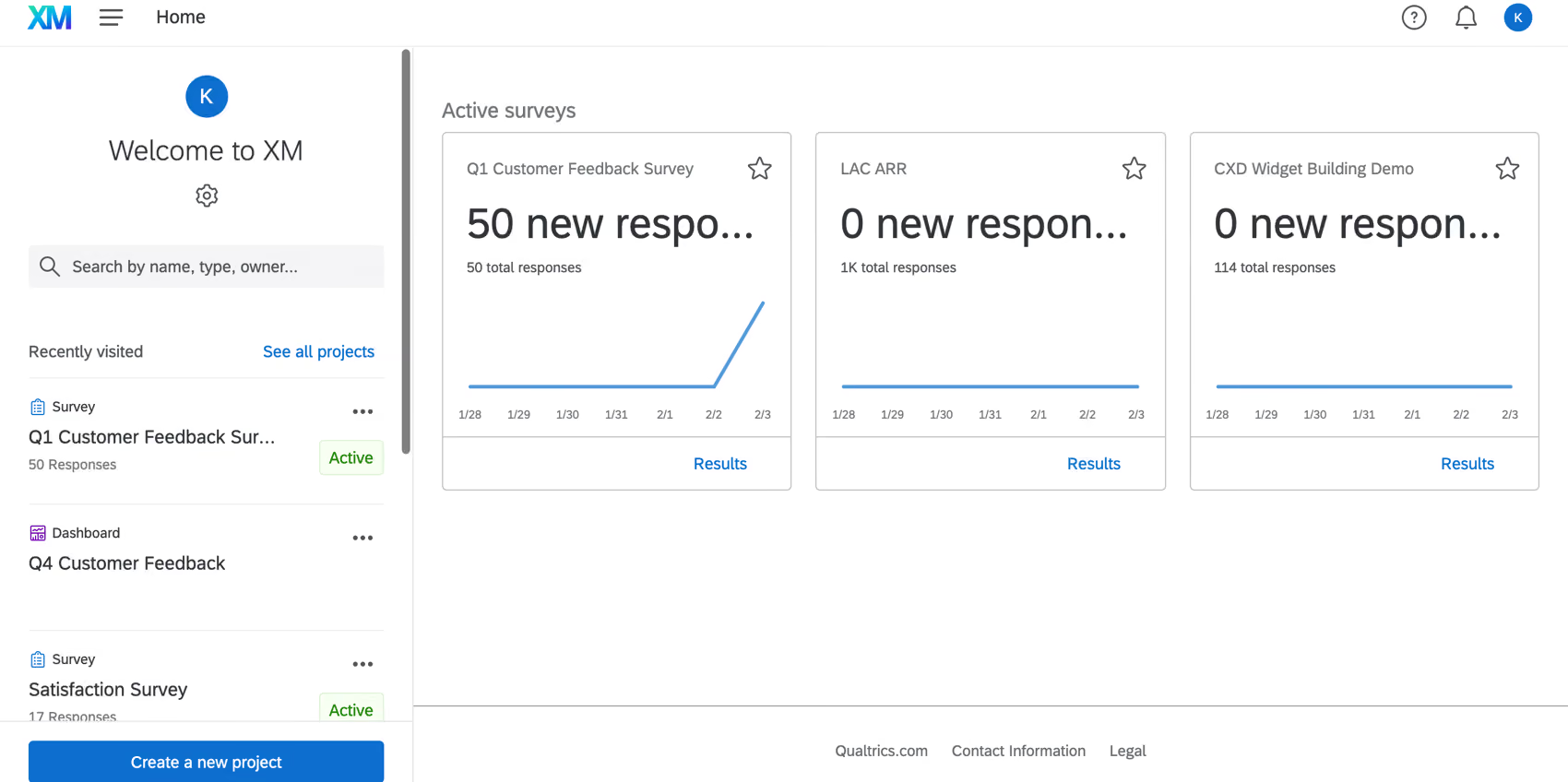
Qualtrics XM is an enterprise customer experience platform that combines survey analysis with advanced text analytics capabilities inherited from its Clarabridge acquisition. For organizations that treat CX measurement as a strategic function, Qualtrics offers depth that most service analytics tools cannot match.
The platform's strength lies in statistical rigor. Qualtrics can run driver analysis, predictive modeling, and segmentation on feedback data at scale — connecting what customers say in surveys and support interactions to downstream business outcomes. The Clarabridge integration added NLP-powered text analytics, bringing unstructured feedback analysis into the same environment where teams already manage structured survey programs.
That said, Qualtrics is built for research-grade analysis, and the platform's complexity reflects it. Teams without dedicated insights or research staff may find the learning curve steep, and the analytics horsepower comes at an enterprise price point that puts it out of reach for smaller organizations.
Qualtrics XM Features
- XM Discover (Clarabridge) — NLP-driven text analytics for unstructured feedback from surveys, social, and support interactions
- Statistical driver analysis — identifies which experience factors have the highest impact on outcomes like retention and NPS
- Predictive analytics — models future satisfaction and churn risk based on feedback trends
- Multi-channel listening — ingests survey, social, call, and digital feedback data
- Role-based dashboards — configurable views for frontline managers, CX leaders, and executives
2026 Pricing
Custom enterprise pricing. Qualtrics does not publish per-seat rates; expect annual contracts scaled to feedback volume and module selection.
Qualtrics XM Pros
- Deepest statistical analytics in the category — driver analysis, predictive modeling, and segmentation
- Clarabridge acquisition added strong NLP text analytics capabilities
- Handles massive survey programs alongside unstructured feedback analysis
- Strong academic and research community with extensive methodology documentation
Qualtrics XM Cons
- Complexity creates a steep learning curve for teams without dedicated research staff
- Enterprise pricing puts it beyond reach for mid-market and smaller organizations
- Platform can feel over-engineered for teams that need fast, actionable insights rather than research-grade analysis
Who It's For
Enterprise CX and insights teams with dedicated research staff that need statistical depth and scale across structured and unstructured feedback programs.
G2 Rating
Qualtrics XM G2 Score: ~4.4/5
4. Medallia
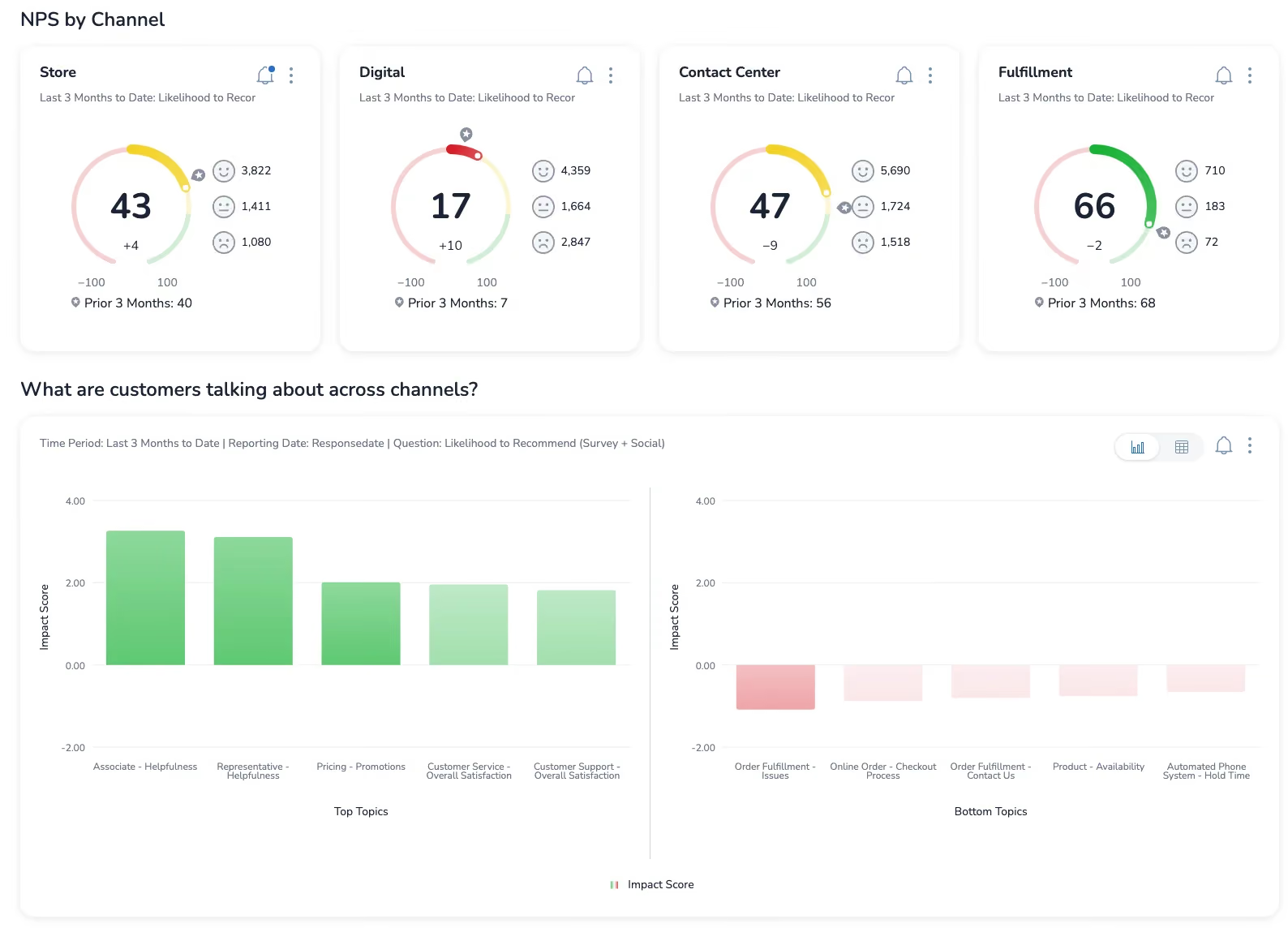
Medallia is an enterprise experience management platform that captures feedback across digital, in-person, and contact center touchpoints — then applies AI to surface patterns and recommend actions. It is one of the broadest platforms in the customer experience tools space, covering everything from survey design to real-time alerting.
What sets Medallia apart is the breadth of its signal capture. Beyond surveys and support tickets, the platform ingests IoT data, video feedback, and digital behavior signals. For large enterprises operating across multiple touchpoints and geographies, that breadth means a more complete picture of the customer journey.
The trade-off is complexity and cost. Medallia's feature set is vast, and organizations often use only a fraction of what the platform offers. Implementation timelines tend to be long, and the platform's value proposition is strongest when deployed across an entire organization rather than within a single team.
Medallia Features
- AI-driven text and speech analytics — analyzes unstructured feedback from calls, chats, surveys, and reviews
- Real-time alerting — triggers notifications when sentiment shifts or anomalies emerge across touchpoints
- Journey orchestration — maps customer experiences across channels and identifies friction points
- Digital experience analytics — captures in-app and website behavior data alongside traditional feedback
- Role-based action planning — routes insights to the right teams with recommended next steps
2026 Pricing
Custom enterprise pricing. Medallia does not publish standard rates.
Medallia Pros
- Broadest signal capture in the category — surveys, digital, IoT, video, and social
- AI-powered recommendations reduce the gap between insight and action
- Strong real-time alerting for high-volume contact centers
- Global scalability across languages and regions
Medallia Cons
- Implementation is resource-intensive and typically requires dedicated consulting support
- Platform breadth means many features go unused, driving up total cost of ownership
- Best suited for full-enterprise deployment — not ideal for teams that just need service analytics
Who It's For
Large enterprises that want to unify experience management across every customer touchpoint, not just service interactions.
G2 Rating
Medallia G2 Score: ~4.5/5
5. Sprinklr Service
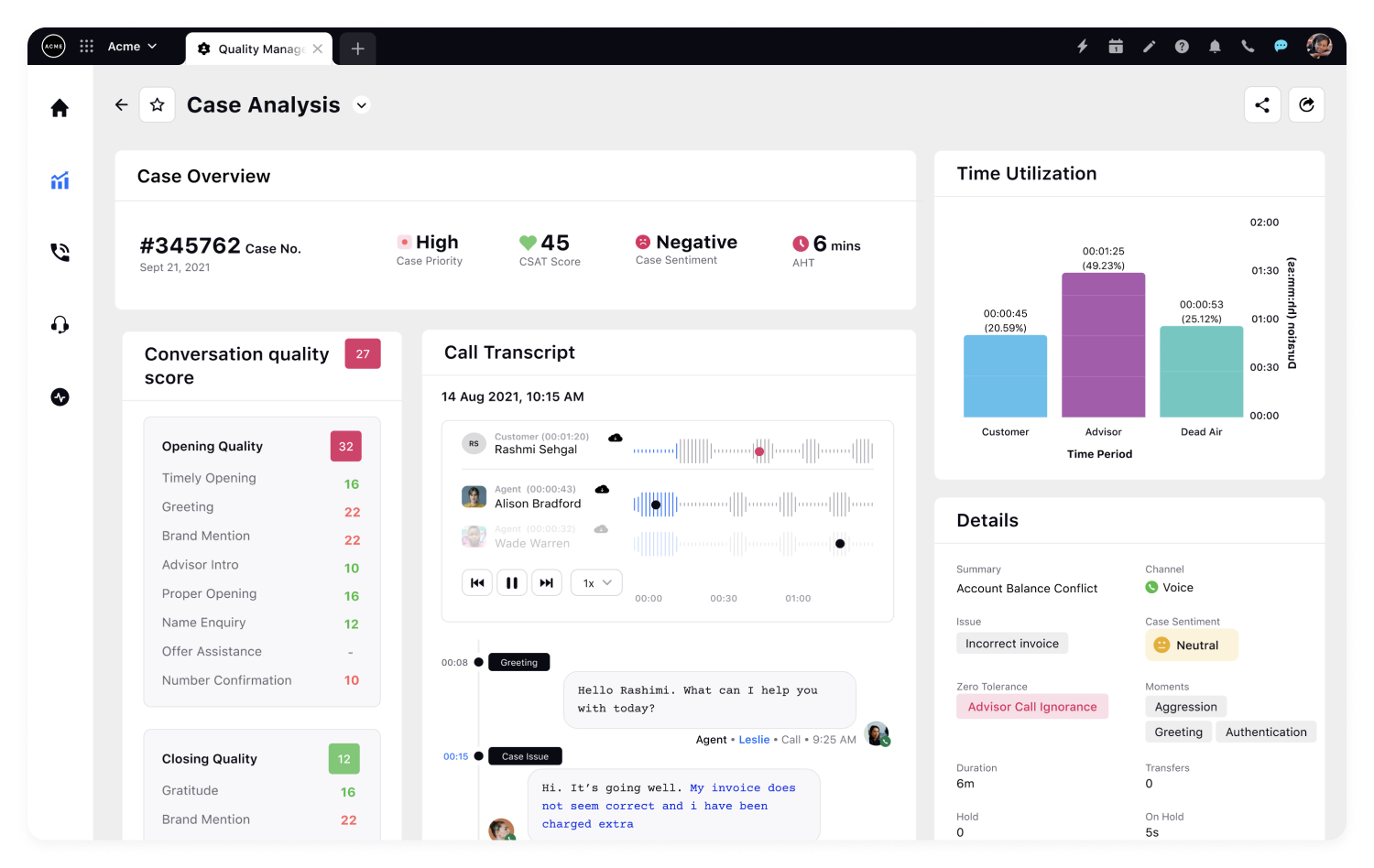
Sprinklr Service is the contact center module of Sprinklr's unified CXM platform. It stands out for omnichannel coverage, connecting voice, social, messaging, email, and chat interactions into a single analytics layer that spans over 30 channels.
For organizations that manage high volumes of customer interactions across social media and messaging platforms alongside traditional support channels, Sprinklr provides a consolidated view that most help desk-centric tools cannot match. The AI engine applies consistently across channels, which means sentiment analysis and topic detection work the same whether the interaction started on X (Twitter), WhatsApp, or a phone call.
The challenge with Sprinklr is its sheer scope. The platform was built for large-scale social engagement, and its service analytics module carries that enterprise DNA. Teams looking for focused customer support analytics may find the platform's breadth more than they need.
Sprinklr Service Features
- Unified AI engine — consistent NLP across 30+ channels for sentiment, intent, and topic detection
- Omnichannel case management — aggregates interactions across social, messaging, voice, chat, and email
- AI-powered quality management — automates agent performance scoring and compliance monitoring
- Real-time reporting — live dashboards for contact center KPIs across every channel
- Social listening integration — connects social brand monitoring directly to service analytics
2026 Pricing
Custom enterprise pricing. Sprinklr does not publish standard per-agent rates for its service module.
Sprinklr Service Pros
- Strongest omnichannel coverage in the category — 30+ channels under one analytics roof
- Unified AI engine ensures consistent analysis across every interaction type
- Combines social listening with service analytics for brands with heavy social engagement
- Scales effectively for global contact center operations
Sprinklr Service Cons
- Enterprise complexity makes it overkill for teams focused on traditional support channels
- Social-first heritage means the platform may feel less polished for voice and email use cases
- Pricing is opaque and typically requires significant annual commitments
Who It's For
Large brands and global contact centers that manage high-volume customer interactions across social, messaging, and traditional service channels.
G2 Rating
Sprinklr Service G2 Score: ~4.3/5
6. Enterpret
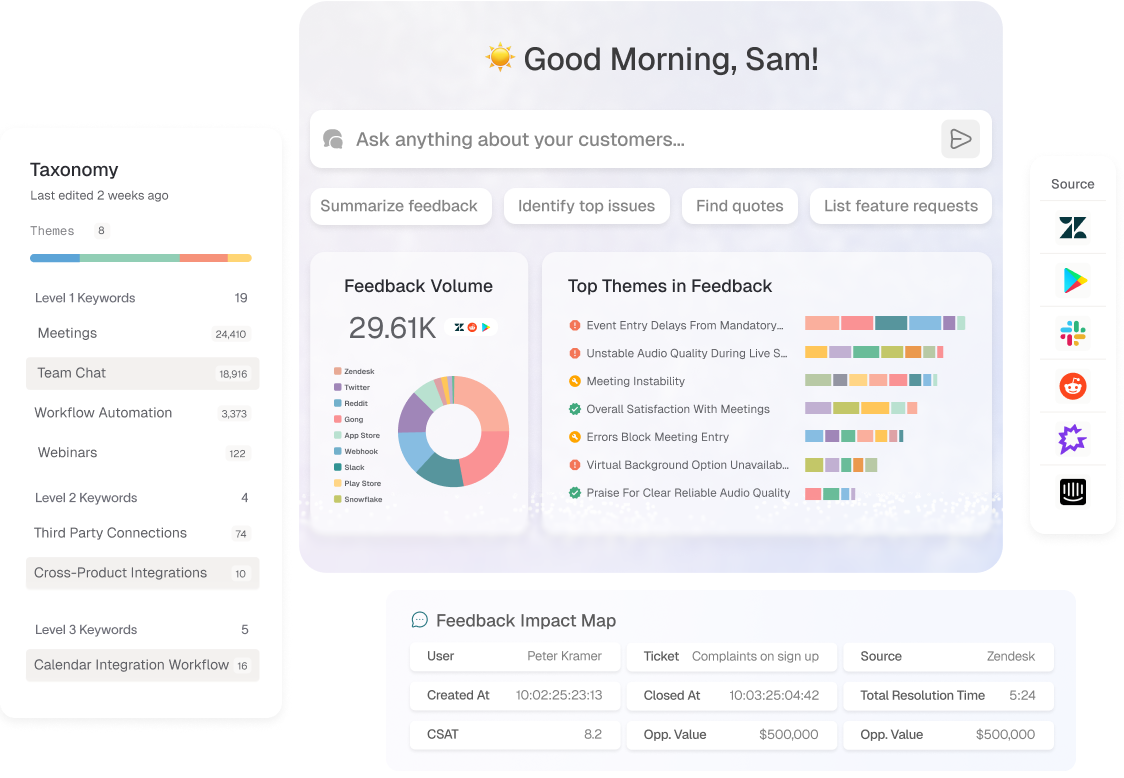
Enterpret is an AI-first customer intelligence platform that builds custom ML models on your feedback data — adapting its taxonomy and categorization to your specific product and customer language rather than relying on generic NLP.
The approach is similar in philosophy to Chattermill's AI-native architecture, but Enterpret focuses tightly on the product feedback loop. It is designed for product and CX teams that want to understand what customers are asking for, what is frustrating them, and where the product experience breaks down across tickets, surveys, reviews, and social feedback.
What makes Enterpret compelling is speed to accuracy. The platform claims its adaptive models reduce the manual taxonomy work that often slows down feedback analytics implementations. For teams that have struggled with tagging accuracy on rule-based systems, Enterpret offers a path to more reliable categorization without building custom models from scratch.
Enterpret Features
- Adaptive ML models — learns your product taxonomy and customer language from feedback data
- Custom feedback taxonomy — automatically generates and refines categories based on actual patterns
- Multi-source ingestion — tickets, surveys, reviews, social, and call transcripts
- Product impact scoring — connects feedback themes to business outcomes and feature requests
- Team-specific dashboards — configurable views for product, CX, and engineering teams
2026 Pricing
Custom pricing. Enterpret does not publish standard rates.
Enterpret Pros
- Adaptive AI reduces the manual taxonomy work that slows traditional feedback analysis tools
- Purpose-built for the product feedback loop, not repurposed from a help desk
- Multi-source coverage rivals enterprise platforms at a more focused scope
- Strong G2 ratings and growing traction with product-led companies
Enterpret Cons
- Relatively newer entrant — smaller customer base and integration ecosystem than established players
- Custom pricing limits visibility for budget planning before engaging sales
- Product-centric focus may leave service operations teams wanting more agent performance analytics
Who It's For
Product and CX teams at scale-ups and mid-market companies that want AI-driven feedback intelligence without enterprise-platform complexity.
G2 Rating
Enterpret G2 Score: 4.6/5 (110 reviews)
7. SentiSum
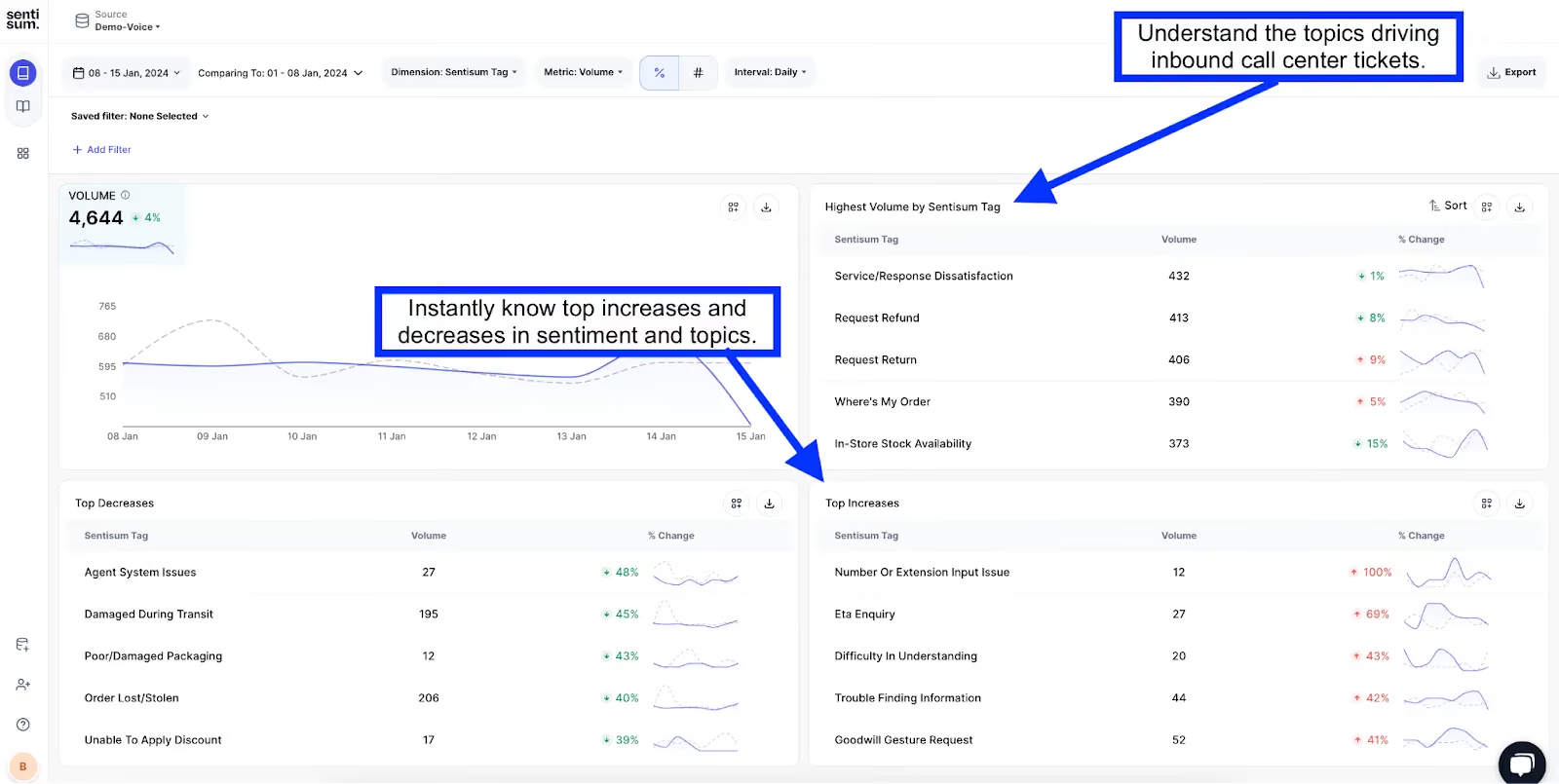
SentiSum is a focused AI analytics platform that turns support tickets into structured, actionable data. If your primary challenge is understanding what is happening inside your ticket queue — not across surveys, reviews, and social — SentiSum delivers a streamlined solution with fast time to value.
The platform uses NLP to auto-tag tickets with topics, sentiment, and priority signals, giving support leaders visibility into the issues that drive the most volume and the most frustration. It integrates directly with Zendesk, Freshdesk, and Intercom, acting as an intelligence layer on top of your existing help desk.
Where SentiSum narrows compared to broader text analysis software is in scope. It excels at support ticket analytics but does not cover the full feedback landscape — surveys, reviews, and social data are outside its primary focus. For teams that need a unified view across all feedback channels, this limitation matters.
SentiSum Features
- NLP-powered ticket tagging — automatically categorizes tickets by topic, sentiment, and urgency
- Ticket analytics dashboards — visualizes trends, topic volumes, and resolution patterns
- AI-driven routing — suggests priorities and escalation paths based on ticket content
- Help desk integrations — connects natively with Zendesk, Freshdesk, and Intercom
- CSAT driver analysis — links ticket topics to satisfaction score changes
2026 Pricing
Starting from $3,000/month. Pricing scales with ticket volume.
SentiSum Pros
- Fast implementation — purpose-built for help desk data, minimal configuration required
- Accurate NLP tagging for support ticket categorization
- Clear ROI model for support teams measuring ticket deflection and resolution efficiency
- Strong G2 rating from verified support operations users
SentiSum Cons
- Limited to support ticket analytics — does not cover surveys, reviews, or social feedback
- Higher entry price than expected for a focused tool at $3,000/month
- Smaller integration ecosystem compared to broader CX platforms
Who It's For
Support operations teams at mid-market companies that want fast, accurate ticket analytics without the complexity of a full VoC platform.
G2 Rating
SentiSum G2 Score: ~4.7/5
8. InMoment

InMoment is an AI-driven experience management platform that combines traditional feedback analytics with conversational intelligence acquired through strategic acquisitions. Recently acquired by Qualtrics, InMoment brings a strong focus on blending structured survey data with unstructured signals from calls, chats, and reviews.
The platform's conversational analytics capabilities stand out. InMoment can analyze call transcripts and chat logs alongside survey responses, giving teams a more complete picture of the service experience. This makes it particularly valuable for contact centers that want to go beyond CSAT scores and understand what is actually being said in customer interactions.
Post-acquisition, InMoment's roadmap will likely evolve alongside Qualtrics. Organizations evaluating the platform should consider how the integration with Qualtrics XM may change pricing, feature availability, and long-term support.
InMoment Features
- Conversational intelligence — analyzes call transcripts and chat logs for sentiment, topics, and agent quality
- AI-driven feedback categorization — automatically classifies open-ended survey responses and reviews
- Predictive experience scoring — models future customer behavior based on feedback trends
- Review management — monitors and responds to third-party reviews from a single platform
- Industry-specific models — pre-built analytics frameworks for hospitality, retail, and financial services
2026 Pricing
Custom enterprise pricing. Recently acquired by Qualtrics, which may affect future pricing structures.
InMoment Pros
- Strong conversational analytics for call and chat data
- Combines structured survey analysis with unstructured feedback analytics
- Industry-specific models reduce configuration time for common verticals
- High G2 rating with strong user sentiment around AI capabilities
InMoment Cons
- Qualtrics acquisition creates uncertainty around long-term platform direction and pricing
- Enterprise-focused pricing puts it out of reach for smaller teams
- Overlapping functionality with Qualtrics XM may cause consolidation confusion for existing customers
Who It's For
Enterprise contact centers and CX teams that need conversational intelligence alongside traditional survey analytics, and are comfortable navigating platform integration under new ownership.
G2 Rating
InMoment G2 Score: ~4.7/5
9. Freshdesk

Freshdesk is a customer service platform from Freshworks that bundles ticketing, collaboration, and analytics into an accessible, affordably priced package. For smaller teams or organizations starting their service analytics journey, Freshdesk offers a low-friction entry point with a genuine free tier.
The analytics capabilities are solid for operational reporting. Teams get out-of-the-box dashboards for ticket trends, agent performance, SLA compliance, and customer satisfaction. Freddy AI, Freshworks' AI assistant, adds intelligent routing and suggested responses, though its analytical depth does not match purpose-built customer analytics tools.
Where Freshdesk fits best is in the early-to-mid maturity stage. Teams that need to understand their basic service metrics and build reporting habits will find it effective. Teams that need strategic insights — root cause analysis, cross-channel unification, or predictive analytics — will eventually outgrow what Freshdesk can offer.
Freshdesk Features
- Built-in analytics dashboards — pre-configured views for ticket volume, response times, and agent workload
- Freddy AI — intelligent ticket routing, auto-responses, and conversation summarization
- SLA tracking and alerts — automated monitoring of response and resolution commitments
- Customer satisfaction surveys — embedded CSAT surveys with automated follow-up
- Team collaboration tools — shared inboxes, collision detection, and internal notes
2026 Pricing
Free plan available (up to 2 agents). Paid plans from $15/agent/month (Growth) to $79/agent/month (Enterprise).
Freshdesk Pros
- Genuine free tier makes it accessible for very small teams
- Intuitive UI with minimal training required
- Solid operational analytics for teams building foundational reporting practices
- Competitive per-agent pricing compared to Zendesk at similar feature tiers
Freshdesk Cons
- Analytics depth is limited to operational dashboards — no VoC analysis, sentiment tracking, or predictive capabilities
- Freddy AI is an assistant, not an analytics engine — limited insight generation
- Scaling beyond basic reporting requires adding supplementary analytics tools
Who It's For
Small to mid-size support teams that need affordable, straightforward service analytics without enterprise complexity.
G2 Rating
Freshdesk G2 Score: ~4.4/5
Choosing The Right Customer Service Analytics Software
Every tool on this list solves a real problem. The question is which problems matter most to your team right now — and where you are headed. Here are the factors that should drive your decision:
- What data sources do you need to analyze? If your analytics needs start and end with support tickets, a focused tool like SentiSum or a built-in solution like Zendesk may be enough. If you need to unify tickets, surveys, reviews, and social data, look at platforms like Chattermill, Qualtrics, or Medallia that treat multi-channel analysis as a core capability.
- Do you need operational reporting or strategic insight? Help desk analytics tell you how your team is performing. Customer intelligence platforms tell you why customers are behaving the way they are. These are different questions that require different tools.
- How mature is your analytics practice? Teams just building their first dashboards may get more value from Freshdesk's straightforward approach than from an enterprise platform with capabilities they will not use for two years.
- What is your AI tolerance? Some teams want AI that works invisibly in the background. Others want to control every taxonomy label manually. Understanding where your team sits on this spectrum narrows the field quickly.
- How does it fit your existing stack? The best analytics platform is the one your team actually uses. Check integration depth with your CRM, help desk, and BI tools before getting excited about feature lists.
- What does your growth trajectory look like? A tool that works for 10,000 tickets per month may not scale to 100,000. Consider whether the platform can grow with your feedback volume, language requirements, and team size.
- How transparent is the pricing? Custom pricing is not inherently bad, but it makes budgeting harder. Factor in the time and effort required to get through sales processes when comparing options.
- What do actual users say? G2 ratings and reviews are not perfect, but they offer a reality check against vendor marketing claims. Pay attention to reviews from companies similar in size and industry to yours.
What Are Customer Service Analytics AI Tools?
Traditional customer service analytics relied on rule-based dashboards that reported on operational metrics — ticket volume, average handle time, first response time. These tools answered the "what" but left the "why" entirely to human interpretation. When your team handles hundreds or thousands of interactions per day, manually reading tickets to find patterns is not a scalable strategy.
AI-powered customer service analytics tools change this equation. Instead of waiting for analysts to categorize and interpret feedback, these platforms use natural language processing and machine learning to automatically detect themes, sentiment, intent, and emerging trends across every customer interaction. The shift from manual reporting to AI-driven intelligence means teams can move from reactive firefighting to proactive issue resolution.
What makes AI particularly transformative in this category is its ability to unify unstructured data. Support tickets, survey responses, app store reviews, social media comments, and call transcripts all contain customer signals — but they are expressed in different formats, languages, and levels of detail. AI text analysis software can normalize these inputs into a consistent taxonomy, making it possible to see whether the same product issue is surfacing across tickets, reviews, and NPS comments simultaneously.
The most advanced platforms go further: they connect feedback themes to business outcomes like churn, retention, and satisfaction scores, turning qualitative customer insights into quantitative business intelligence. This is where the line between service analytics and customer intelligence starts to blur — and where the real strategic value lives.
Benefits Of Using Customer Service Analytics Software
Why does this category even exist? Because raw service data — tickets closed, average handle time, CSAT scores — only tells you half the story. The right analytics platform transforms that data into decisions:
- Root cause visibility — stop treating symptoms and start fixing the product issues, process gaps, and content failures that generate tickets in the first place
- Proactive issue detection — anomaly alerts and trend monitoring let teams address emerging problems before they become escalation crises
- Cross-channel insight — understanding how the same customer issue shows up across tickets, surveys, reviews, and social creates a unified customer experience view that siloed tools miss
- Revenue impact quantification — connecting feedback themes to NPS, CSAT, CES, and churn gives CX teams the financial language to justify investment
- Agent performance optimization — interaction analytics and quality scoring identify coaching opportunities that directly improve service quality
- Product feedback loops — service analytics feeds directly into product development when teams can route categorized feedback to product managers with context
- Faster time to insight — AI-powered analysis delivers categorized, prioritized insights in hours rather than the weeks manual analysis requires
- Strategic alignment — when service data connects to business outcomes, CX stops being a cost center and starts informing company strategy
The ROI Of Customer Service Analytics
What does investing in customer service analytics actually return? The answer depends on how deeply you connect feedback data to business outcomes — but the patterns are consistent across industries:
- Churn reduction — teams that identify and address the top 3 negative feedback themes typically see measurable retention improvements within a quarter. When you know which product issues or service gaps are pushing customers away, you can intervene before the renewal conversation.
- Ticket deflection — root cause analysis reveals which issues generate the highest ticket volume. Fixing those upstream — whether through product changes, knowledge base updates, or proactive communication — reduces inbound volume without adding headcount.
- NPS and CSAT improvement — platforms that surface the specific drivers of dissatisfaction give CX teams a clear roadmap for lifting satisfaction scores. The difference between guessing which initiative to prioritize and knowing which one will have the greatest impact is the difference between flat scores and measurable improvement.
- Cost per resolution — AI-powered categorization and triage reduce the manual effort agents spend sorting, tagging, and routing tickets. For high-volume teams, this compounds into significant operational savings.
- Product development alignment — when customer feedback analytics feeds structured insights to product teams, feature prioritization shifts from opinion-driven to evidence-driven. The cost of building the wrong feature is orders of magnitude higher than the cost of an analytics platform.
The cost of inaction is harder to quantify but no less real: every month without root cause visibility is a month of repeat issues, preventable churn, and strategic decisions made on incomplete data.
Get Started With Chattermill
Customer service data holds answers that most teams never get to see — buried in ticket queues, scattered across surveys, lost in review platforms. The organizations that turn service interactions into strategic insight are the ones that invest in analytics built for the complexity of modern customer experience.
Chattermill unifies your support tickets, surveys, reviews, and social feedback into a single AI-powered analytics platform — so your team can move from measuring what happened to understanding why it happened and what to do about it.
Frequently Asked Questions
What Is Customer Service Analytics Software?
Customer service analytics software collects, organizes, and analyzes data from support interactions — tickets, chats, calls, surveys, and reviews — to identify trends, measure performance, and surface actionable insights. The best platforms go beyond operational dashboards to detect root causes, predict satisfaction trends, and connect feedback themes to business outcomes like retention and revenue.
What's The Best Customer Service Analytics Tool For Enterprise Teams?
For enterprise teams that need to unify multi-channel feedback into strategic insights, Chattermill, Qualtrics XM, and Medallia are the strongest options. Chattermill stands out for AI-native unification across tickets, surveys, and reviews. Qualtrics excels at statistical depth and research-grade analysis. Medallia offers the broadest signal capture across digital, in-person, and contact center touchpoints. The right choice depends on whether your priority is AI-driven intelligence, statistical rigor, or breadth of signal.
How Does AI Improve Customer Service Analytics?
AI transforms customer service analytics by automating the categorization, sentiment detection, and pattern recognition that manual analysis cannot scale. Instead of relying on teams to tag tickets or read survey comments, AI models can process thousands of feedback signals per day — identifying emerging themes, detecting anomalies, and prioritizing issues by business impact. Advanced platforms use custom ML models trained on your specific data, delivering higher accuracy than generic text analysis or rule-based approaches.
What's The Difference Between Customer Service Analytics And Customer Experience Analytics?
Customer service analytics focuses specifically on support interactions — tickets, calls, chats, and agent performance metrics. Customer experience analytics takes a broader view, encompassing every touchpoint in the customer journey including marketing, product usage, purchase behavior, and post-sale engagement. The most effective approach bridges both, using service data as one signal within a complete voice of customer program. Platforms like Chattermill unify service analytics with broader VoC intelligence so teams do not have to choose between depth and breadth.
How Much Does Customer Service Analytics Software Cost?
Pricing varies dramatically across the category. Help desk platforms with built-in analytics like Freshdesk start free, with paid tiers from $15/agent/month. Zendesk ranges from $19 to $115/agent/month depending on features. Dedicated analytics platforms like SentiSum start around $3,000/month. Enterprise platforms like Chattermill, Qualtrics, Medallia, and Sprinklr use custom pricing based on feedback volume and deployment scope. As a general benchmark, expect dedicated analytics platforms to range from $30,000 to $150,000+ annually for enterprise deployments.



See Chattermill in action on your own feedback
Book a demo


